
Big Forex Players EA is an H1 forex and gold trading system with three independently selectable engines: developer-supplied bank-position signals, higher-timeframe indicator entries, and a multi-currency Robot strategy. This review compares the MT4 and MT5 editions and explains the settings that change concurrent exposure.
Available from CheaperForex
Choose your platform to see product details and current pricing.
Our assessment: the attraction is being able to select different signal sources rather than committing to one entry model. The main considerations are the proprietary bank feed, possible overlap between engines and markets, and Robot modes that permit multiple positions. Several strategy switches do not by themselves prove diversification or consistent returns.
Source check: 12 November 2026. Both official editions showed version 6.0. This is a source-based review, not a firsthand terminal test or an independently reproduced performance study.

What the three trading engines do
Banks: positions supplied by the developer
The Banks engine receives positions from the developer’s database and executes trades with TP/SL settings. The listing describes medium- and long-term positions and one position per pair for this engine.
That makes the data feed central to this strategy. The public description does not establish how the bank positions are sourced, how complete the dataset is, or how quickly every change reaches the terminal. We have not audited those points. Check the connection and the relevant setup requirements; a proprietary feed is a dependency to understand, rather than proof of access to the entire institutional market.
Indicators: higher-timeframe signals
The second engine uses RSI, MACD and Stochastic on H4/D1, with one position per pair and TP/SL. The EA’s specified host chart is H1, so the chart you attach it to and the timeframes used internally for signals are different concepts.
The listing describes medium- and long-term positions for this engine. It does not follow that a higher-timeframe entry has a better win rate or a lower risk of loss; that requires evidence from the actual settings and trading conditions.
Robot: price action and adjustable concurrency
The Robot engine combines price action, Cycle Strength, SMA Strength, RSI and two custom indicators. The published parameters identify EURUSD, GBPUSD, USDJPY and Gold. Low, Medium and High modes can produce one or more positions on a pair.
This is why the older blanket description of a single-position EA is incomplete. Banks and Indicators have their own per-pair limits, while Robot can hold concurrent trades. Multiple engines and correlated currency pairs can add to the same market exposure. The source also lists Orders Step and Lots Step controls. Earlier release history dated 25 October 2023 mentions multiplier and recovery additions. That brief note does not fully define the mechanism or confirm which settings are active in a current configuration. Inspect sizing and recovery behaviour on demo; a blanket claim that every mode avoids recovery or position scaling is not supported by these public details.
What changed in version 6.0?
Both editions’ 3 November 2026 release notes introduce an AI Geopolitical Filter. The developer describes real-time monitoring of political sources, AI analysis and automatic suspension of trading when significant risks are detected. It groups this with economic-news protection and a volatility filter as three layers of protection.
This is a developer-described capability, not an independently tested guarantee. Public release notes do not establish complete source coverage, detection latency, false-positive rates or behaviour during a service outage. Check the required connections and test the filter before relying on it. No claim that all geopolitical shocks will be detected is justified by the release note alone.
MT4 and MT5: choose the account you actually use
The two current listings present the same three main engine families and both showed version 6.0 on the source-check date. The MT4 edition runs in MetaTrader 4; the MT5 edition runs in MetaTrader 5. The platform binaries and broker accounts are separate, even where the strategy descriptions overlap.
Choose on broker/account compatibility and validate that edition’s settings. A newer platform does not guarantee faster fills, lower drawdown or better returns. Compare the MT4 product details and MT5 product details rather than buying a platform label as a performance promise.
Both listings specify H1 attachment and a minimum deposit reference of $1,000. Their setup prose and specifications show different lower leverage endpoints, so do not treat one printed range as a complete suitability test. Available margin, lot size, trading costs and simultaneous positions determine how a particular configuration behaves.
Understand what each protection actually controls
- News entries: the described 60-minute before/after window is adjustable. Currency switches and keyword matching let the user decide which events are included.
- Existing trades around news: a separate news-related stop setting addresses positions that were already open. Entry blocking alone does not close their exposure.
- Spread restriction: Max Spread can block fresh entries above a configured threshold. It cannot guarantee that a later exit has the same spread.
- Daily pause: Disable EA after loss stops new positions until the following day after the configured MaxDD threshold. It is not a guarantee that existing trades or a gap cannot push losses further.
- Trading hours: the source defines Trade Hours using local PC time. Check the actual terminal/VPS clock and time zone.
- Hidden protection: TPSLHidden is described for Low mode. If TP/SL is managed locally, the terminal and its connection must remain available for the EA to act.
These controls are useful configuration tools. They do not guarantee prop-firm compliance, a challenge pass or a fixed maximum realized loss. Check the current rules of the specific account, especially around news, aggregate exposure and daily drawdown calculations.
What the retained illustrations show
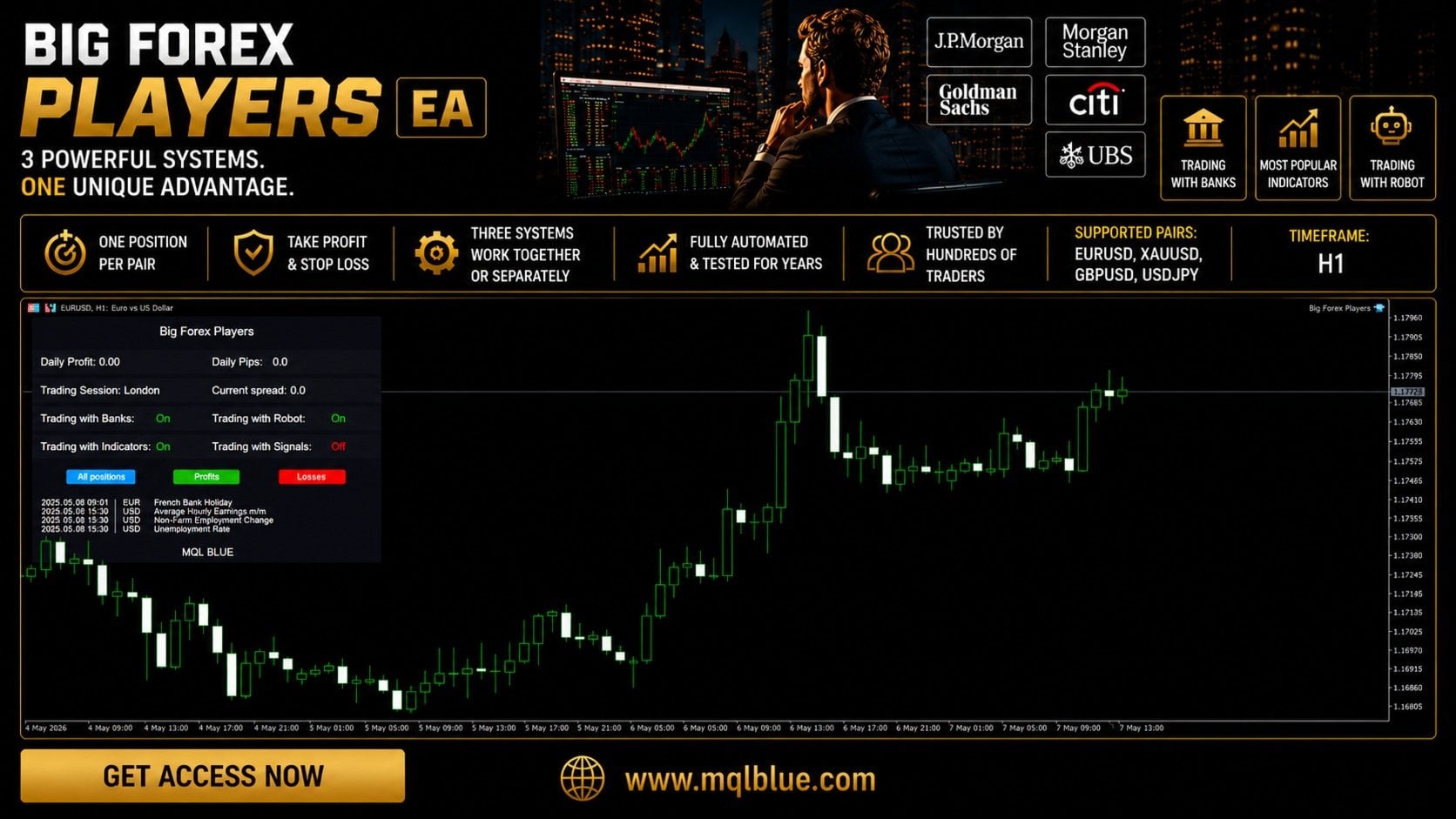
The interface illustrates the panel’s trading, session and account context. Use it to understand the type of information presented, while checking the current build for its exact controls and layout.
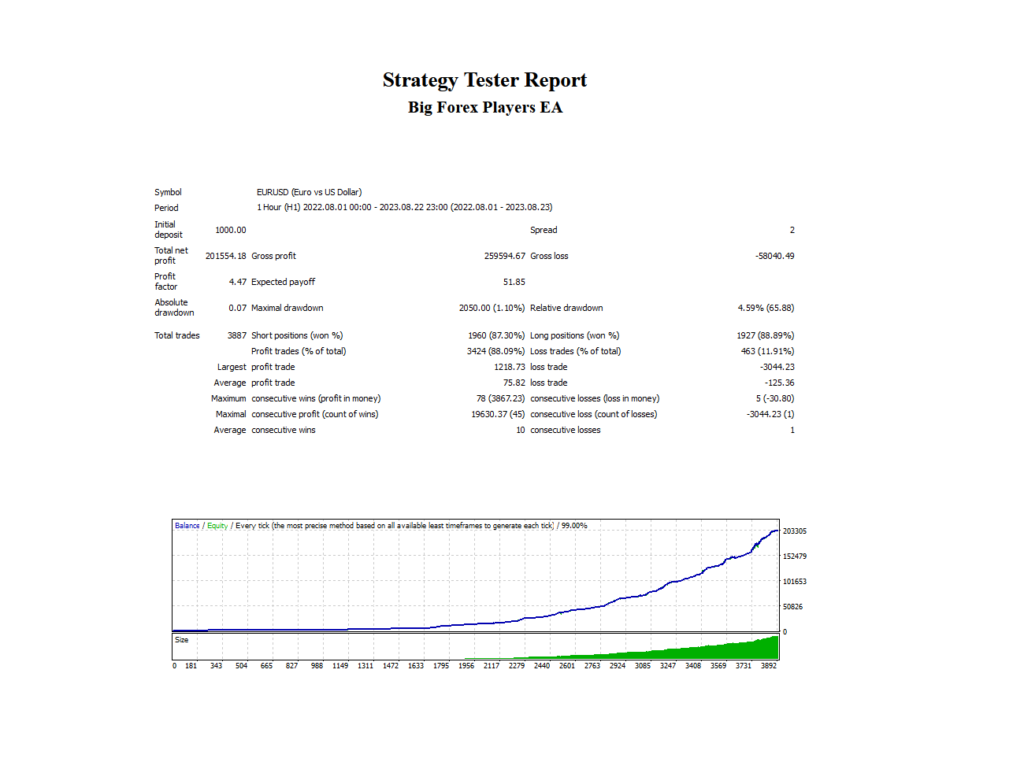
A historical tester image cannot establish current live returns. Costs, modelling choices, broker data and the selected engines matter. The bank-data engine also depends on information supplied outside ordinary historical chart prices; do not assume a tester run reproduces that live feed. No new independent backtest or live-account verification was performed for this refresh.
The previously linked FXmerge record reported that its user had deleted the system when checked for this refresh. It therefore does not supply a current public live record to validate the EA here. Older references to growth or drawdown from that record should not be read as current figures.
Buyer feedback: useful for operation, limited for performance
The official listings contain customer reviews covering setup, support and early trading experience. As checked on 12 November 2026, the MT4 listing’s visible recent feedback included a buyer still looking forward to further testing; MT5 comments included praise for installation assistance and support.
These are customer opinions on MQL5, separate from CheaperForex verified-purchase ratings. They can help frame operational questions, but review counts and star averages do not verify a bank feed, establish independent returns or prove that all risk modes behave alike. Earlier fixed review totals and star claims have therefore not been reused as performance evidence.
Questions to resolve before running several engines
- Which engine and currency exposure does each open trade belong to?
- How many simultaneous positions can the selected Robot mode and other enabled engines create?
- Are stops held by the broker or managed locally, and is the terminal continuously available?
- Do the local-time session window, spread threshold and news settings match the intended account conditions?
- Does a demo run confirm data-feed connectivity and the behaviour of the selected settings?
The source mentions a future Trading with Signals addition. We have not counted that wording as a fourth confirmed current engine. The developer directs marketplace buyers to private messages for manuals and group access. No public manual was available to audit from the listing; this review uses the public descriptions and release histories.
Frequently asked questions
What is the difference between Big Forex Players MT4 and MT5?
The current official listings describe the same three main strategy families and both show version 6.0 as checked on 12 November 2026. They are separate platform editions. Choose the one supported by the broker account and terminal you will use.
Does a three-strategy EA automatically diversify risk?
No. Different entry rules can still generate trades exposed to the same currency, market move or news event. Assess aggregate positions and losses rather than assuming that three engines are uncorrelated.
Is Big Forex Players always a single-position system?
No. Banks and Indicators are each described as one position per pair. Robot permits one or more positions per pair according to the risk mode; other engines and symbols can add exposure at the same time.
Is the bank-position data independently verified here?
No. The listing says positions are sent from the developer’s database. This review has not audited that database, its sourcing, completeness or timeliness.
What can the daily-loss control do?
Disable EA after loss is described as stopping new positions until the next day when MaxDD is reached. Open exposure and execution risks remain; it is not a guaranteed account-loss cap.
Are the retained images new version 6.0 tests?
No. They are archived interface and backtest illustrations from the earlier article. The backtest is historical simulated evidence, and the original capture dates are not established.
Verdict
Big Forex Players is most relevant to traders who want to configure several signal sources within one EA and can monitor their combined exposure. Its useful distinctions are the developer-fed Banks engine, separate H4/D1 indicator logic and a Robot engine with adjustable concurrency. The limits are equally concrete: the proprietary feed has not been independently audited here, the engines can overlap, and the archived images are not a current performance study.
Use the platform edition supported by your account, verify the settings on demo, and judge actual behaviour rather than the number of strategy switches.
Sources: Big Forex Players MT4 and Big Forex Players MT5, plus their MT4 release history and MT5 release history, checked 12 November 2026. Trading forex and CFDs can result in substantial losses; historical simulations and customer opinions do not guarantee future results.
Setup and inputs: Big Forex Players MT5 settings guide.