Trustpilot service reviews

What our customers say

Selected Trustpilot feedback about CheaperForex support, setup and service.

Since 2019 in business 28,000+ customers served
MQL5 Market build · Not a cracked download

Why is the CheaperForex price lower?

Very cheap download sites may simply send an unlicensed or modified file. CheaperForex instead installs the product from its live MQL5 Market listing—but the account and activation arrangement is different from buying directly on MQL5.

Buy through CheaperForex Lower-priced managed installation
  • Current build installed from MQL5
  • Installation on one Windows PC or VPS
  • CheaperForex-managed MQL5 account
  • Installation and update assistance
Buy directly on MQL5 Full-price personal purchase
  • Purchase recorded in your MQL5 account
  • All activations shown on the listing
  • You manage installations and migrations
  • Full MQL5 Marketplace price
The short answer: You are purchasing one managed Marketplace installation rather than the complete direct-purchase entitlement in your own MQL5 account. That narrower arrangement is why the price is lower.
Important account disclosure

The purchase is not added to your personal MQL5 account. A CheaperForex-managed account must remain signed in on the activated machine. Moving or reinstalling the EA may require our assistance.

Read exactly how installation works →
7-Day Refund Protection

Request a refund within seven days of purchase, provided the EA has not yet been activated. Once activated, the licence is permanently assigned and cannot be refunded.

No random file downloads. Updates are handled through MT5 when the developer releases a new version.
Simple, assisted setup

How buying from us works

From checkout to a working MT5 installation.

  1. 01 Current MQL5 Market build

    We source the product from its live MQL5 Market listing—not from a file-sharing or crack website.

  2. 02 Choose card or crypto

    Complete checkout using card, Apple Pay, Google Pay or a supported cryptocurrency.

  3. 03 We arrange the installation

    We help install the EA through a CheaperForex-managed MQL5 account on your chosen machine.

  4. 04 Activate on one PC or VPS

    Eligible refund requests can be made within seven days, provided activation has not yet taken place.

  5. 05 Use it without a subscription

    Continue using the activated build on that machine. The managed MQL5 account must remain signed in.

  6. 06 Updates and reinstall support

    New developer builds are delivered through MT5. Contact us before moving the EA or reinstalling your platform.

Need help during setup? Our team can guide you through installation and activation.

Aikon MT5 EA

Aikon MT5 EA connects conversational trading configuration with chart controls and capital management.

  • Ask Aikon: describe a change, review the proposal and confirm it.
  • Chart and remote controls: interact through MT5 or optional Telegram.
  • Capital profiles: organise trading allocation, reserve and profit.

Aikon features and review

Original price was: $897.97.Current price is: $499.95.

Save 60-70%
Genuine MQL5 Market build · Not a cracked download
Direct MQL5 price
Save
Crypto price

MQL5 Market installation

Choose how you pay

The current developer build is installed through MQL5 on one Windows PC or VPS—not delivered as a cracked EX5 download.

Current Market build Updates through MT5 Developer-supplied files
Most popular

Pay by card

Secure checkout with card, Apple Pay or Google Pay.

Loading product price…
Save 20%

Pay with crypto

Pay with BTC, ETH or USDT and receive the checkout discount.

Loading discounted price…
One managed installation on a Windows PC or VPS Installed through a CheaperForex-managed MQL5 account. The purchase will not appear in your personal MQL5 purchase history.
Available for assisted installation
Serving traders since 2019 Read our independent Trustpilot reviews →
Installed through MT5 · Updates · Real support

Why Marketplace installation matters

A cheap standalone file is not the same as a Marketplace installation with update access and accountable after-sales support.

Installed from the live MQL5 listing The current Marketplace build is installed inside MT5—not supplied as a loose, modified or “unlocked” EX5 download.
Developer updates through MT5 Updates published by the developer are available at no extra cost. They normally appear inside MT5 within 24 hours; click Update to install them.
Supplied product materials Manuals, recommended settings, presets and set files are included wherever the developer provides them.
Accountable post-purchase support You are buying from an established business with a public Trustpilot record—not an anonymous download page.
You'll also get 3 months free PrismAlgo MT5
Diversify across 28 FX pairs, Gold and Bitcoin alongside your purchase. Learn more at PrismAlgo.com →
View Signal
Need Help? Message us on Telegram, or contact us

Quick Summary: Aikon MT5 by William Brandon Autry is for traders who want to express an intention, understand the proposed configuration and stay in control of what happens next. Official Aikon listing.

Explore Aikon: AI connections and costs · Full editorial review

Aikon MT5 EA cover with blue chrome branding and CheaperForex.com watermarks
Brand artwork, not a screenshot of the trading interface.

Make the configuration easier to work with

Ask Aikon lets you describe a change, inspect the proposal and confirm it. The on-chart interface and optional Telegram controls provide ways to interact with the system; keep the requested change and approved configuration together when reviewing its behaviour.

The AI Economics view tracks calls, usage and cost. Use it alongside your provider’s bill to understand what your own pattern of interaction costs.

Capital settings deserve their own review

The author’s public explanation separates money allocated to trading, a reserve and profit above the allocation. Named profiles include Growth 80/20, Balanced 2:1 and Defensive 1:1. See the author’s 6 September explanation.

Before selecting a profile, write down what you intend to allocate and what action you expect at a boundary. A profile name cannot make that decision for you. The reserve remains a software-managed distinction inside the account; it is not money transferred into a separate protected account.

AI connections and running costs

Live AI functions require your own provider credentials. Keep API secrets out of screenshots or public messages. External AI usage is charged separately; check your provider’s billing alongside AI Economics. The developer reserves its own manuals and direct support for proven MQL5 purchasers; access to those restricted materials is not included here.

See Aikon’s setup screens

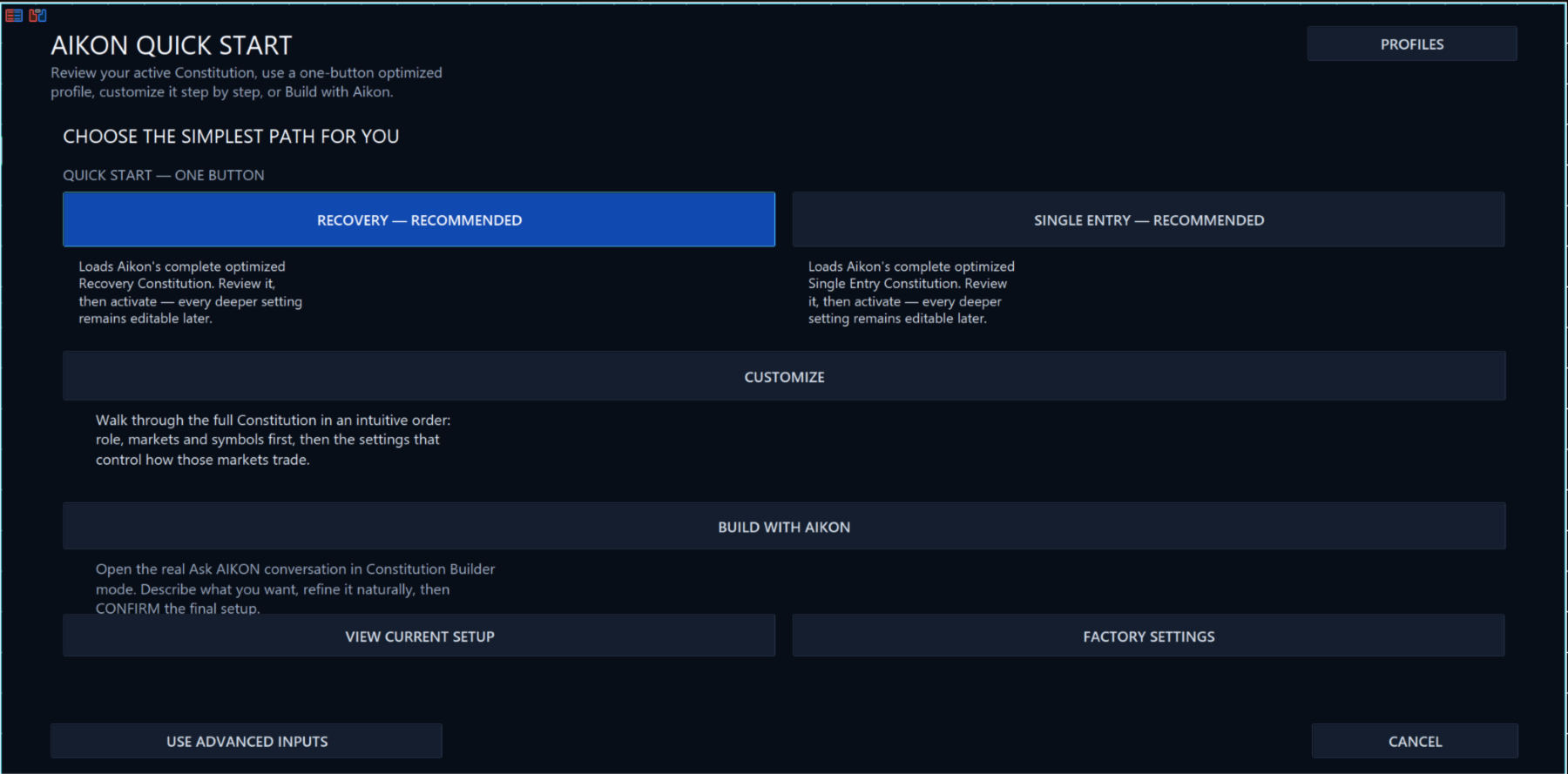
These original developer screenshots show the provider choices and starting workflows. Our Aikon review also shows Ask Aikon, portfolio controls and AI usage.
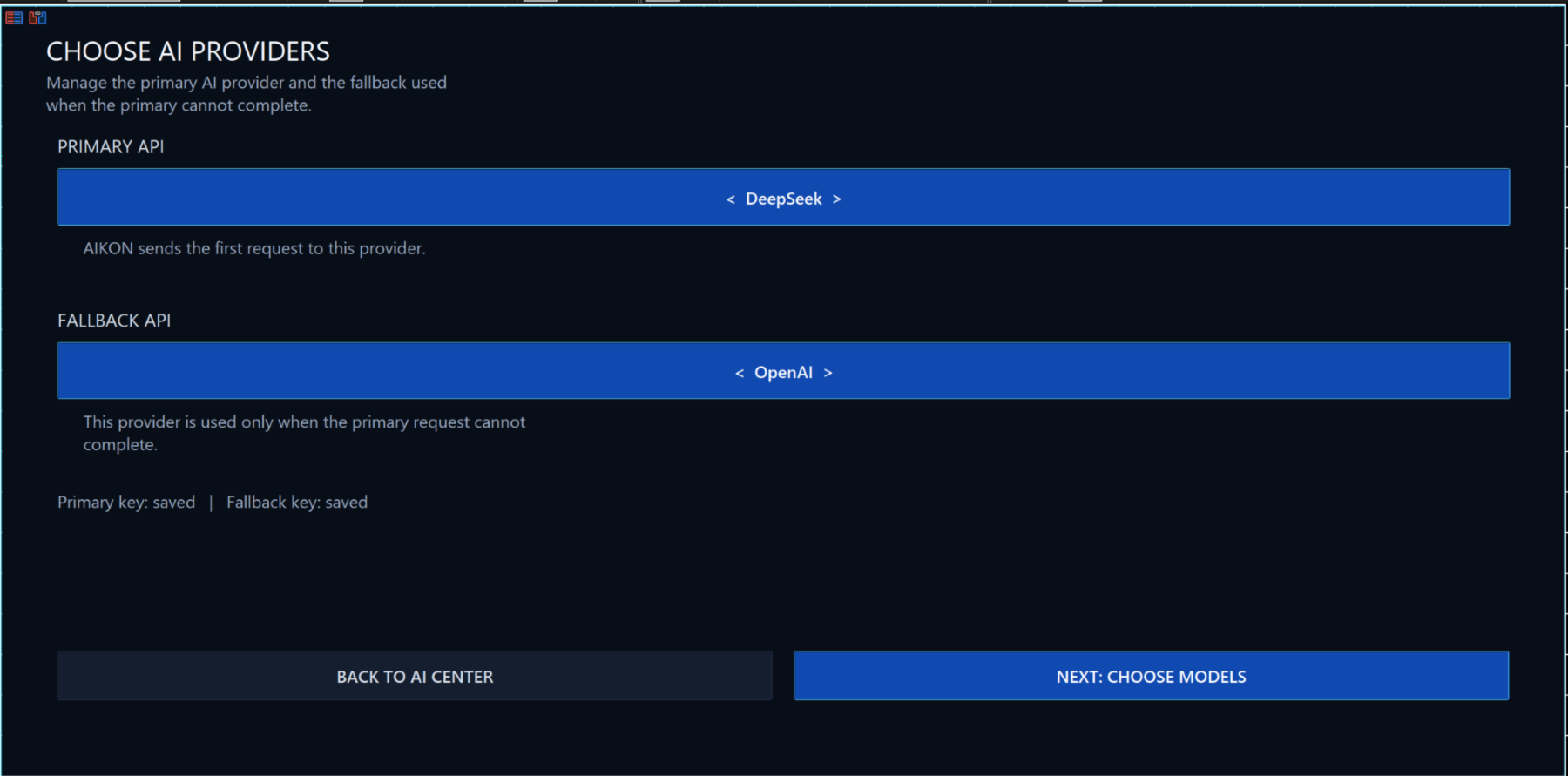
Aikon provider setup showing primary and fallback AI provider selectors
Provider setup: separate primary and fallback choices are visible. The selections shown are an example, not a required configuration. Source: developer’s MQL5 gallery, checked 9 September 2026. Select the image for its full-size view.
Aikon Quick Start screen showing Recovery, Single Entry, Customize and Build with Aikon options
Quick Start shows separate Recovery and Single Entry paths, plus Customize and Build with Aikon. Source: developer’s MQL5 gallery, checked 9 September 2026. Select the image for its full-size view.

Watch the developer’s video linked from the MQL5 listing →

Early MQL5 feedback

Five MQL5 review entries were visible on 9 September 2026. Written feedback highlights phone control and the wider operating framework. Read the original MQL5 reviews.

Read the evidence assessment

Our review explains the trading-mode choices, the limits of historical testing and how to keep useful evaluation records. It gives you a closer look at the operating concept before you decide.

Read the Aikon MT5 review → · Ask about Aikon · Official change history

Delivery: managed MT5 installation; follow your order’s README (Delivery details). Includes the latest MQL5 version, with updates you can check for and install yourself.

FAQs

How is Aikon delivered by CheaperForex?

We arrange managed installation on your chosen Windows PC or VPS. The product is installed through a CheaperForex-managed MQL5 account; it is not transferred to your personal MQL5 account.

Can I use Aikon on a netting account?

Recovery is excluded on netting accounts. FIFO/no-hedge restrictions also affect execution. Check that your intended trading mode is compatible with your account type.

Are external AI charges included?

No. Provider charges are separate; check its billing terms.

How do I arrange setup and support?

Follow the README instructions supplied with your order and quote your order number when contacting CheaperForex. We arrange managed installation assistance. Access to the developer’s restricted manuals and direct support follows its separate purchase requirements.

Will I receive the latest version, and can I update it myself?

Yes. Your managed installation includes the latest version available on MQL5, and you can check for and install updates yourself at any time.

Which markets and chart timeframe does it use?

The documented starting profiles cover Forex and XAUUSD. Confirm your exact broker symbols and chart period for the installed build during setup; a complete public compatibility list was not verified.

Reviews

There are no reviews yet.

Be the first to review “Aikon MT5 EA”

Frequently Asked Questions

Yes! All products listed on our site are in stock and ready for immediate activation.

No waiting periods, no group buys. Purchase today, get it activated today.

We purchase licenses in bulk, then pass the wholesale savings to you. MQL5 charges full retail because they're a marketplace with fees and overhead. We buy direct and operate lean.

Buying directly on MQL5 means paying full price — often $500–$1,500 — without knowing if the EA will work for you. If it doesn't perform, there's no refund. With us, you get the exact same official lifetime-licensed copy for up to 70% less. Test it at lower risk before committing full price elsewhere.

You get the exact same product:

  • Same official MQL5 license (not cracked or pirated)
  • Same lifetime updates from the developer
  • Same technical support
  • We handle the activation for you (under 2 minutes)
The only difference? You pay 50–80% less.

We're an EA reseller that's been operating since 2019. We purchase official licenses in bulk from the MQL5 marketplace and pass the savings on to you.

Every product is 100% genuine — activated directly from the developer's official MQL5 marketplace listing through MQL5's one-click activation system. You get the real product with full functionality and automatic updates.

We accept card payments via Stripe — only registered, verified businesses can process card transactions. Crypto is also available with an extra 20% discount.

We respond on Telegram and email within minutes during business hours, and with 28,000+ customers rated Excellent on Trustpilot, our track record speaks for itself.

Your EA is activated directly inside your MT5 terminal — the same way it would be installed if you bought from MQL5 at full price. We handle the activation for you remotely, and it takes under 2 minutes.

Because it's an official MQL5 marketplace activation, you receive all future updates automatically — they arrive straight to your MT5 from the developer, no action needed on your part.

This is actually how you know you're getting the real thing. MQL5 marketplace EAs are protected and can only be installed through official activation. Anyone offering a downloadable .ex5 file is selling a fake or cracked copy that won't work properly and won't receive updates.

Read our full guide: How MT5 EA Installation Works

Yes — this is a lifetime license. Once activated, it's yours permanently with no expiry, no renewals and no ongoing fees.

Each purchase covers a single computer activation. On that machine you can run it across multiple MT5 terminals and use it with as many broker accounts as you like. If you need it on a second computer, you'd need a second license.

Most customers install on a VPS they'll run for years and never need to think about it again. It's the trade-off for getting the same official product at a fraction of the MQL5 price.

You receive the official MQL5 license activated directly in your MT5 terminal, lifetime updates from the developer delivered automatically, and fast support from our team via Telegram and email.

If the developer provides any official user guides, presets or set files, we'll get them from the developer and send them straight to you. If the EA has an official community group, we'll do our best to get you access to that too.

If you change your mind before we activate the product in your MT5 terminal, you get a full refund — no questions asked.

Once activated, refunds are no longer available. This isn't a policy choice on our end — MQL5 licenses can't be deactivated once issued. The license is permanently yours and cannot be revoked or transferred back, so we can't reclaim it to refund the cost.

Why Traders Trust Us

Excellent on Trustpilot
4.5★ from real customers
In Business Since 2019
28,000+ customers served
Instant Access
No group buys or waiting
7-Day Refund Policy
Before activation
Remote Installation
We can install for you
Flexible Payments
Cards, Apple Pay, Crypto

Us vs MQL5 Marketplace

See why 28,000+ customers choose us

CheaperForex
Best Value
MQL5 Direct
Price Save 50-80% Full price
Crypto Discount Extra 20% off Not available
Refund Policy Full refund before activation Store credit only
Payment Options Cards, Apple Pay, Crypto Cards only
Activation Support We install for you Self-install
Ownership Lifetime, no expiration Lifetime, no expiration
Hardware Activations 1 (up to 10 MT5s) 5 activations
Trustpilot Rated "Excellent" Seller ratings vary
Product MQL5 build
Card Crypto