
Aikon EA MT5 combines automated trading engines with conversational configuration and portfolio controls. Its appeal is operational: you can inspect proposed changes, manage allocations and monitor provider usage within a wider trading workflow. The decision is whether those capabilities justify the extra setup and ongoing AI costs for your needs.
View Aikon EA MT5 features and current pricing
Ready to Buy Aikon EA MT5?
$319.96 with crypto · $399.95 by card
✅ AI Trading & Portfolio Controls
✅ Check the current offer and the platform requirements before purchase.
Official version · Instant download · Free lifetime updates · 7-day money-back guarantee
Our assessment: This review evaluates public documentation and genuine interface/manual excerpts, not our own trading results. Routine entries are automated; confirmation of an Ask Aikon settings proposal is a separate action.
Current product check — 24 September 2026
The current listing separates Forex Single Entry, Gold Single Entry and optional Forex Recovery. It also adds operating controls such as temporary plans and AI usage monitoring. One provider/model connection can be enough for the quick-start workflow. Routine trading does not wait for manual approval of each normal entry; the confirmation workflow applies to proposed operating changes.
What Ask Aikon adds to the trading workflow
The developer describes Ask Aikon as a way to inspect an operation and propose settings changes, alerts or scheduled actions. The user reviews the proposal before confirming it. Telegram provides another way to send requests to the Aikon instance running in MT5. Official feature description.
The useful distinction is between asking for information and authorising a change. A question about the current setup should help you understand it; a change request needs a clear scope. For example, in a hypothetical instruction to suspend new activity for a period, we would check the proposed start and end time, the affected account and what happens to positions already open. That is the level of clarity a conversational control should provide.
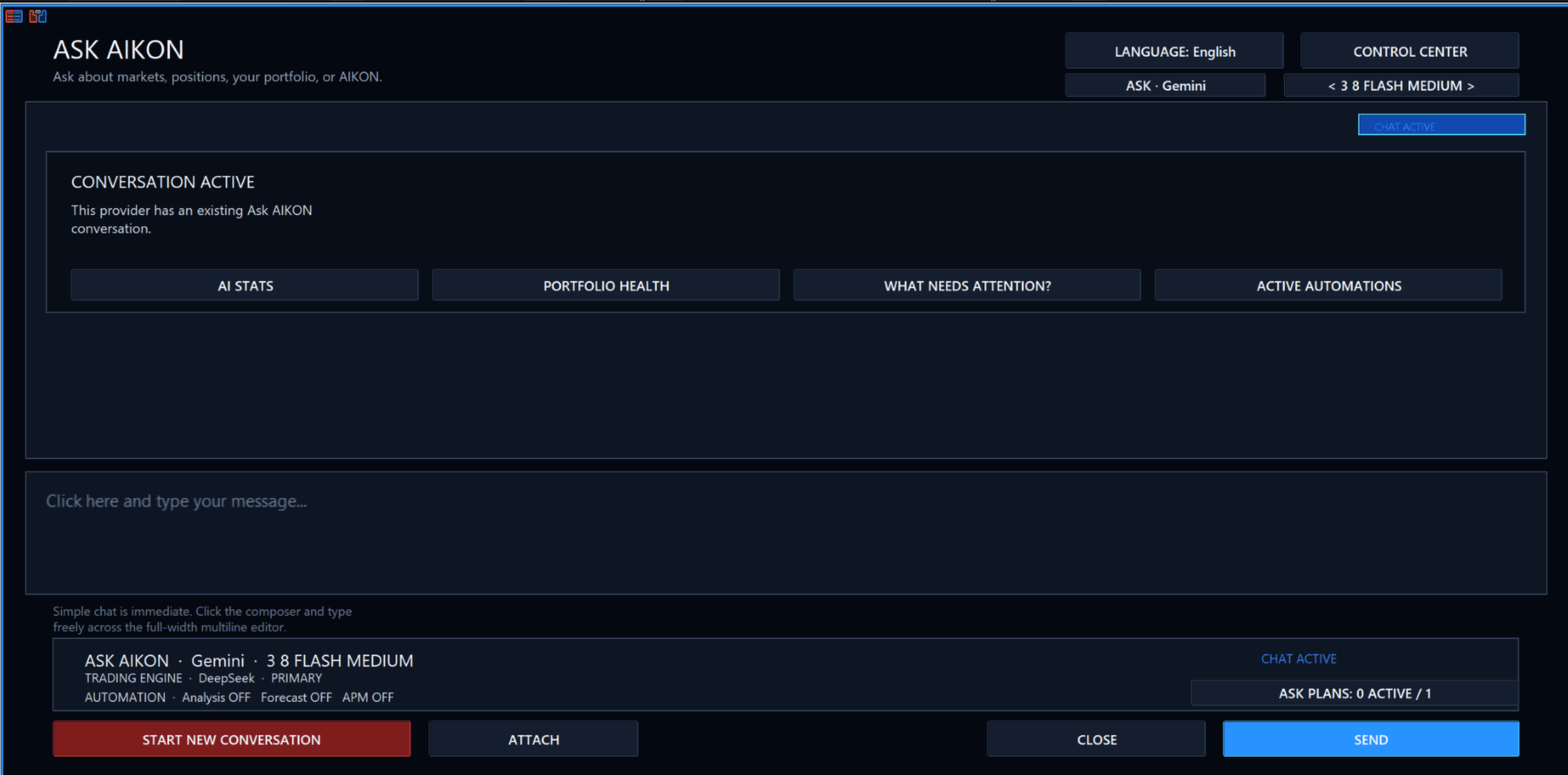
The Ask Aikon screenshot below includes shortcuts for AI Stats, Portfolio Health and Active Automations. These give an operator concrete places to review the result of a conversation. Our practical view: the interface is most valuable if it helps you find and understand the resulting state, rather than simply making an instruction easier to type.
Can you operate Aikon from a phone?
Telegram is a remote control for the running MT5 installation. It does not move the EA onto the phone. This matters when choosing where to install it: switching off the computer or stopping the MT5 instance interrupts the place where the EA operates. Your MT5 terminal should therefore run on the Windows PC or VPS you intend to keep available.
For someone away from a desk, access to operating information and controls is a useful convenience. It still pays to inspect the relevant account and requested action carefully on a smaller screen.
Single Entry versus Recovery: the choice that changes exposure
Aikon offers Single Entry with Stop Loss and optional Recovery. The latter can involve additional positions; it is not required to use Aikon. Netting accounts exclude Recovery, and FIFO or no-hedging restrictions affect execution. Documented trading modes and account requirements.
| Single Entry | Recovery |
|---|---|
| Review the initial position, its size and the configured exit. | Review the whole campaign and how total exposure changes when positions are added. |
| Ask how an individual trade is closed and how the next opportunity is handled. | Ask what permits another position and what ends the campaign. |
| Compare outcomes against other runs using the same mode. | Keep campaign results separate from Single Entry results. |
The account type is therefore a purchase decision, not a detail to discover after setup. We would not choose a mode because its label sounds safer or because a different configuration produced an attractive result. The operating rules and the exposure you are willing to accept need to agree.
Capital allocation and Reserve Guard: what the controls mean
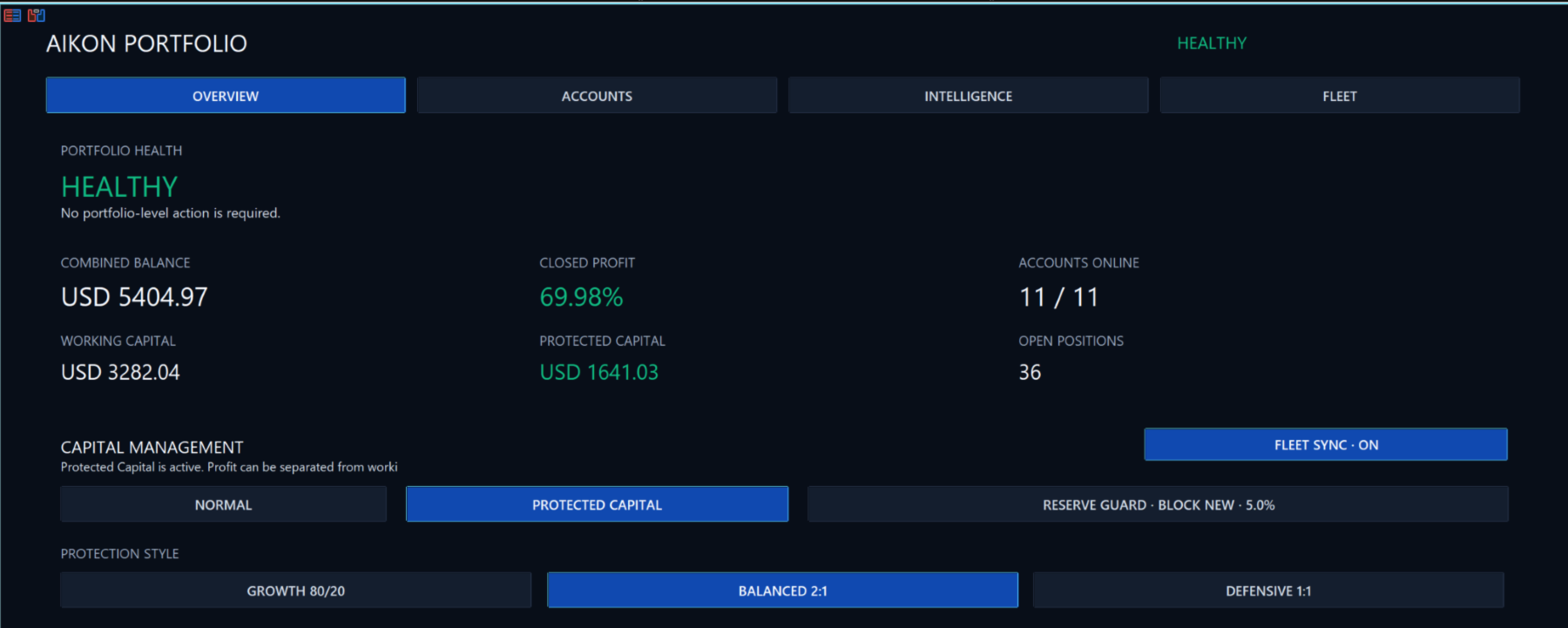
The portfolio interface separates operating allocation, reserve and profit. The developer’s public explanation describes Reserve Guard responses that restrict new campaigns, restrict campaigns plus recovery, or request exits. Developer’s capital-control explanation.
These choices answer different questions. Preventing a new campaign limits additional activity. Restricting recovery also affects how an existing campaign can develop. Requesting exits aims to reduce positions already held. A buyer should be able to explain which response their configuration uses and what remains open after it triggers.
This is more useful than judging a profile by its name. The practical benefit is making the account’s operating boundaries visible. A software reserve remains inside the trading account; it is not a separate insured balance, and exit requests still depend on execution.
Official user manuals supplied with Aikon
CheaperForex includes all official Aikon user manuals with the product. The manual excerpts show an installation checklist, chart setup, interface explanations and input settings. These give buyers a reference for configuring the EA and understanding the controls discussed in this review.
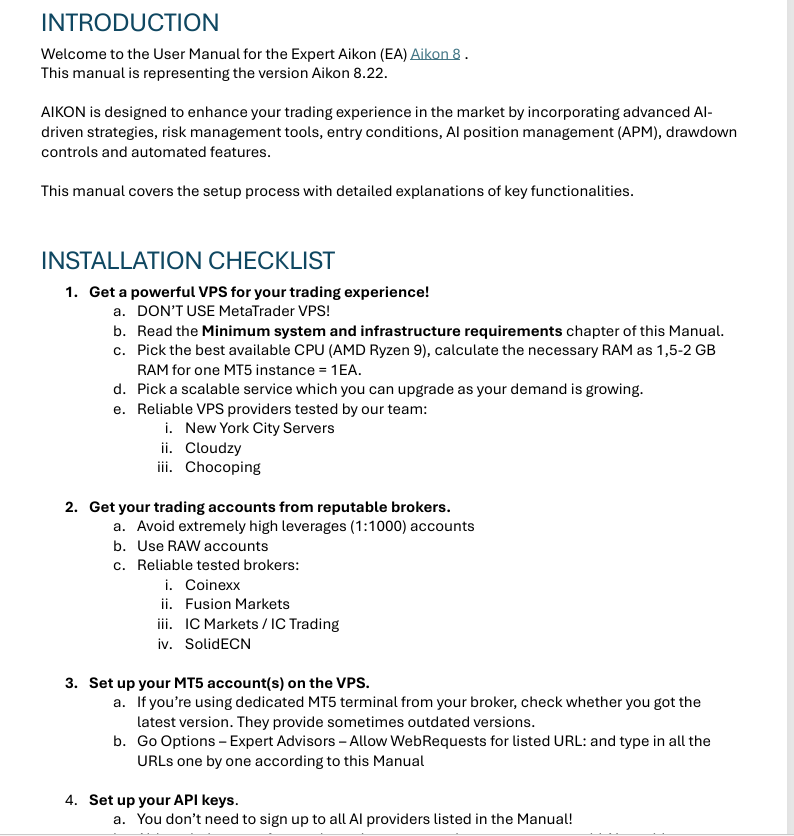
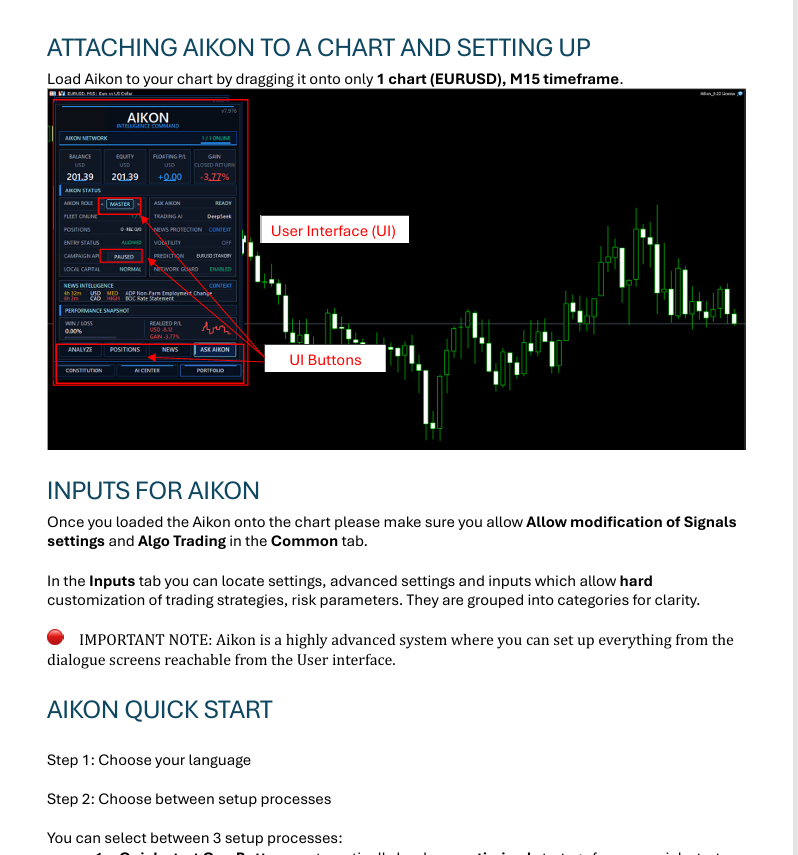
Version labels in these excerpts identify the documentation edition.
Aikon running costs: what to budget and where to look
The purchase price is only one part of the operating cost. Allow separately for AI-provider usage and, if you choose one, a VPS. Trading costs such as spreads, commission and swaps belong in a different line of the calculation. Keeping these separate helps identify whether an expense comes from the software workflow, hosting or trading activity.
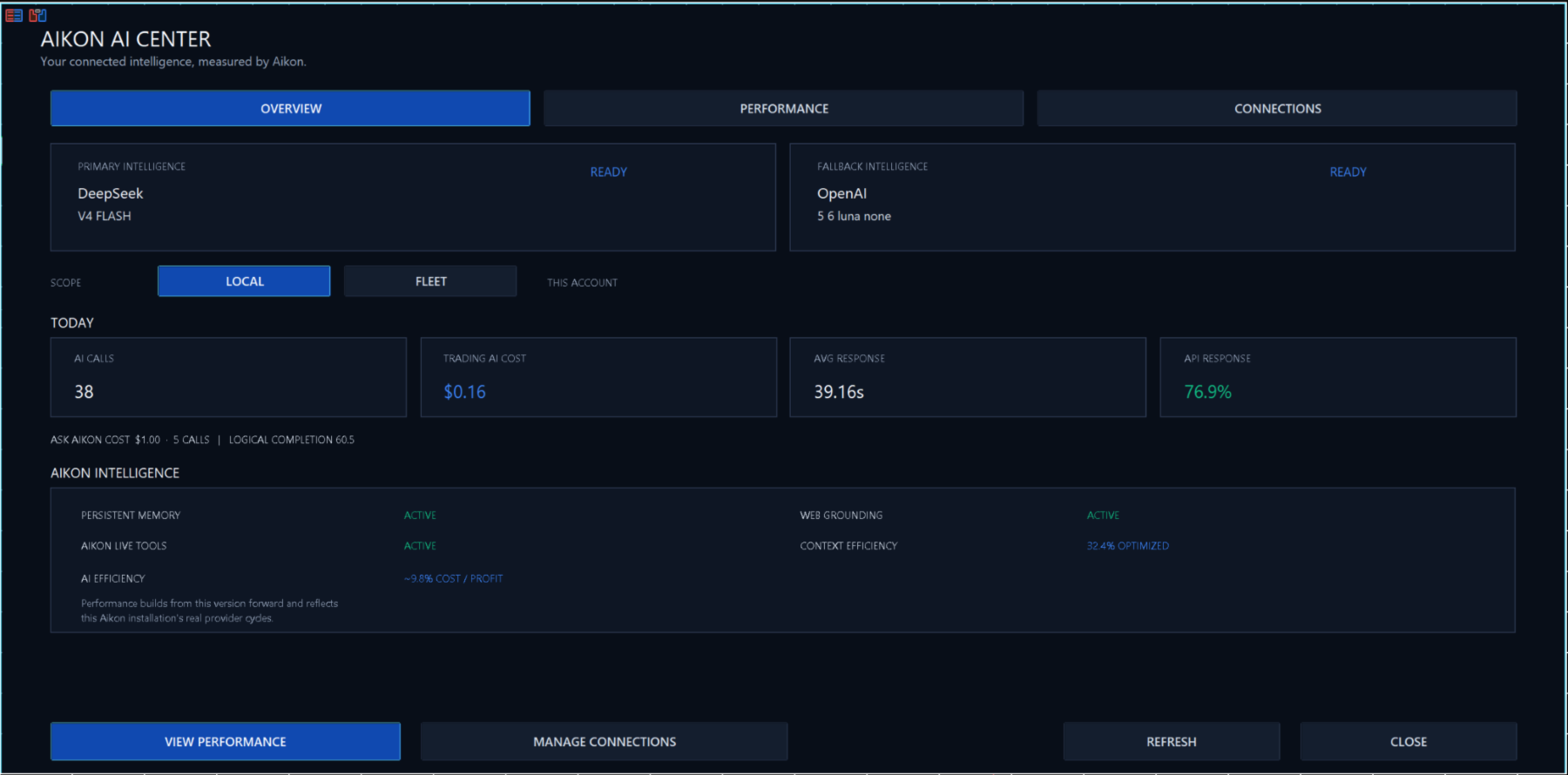
The AI Center screenshot shows connection status, usage and response measurements. Here is how we would use those views when assessing the setup:
- Connection status: establish which provider is connected before investigating an unanswered request.
- Usage and cost: compare the displayed activity with the provider’s bill over the same dates.
- Response measurements: consider whether the waiting time is suitable for the task. A useful explanation and a time-sensitive instruction have different demands.
For a meaningful comparison between models, use similar tasks and record whether you needed to repeat or correct requests. A lower bill is less attractive if it comes with more work for the operator. We have no measured monthly cost to quote; the screenshot is an example rather than a budget.
What a connected evaluation should establish
MetaQuotes states that WebRequest is unavailable in Strategy Tester. A historical simulation can therefore assess available mechanical behaviour, while a connected evaluation is needed to examine HTTP-dependent interactions. MetaQuotes WebRequest reference.
A useful first evaluation would answer four practical questions:
- Can you identify the selected mode, account and operating limits without guessing?
- Does a proposed change clearly describe the action you intended, and can you find its resulting state?
- Can you distinguish a provider connection problem from an instruction that was not accepted?
- Can you reconcile usage costs with the activity you performed?
Keep the build and configuration with that record. It makes later comparisons useful when you change a model, mode or setting.
What MQL5 reviewers report
- ghazouani77, 8 September: praises the broad operating framework.
- Michael 888, 8 September: finds phone control convenient and intuitive.
- LUIS ALBERTO BIANUCCI, 5 September: praises the AI-assisted design.
- Jing2017 and Cristóbal Manuel, 5 September: ratings without written comments.
The strongest theme in this early feedback is usability, especially remote operation and the breadth of the interface. That supports interest in the workflow, but does not establish trading performance. No independently verified Aikon trading record is presented in this review.
Our verdict: who is Aikon MT5 for?
Most relevant: traders who want to organise configuration, account oversight and remote controls in one workflow, and who are willing to understand the selected trading mode and maintain a provider connection. The screenshots give these buyers something specific to assess: the conversation window, allocation controls and usage dashboard.
Less compelling: buyers whose priority is a minimal setup with few operating choices, or whose purchase decision depends on an independently verified Aikon performance history. The public material reviewed here is stronger on interface and operating design than on quantified trading results.
Our view is that Aikon’s appeal lies in how it helps an operator organise and control the system. The buying decision should turn on whether those controls solve a real need for you, alongside the account compatibility and running costs.
CheaperForex supplies Aikon as a standalone MT5 file. Free lifetime updates are included, added as soon as we receive them. You never pay twice. See Aikon features and current pricing.
Aikon MT5 review FAQs
Is Aikon MT5 only an entry-signal EA?
Its documented scope also covers conversational configuration, operating controls and account oversight. Its value to a buyer therefore depends on whether those additional controls are useful, as well as the selected trading approach.
Does Aikon have to use Recovery?
No. Single Entry with Stop Loss is a separate choice. Recovery changes how a campaign can build exposure, so compare the two as different configurations rather than treating their results as interchangeable.
Does Telegram replace the MT5 installation?
No. Telegram provides remote access to the Aikon instance running in MT5. The Windows PC or VPS hosting that instance still needs to be available; the EA does not run on the phone.
What should I compare when choosing an AI model?
Compare response usefulness, waiting time and cost over similar tasks. Also record repeated or corrected requests: a cheaper response is less valuable if it creates more work. The provider bill is the basis for your actual spending.
Can Strategy Tester demonstrate all of Aikon?
No. MetaQuotes states that WebRequest does not run in Strategy Tester. Available mechanical behaviour can be assessed in a backtest, but live HTTP-dependent interactions need a connected evaluation.
Who is most likely to find Aikon useful?
An MT5 user who wants to organise configuration, account oversight and remote controls in one workflow, and is comfortable maintaining a provider connection. Someone seeking a minimal setup may place less value on those extra choices.
View Aikon MT5 features and pricing →