
Official MT5 version · Gold EA
Aikon MT5 EA
Version 9.0
We’re rated Excellent on Trustpilot · 4.6/5 (opens in a new tab)Aikon EA MT5 combines automated Forex and gold trading with conversational configuration, portfolio allocation and account controls. It suits traders who want to manage both strategy settings and AI operating costs.
- Automated trading, with a conversational control panel.
- Separate trading capital from the operating reserve.
- Plan the AI connection and running costs.
 MT5Save 64%
What you receive
- Aikon.ex5Genuine, unmodified developer file for MetaTrader 5Version 9.0
- Setup guide.pdfA general guide to installing expert advisors.Official step-by-step install guide
Delivered instantly to your account after payment
Regular priceRegular price was $1,097.97
$399.95 with card
Visa, Mastercard, Apple Pay and Google Pay accepted.
Card payments add bank fees, sales taxes and other charges.
- Official developer build · Version 9.0
- Instant downloadYour file is provided immediately after payment. In very rare cases we manually review an order first, then send your download straight after. If you don’t receive your file, you can request a full refund.
- Free lifetime updatesAll updates are free. They’re provided on a best-availability basis: we get new versions as fast as we can, led by customer demand, but we don’t guarantee them immediately. If you need every update the moment it’s released, our service may not be the best fit for you.
- 7-day money-backRefunds only cover an EA that fails to attach to your chart because of errors we can replicate. We don’t cover changing your mind or not liking the EA. All brokers are different, and results are never promised because markets are constantly changing.
- Unlimited activationsUse it on as many MT5 accounts and computers as you want, live or demo. There are no restrictions on how you use it.
What you receive
- Aikon.ex5Genuine, unmodified developer file for MetaTrader 5Version 9.0
- Setup guide.pdfA general guide to installing expert advisors.Official step-by-step install guide
Delivered instantly to your account after payment


28,000+ tradersServed since 2019
Official versionsInstant downloadFree lifetime updatesExtra 20% off with cryptoReal people on support28,000+ tradersTrading since 2019Rated Excellent on Trustpilot
Product description
About Aikon MT5 EA
Aikon EA MT5 combines automated Forex and gold trading with conversational configuration, portfolio allocation and account controls. It suits traders who want to manage both strategy settings and AI operating costs; all official user manuals are included with our offer to help you work through that setup.
Read the full Aikon EA MT5 review
Automated trading, with a conversational control panel
Ask Aikon lets you describe changes, inspect a proposal and confirm configuration actions. Routine strategy trading is automated; the system does not require your approval before every normal entry. The current listing distinguishes Forex Single Entry, Gold Single Entry and an optional Forex Recovery mode, so check which engine is active.
Separate trading capital from the operating reserve
The portfolio tools divide allocations into operating capital, reserve and harvested profit. These are controls inside the trading account, not withdrawals to a protected bank account. Choose the symbols yourself or use the documented selection process, then inspect how much exposure the enabled engines can create together.
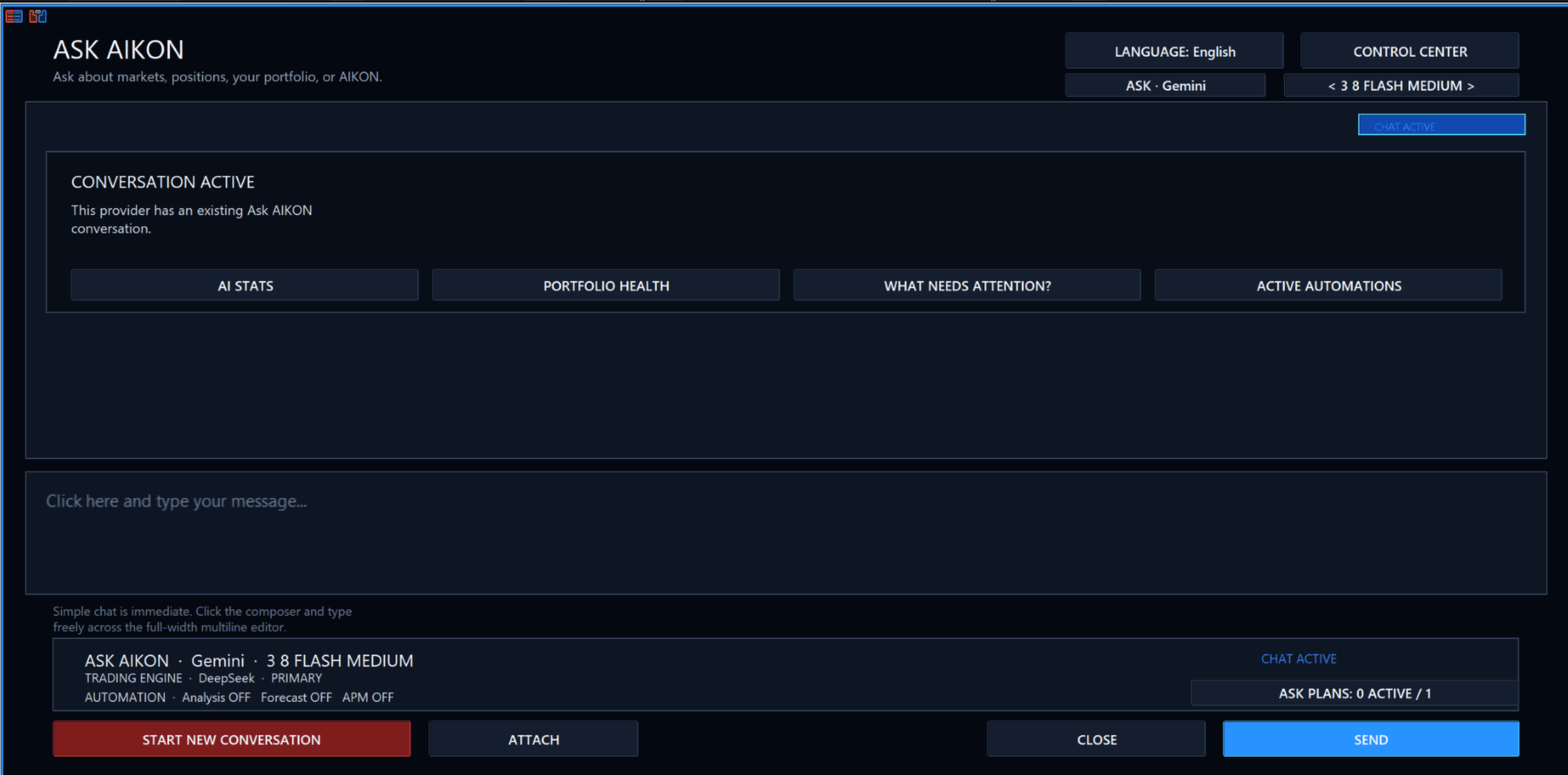
Plan the AI connection and running costs
The quick-start workflow can use one provider, model and API key. Provider charges are separate from the EA purchase and depend on usage. The AI Center and economics controls help inspect calls and costs. Keep MT5 running and check the documented WebRequest permissions; a Strategy Tester run cannot reproduce every live web-connected interaction.
Use the manuals alongside the interface
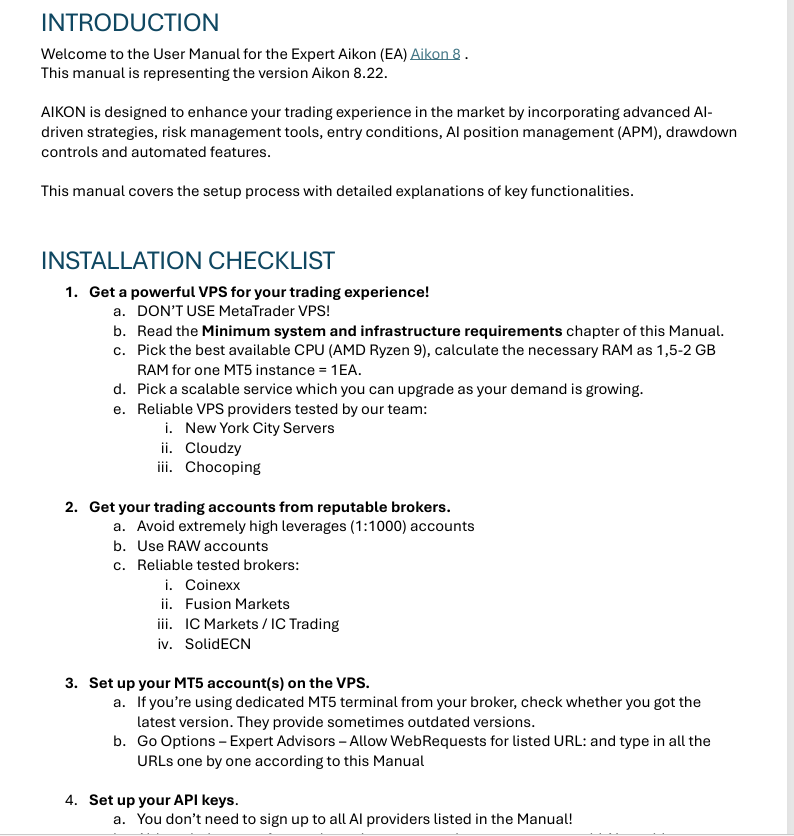
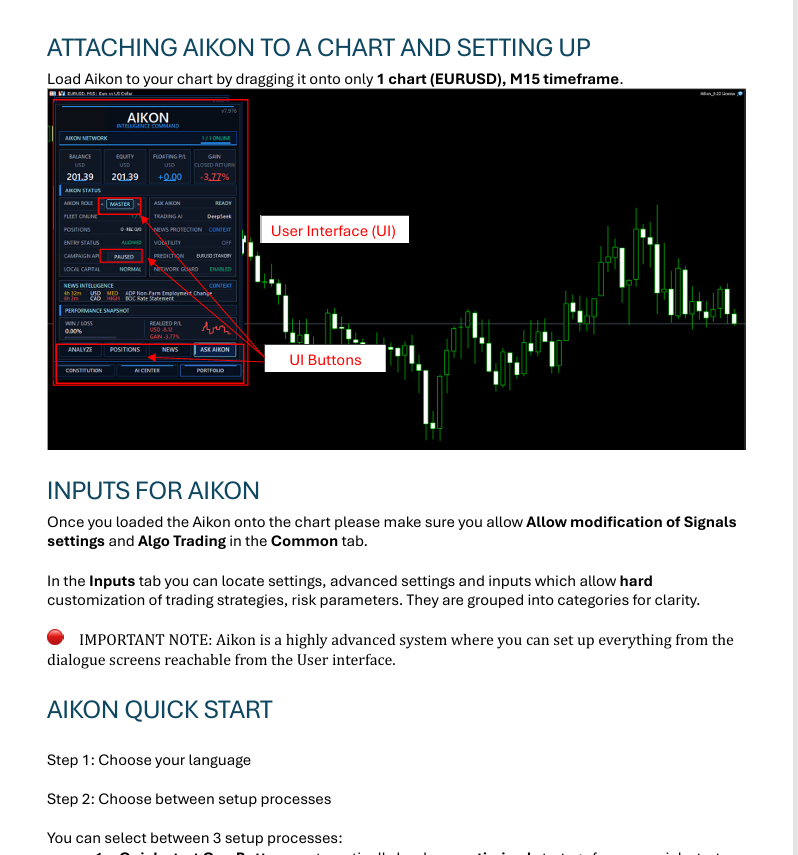
The official manual excerpts below cover chart setup, inputs, VPS preparation and connections. Their printed version labels belong to those documents and screenshots. Follow the current package instructions for the active build rather than assuming every older screen matches today’s interface. Telegram and Master/Node operation add further configuration choices that deserve their own checks.
Inside the official user manuals
Setup questions
Do I have to approve every trade?
No. Routine strategy trading is automated. Conversational proposals and configuration changes have their own confirmation workflow.
Are all official user manuals included?
Yes. The offer includes all official Aikon user manuals. The excerpts on this page show their setup coverage; document version labels are historical references.
Are AI provider fees included in the EA price?
No. External provider usage can incur separate charges. Check the provider, model, call limits and usage reporting before enabling the live connection.
Your CheaperForex offer
Supplied as a standalone file. Follow the delivery instructions in your order; the instructions document is not the trading executable. Free lifetime updates are included, added as soon as we receive them. You never pay twice. Email setup help is available. All official user manuals are included.
7-day money-back guarantee. If the EA fails to attach to your chart because of errors we can replicate, you get a full refund. Trading results are not covered.
Verify it yourself
Every order
What’s included with Aikon
- Instant downloadReady after checkout and kept in your account
- Free lifetime updatesAdded as soon as we receive them, every version kept in your account
- Unlimited activationsUnlimited live and demo accounts
- Free remote installationOptional: a one-time install over AnyDesk, with settings advice and custom presets
- 7-day money-back guaranteeIf the EA fails to attach to your chart because of errors we can replicate, you get a full refund.
Product FAQs
Aikon MT5 EA FAQs
Real people on support, by Telegram or our contact form.
Do I have to approve every trade?
No. Routine strategy trading is automated. Conversational proposals and configuration changes have their own confirmation workflow.
Are all official user manuals included?
Yes. The offer includes all official Aikon user manuals. The excerpts on this page show their setup coverage; document version labels are historical references.
Are AI provider fees included in the EA price?
No. External provider usage can incur separate charges. Check the provider, model, call limits and usage reporting before enabling the live connection.
Customer reviews
Reviews of Aikon MT5 EA
You must be logged in to post a review.
- Excellent on Trustpilot 4.6 out of 5 from 120 reviews (opens in a new tab)
- 28,000+ traders since 2019
- 1,560+ official EAs
- Card or crypto payments
Related EAs
Traders also explore
Premium expert advisors at vault-low prices, with your crypto price on every card.
 MT5Save 50%
 MT5Save 50%
 MT5Save 50%
 MT5Save 50%
Ready when you are
Aikon MT5 EA for $319.96 with crypto
Regular price was $1,097.97 · $399.95 with card · instant download · free lifetime updates

Aikon MT5 EA$319.96with crypto$399.95 with card
There are no reviews yet.