
GoldenShot EA MT5 is a two-strategy gold robot with one total open position and no recovery sequence. Its appeal is a relatively inspectable trade lifecycle: entry validation, a defined initial stop and strategy-specific protection. The key buying questions are minimum-lot sizing and how much weight to give the young public evidence.
View GoldenShot EA MT5 features and current pricing
Ready to Buy GoldenShot EA MT5?
$143.96 with crypto · $179.95 by card
✅ Single-Position Gold Trading
✅ Check the current offer and the platform requirements before purchase.
Official version · Instant download · Free lifetime updates · 7-day money-back guarantee
Our assessment: The current controls were checked against the developer listing on 24 September 2026. Signal captures and the detailed numerical analysis below are the original 9 September observations, not an updated performance claim.

Current product check — 24 September 2026
The latest developer description distinguishes pre-entry rejection from Pullback’s post-fill rapid-failure tightening. Momentum uses its own trailing logic. Orders are market entries, and stop changes are broker-confirmed. Minimum-lot use versus skipping an undersized order remains a material sizing decision. These current controls should be read separately from the older manual and signal analysis below.
What GoldenShot is trying to do
The developer’s listing presents two entry styles. Pullback seeks a rebound after a retracement; Momentum seeks directional continuation with trend and volatility confirmation. Both sit inside a single-position design per instance, without a chain of recovery orders.
That distinction is useful when reviewing a trade log. With a basket, one displayed result can combine several entries, changing size and an eventual group exit. With one position, you can more directly compare the entry, intended stop exposure and realised exit. This makes inspection simpler; it does not make the signal stronger or the loss smaller by itself.
Two strategy names also do not prove diversification. They trade the same underlying market, so the same gold move, spread expansion or execution problem can affect both. A sensible evaluation records which entry style produced each trade instead of assuming the combined curve represents two independent sources of return.
The live signal: an early observation, not a track record verdict
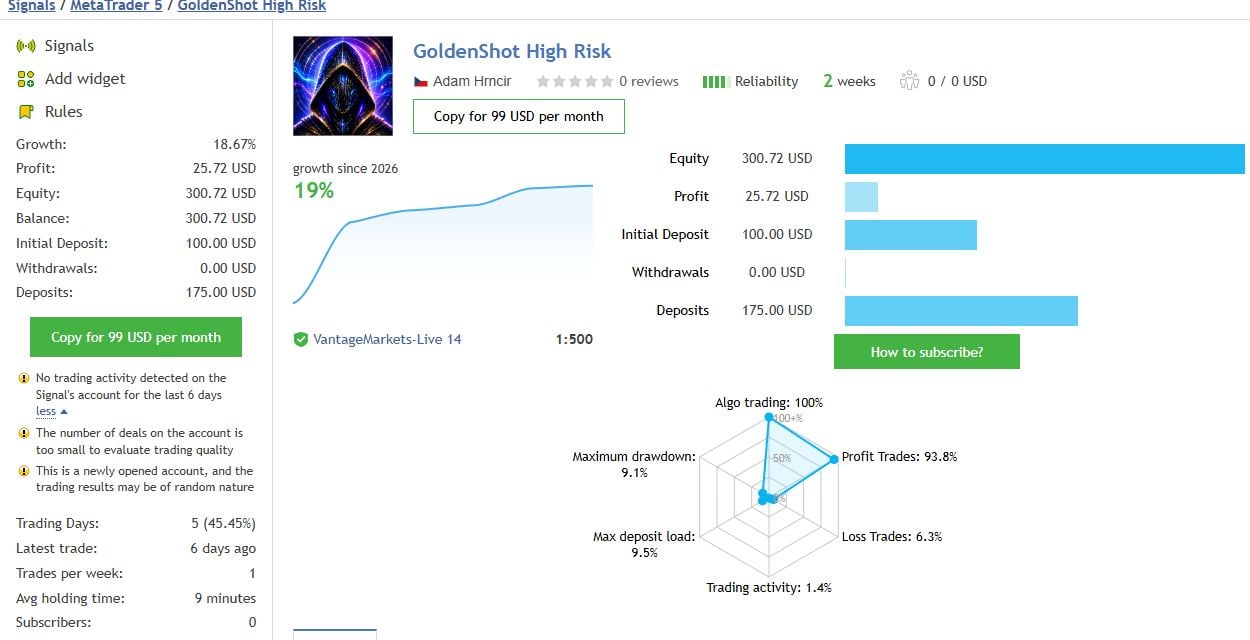
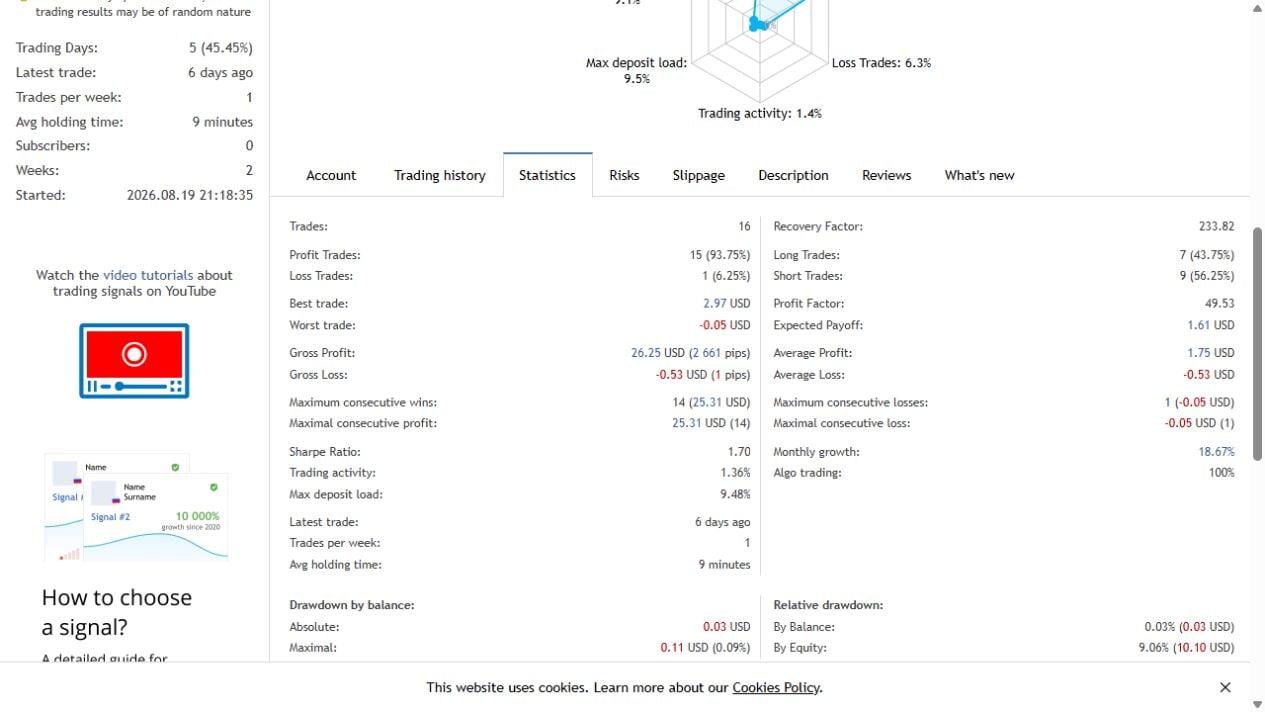
| Field on 9 September 2026 | Observed value | How to read it |
|---|---|---|
| Growth / closed trades | 18.67% / 16 | A small sample; additional losses could change the picture quickly. |
| Equity drawdown / maximum deposit load | 9.06% / 9.48% | Read exposure and floating losses alongside the growth figure. |
| Balance / trading profit | $300.72 / $25.72 | The balance also includes a $100 initial deposit and $175 added later. |
| MQL5 displayed weeks / latest trade | 2 / 6 days ago | MQL5 warns about a new account and too few deals to assess quality. The displayed weeks field does not establish the complete trade-history duration. |
The cash reconciliation is straightforward: $100 + $175 + $25.72 = $300.72. Treating the increase from the initial deposit to the balance in that capture as a trading return would count fresh money as profit. Likewise, a smooth closed-balance line can conceal the adverse movement experienced while positions were open.
Our conclusion is to keep watching, not to extrapolate a monthly income from this snapshot. Useful follow-up evidence would include more completed trades, a meaningful losing sequence, different market conditions and a clear record of which EA settings and build generated each period. The public figures do not establish that the account continuously ran today’s version with the settings you will choose.
The sizing detail that can change the whole risk profile
The v1.10 manual describes percentage sizing and a minimum-lot fallback. When a calculated order is smaller than the broker allows, choosing the smallest accepted order can mean taking more risk than the selected percentage. Disabling that fallback is the documented way to skip such an order.
Consider a purely illustrative example: your intended cash loss at the stop is $2, but the smallest permitted order would lose $20 under the same assumptions. Rounding up does not preserve the $2 plan; it multiplies that exposure by ten. Commission, currency conversion, contract specification and execution can change the final amount further.
Before evaluating a demo result, write down the proposed lot, intended stop distance and corresponding cash loss. Compare that amount with the account funds actually available. A favourable curve produced with a larger exposure is not an equal-risk comparison with another EA.
Earlier release history and the older manual
Protection must also be enabled: the manual documents daily drawdown protection as off by default. Check the installed build’s actual switch and threshold; the existence of the feature does not mean it is active.
This changes how you would supervise a shared account. A product-specific limit cannot be read as a combined limit for every strategy you run. Keep an account-level view of open risk, especially if you install several instances. A name such as “daily protection” is not enough to establish compliance with a broker or prop firm’s separate rules.
After an update, record the build and check its release instructions before continuing an experiment. Otherwise you may compare trades generated by different logic while treating them as one unchanged system.
Separate entry permission from open-trade management
The manual distinguishes time/news gates from management of a position already open. A gate can prevent a new order without closing the current one. It also distinguishes broker-side exits from actions that require the connected terminal.
For a useful first check, make a small operating record: broker time, news status, reason a new entry is allowed or blocked, and whether an existing position has its intended stop and target. This helps distinguish a setup problem from an EA that is correctly waiting. Use the status evidence before changing several parameters at once.
Historical testing needs a separate check. MetaQuotes documents that WebRequest is unavailable in Strategy Tester. Do not assume a connected external news feed behaves identically in a historical run. Record what calendar/filter information the test actually used, together with spread and other trading costs.
Does the developer’s backtest explanation settle overfitting?
The developer’s development article describes staged tests from 2025 onward, adding protections and modifying trading periods. It is useful because it exposes some of the decisions behind the configuration. It also says the intermediate layers cannot be reproduced individually by customers.
That account of development does not, by itself, establish that the final rules work on data untouched during their selection. If a rule was chosen because it improved the inspected period, the final chart remains evidence from that selection process. Running the same historical market through another broker feed checks a different question: sensitivity to prices and costs.
A stronger evaluation would keep the chosen rules fixed, state the test dates and costs, and follow their behaviour on subsequent observations. Until that evidence develops, use the article to understand the design decisions rather than as proof that overfitting has been ruled out. We have not independently reproduced the developer’s tests.
GoldenShot versus Wave Rider
Adam Hrncir links the two products, but they offer different choices. The current Wave Rider listing describes seven strategies and optional recovery, whereas GoldenShot concentrates on two entry styles without recovery.
| Decision | GoldenShot | Wave Rider |
|---|---|---|
| What you want to inspect | A narrower entry framework and each position’s exit. | A broader set of strategies and the selected recovery mode. |
| What to evaluate separately | Its own trades, sizing and current release. | Its own mode, exposure and performance evidence. |
| CheaperForex pages | GoldenShot features and pricing | Wave Rider product · Wave Rider review |
The family connection is a useful comparison link, not a reason to transfer settings or assign Wave Rider’s history to GoldenShot. Choose which operating approach you want to assess first, then judge its evidence on its own terms.
Who should put GoldenShot on a shortlist?
It fits a shortlist for someone who specifically wants MT5 gold automation without recovery orders and is prepared to inspect sizing and follow an early forward record. Its public manual and release log provide material to work through before paying.
If your purchase criterion is already demonstrated resilience through several market conditions, the 9 September signal snapshot did not answer that question. That is the main evidence gap, rather than a missing headline percentage. Gold trading can produce losses beyond a neat backtest expectation; a stop or software threshold is not a guaranteed cash-loss ceiling.
GoldenShot review FAQs
Is this a hands-on GoldenShot performance test?
No. This is an editorial assessment of the developer’s public documentation, release history and linked MQL5 signal, checked on 9 September 2026. We have not independently run the EA or reproduced its backtests.
Does 93.75% winning trades establish a reliable win rate?
No. The captured signal contains only 16 trades. A percentage from such a small sample can change sharply after a few additional losses and says little about the size of future losses.
Why is the signal balance much higher than its starting deposit?
The snapshot shows a $100 initial deposit, $175 of additional deposits and $25.72 profit, producing a $300.72 balance. Deposited money is not trading profit. Read the platform’s growth measure separately from the change in cash balance.
Does GoldenShot’s daily drawdown control protect all trading on my account?
The v1.20 release notes narrowed it to GoldenShot’s own trades. The older v1.10 manual describes a broader scope, so that passage should not be used to assume an account-wide limit. Other activity on the account needs separate oversight.
Can more than one GoldenShot trade be open across several charts?
Yes. The documented single-position design applies per instance. Separate instances with distinct magic identifiers can add exposure. Counting positions on only one chart is not a complete account risk check.