
What's included

  • Installation guideStep-by-step PDF with screenshots
  • Optimised presetsReady-to-use configuration files
  • Future updatesIncluded free when we receive them
  • Email supportHelp with setup and technical issues
7-day money-back guarantee. If the EA fails to attach to your chart because of errors we can replicate, you get a full refund. Trading results are not covered.
Trustpilot service reviews

What our customers say

Selected Trustpilot feedback about CheaperForex support, setup and service.

Since 2019 in business 28,000+ customers served

NonStop EA MT5

NonStop EA MT5 combines six trading modules for AUDCAD and AUDNZD with basket exits, automatic lot sizing and account-level protection. Separate M15 presets organise the two currency pairs while configurable timeout and loss limits manage open baskets.

  • AUDCAD and AUDNZD modules using a separate M15 chart and preset for each pair.
  • Basket stop loss, timeout management and account equity/balance protection.
  • Fixed or automatic lot sizing; optional martingale is disabled by default.

Read the NonStop EA MT5 review

Original price was: $129.00.Current price is: $89.95.

 
Card price. Apple Pay and Google Pay accepted.
Pay with crypto and it is  20% off at checkout
  • Instant download from your account the moment checkout completes. The files stay in your customer portal.
  • Official version, with future updates included free when we receive them. You never pay twice for the same product.
  • 7-day money-back guarantee if it fails to install or run. Setup help by email whenever you need it.
Orders over $300 include 3 months of PrismAlgo EA MT5, free Our cloud-connected EA for 28 FX pairs, Gold and Bitcoin. Added to your cart automatically. PrismAlgo.com
View listing
Need Help? Message us on Telegram, or contact us

What's included

  • Installation guideStep-by-step PDF with screenshots
  • Optimised presetsReady-to-use configuration files
  • Future updatesIncluded free when we receive them
  • Email supportHelp with setup and technical issues
7-day money-back guarantee. If the EA fails to attach to your chart because of errors we can replicate, you get a full refund. Trading results are not covered.

NonStop EA MT5 combines six trading modules for AUDCAD and AUDNZD with basket exits, automatic lot sizing and account-level protection. Separate M15 presets organise the two currency pairs while configurable timeout and loss limits manage open baskets.

Strategy and controls

The developer’s setup comments allocate modules 1–4 to AUDCAD and modules 5–6 to AUDNZD. The exact entry logic remains proprietary. Basket management is central: a collection of positions can be controlled through a common exit or timeout rather than assessing only the profit of individual closed trades. Martingale is an optional setting, not a feature that can be described as absent from the software.

  • AUDCAD and AUDNZD modules using a separate M15 chart and preset for each pair.
  • Basket stop loss, timeout management and account equity/balance protection.
  • Fixed or automatic lot sizing; optional martingale is disabled by default.

Setup essentials

Run two MT5 charts, AUDCAD M15 and AUDNZD M15, loading the corresponding preset on each. The developer gives a $300 minimum account reference, which is not assurance that this amount is adequate for every broker or configuration. Check both symbol suffixes, minimum volumes and margin requirements. A stable VPS helps maintain continuous basket management.
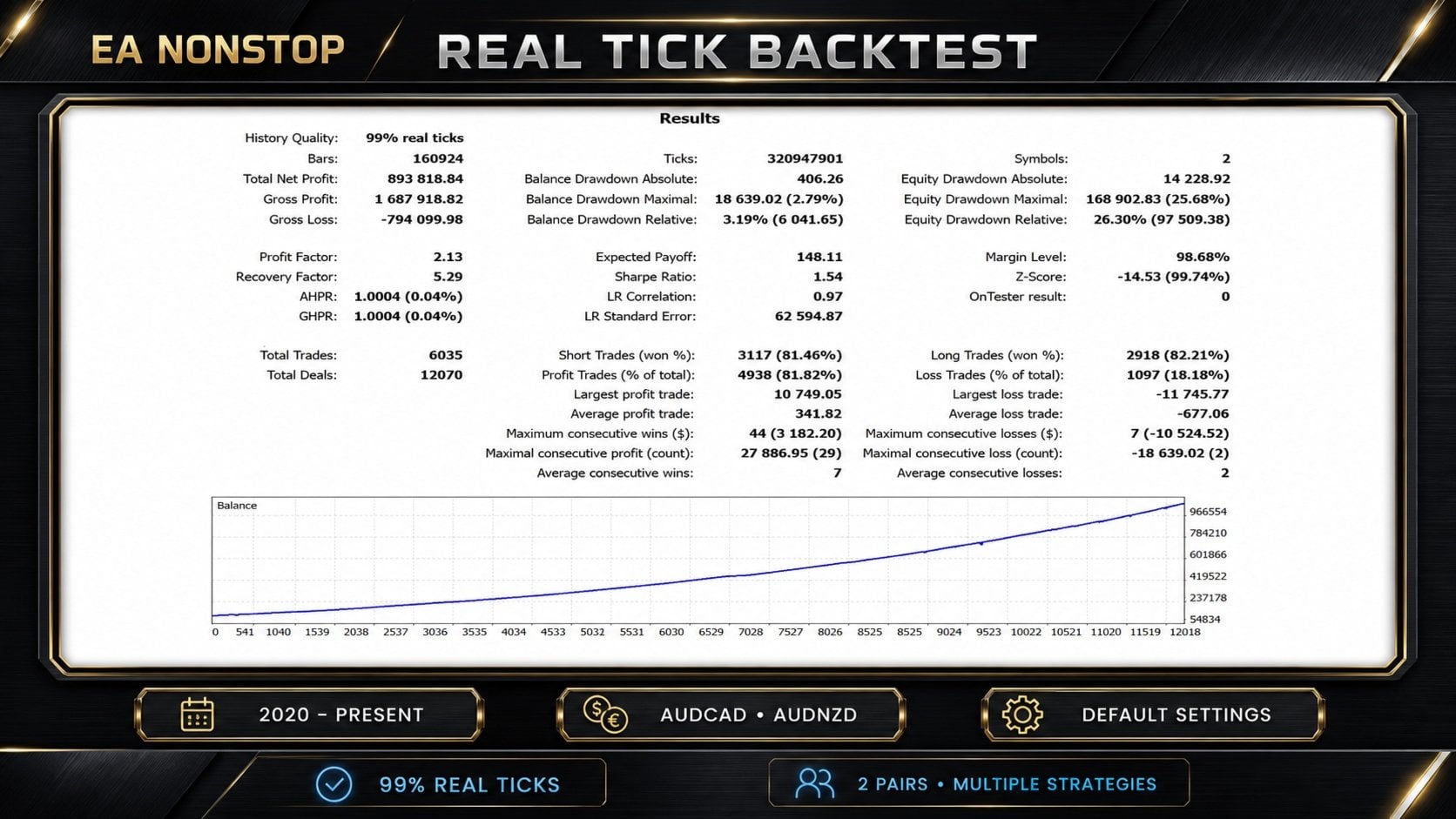
NonStop EA MT5 original developer image 1
Original developer-supplied MQL5 gallery image, retrieved 15 September 2026. Historical illustration or simulation; not independently verified current performance.

Public results: what to check

The linked account recorded 39.43% equity drawdown. Its description still names Diamond Quant, so the full history cannot be attributed confidently to the current NonStop configuration.

Read the dated signal analysis, original images and customer-feedback discussion.

More from the same developer

Compare the different strategies and markets before choosing a configuration.

Also available from Lo Thi Mai Loan:

Standalone file — latest version. Follow the delivery instructions provided with your order.

FAQs

What does this EA trade?

NonStop EA MT5 combines six trading modules for AUDCAD and AUDNZD with basket exits, automatic lot sizing and account-level protection. Separate M15 presets organise the two currency pairs while configurable timeout and loss limits manage open baskets.

How should it be set up?

Run two MT5 charts, AUDCAD M15 and AUDNZD M15, loading the corresponding preset on each. The developer gives a $300 minimum account reference, which is not assurance that this amount is adequate for every broker or configuration. Check both symbol suffixes, minimum volumes and margin requirements. A stable VPS helps maintain continuous basket management.

What should I know about the linked results?

The linked account recorded 39.43% equity drawdown. Its description still names Diamond Quant, so the full history cannot be attributed confidently to the current NonStop configuration.

Which version and delivery type are supplied?

The latest version as a standalone file. Follow the delivery instructions provided with your order.

Pre-Purchase FAQs

Are updates always free?

Yes, all updates are completely free—you'll never pay twice.

We receive updates from developers and upload them to your account when they're available. Please be patient, as we're managing hundreds of products at discounted prices. More popular products are updated more frequently.

All versions are stored in your account for easy access.

What's your refund policy?

We offer a 7-day technical guarantee. If the EA fails to attach to your chart due to verified errors we can replicate, we'll issue a full refund.

However, we cannot refund based on trading performance or profit expectations—forex markets are unpredictable, and results vary by broker, spread, and market conditions. We provide tools, not guarantees.

I need assistance installing this?

Yes, we'd be happy to assist you!

We can advise you on the best settings for your account or create custom presets tailored to your needs. Additionally, we offer a one-time free installation service using AnyDesk for remote setup.

Please note, however, that we cannot provide advice on how to make money with any of our products.

Can I use this on multiple accounts?

Absolutely. Once you purchase, the EA is yours to use on unlimited live and demo accounts—no restrictions.

You can run it on multiple brokers, VPS servers, or trading accounts simultaneously.

There are no license limits or activation keys. Buy once, use everywhere.

How do I download after payment?

After successful payment, your product will be available for download instantly:

  • Displayed on the screen immediately after checkout
  • Emailed to the address you provided during purchase
  • Stored in your account if you created one at checkout

In rare cases (about 1% of high-value premium products), orders may be held for manual review to prevent fraud. If you don't see a download link, contact us for assistance.

Is this an original product?

Yes, absolutely.

We do not sell fake products, and our customer reviews, along with our pricing, reflect the quality and authenticity of what we offer.

Why Traders Trust Us

Excellent on Trustpilot
4.5★ from real customers
In Business Since 2019
28,000+ customers served
Instant Access
No group buys or waiting
7-Day Refund Policy
For product errors
Remote Installation
We can install for you
Flexible Payments
Cards, Apple Pay, Crypto

Reviewed by Our Trader

Picture of Peter Jones

Peter Jones

Peter Jones is a full-time trader, forex software developer, and founder of CheaperForex.com. With over 10 years of experience in algorithmic trading, he helps traders gain an edge using reliable EAs and strict risk control.
SKU CHF-NONSTOP-MT5-EA Categories ,
Product
— Card — Crypto