
FXCOW Smart EA MT5 Review: Breakout Panel, Sessions and Evidence
FXCOW Smart EA MT5 automates market-structure breakout entries and trade management. Its illustrated dashboard combines Smart Entry controls with a separate Smart Breakout section, including direction switches, session controls, position limits, stop loss, take profit and trailing settings. Our assessment: the attraction is one dashboard for entry controls and session-breakout management. The main uncertainty is the thin public specification: session timing and entry rules are not fully explained, and no linked live account or statistical report supports a performance verdict.
View FXCOW Smart EA MT5 features and current pricing

- Developer source link: FXCOW Smart EA MT5 on MQL5
- Live signal link: No public live signal was linked from the checked listing or seller page on 16 September 2026.
Sources checked 16 September 2026: developer listing, original gallery screenshot, comments, release notes and seller page. This is a source-based assessment, not our own traded test or code inspection.
Market structure and breakout execution
Lemuel Pangandoyon describes an EA that analyses price structure, detects potential breakouts and manages qualifying trades automatically. Stop loss, take profit, position management and trailing are part of the advertised lifecycle. The listing does not disclose the range calculation, breakout confirmation threshold or exact signal formula, so it should not be recast as a specific indicator strategy without evidence.
The original dashboard is more informative than the slogans
The gallery shows XAUUSD.PRO M5 and two labelled blocks: Smart Entry and FXCOW Smart Breakout. Smart Entry has Buy/Sell permissions, lot size, dollar-labelled stop and target fields, a trailing switch with start/distance inputs, and breakeven with a trigger. The shown trailing switch is off while breakeven is on; having a feature is different from enabling it.
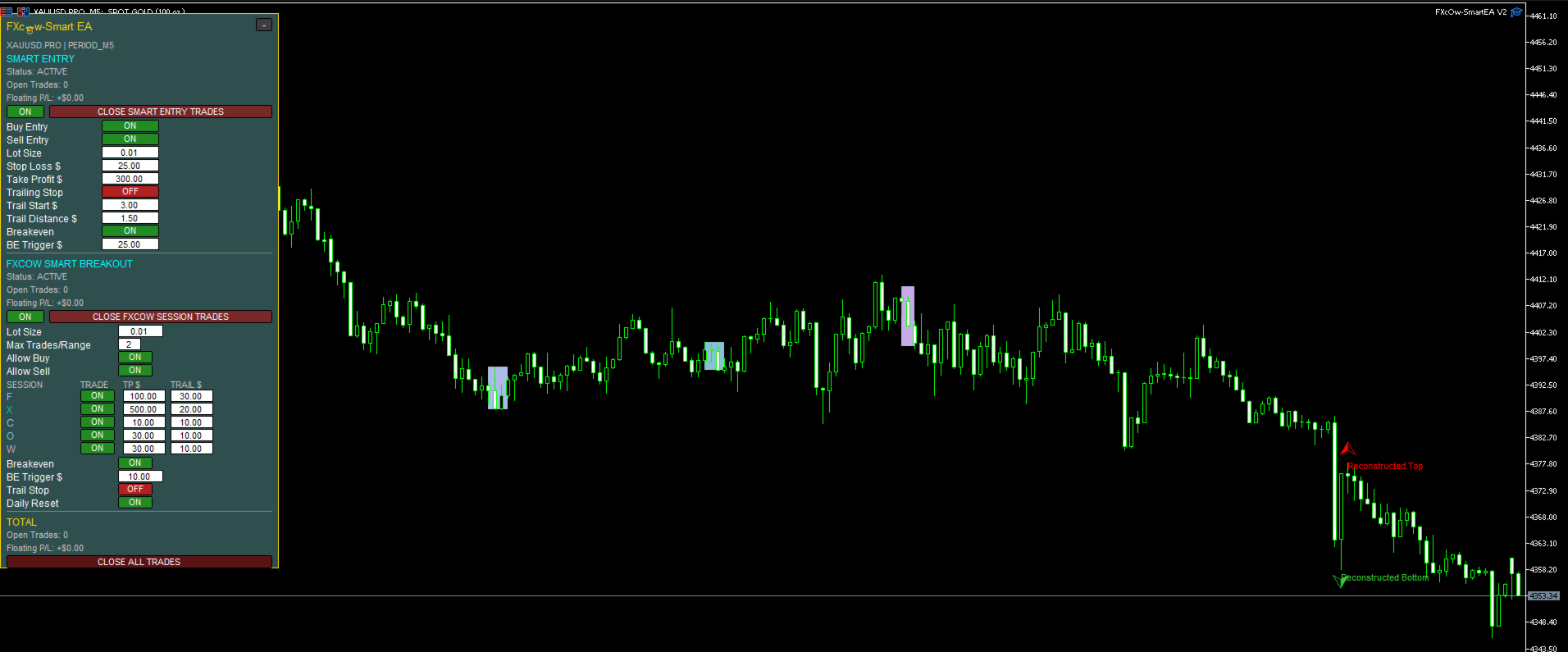
The breakout section has a separate lot size, maximum trades per range, direction permissions and five session rows. It also has breakeven, trailing and daily-reset controls. The screenshot shows a two-trade-per-range example. These are historical interface values, not recommended settings or a guaranteed limit for every configuration.
Session rows: useful flexibility, undocumented mapping
Rows F, X, C, O and W each have an on/off switch and separate TP and trailing amounts. The public text does not define the row names, trading hours, GMT conversion or daylight-saving behaviour. It would be misleading to assign London, New York or Asian-session labels without the developer’s explanation.
Before relying on these controls, confirm which broker-time periods each row represents, when daily reset occurs and how multiple enabled rows interact. A cash-labelled target also needs to be checked against account currency, contract size and lot size. Stops can be affected by gaps, spread and slippage; the controls are not a fixed account-loss guarantee.
Gold M5 is an example, not a universal specification
The visible chart is gold on M5. The listing itself gives no exclusive market/timeframe requirement, minimum deposit or public setup manual. It does not establish no-grid/no-martingale behaviour, external-service requirements or suitability for a particular prop firm. Those details should not be invented from the appearance of a dashboard.
Release notes and evidence limits
The 11 September update mentions market filtering; the 15 September entry mentions better entry confirmation. Its heading and internal build reference differ, so the practical claim is simply an update to filtering/confirmation. The gallery carries an older interface label and is retained as historical illustration, while our offer uses latest-version wording.
Developer release notes · Developer comments
There are no customer reviews to screenshot at this check, no substantive public comments and no linked public live signal. The single gallery image has no complete backtest statistics. Consequently there is no defensible win-rate, profit-factor or drawdown conclusion to attach to this product. Check current MQL5 customer reviews
Smart EA versus Smart Entry
Smart EA’s pictured distinction is the additional breakout/session panel alongside Smart Entry controls. FXCOW Smart Entry MT5 has its own direction and trade-management dashboard and a documented multi-entry update. The screenshots do not prove the two products have identical internal entry logic, and one should not be described as an included bonus for the other. Read the Smart Entry review for its separate images and update history.
Purchase comparison
At our check, MQL5 offers Smart EA by rental, with no outright purchase button. The comparison on our product page refers specifically to its one-year rental. Our standalone offer is a different delivery arrangement; the comparison must not be read as a discount against a nonexistent MQL5 lifetime purchase price.