
GEA Gold Pro is a MetaTrader 5 gold EA that combines several trading units with a shared risk manager. It offers two position-overlap modes, fixed or percentage-based volume, individual stop losses and selectable news protection.
Available from CheaperForex.
Our assessment: the appeal is a coordinated multi-unit framework with an explicit choice over trade overlap. It suits traders who want to compare those operating modes on one gold chart. The main consideration is the gap between the fixed-volume published tests and the percentage-based default. Sources were checked on 15 November 2026; this is a source-based review, not a firsthand terminal test or independently reproduced backtest.

How the multi-unit framework works
The developer describes several trading units that were developed and tested separately, then combined inside one EA. A central manager coordinates them and is intended to prevent trades clustering in the same price zone. That is a useful distinction from simply attaching several unrelated robots and leaving each unaware of the others.
The public description does not provide enough detail to reconstruct every entry rule or establish each unit’s behavior in a different market regime. A multi-unit label alone also does not demonstrate diversification: several gold strategies can respond to the same underlying move. Consider the whole account’s exposure rather than treating each unit as an independent source of risk.
The stated model has no martingale or lot multiplication, with a stop loss on each position. These are meaningful trade-management choices. They do not remove the effect of gold-price gaps, changing liquidity or several positions losing during the same market event.
Safe mode and Aggressive mode control overlap
Safe is the developer’s stated default. It prevents a unit from stacking its own trades and excludes opposite positions. Aggressive allows a unit to add to its positions. More permitted overlap can create more trades and more simultaneous exposure; it should not be evaluated only through its higher historical profit total.
The mode name and the lot-sizing mode do different jobs. Selecting Safe does not establish a fixed maximum account loss, while selecting Aggressive does not by itself specify a lot multiplier. The developer describes the same volume framework alongside both modes. A complete configuration therefore needs the overlap mode, sizing method, maximum lot cap and daily loss settings considered together.
Default percentage sizing differs from the tested volume
The published mode comparison uses a fixed 0.01 lot on a $10,000 starting deposit. The current release notes retain Risk Percentage, 1% as the default. Those are different configurations. A buyer should not attach the EA with its default volume setting and assume that the published dollar drawdowns describe the resulting account exposure.
The developer illustrates the difference by associating the percentage default with approximately 0.10 lot on a $10,000 balance. That is an example from the listing, not a sizing formula independently checked here. It highlights why a fixed-lot backtest must be read alongside its actual volume. Results from a larger or balance-varying position size cannot be obtained reliably by copying the smaller test’s headline drawdown percentage.
The setup recommendation is at least $3,000 for each fixed 0.01 lot. That is developer guidance, rather than a guaranteed capital requirement or loss boundary. Check the broker’s gold contract, volume step, margin and intended total exposure before enabling trading. A percentage label should not replace that examination.
Version 1.10 changes the news defaults
The main description still opens with v1.00 and refers to a news pause of 100 minutes before and 60 minutes after major US releases. The 12 November 2026 release notes for version 1.10 are the newer source: they explicitly set the news filter to Off by default. The earlier wording should not be read as proof that news protection starts active in the current release.
The available selections include NFP only, NFP plus CPI, high-importance events, medium-importance events, and the combined importance groups. Before-and-after pause windows are configurable. During an active pause the EA prevents new trades and removes pending orders. A separate option can close open positions before news; it is off by default.
The release notes say forward operation follows the economic calendar, while historical tests use a built-in calendar copy. This describes how the developer intends the two environments to handle events; it does not independently establish identical executions or outcomes. Choose the event level and action deliberately, and check what the dashboard reports before relying on the pause.
Handle the changed magic number before updating
Version 1.10 changes the magic number to 228668 and the order comment to GEA Gold PRO. The developer gives a specific transition instruction: close or let positions opened by the previous version finish before switching. The new version will not manage those older-magic trades.
This matters because replacing an EA while older positions remain open can leave those positions outside the updated instance’s management. A clean restart is not evidence that an earlier position has been adopted. Follow the release-specific transition instruction rather than assuming that a routine file update transfers every open trade automatically.
Reading the published test results
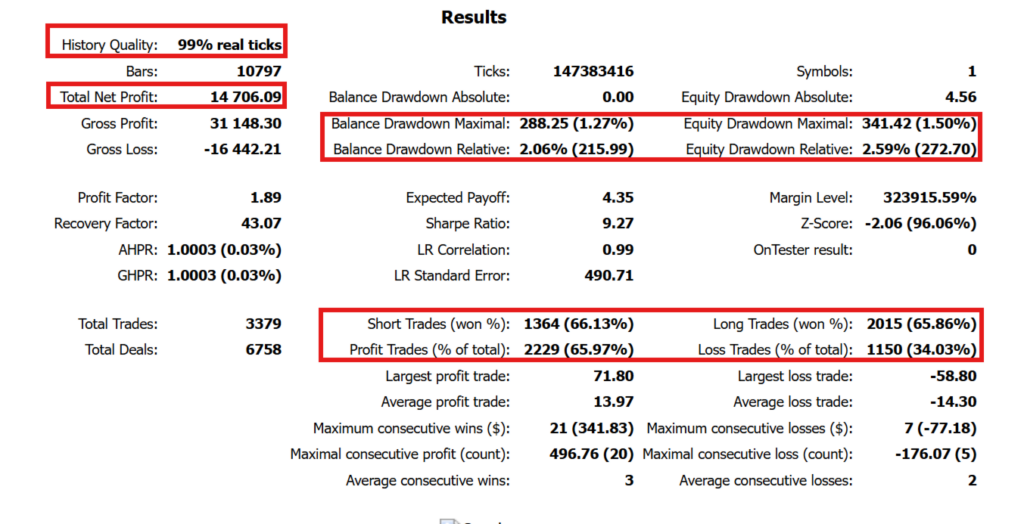
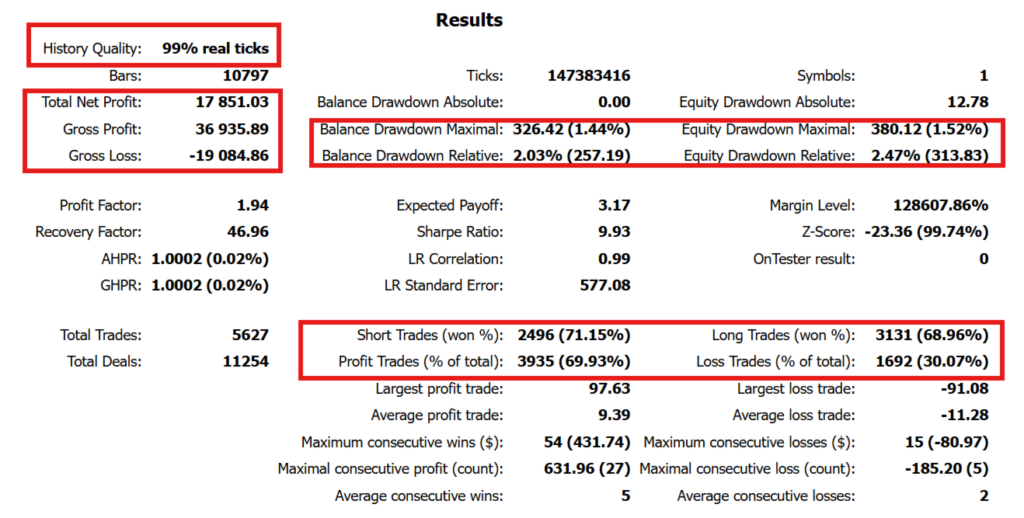
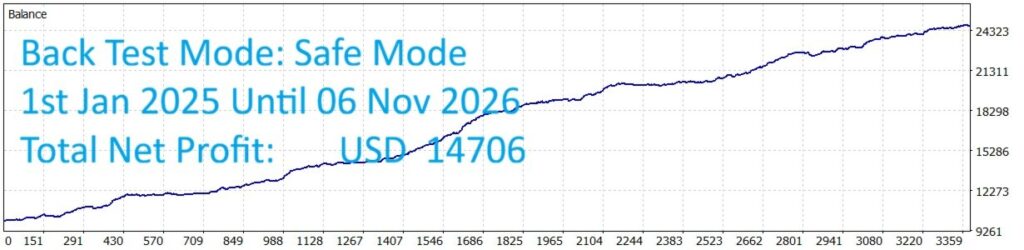
The developer’s comparison covers 1 January 2025 to 6 November 2026, using a $10,000 starting deposit, fixed 0.01 lots and a stated 230 ms execution delay. The description reports 99% history quality and MT5’s real-tick test mode. The figures below come from the developer’s original historical-test reports, checked on 15 November 2026. They are not a live account record.
| Developer test metric | Safe mode | Aggressive mode |
|---|---|---|
| Net profit | $14,706.09 | $17,851.03 |
| Profit factor | 1.89 | 1.94 |
| Trades | 3,379 | 5,627 |
| Profitable trades | 65.97% | 69.93% |
| Maximal equity drawdown | $341.42 (1.50%) | $380.12 (1.52%) |
| Relative equity drawdown | 2.59% ($272.70) | 2.47% ($313.83) |
| Relative balance drawdown | 2.06% ($215.99) | 2.03% ($257.19) |
Aggressive records substantially more trades and higher net profit, alongside a larger maximal equity drawdown amount. However, the separate relative equity drawdown is higher in Safe: 2.59%, compared with 2.47%. Safe is the mode name; it does not mean that every historical drawdown measure is lower. Market sequence, position size, costs and the chosen test period all affect the comparison.
The reports distinguish maximal equity drawdown from relative equity drawdown. The 1.50% and 1.52% values shown beside the maximal amounts must not replace the distinct 2.59% and 2.47% relative figures. Nor should they be treated as percentages of the initial deposit or a future loss ceiling.
The monthly list includes a loss of $78 in the first week of November 2026 for Safe mode. That partial month remains relevant even though the overall simulation is positive. The published trade count and profit factor offer more context than an equity curve alone, but they do not reveal how a future broker account will behave.
What is missing from the public evidence?
No public live signal is linked in the product description examined for this review. The listing’s review section currently has no customer reviews. Consequently, the available material does not provide a separate live account history or buyer-feedback sample to compare with the developer’s simulations. No third-party stars have been imported as CheaperForex purchase ratings.
Historical test quality is worth examining, but a high history-quality value does not establish out-of-sample robustness, future profitability or identical broker execution. Forward checking should use the intended account type and chosen sizing configuration, with attention to trades, exposure, costs and drawdowns rather than profit alone.
Broker and operating requirements
The stated setup is one XAUUSD / Gold H1 chart in MetaTrader 5, a hedging account, low-spread ECN / Raw pricing and leverage of 1:100 or higher. A VPS is recommended for continuous weekday operation. These are operating prerequisites; more leverage is not a substitute for suitable volume.
Check the exact gold symbol, contract size and volume increments offered by the broker. Spread and slippage controls can reject unsuitable entries, while stop losses remain subject to the execution available in a fast market. The terminal, connection and news status also need to remain healthy for the EA’s management logic to operate as intended.
GEA Gold Pro or GEA X Pro?
GEA X Pro EA MT5 is a separate product from the same developer. Its description emphasizes market-condition filtering, terminal-restart recovery, pending-order retries and weekend order handling. GEA Gold Pro instead presents a central manager and an explicit Safe-versus-Aggressive comparison. Shared authorship does not make their settings, trade histories or exposure interchangeable.
Read the GEA X Pro review for that product’s historical comparison and operating controls. Compare the behavior you want to manage, rather than assuming that a higher headline return or a similar product name identifies the better fit.
GEA Gold Pro review FAQ
Is Safe mode the same as fixed 0.01-lot trading?
No. Safe controls trade overlap. The lot mode is separate, and the current release retains a 1% Risk Percentage default. The published mode comparison used fixed 0.01 lots.
Is news protection enabled in the current version?
The version 1.10 release notes say it defaults to Off. Select the intended level and pause window if you want to use it. Closing open trades before an event is separately configurable.
Does the reported drawdown limit future losses?
No. It is a historical test statistic from a particular volume, deposit, period and execution setup. The daily loss input and individual stop losses have different operational roles.
Can version 1.10 manage positions from the older magic number?
The developer says it will not. The release instruction is to close or let earlier-version trades finish before switching to the updated EA.
Sources checked
This review uses the official GEA Gold Pro description and version 1.10 release notes, checked on 15 November 2026. The current listing version is 1.10; older description and test labels remain identified in their original context.
Check the current CheaperForex offer.