
GEA X Pro is an automated XAUUSD system for MetaTrader 5 that combines several trading engines with an active-market filter. Broker-side exits, news controls and restart handling surround the entry logic.
Available from CheaperForex.
Our assessment: the appeal is practical control over when the EA operates, with explicit attention to pending orders and interruptions. It suits traders who want to monitor filter status and execution conditions. The main consideration is that the public performance material is a developer backtest, not a separate live account record. Sources were checked on 15 November 2026; no terminal test or independent backtest was performed for this review.

Several engines with a market-condition gate
The developer describes multiple trading engines with their own timing and risk profiles. A market-condition filter sits around their operation and can keep the EA inactive when conditions do not suit it. The public description does not disclose every engine’s entry rules, so the engine count should not be treated as proof of independent or uncorrelated strategies.
The release history explains an operational improvement to this filter. An earlier version could remain paused for the whole day after a quiet preceding day; the updated logic continues monitoring and resumes when activity returns. This is a more specific behavior than a general claim that the EA always knows the best time to trade.
A quiet day is therefore not automatically an error. Read the market-status display and journal before changing the filters. Forcing entries to maintain daily activity would change the intended operating conditions, and more trades would not establish better results.
Trade protection rests at the broker
The stated design places stop loss and take profit with each order at the broker. This separates those exits from protections that work only while a terminal is online. Existing broker-side stops can remain in place during a local interruption, while the EA’s additional management and ability to place or change orders still depend on a working terminal and connection.
The developer specifies no martingale, grid, averaging down or lot multiplication. Those exclusions describe the proposed management framework; they do not demonstrate that the strategy cannot have a losing sequence. Gold gaps, spreads and available liquidity can still affect where a stop is filled.
Several engines can also contribute exposure to the same underlying market. Evaluate the intended number and size of positions together, including any other gold EAs on the account, instead of judging risk from one position’s stop or the absence of martingale alone.
Fixed, Risk Percentage and Compound sizing
The listed volume choices are Fixed Lot, Risk Percentage and Compound, alongside a maximum lot control. The public example associates a 1% Risk setting with 0.01 lot per $1,000. That is a developer sizing example, not a formula verified against the actual Inputs window in this review. It should not be assumed to mean that every possible stop loss costs exactly 1% of the account.
The published comparison uses fixed 0.01 lots without compounding or risk scaling. A balance-varying configuration changes the sequence of position sizes and exposure. Its outcome cannot be established by taking the fixed-volume curve and assuming the same drawdown percentage will remain unchanged.
The developer gives a $100 minimum-deposit example at fixed 0.01 lots and recommends $500 or more. These are setup guidelines, not evidence that a small account can absorb every adverse sequence. The actual contract size, trade exits, simultaneous positions and margin requirements matter as well as the deposit figure.
News filtering without a WebRequest address
GEA X Pro uses the MQL5 Economic Calendar for its documented news feature. The developer says this does not require adding an external WebRequest URL. Users select the event impact and currencies, the pause before and after events, and the action to take during news.
Available actions described in the listing include pausing new orders, deleting pending orders and closing positions. Those choices have different effects. Decide which behavior is intended and check the current setting’s scope; do not assume that pausing entries also closes an existing position.
The earlier 1.2 release adds mobile news pause/resume notifications, described as enabled by default. They require a MetaQuotes ID entered in MT5’s Notifications settings. A notification is a status message, not protection against an unavailable calendar feed, a disconnected terminal or a sharply moving gold market.
Pending orders, restarts and weekends
The documented restart behavior recognizes the EA’s own orders and positions. The release history specifically addresses a period while price history is loading: existing pending orders are preserved and the dashboard reports a loading state. Temporary failures such as a closed market, excessive spread or connection issue trigger retries rather than waiting for a fresh candle.
These are useful operational details because a restart can occur during maintenance, a VPS reboot or a temporary connection problem. They do not mean every failed order is retried regardless of broker restrictions. The description limits retries to temporary errors and includes checks for trading hours, margin, volume and minimum distances.
A separate weekend guard is intended to avoid leaving pending orders to be filled at a Monday opening gap. Removing pending orders is not the same as guaranteeing that every open position has been closed before the weekend. Check the intended position and order handling separately.
Daily loss limit and the dashboard
The daily loss control can be configured as an amount or a percentage of balance. The description says trading pauses until the following day once the selected limit is reached. Treat this as an operating rule rather than a guaranteed maximum account loss: execution effects and positions elsewhere on the account can affect the result.
The dashboard brings together balance, equity, floating profit/loss, daily and longer-period results, open positions, volume, pending orders and the daily loss setting. It also displays news status, the next event, market-filter status, spread and server time. These status fields are useful for diagnosis, but the display itself is not independent performance verification.
Reading the developer’s version comparison
The official current listing shows version 1.3. Its release entry dated 5 November 2026 uses the developer heading v1.03; the figures below retain that historical label. The description compares versions v1.02 and v1.03 using fixed 0.01 lots and a stated 99% real-tick MT5 test. The comparison is labeled January 2025 to October 2026; the broader description also refers to Dukascopy gold history through November.
| Developer comparison | Earlier test, v1.02 | Updated test, v1.03 |
|---|---|---|
| Net profit | $1,503.87 | $1,786.95 |
| Profit factor | 2.36 | 2.42 |
| Maximum drawdown, amount | $84.30 | $95.16 |
| 2025 result | −$18.82 | +$81.25 |
| October 2026 result | $76.45 | $91.50 |
The updated simulation reports higher net profit and profit factor, but its absolute maximum drawdown also rises from $84.30 to $95.16. A higher historical profit figure does not establish an improvement in every risk measure. The test’s starting capital and full execution assumptions should be checked before turning an absolute drawdown amount into a risk comparison with another EA.
The updated test’s 2025 result is only $81.25 of its $1,786.95 total. The earlier comparison even shows a small loss for 2025. That uneven distribution matters when evaluating claims of steady growth: a profitable overall period can contain much weaker stretches. Results remain dependent on the historical sequence used in the test.
The gallery report is a separate benchmark
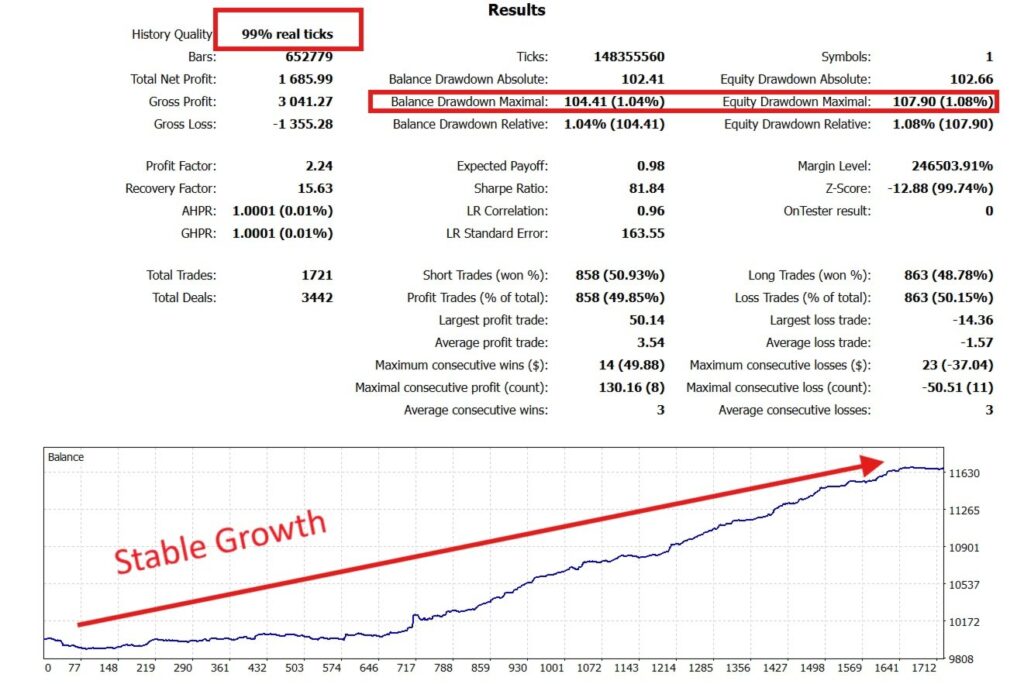
The original gallery report below shows $1,685.99 net profit, a 2.24 profit factor and 1,721 trades, with maximal and relative equity drawdown of $107.90 (1.08%). It does not visibly identify its version or full date range. Those figures differ from the current description’s v1.03 comparison, so this image must not be presented as proof of the $1,786.95 / 2.42 benchmark or labeled a current-version test without further documentation.
Release changes and the limits of the evidence
The 1.3 release describes improved trade management and protection of open positions, with no new settings. It says configurations from the previous version remain compatible. That is a developer compatibility statement; after an update, read the actual resulting settings and operating status rather than relying on a familiar preset name.
No public live signal is linked in the product description checked for this review, and the review section currently has no customer reviews. There is therefore no separate public live record or buyer-feedback sample here to validate the simulation. No outside rating has been added to CheaperForex verified-purchase scores.
Real-tick testing can provide useful historical execution detail, but it cannot establish future profitability or identical fills at every broker. Forward checking should compare the chosen volume, spread, news behavior, order retries and drawdowns on the actual intended setup.
Setup requirements and the other GEA product
The developer specifies XAUUSD / Gold only, a hedging account, low-spread ECN / Raw pricing and leverage of 1:100 or higher. Any gold host-chart timeframe is permitted in the setup description. A VPS is strongly recommended for continuous operation; keep the terminal connected and able to receive current prices and calendar information.
The developer’s setup includes a one-time Terms & Conditions confirmation within the EA. Review the prompt and chosen settings before permitting automated trading. This source review did not install the EA or accept that confirmation.
GEA Gold Pro EA MT5 is a separate product from the same developer. Its centrally coordinated units and Safe/Aggressive overlap modes give a different framework to compare with GEA X Pro’s market filter and operating safeguards. The GEA Gold Pro review explains its fixed-lot test and percentage-default distinction.
GEA X Pro review FAQ
Does every quiet day mean something is wrong?
No. The market-condition filter can pause entries. The updated logic monitors conditions and can resume when activity returns. Check status and journal messages before changing settings.
Can the published fixed-lot test represent Compound mode?
No. The comparison uses fixed 0.01 lots without compounding. Changing position sizes with the balance produces a different exposure path.
Does the weekend guard close every market position?
The listing specifically describes not leaving pending orders over the weekend. That should not be expanded into an unverified promise that every open position is closed.
Are the published figures live account results?
No. They are developer historical-test figures. No separate public live signal is linked in the product description examined here.
Sources checked
This review uses the official GEA X Pro listing and release history, checked on 15 November 2026. Version labels in the historical comparison remain distinct from the current listing label.
Check the current CheaperForex offer.