Bitcoin Scalping EA MT5 trades BTCUSD using previous-day price action and momentum, with a daily entry cycle and configurable exits. Its appeal is a focused Bitcoin strategy without the developer’s use of grid or martingale. The key consideration is payoff: frequent small wins can coexist with substantially larger losses.
Our assessment: useful controls and encouraging customer feedback make it worth evaluating on realistic broker data. The published reports need context, however: customer screenshots and filtered trade statistics are not an independently verified account-equity record. This is a source-based review, not a claim that we live-tested the EA.
View product details and current pricing.

Updated 13 September 2026. The current MQL5 listing displays version 2.1, updated 13 January 2025.
What the EA actually does
The entry logic uses the previous day’s market behaviour and momentum. The developer describes a daily entry cycle, with the number of trades selectable from one to three per session. The listing’s separate claim of a maximum of one trade per day is inconsistent with that flexibility; it is better to assess the chosen settings than repeat an absolute daily cap.
Stop-loss and take-profit distances became adjustable in version 2.0. Optional trailing-stop and breakeven controls affect how profits are protected after entry. The developer explicitly rules out grid and martingale in the stated design. That makes the method different from basket recovery, but it does not make it loss-free.
Timing and broker settings that matter
BTCUSD is the intended instrument and H1 the recommended chart period. The developer suggests $1,000 starting capital and names IC Markets, with a spread reference below 2,000 points. Bitcoin contract sizes, digits and point values differ between brokers: translate that reference into the actual cash cost and risk of your own contract.
Version 2.1 changed trading hours to GMT+0. The developer’s January 2025 explanation gives a default 01:00–21:00 GMT window and says to adjust the test session for the broker’s offset in historical testing. Check daylight-saving differences and your broker’s cryptocurrency sessions instead of copying an offset blindly.
A public preset was posted in June 2025. A preset is a starting configuration, not proof that its lot sizes or stops suit another account. The release notes and developer comments provide the relevant setup context; no separate public manual was linked from the listing during this check.
The newer gallery: strong figures, with an important evidence limit
The current gallery contains a report for 21 July 2025 to 24 July 2026. It shows 560 closed trades, $1,437,550.45 net profit, a 90.36% win rate and a 2.55 profit factor. These are the figures displayed in a developer-published filtered P&L report; we have not verified the underlying account, initial capital or complete open-equity history. The dollar profit should not be converted into an assumed investment return.
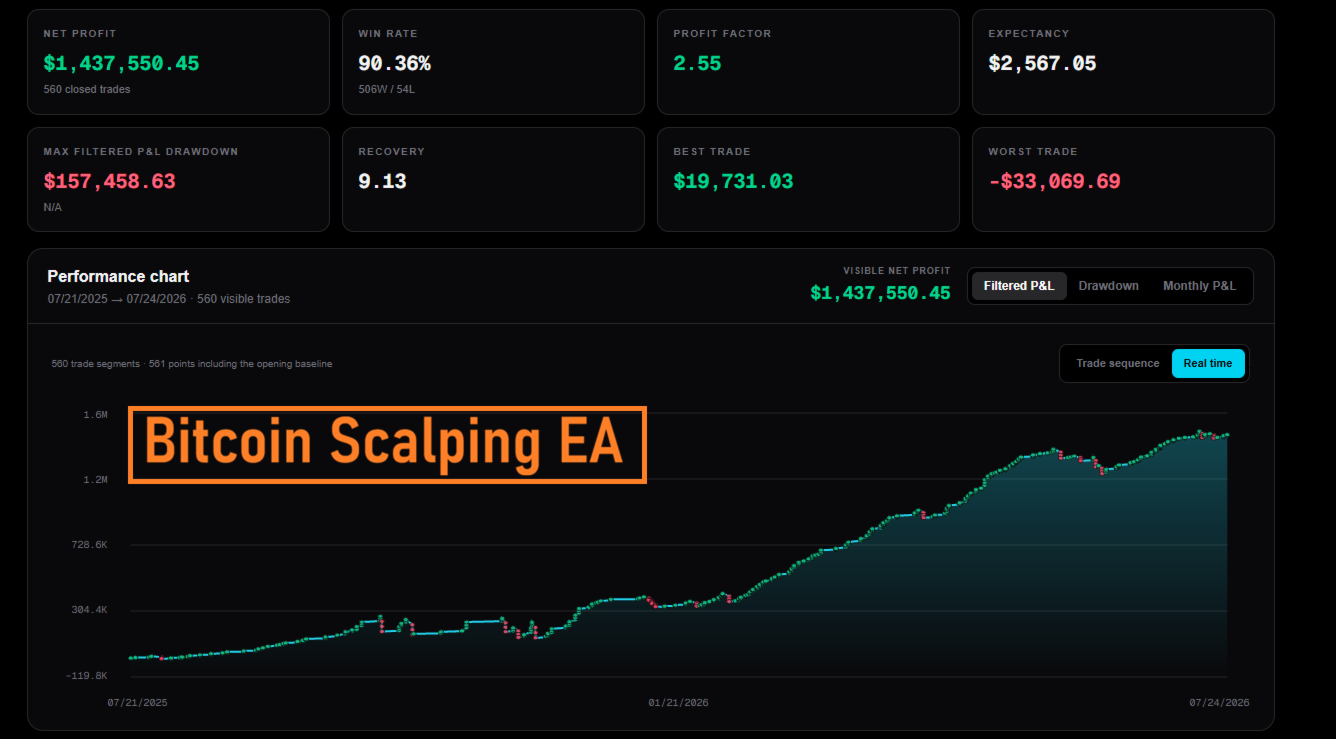
The first panel labels maximum filtered P&L drawdown as $157,458.63. That is not an account equity-drawdown percentage. Without complete equity and cash-flow records, it cannot support the old page’s claim of a specific safe risk level.
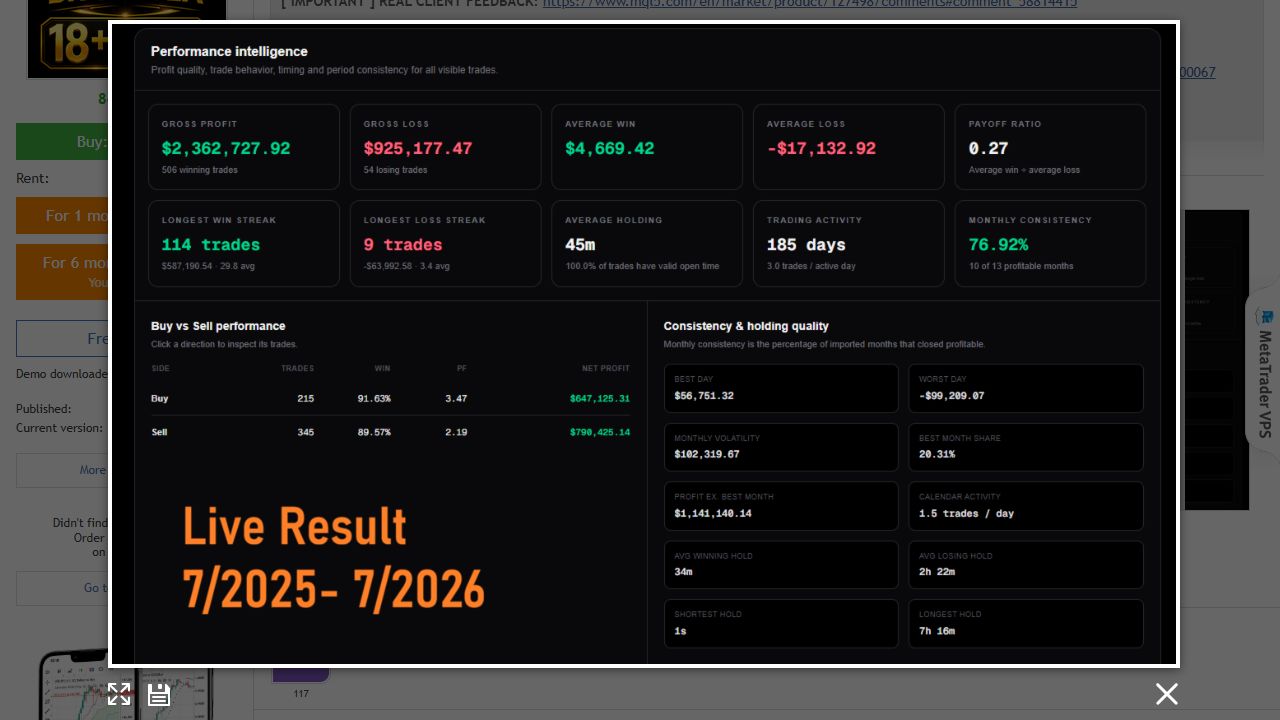
The second panel is particularly useful: average winning trade is $4,669.42, while the average loss is $17,132.92, with a displayed payoff ratio of 0.27. A loss is therefore roughly 3.7 times the average win in this sample. This explains why a high win rate alone is a poor measure of safety. It also shows both buy and sell trades, so the old page’s buy-only backtest discussion should not be treated as a description of every current configuration.
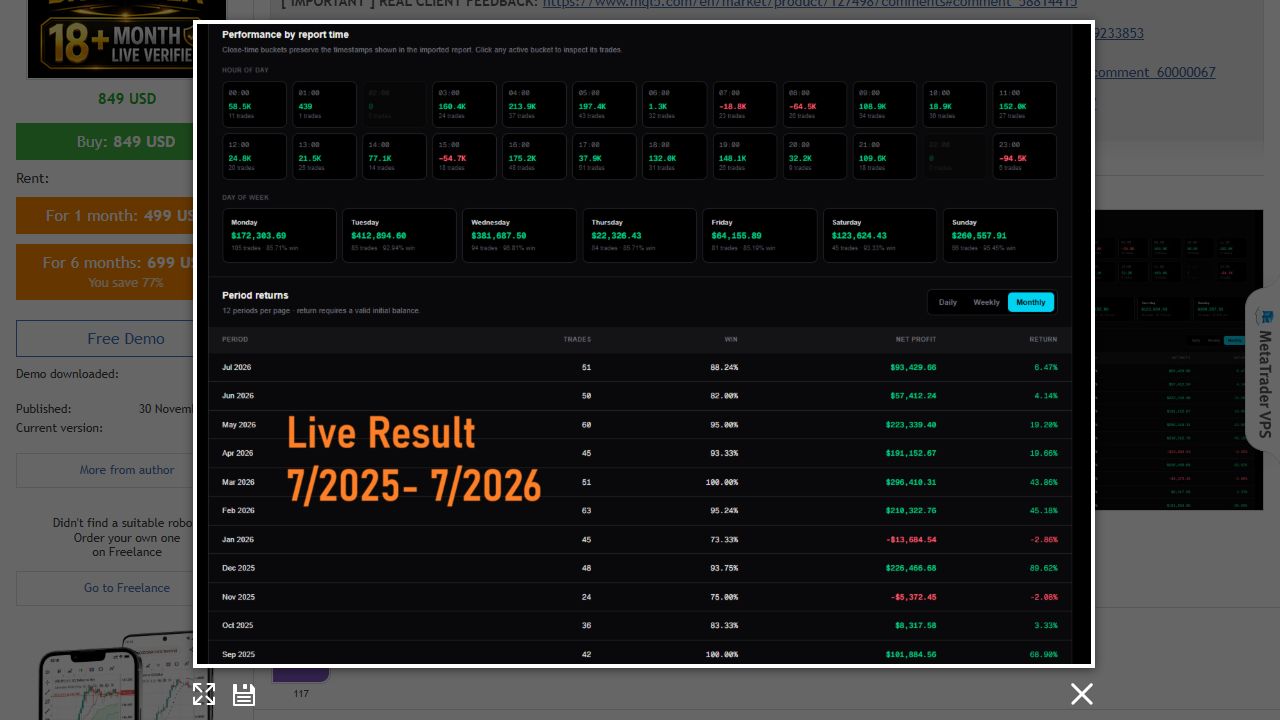
The monthly breakdown contains losing months despite the upward overall curve. The hourly and weekday statistics describe this imported report; they do not prove that selecting its best historical hours will improve future returns. Its period percentages also depend on the report’s capital assumptions.
Customer profit updates: what changed since the old review?
The previous review led with a developer-posted $42,000 client-profit claim over twelve months. A July 2026 update describes a later $217,000 result over approximately eighteen months, and another feedback post appeared on 12 September. These are customer reports relayed by the developer, not independently audited performance.
That distinction matters: in a December 2025 reply about a client’s result, the developer said they did not know that account’s broker or settings. The visible October 2025 customer explanation also describes filtering this EA’s trades from an account running other EAs. Attribution, exposure and account-wide drawdown therefore need more than an isolated profit screenshot.
Earlier customer-profit post · July 2026 follow-up · September 2026 feedback
What the MQL5 reviews say
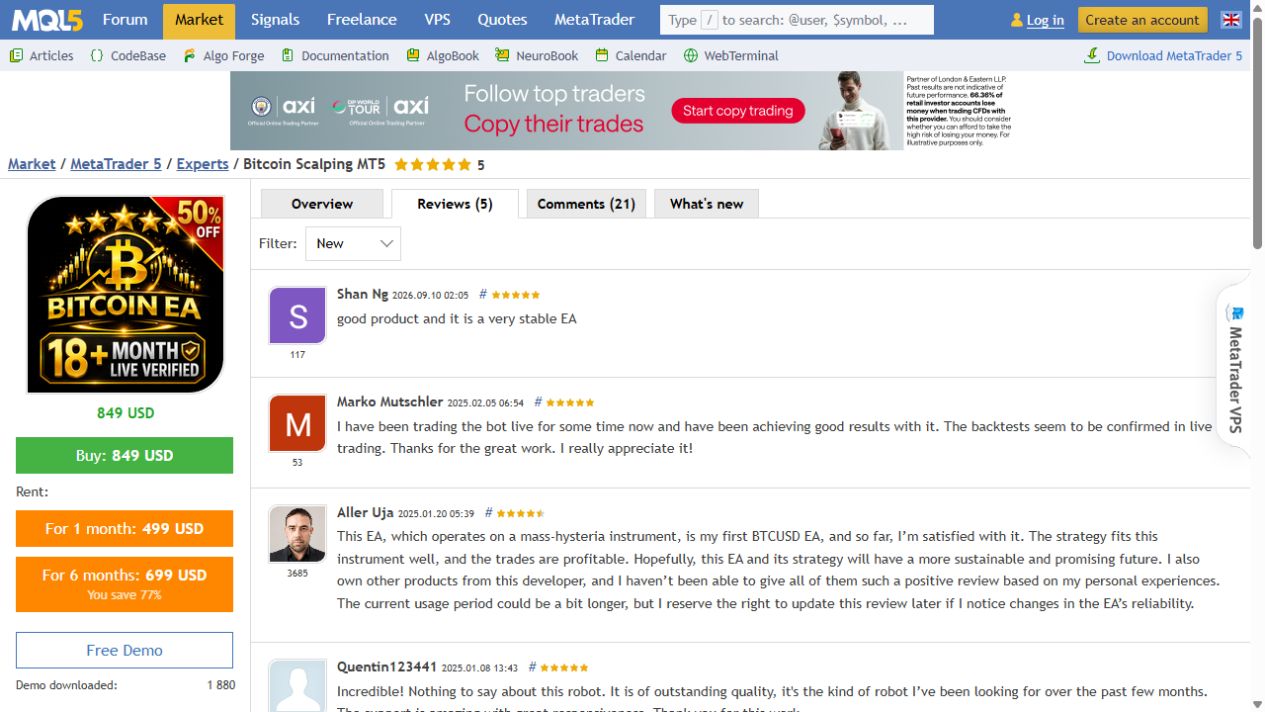
Five reviews were visible at the check. The September feedback praises stability, while earlier reviewers discuss good live trading experiences and responsive support. Aller Uja’s review is more qualified: the user was satisfied but wanted a longer observation period and reserved the right to revise the assessment.
That is a useful balance. Positive feedback supports interest in the product, but the small review sample does not establish typical returns, a maximum drawdown or comparable broker conditions. The names and dates in the capture also avoid mixing an older cached review selection with the currently visible feedback.
Backtests and the old one-week signal
The developer says historical testing extends back to 2018. The previous CheaperForex page included a backtest and a one-week signal snapshot. We are not presenting that week-old snapshot as current live monitoring: no direct Bitcoin Scalping signal link was provided in the current listing or the linked comments checked for this refresh. Backtests remain simulations and should use realistic spread, commission, timing and slippage assumptions.
MT5 or the existing MT4 edition?
This review focuses on the current MT5 listing. The MT5 product page describes the standalone offer. The existing MT4 listing remains available separately at its existing version and price; do not assume the files or update histories are interchangeable.
Golden Blitz MT5 is another product by the same developer, focused on gold. Owning two systems does not automatically produce diversification; concurrent losses and margin use still need consideration.
Verdict
Bitcoin Scalping provides a focused BTCUSD approach with flexible trade count, stops and exit management. The most useful new evidence is not just the larger profit number: it is the visible trade distribution, including losses much larger than typical wins. Evaluate those mechanics and your broker’s execution before increasing size. None of the published results guarantees future profits.
View Bitcoin Scalping EA MT5 pricing · View Bitcoin Scalping MT4
Frequently asked questions
Which market and timeframe is Bitcoin Scalping MT5 designed for?
BTCUSD is the intended market. The developer recommends H1, while describing the engine as usable on other chart periods. Broker symbol names may differ.
Does it use grid or martingale?
The developer describes the EA as using neither grid nor martingale. It places a stop loss on each trade and offers adjustable exit controls. Losing trades and slippage remain possible.
How many trades can it open?
The listing describes a daily entry cycle with a configurable allowance of one, two or three trades per session. Its separate one-trade-per-day wording is inconsistent, so do not assume every configuration opens exactly one position.
What changed in version 2.1?
The January 2025 update moved trading time to GMT+0. The developer explains that historical tests need the session adjusted for the broker time offset; the published default window is 01:00 to 21:00 GMT.
Which broker conditions matter?
The developer names IC Markets and spreads below 2,000 points. Check your own BTCUSD contract size, point value, spread, commission and trading sessions; a point threshold is not a universal dollar cost.
Are the customer profit figures independently verified live signals?
They are customer reports and developer-published screenshots, including filtered trade reports. They are useful evidence to inspect, but they do not establish the complete account equity history or independently verified future performance.