FlyBrain EA MT5 is an automated XAUUSD robot with an on-chart research engine, two supplied gold presets and an assistant for building and comparing alternative settings. Its main appeal is the ability to inspect a candidate, compare it with the core preset and control trading from one panel. The developer describes per-order stops and targets without grid, martingale or averaging.
Our assessment: FlyBrain is most relevant to gold traders who want a guided preset-testing workflow and account limits in the same interface. The key consideration is evidence: an optimizer’s historical verdict is not live validation, and the linked account currently has a very short trading sample with substantial equity drawdown.
This review examines the developer’s public listing, original interface images and linked MQL5 signal as checked on October 1, 2026. It is an assessment of those materials, not a reproduction of the EA’s tests or an independently verified performance claim.
View FlyBrain EA MT5 pricing and features

What FlyBrain’s strategy lab actually changes
FlyBrain’s public explanation centers on selecting and researching presets rather than publishing a complete entry formula. ACTIVITY, STYLE and LOT controls adjust the configuration, while AI BUILD searches alternative settings. The supplied PAIR LOCK and ACTIVE gold presets are identified by the developer as verified in the MT5 Strategy Tester; AI LAB candidates use FlyBrain’s built-in tester.
That distinction matters. The built-in engine’s speed is convenient for research, but speed alone does not establish realistic execution. Its results need to be checked against MT5 tests and broker conditions, including spread, commission, slippage and the exact saved settings. The public overview does not disclose enough detail to assume both testers reproduce identical trades or costs.
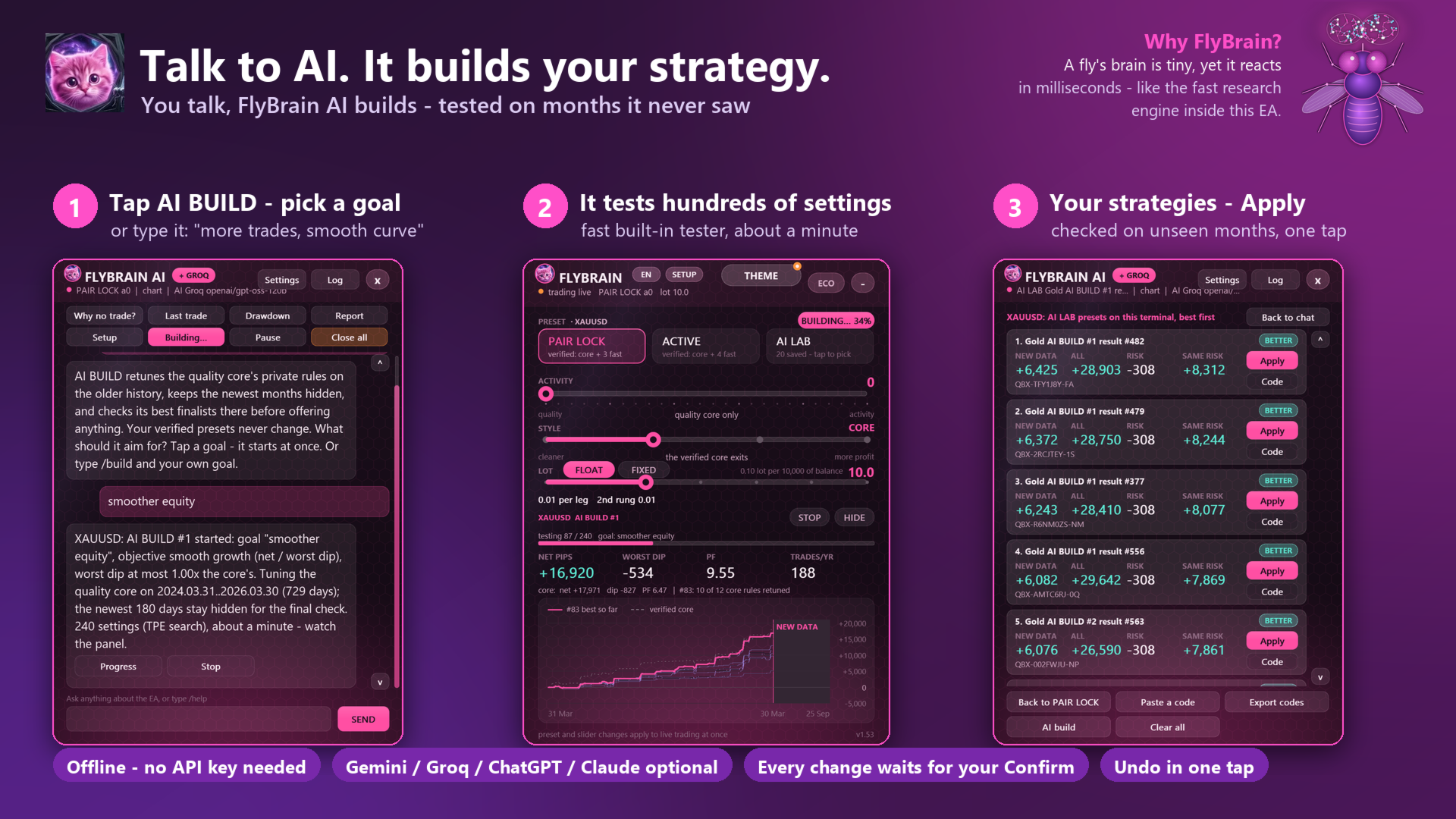
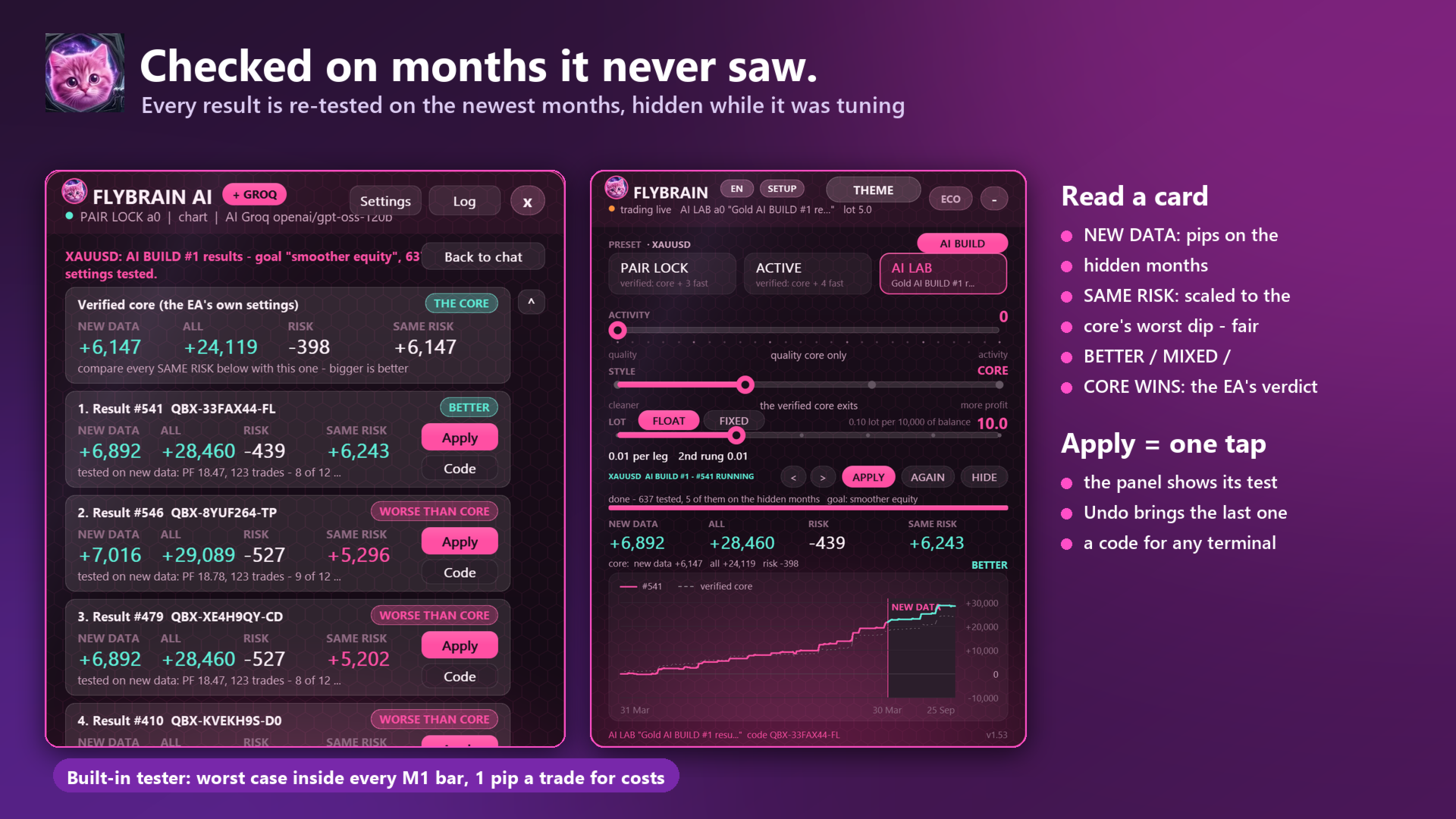
After a search, the panel can label a candidate BETTER, MIXED or CORE WINS. This is useful feedback because the core preset can win the comparison. The developer also describes checking candidates on months outside the initial search period. Repeated searches can still select a configuration that happens to fit those later months, so reserve a further untouched period and use a demo forward test before relying on a candidate.
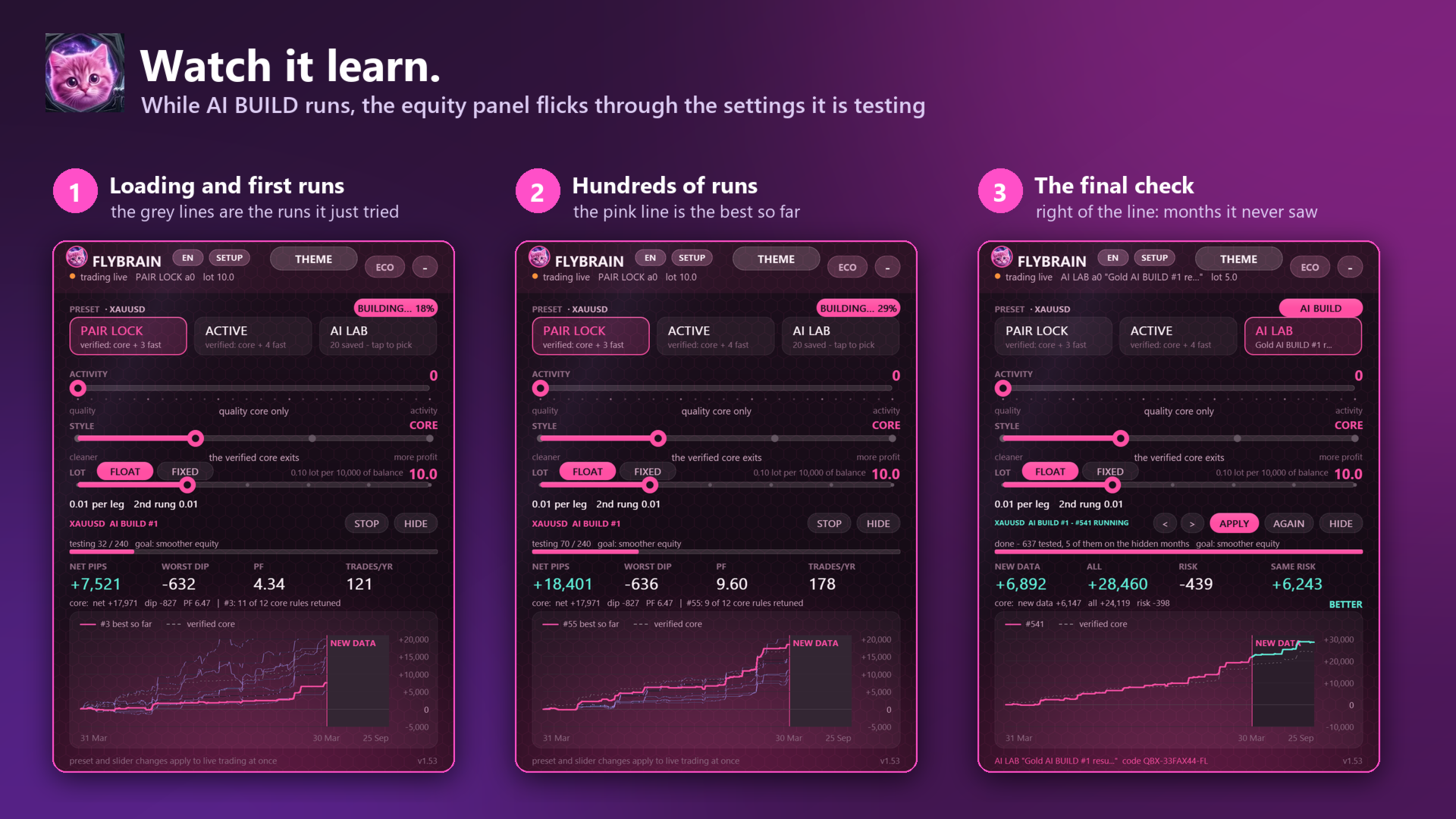
A further gallery image describes the built-in test as using a worst-case assumption within each M1 bar and one pip per trade for costs. That is a disclosed modeling assumption, not evidence of a full tick-by-tick reproduction of your broker’s spread and execution. Its SAME RISK column scales the comparison to the core preset’s historical worst dip; equal modeled risk does not ensure equal future drawdown.
Scheduled optimization needs a recorded baseline
Auto-optimize is intended to rebuild on a schedule and replace the running preset only when a candidate beats it on new data. Keep a copy of the original preset, search dates, chosen comparison period and position size. Otherwise, a changing set of inputs can make it difficult to distinguish better trading from a different risk level or a favorable stretch of the market.
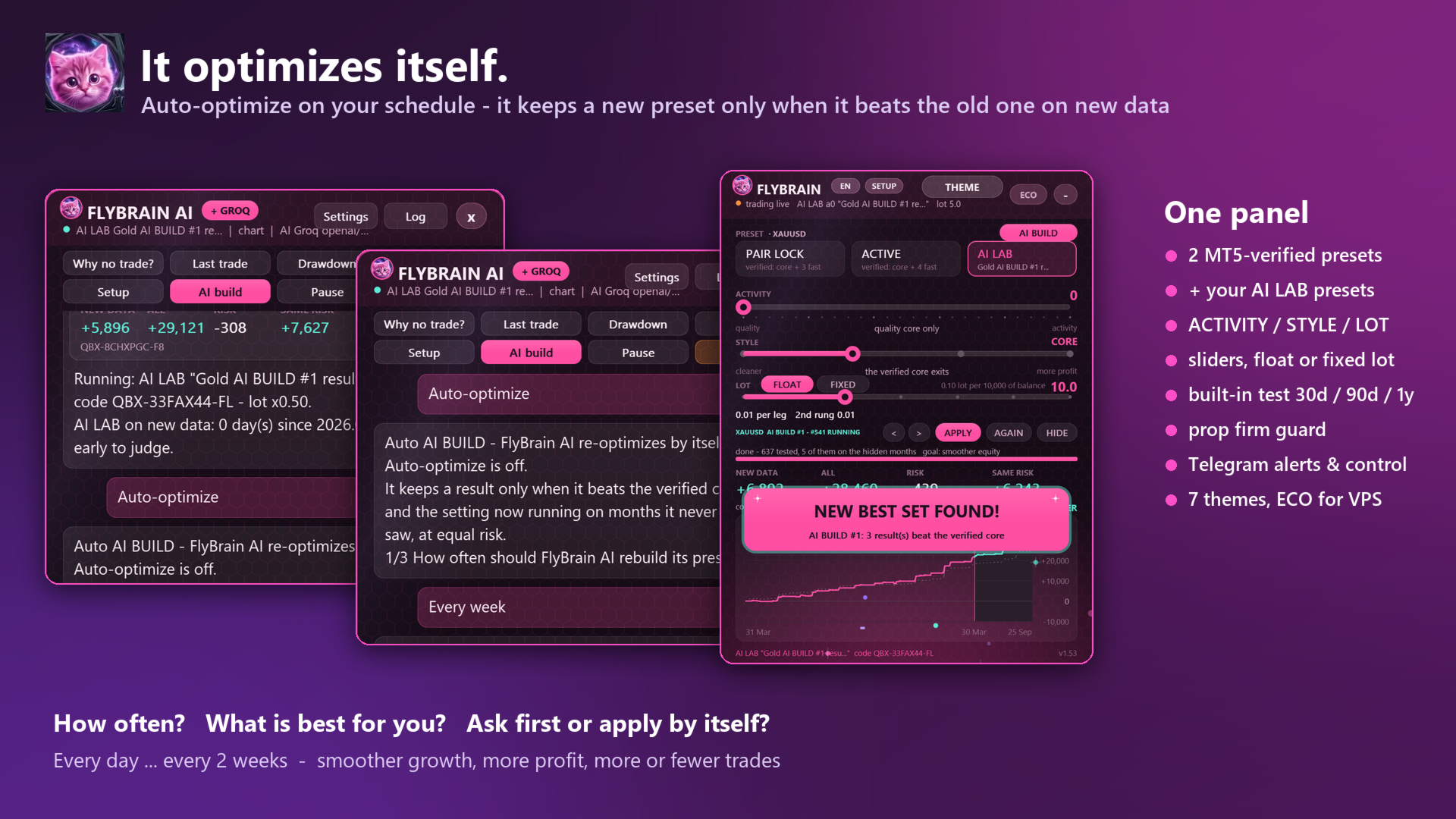
The listing says AI LAB presets start at a reduced lot. Treat that as a sizing rule to verify in the terminal, not proof that a newly generated preset is low risk. A series of small losses, multiple positions or gold volatility can still reach an account limit.
The assistant: local guidance and optional cloud conversation
STANDARD is the local, offline assistant for FlyBrain’s procedures: setup, reports, commands, research and lot advice. It does not require an API key. BOOSTED adds a supported external service such as Gemini, Groq, ChatGPT, Claude, Grok, DeepSeek or OpenRouter so the user can make requests in ordinary language.
An external connection requires credentials and the appropriate MT5 WebRequest permissions. The developer states that keys are stored encrypted in MT5; the public materials do not establish an independent security audit. Manual assistant proposals use confirmation, while the scheduled-optimization illustration also offers an automatic-application choice. Check the actual approval mode. Provider quotas, access and charges remain separate from the EA; do not assume an advertised free key stays available or unlimited.

Gold setup, account limits and position sizing
- Recommended market
- XAUUSD. Silver, indices and currencies are presented as learning and research options, not equally validated markets.
- Chart and account
- Any chart timeframe is permitted; the developer recommends an MT5 hedging account.
- Orders
- Stop loss and take profit on each order; no grid, martingale or averaging claimed.
- Account controls
- Daily loss, maximum loss, profit target and closing before the weekend.
- Interface
- Two supplied presets, AI LAB, ACTIVITY / STYLE / LOT sliders, a setup wizard and conventional inputs.
- Ongoing operation
- Scheduled optimization, Telegram alerts/control and an ECO mode for a VPS.
The floating-lot example in the overview is 0.01 lot per 1,000 of account balance with the setting at 10. Check the resulting volume and the monetary value of its stop for your broker’s gold contract. A familiar lot number does not mean the same exposure across brokers or account currencies.
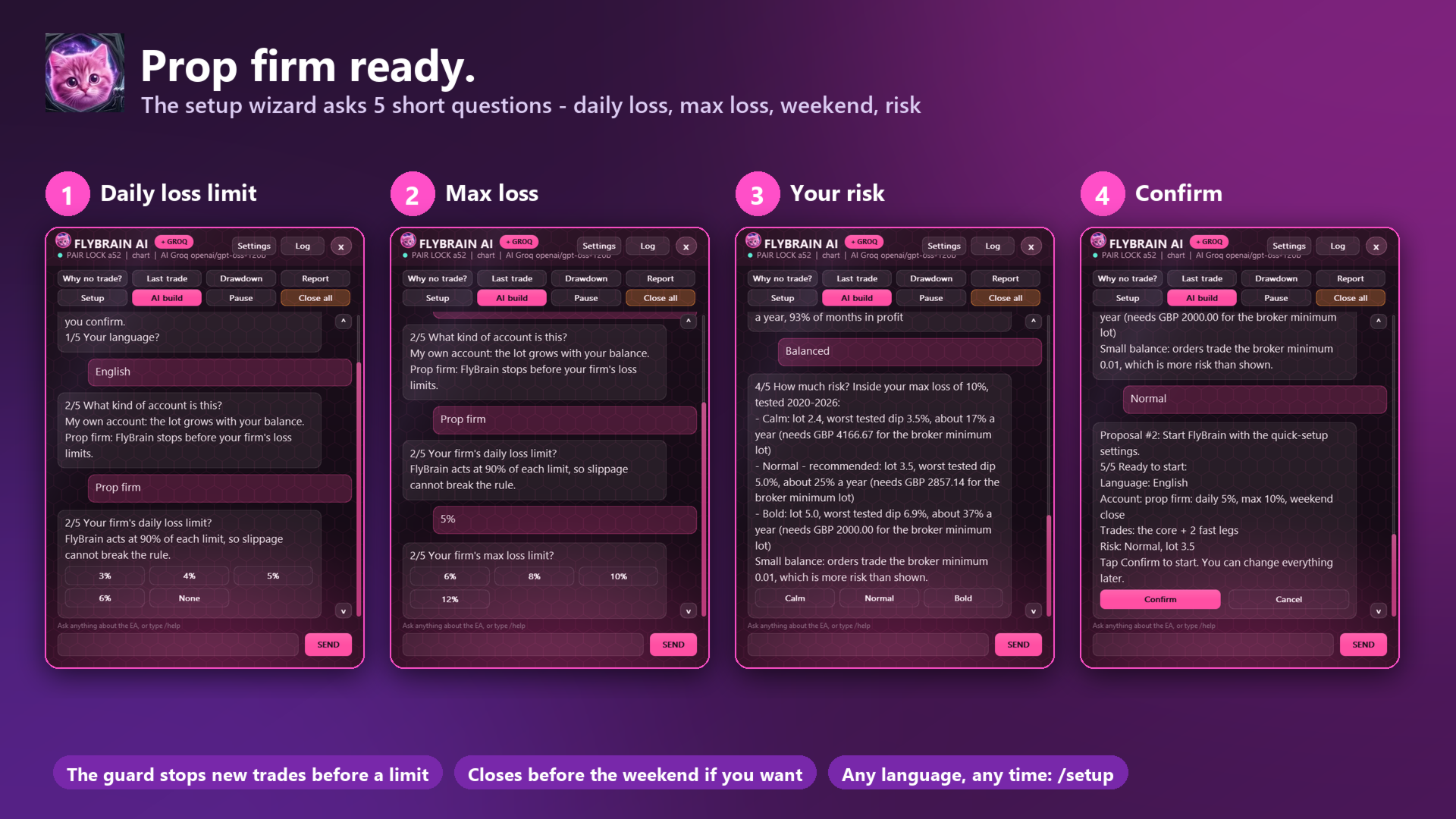
The prop firm guard gives useful controls, but a profit target or loss stop cannot promise a funded-account pass. Determine whether a limit includes floating losses and other positions, when it resets, and what closing actions it takes. Compare that behavior with the firm’s current rules.
The linked Goldtest signal: growth alongside floating risk
The FlyBrain listing links to Goldtest on MQL5, labeled a real account on GlobalPrime-Trade with 1:500 leverage. At the October 1 check, it showed 33.91% growth over a two-week account history, with 19 trades across three trading days. All recorded trades were short XAUUSD positions.
MQL5 warns that the account is newly opened and has too few trades to evaluate trading quality. One trade contributed 23.05 to the account’s 33.91 USD net profit, so the observed gain is also concentrated in one result.
The reported maximum balance drawdown was 0.22%, while equity drawdown was 28.14% and maximum deposit load was 54.23%. Balance drawdown reflects closed-account results; equity drawdown includes floating exposure. The gap means a smooth closed balance curve should not be read as evidence of small interim losses.
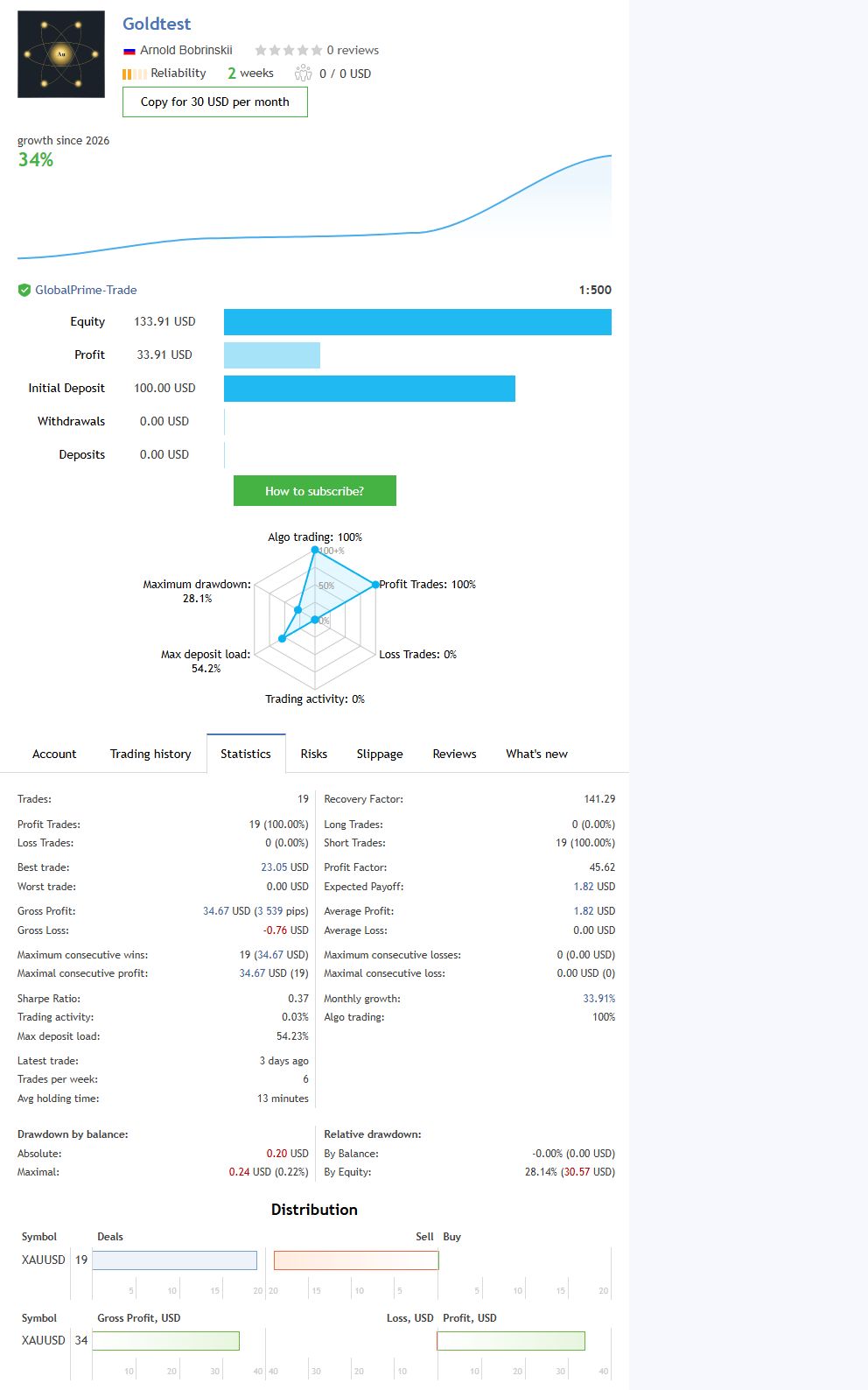
The account began on September 18, ten days before FlyBrain’s September 28 public release. It is a developer-linked account, but the public record does not isolate which FlyBrain build and preset produced every trade. Its short history, one-sided gold sample and concentrated trading days limit what it can tell us about varied market conditions. Check the current page rather than treating these dated figures as a continuing result.
Public feedback and evidence limits
No public reviews were shown for FlyBrain when these materials were checked. The developer’s ratings across other products are separate from FlyBrain customer feedback. There was also no public standalone manual or release-note history linked from the inspected listing. The overview and screenshots are useful for understanding the advertised interface, but they do not replace a test of the delivered build and chosen preset.
How FlyBrain relates to the developer’s other EAs
CheaperForex also lists Arnold Bobrinskii’s Gold Beaver EA MT5, with a separate Gold Beaver strategy and signal review. Gold Beaver is the more direct gold comparison, while FlyBrain’s distinguishing offer is its integrated preset research and assistant interface.
Bober Real EA MT5 and its Forex session review provide another comparison within the developer’s catalogue. For night scalping, see Bober Lannister EA MT5 and the MT4/MT5 Lannister review. These systems have separate settings and histories; their results should not be transferred to FlyBrain.
A practical evaluation before enabling trading
Start on a demo hedging account with the recommended XAUUSD preset. Record its input values and the resulting lot size, then test the intended loss limits and weekend behavior. If using AI BUILD, compare the candidate with the unchanged baseline under the same costs and risk, keep an untouched test period, and forward-test it before replacing the running preset.
FlyBrain offers a distinctive way to research and operate a gold EA. Its value depends on the actual preset, realistic test conditions and account control behavior. The public evidence is presently too young to establish long-term robustness.
Explore FlyBrain EA MT5 and current pricing
Primary source: FlyBrain’s developer listing on MQL5. Features and dated observations above refer to the public materials inspected on October 1, 2026.