
Official MT4 version
Bonnitta EA MT4 with Preset
We’re rated Excellent on Trustpilot · 4.6/5 (opens in a new tab)The core of Bonnitta EA lies in its sophisticated Pending Position Strategy (PPS).
This strategy is enhanced by a secretive custom indicator that analyzes market trends and price actions through trendlines and support & resistance levels. These elements are integral to its trading decisions, ensuring that each trade is executed with the highest probability of success.
This Package Contains an Instant Download of:
+ Expert: Bonnitta EA MT4 (.ex4) V1.42 – No DLL files – For ALL MT4 Builds
+ Indicator
+ Preset
+ Pairs/Timeframes/News URLs
+ How to Install.pdf
More Information:
+ https://www.mql5.com/en/market/product/52210
+ Video review: https://youtu.be/kCc_QdlOwZE
Live Signal:
+ https://www.mql5.com/en/signals/605975
 MT4Save 99%
What you receive
- Bonnitta.ex4Genuine, unmodified developer file for MetaTrader 4
- Setup guide.pdfA general guide to installing expert advisors.Official step-by-step install guide
- Optimized presets.setReady-to-use settings files
Delivered instantly to your account after payment
Regular priceRegular price was $5,500.00
$49.95 with card
Visa, Mastercard, Apple Pay and Google Pay accepted.
Card payments add bank fees, sales taxes and other charges.
- Instant downloadYour file is provided immediately after payment. In very rare cases we manually review an order first, then send your download straight after. If you don’t receive your file, you can request a full refund.
- Free lifetime updatesAll updates are free. They’re provided on a best-availability basis: we get new versions as fast as we can, led by customer demand, but we don’t guarantee them immediately. If you need every update the moment it’s released, our service may not be the best fit for you.
- 7-day money-backRefunds only cover an EA that fails to attach to your chart because of errors we can replicate. We don’t cover changing your mind or not liking the EA. All brokers are different, and results are never promised because markets are constantly changing.
- Unlimited activationsUse it on as many MT4 accounts and computers as you want, live or demo. There are no restrictions on how you use it.
What you receive
- Bonnitta.ex4Genuine, unmodified developer file for MetaTrader 4
- Setup guide.pdfA general guide to installing expert advisors.Official step-by-step install guide
- Optimized presets.setReady-to-use settings files
Delivered instantly to your account after payment


28,000+ tradersServed since 2019
Orders over $300 include 3 months of PrismAlgo freeThe highly recommended cloud-connected EA, on all 28 Forex pairs for one MT5 account. Added to your cart automatically. View PrismAlgo
Official versionsInstant downloadFree lifetime updatesExtra 20% off with cryptoReal people on support28,000+ tradersTrading since 2019Rated Excellent on Trustpilot
Product description
About Bonnitta EA MT4 with Preset
Bonnitta EA for MT4: Elevate Your Trading Experience
Welcome to the next level of automated trading with Bonnitta EA for MT4, a cutting-edge Expert Advisor (EA) designed to revolutionize your trading strategy. Created out of love and empowerment, Bonnitta EA leverages an advanced Pending Position Strategy (PPS) and a proprietary trading algorithm to ensure you stay ahead in the forex market. With over two years of rigorous real-money testing and exceptional performance, Bonnitta EA stands as a reliable and powerful tool for both novice and experienced traders.
Introduction
In the world of forex trading, having the right tools can make a significant difference in your trading success. Bonnitta EA is not just another trading robot; it is a meticulously crafted EA designed to optimize your trading potential on the MetaTrader 4 (MT4) platform. Its unique blend of a custom indicator, trendlines, support and resistance levels, and a secretive trading algorithm makes it a standout in the crowded market of trading robots.
Available exclusively on CheaperForex.com, Bonnitta EA is tailored for traders who seek consistent, reliable, and profitable trading solutions. Whether you’re trading EURUSD, EURCHF, or EURGBP, Bonnitta EA provides the precision and efficiency required to capitalize on market opportunities.
Strategy Overview
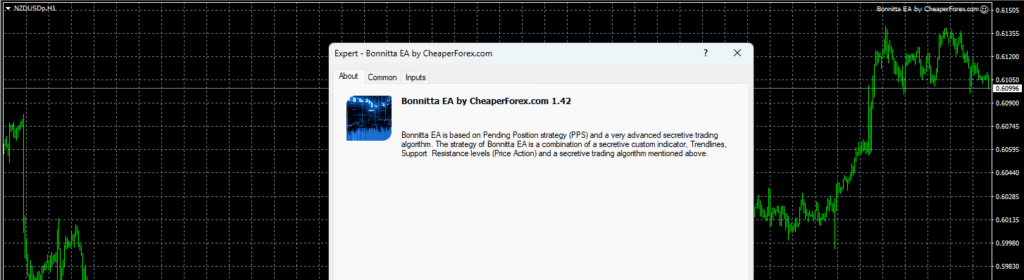
The core of Bonnitta EA lies in its sophisticated Pending Position Strategy (PPS). This strategy is enhanced by a secretive custom indicator that analyzes market trends and price actions through trendlines and support & resistance levels. These elements are integral to its trading decisions, ensuring that each trade is executed with the highest probability of success.
Bonnitta EA’s secretive trading algorithm is what sets it apart. This algorithm has been developed and refined over more than two years, undergoing rigorous testing with real money to ensure its reliability and effectiveness. The EA also includes an algorithm for statistics collection and slippage control, which helps protect traders from broker manipulation by monitoring the quality of broker execution before placing orders.
Trading Specifications
Bonnitta EA is designed to be versatile and robust, catering to a variety of trading conditions and preferences. Here are its key trading specifications:
- Recommended Trading Pairs: EURUSD, EURCHF, EURGBP
- Timeframe: H1 (Hourly)
- Minimum Balance: $1,000
This EA has been tested extensively, passing stress tests with slippage and commission approximations close to real market conditions. It has shown impressive resilience and performance over a 22-year period, using real ticks with 99.9% quality.
Features
Bonnitta EA is packed with features that make it a formidable tool in any trader’s arsenal:
- MultiCurrency in OneChart Option: This feature allows traders to manage multiple currency pairs from a single chart, simplifying the trading process and enhancing efficiency.
- News Filter and Auto GMT Time: These features ensure that the EA adapts to changing market conditions and adjusts to different time zones automatically, providing seamless trading.
- Provided Sets: The EA comes with pre-configured settings for EURUSD, EURCHF, and EURGBP on the H1 timeframe, ensuring optimal performance.
- Recommended Deposit: For optimal results, a minimum deposit of $1,000 is recommended for trading 0.01 lots across three pairs, with the option to trade two pairs simultaneously.
Performance Results
Bonnitta EA has demonstrated remarkable performance in both backtesting and live trading environments. During the strategy tester evaluation, starting with an initial deposit of $1,000, the EA earned over $3,800,000 on EURUSD H1 from January 1, 2020, to May 31, 2021. This resulted in a net income of $3,801,900, with an automatic money management system and a drawdown of 28%.
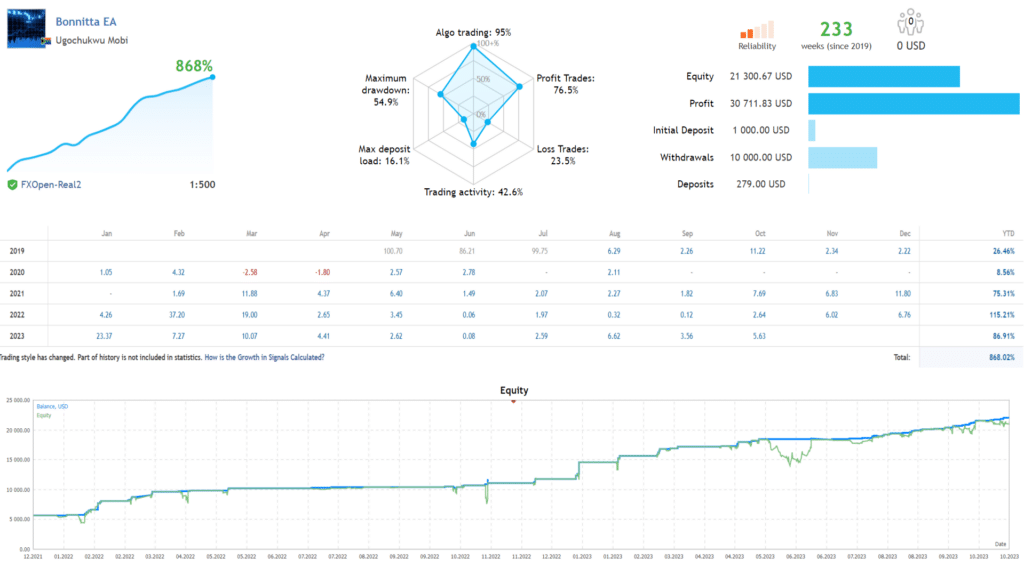
In live trading, Bonnitta EA has achieved a stunning 1,179% profit, generating $37,000, showcasing its capability to deliver consistent returns. Traders can replicate these results by downloading the demo version and running their own tests.
Final Verdict
Bonnitta EA for MT4 is a game-changer in the realm of automated trading. Its combination of a sophisticated PPS, a secretive trading algorithm, and a robust set of features makes it an invaluable tool for traders aiming to maximize their profits while minimizing risks. The extensive testing, both in backtests and live trading, underscores its reliability and effectiveness.
Available on CheaperForex.com, Bonnitta EA is a wise investment for those looking to elevate their trading strategy. With its proven track record, customizable settings, and user-friendly features, it is designed to help you navigate the complexities of the forex market with confidence and precision.
Don’t settle for ordinary trading robots. Experience the power and precision of Bonnitta EA and take your trading to new heights. Visit CheaperForex.com today to learn more and get started with your free demo.
Important Note
Before purchasing any EA, including Bonnitta EA, it is crucial to conduct your own research and ensure that it meets your trading needs and expectations. Remember, the key to successful trading is not just having the right tools, but also using them wisely.
Embrace the future of trading with Bonnitta EA for MT4, and experience the blend of advanced technology and meticulous craftsmanship designed to empower and elevate your trading journey.
Every order
What’s included with Bonnitta
- Instant downloadReady after checkout and kept in your account
- Optimized presetsReady-to-use configuration files
- Free lifetime updatesAdded as soon as we receive them, every version kept in your account
- Unlimited activationsUnlimited live and demo accounts
- Setup helpReal people on Telegram or email
- 7-day money-back guaranteeIf the EA fails to attach to your chart because of errors we can replicate, you get a full refund.
Customer reviews
Reviews of Bonnitta EA MT4 with Preset
You must be logged in to post a review.
- Excellent on Trustpilot 4.6 out of 5 from 120 reviews (opens in a new tab)
- 28,000+ traders since 2019
- 1,560+ official EAs
- Card or crypto payments
Related EAs
Traders also explore
Premium expert advisors at vault-low prices, with your crypto price on every card.
 MT5Save 78%
 MT4Save 96%
 MT4Save 96%
 MT4Save 89%
Ready when you are
Bonnitta EA MT4 with Preset for $39.96 with crypto
Regular price was $5,500.00 · $49.95 with card · instant download · free lifetime updates

Bonnitta EA MT4 with Preset$39.96with crypto$49.95 with card
There are no reviews yet.