
Bonnitta EA MT5
Version 1.45
Bonnitta EA for MT5 by Ugochukwu Mobi is a forex Expert Advisor based on the developer’s proprietary Pending Position Strategy (PPS) combined with a custom indicator, Trendlines, Support & Resistance levels, and a proprietary trading algorithm. The system trades primarily EURUSD on H1, with the developer reporting tests across 22 years of historical data at 99.9% tick quality including Monte Carlo simulation validation.
The verified MQL5 live signal has been running since 2019 — 233 weeks of continuous live trading showing 868% total growth on FXOpen-Real2 ($1,000 starting deposit grown to $21,300 with $10,000 already withdrawn). First published February 2022, now at version 1.45 with continued developer maintenance. The system uses a Money Autolot risk control — higher number = lower risk. Each Bonnitta EA purchase from CheaperForex delivers the full unlimited .ex5 file, removing the activation limitations of direct MQL5 purchase.
- ✅ 233-week live signal, 868% growth since 2019 — FXOpen-Real2, $1,000 → $21,300 equity + $10,000 withdrawn
- ✅ Full unlimited .ex5 file delivery — install on any number of MT5 terminals without activation limits
- ✅ Pending Position Strategy + 4+ years on MQL5 — custom indicator, trendlines, S/R levels, active developer maintenance
868% verified live signal. 4.5+ years live. Full unlimited .ex5 file.
 MT5Save 78%
What you receive
- Bonnitta.ex5Genuine, unmodified developer file for MetaTrader 5Version 1.45
- Setup guide.pdfA general guide to installing expert advisors.Official step-by-step install guide
Delivered instantly to your account after payment
Regular priceRegular price was $5,500.00
$1,199.95 with card
Visa, Mastercard, Apple Pay and Google Pay accepted.
Card payments add bank fees, sales taxes and other charges.




 Apple Pay and Google Pay ready at checkout
- Official developer build · Version 1.45
- Instant downloadYour file is provided immediately after payment. In very rare cases we manually review an order first, then send your download straight after. If you don’t receive your file, you can request a full refund.
- Free lifetime updatesAll updates are free. They’re provided on a best-availability basis: we get new versions as fast as we can, led by customer demand, but we don’t guarantee them immediately. If you need every update the moment it’s released, our service may not be the best fit for you.
- 7-day money-backRefunds only cover an EA that fails to attach to your chart because of errors we can replicate. We don’t cover changing your mind or not liking the EA. All brokers are different, and results are never promised because markets are constantly changing.
- Unlimited activationsUse it on as many MT5 accounts and computers as you want, live or demo. There are no restrictions on how you use it.
What you receive
- Bonnitta.ex5Genuine, unmodified developer file for MetaTrader 5Version 1.45
- Setup guide.pdfA general guide to installing expert advisors.Official step-by-step install guide
Delivered instantly to your account after payment


28,000+ tradersServed since 2019
Official versionsInstant downloadFree lifetime updatesExtra 20% off with cryptoReal people on support28,000+ tradersTrading since 2019Rated Excellent on Trustpilot
Product description
About Bonnitta EA MT5
Quick Summary:
Bonnitta EA for MT5 is a forex Expert Advisor by Ugochukwu Mobi built around the developer’s proprietary Pending Position Strategy (PPS). The system combines a custom indicator, Trendlines, Support & Resistance levels (price action analysis), and a proprietary trading algorithm into a single coordinated system trading primarily on EURUSD H1.
Bonnitta EA has been on the MQL5 marketplace since February 2022 — over 4 years of continuous market presence and developer maintenance, currently at version 1.45 (updated May 2024). The developer reports the system was tested across 22 years of historical price data at 99.9% tick quality, with Monte Carlo simulation validation across different data feeds.
What you receive at CheaperForex: the full unlimited .ex5 file. Unlike the direct MQL5 purchase which carries activation limitations, the CheaperForex version lets you install Bonnitta EA on any number of MT5 terminals without restriction — a significant practical advantage for traders running multiple broker accounts or VPS setups.
Official MQL5 Listing:
Bonnitta EA MT5 — MQL5 Marketplace
233-Week Verified Live Signal — 868% Growth Since 2019
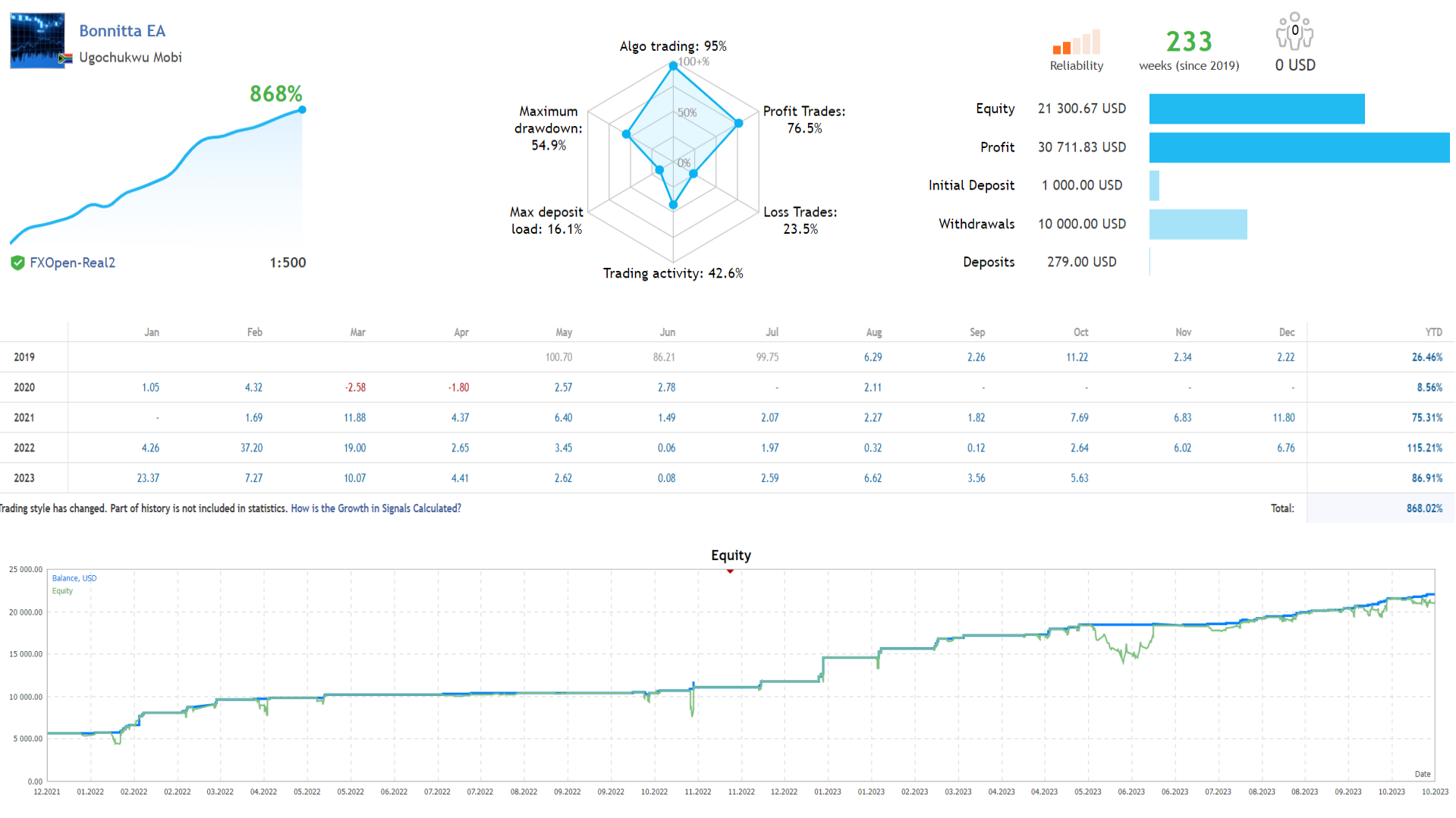
The developer maintains a verified MQL5 live signal running since 2019 — 233 weeks (4.5+ years) of continuous live trading on FXOpen-Real2 at 1:500 leverage. Key statistics:
- Total Growth: 868.02% since inception
- Initial Deposit: $1,000
- Current Equity: $21,300.67
- Withdrawn to date: $10,000
- Profit Trades: 76.5%
- Maximum Drawdown: 54.9%
- Yearly returns: 26.46% (2019), 8.56% (2020), 75.31% (2021), 115.21% (2022), 86.91% (2023)
The 54.9% maximum drawdown is significant and reflects the position-management mechanics inherent to the strategy. Anyone deploying capital must be psychologically prepared for substantial floating drawdowns before reversion. The $10,000 already withdrawn from $1,000 starting capital demonstrates that the developer treats this as a real personal trading account — meaningful skin-in-the-game validation. Note that MQL5 flags “Trading style has changed. Part of history is not included in statistics” on the signal, indicating strategy adjustments may have occurred during the signal’s history.
Why Bonnitta EA MT5
Bonnitta EA appeals to traders who want a long-running, actively maintained EA from a developer with multiple products in the market:
- Pending Position Strategy (PPS) — the core architecture uses pending orders placed at calculated price levels rather than market-order chasing. Trades only execute when price reaches predefined entry zones.
- Custom indicator + price action layer — the developer’s proprietary indicator combines with Trendlines and Support & Resistance level analysis to filter entry conditions. Not a generic RSI/MACD recombination — uses the developer’s own signal logic.
- 22-year tested data span — the developer reports the system was tested across 22 years of historical price data at 99.9% tick quality with Monte Carlo simulation validation.
- Money Autolot risk control — the EA includes a Money Autolot parameter that determines drawdown tolerance. Higher numbers produce lower risk and smaller drawdowns; lower numbers produce more aggressive position sizing with proportionally higher drawdowns. Traders can dial risk up or down based on capital and tolerance.
- Broker execution quality control — the developer reports the EA controls broker execution quality before placing orders, with built-in statistics collection and slippage monitoring designed to protect against broker manipulation.
- News filter — built-in option to pause trading during high-impact news events.
- 4+ years of continuous development — first published February 2022, currently at version 1.45 (May 2024 update). The developer maintains active forum support and version updates rather than treating the product as one-time-sale-and-abandon.
- Full unlimited .ex5 file — the CheaperForex version removes the activation count limit, letting you install on any number of MT5 terminals across multiple broker accounts.
EA Setup at a Glance
- Platform: MetaTrader 5
- Primary Pair: EURUSD
- Timeframe: H1
- Strategy: Pending Position Strategy (PPS) with custom indicator, Trendlines, S/R levels
- Money Autolot: 2000 default — increase the number to reduce risk (e.g., 3000 or 4000 for conservative deployment)
- Account type: Hedging account required
- VPS: Recommended for continuous H1 chart monitoring
- News filter: Built-in
- Broker quality monitoring: Built-in slippage and execution statistics
- Version: 1.45 (latest, May 2024)
- Published: February 2022 (4+ years on MQL5)
- Activation: Unlimited when purchased from CheaperForex (vs limited activations on direct MQL5 purchase)
Money Autolot Risk Configuration — Critical to Understand
The most important configuration parameter in Bonnitta EA is the Money Autolot value, which determines the system’s drawdown tolerance and risk profile:
- Money Autolot = 2000 (default) — the developer’s standard setting. Balanced risk profile, but still aggressive enough that some users have reported significant drawdowns during adverse market periods.
- Money Autolot = 3000 — moderately conservative. Reduces position sizing approximately 33%, producing smaller drawdowns at the cost of smaller percentage returns.
- Money Autolot = 4000 — conservative. Cuts the default risk in half, suitable for traders prioritising capital preservation over aggressive returns.
- Money Autolot = 5000+ — very conservative. Appropriate for traders who want minimal drawdown profile, accepting much smaller returns in exchange.
Important: Many of the negative reviews on the MQL5 listing reflect traders who used aggressive Money Autolot settings without understanding the risk profile. The strategy involves position-management mechanics that can produce significant floating drawdowns during adverse trends — particularly visible if Money Autolot is set too low for your account size. Conservative settings (3000-4000+) are strongly recommended for first-time deployment, regardless of the smaller percentage returns this produces.
From Developer Ugochukwu Mobi
Ugochukwu Mobi is an active MQL5 developer with a portfolio of trading products. The Bonnitta brand includes the original Bonnitta EA (this product) and Bonnitta Gold MT5 — a separate XAUUSD-focused Expert Advisor using the developer’s Bonnitta Trading Indicator combined with similar custom logic.
The developer maintains active forum support, responds to buyer queries on the MQL5 listing, and has continued releasing version updates for over 4 years. This longevity of active maintenance is meaningful — many MQL5 EAs are abandoned within 12-18 months of launch.
Who Bonnitta EA MT5 Is For
Ideal for traders who:
- Are experienced with EA configuration and understand position-management risk profiles
- Want a long-running, actively maintained EA rather than brand new launches
- Are willing to use conservative Money Autolot settings (3000+) to manage drawdown
- Trade EURUSD H1 with sufficient account capital ($2,000+) to absorb floating drawdown
- Run multiple MT5 terminals/brokers and benefit from the unlimited .ex5 delivery
- Understand that Bonnitta EA has received mixed reviews and want to evaluate it themselves with appropriate risk management
Consider alternatives if you:
- Want a non-grid, single-position EA — Bonnitta uses position-management mechanics
- Need a verified MQL5 live signal — the developer has not maintained a public live signal
- Are uncomfortable with the mixed review profile on the MQL5 listing
- Specifically need Gold trading — consider Bonnitta Gold MT5 instead
- Trade strictly on MT4 — the MT4 version is no longer available from the developer
What You Receive
- Bonnitta EA for MT5 — Version 1.45
- Full unlimited .ex5 file — install on any number of MT5 terminals without activation restriction
- Setup guidance and recommended presets
- Free lifetime updates
Risk Disclaimer
Past performance does not guarantee future results. Bonnitta EA uses position-management mechanics including pending position layering that can produce significant floating drawdowns during adverse market periods. The MQL5 reviews on this product are mixed — some users report consistent profits, others report significant losses. The Money Autolot parameter must be configured carefully based on your account size and risk tolerance; the default value of 2000 may be too aggressive for some accounts. Always test on a demo account before live deployment. Do not trade with funds you cannot afford to lose. The 22-year backtest performance reported by the developer does not guarantee similar results in live forward trading.
Want the Full Breakdown?
📖 Read our complete Bonnitta EA review →
Includes detailed breakdown of the Pending Position Strategy mechanics, Money Autolot configuration guidance, analysis of the mixed MQL5 reviews and what they reveal, comparison with Bonnitta Gold MT5, broker recommendations, and our verdict on whether Bonnitta EA is right for your trading profile.
Every order
What’s included with Bonnitta
- Instant downloadReady after checkout and kept in your account
- Free lifetime updatesAdded as soon as we receive them, every version kept in your account
- Unlimited activationsUnlimited live and demo accounts
- Free remote installationOptional: a one-time install over AnyDesk, with settings advice and custom presets
- 7-day money-back guaranteeIf the EA fails to attach to your chart because of errors we can replicate, you get a full refund.
Product FAQs
Bonnitta EA MT5 FAQs
Real people on support, by Telegram or our contact form.
What is Bonnitta EA for MT5?
Bonnitta EA is a forex Expert Advisor for MetaTrader 5 by Ugochukwu Mobi, first published February 2022 and currently at version 1.45. The system uses a proprietary Pending Position Strategy (PPS) combining a custom indicator, Trendlines, Support & Resistance levels, and the developer’s trading algorithm. Primary trading pair is EURUSD on H1 timeframe. The developer reports 22 years of historical testing at 99.9% tick quality with Monte Carlo simulation validation across different data feeds.
What’s the Pending Position Strategy (PPS)?
The Pending Position Strategy uses pending orders placed at calculated price levels rather than market-order chasing. Trades only execute when price reaches the predefined entry zones identified by the developer’s custom indicator combined with trendline and support/resistance analysis. This approach is different from indicator-crossover EAs that rely on real-time signal triggers — PPS waits for price to come to predetermined zones rather than chasing breakouts or reversals.
What’s the difference between MQL5 purchase and CheaperForex purchase?
The most important practical difference is activation count. The direct MQL5 purchase carries activation limitations restricting how many MT5 terminals you can install the EA on. The CheaperForex version delivers the full unlimited .ex5 file — you can install Bonnitta EA on any number of MT5 terminals across multiple broker accounts and VPS setups without restriction. Both editions follow the same EA logic and the same lifetime updates.
How should I configure the Money Autolot parameter?
Money Autolot determines drawdown tolerance — higher values produce lower risk. Default is 2000. Conservative settings of 3000-4000 cut risk significantly (3000 reduces position sizing ~33%, 4000 cuts it in half). For first-time deployment we recommend Money Autolot = 3000 minimum, increasing to 4000 or higher if you prioritise capital preservation. Lower values produce more aggressive returns but proportionally higher drawdowns, which is the most common reason for negative reviews from buyers who used aggressive settings without sufficient account capital.
What does the live performance look like?
The developer maintains a verified MQL5 live signal running since 2019 — 233 weeks (4.5+ years) of continuous live trading on FXOpen-Real2 at 1:500 leverage. Total growth 868% from $1,000 starting deposit, current equity $21,300, $10,000 already withdrawn. 76.5% profit trades, 54.9% maximum drawdown. Yearly returns: 26.46% (2019), 8.56% (2020), 75.31% (2021), 115.21% (2022), 86.91% (2023). MQL5 notes “Trading style has changed. Part of history is not included in statistics” on the signal, indicating strategy adjustments may have occurred during its history.
What broker should I use for Bonnitta EA MT5?
Any reputable broker with hedging-enabled accounts and competitive EURUSD spreads. IC Markets, IC Trading, FP Markets, Pepperstone, FxTrading all work well. ECN/Raw spread accounts preferred for tightest execution. The EA includes broker quality monitoring with built-in slippage and execution statistics, so you’ll see if your broker’s execution is degrading the strategy’s signals over time.
What’s the minimum capital needed?
$1,000 absolute minimum with the most conservative Money Autolot settings (5000+). $2,000-3,000 recommended for default Money Autolot 2000 deployment with reasonable drawdown tolerance. The position-management mechanics can produce significant floating drawdowns during adverse market periods, so more capital provides better tolerance during difficult market windows.
Is there an MT4 version?
No. The MT4 version of Bonnitta EA was previously available but has been removed by the developer. MT5 is the only currently supported platform. If MT4 is essential for your broker setup, consider one of the other forex EAs in our catalog, or contact us for guidance on suitable alternatives.
- Excellent on Trustpilot 4.6 out of 5 from 120 reviews (opens in a new tab)
- 28,000+ traders since 2019
- 1,560+ official EAs
- Card or crypto payments
Related EAs
Traders also explore
Premium expert advisors at vault-low prices, with your crypto price on every card.
 MT4Save 99%
 MT5Save 40%
 MT5Save 21%
 MT4Save 76%
Ready when you are
Bonnitta EA MT5 for $959.96 with crypto
Regular price was $5,500.00 · $1,199.95 with card · instant download · free lifetime updates

Bonnitta EA MT5$959.96with crypto$1,199.95 with card