
Official MT4 version
Forex Robotron EA MT4 – Premium Plan
The Forex Robotron EA is a fully automated forex trading system that analyzes market charts to identify trading signals and execute trades based on its sophisticated built-in algorithm. This EA is the culmination of over 15 years of dedicated development and rigorous testing, aimed at creating the best commercially available forex trading robot.
It’s designed to adapt to various market conditions, making it effective for short, medium, and long-term trading strategies.
The Download Package Includes:
+ Expert: Forex Robotron EA (.ex4)
+ License key
+ Pairs/Timeframes
+ How to Install MT4 Files.pdf
More Information:
+ https://forexrobotron.com/
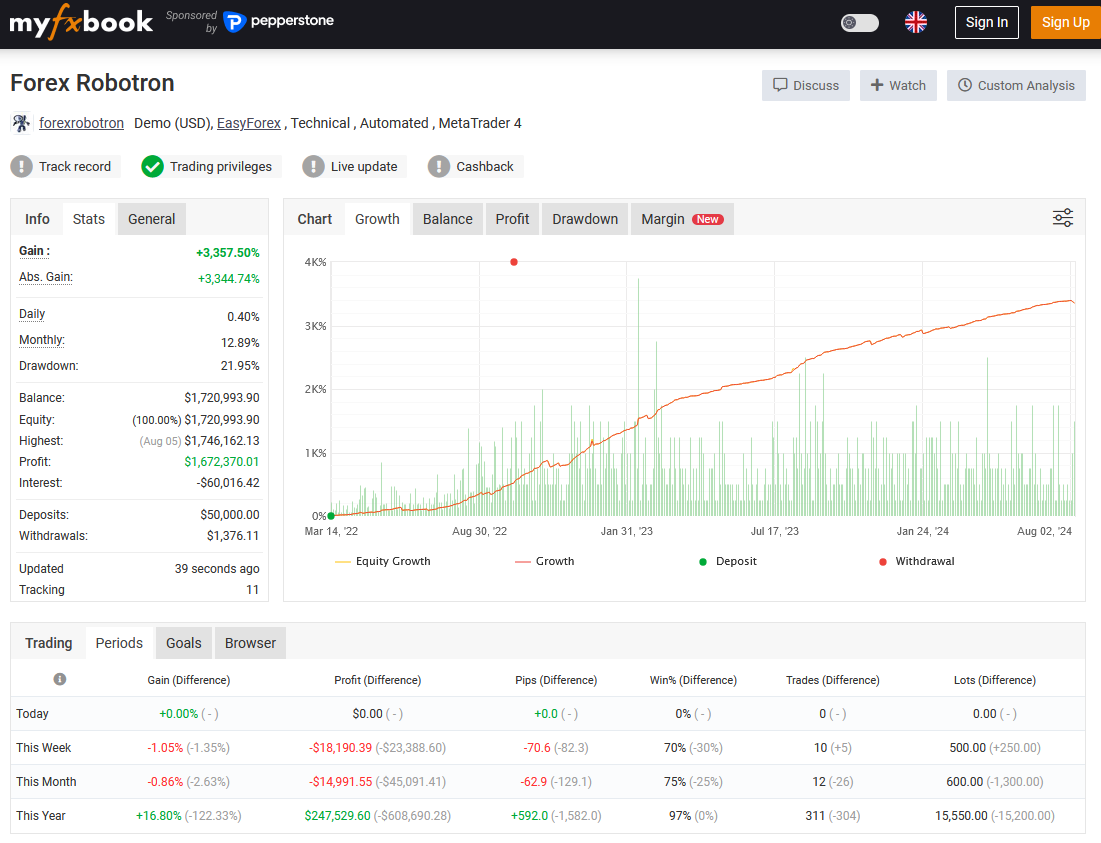
Live Performance Signal:
+ https://www.myfxbook.com/members/forexrobotron/forex-robotron/9463281
Quant Analyzer Portfolio Report:
+ https://forexrobotron.com/results/v33/Portfolio/Portfolio.html
 MT4Save 95%
Regular priceRegular price was $997.00
$49.95 with card
Visa, Mastercard, Apple Pay and Google Pay accepted.
Card payments add bank fees, sales taxes and other charges.
- Instant downloadYour file is provided immediately after payment. In very rare cases we manually review an order first, then send your download straight after. If you don’t receive your file, you can request a full refund.
- Free future updatesAll updates are free. They’re provided on a best-availability basis: we get new versions as fast as we can, led by customer demand, but we don’t guarantee them immediately. If you need every update the moment it’s released, our service may not be the best fit for you.
- 7-day money-backRefunds only cover an EA that fails to attach to your chart because of errors we can replicate. We don’t cover changing your mind or not liking the EA. All brokers are different, and results are never promised because markets are constantly changing.
- Unlimited activationsUse it on as many MT4 accounts and computers as you want, live or demo. There are no restrictions on how you use it.
Source code (.mq4) available at checkout.


28,000+ tradersServed since 2019
Orders over $300 include 3 months of PrismAlgo freeThe highly recommended cloud-connected EA for 28 FX pairs, Gold and Bitcoin. Added to your cart automatically. View PrismAlgo
Official versionsInstant downloadFuture updates includedExtra 20% off with cryptoReal people on support28,000+ tradersTrading since 2019Rated Excellent on Trustpilot
Product description
About Forex Robotron EA MT4 – Premium Plan
Introducing the Forex Robotron EA for MT4: Transform Your Trading Approach
In the competitive world of forex trading, the Forex Robotron EA for MT4 stands out as a pioneering automated trading solution, boasting years of real, verified results. As one of the most innovative multi-currency forex trading robots available, Forex Robotron is designed to deliver substantial profits while minimizing risk.
Developed through years of meticulous programming and testing, this Expert Advisor (EA) is built to run seamlessly on the MetaTrader 4 (MT4) platform, offering traders an unparalleled trading experience.
Description of Forex Robotron EA
The Forex Robotron EA is a fully automated forex trading system that analyzes market charts to identify trading signals and execute trades based on its sophisticated built-in algorithm. This EA is the culmination of over 15 years of dedicated development and rigorous testing, aimed at creating the best commercially available forex trading robot. Forex Robotron is designed to adapt to various market conditions, making it effective for short, medium, and long-term trading strategies.
How Does Forex Robotron Work?
Forex Robotron is straightforward to use. Once installed on the MT4 platform, it begins analyzing multiple currency pairs using its default settings. Traders can customize these settings, adjusting lot sizes or risk per trade to match their individual risk tolerance. The EA comes with easy-to-follow setup instructions, comprehensive support, and lifetime updates, ensuring a smooth and user-friendly experience.
Unique Trading Algorithm
Forex Robotron implements a unique trading algorithm that combines technical analysis with price action and dynamic money management. This ensures that it can adapt to ever-changing market conditions and volatility, providing traders with a reliable and effective trading tool.
Money Management
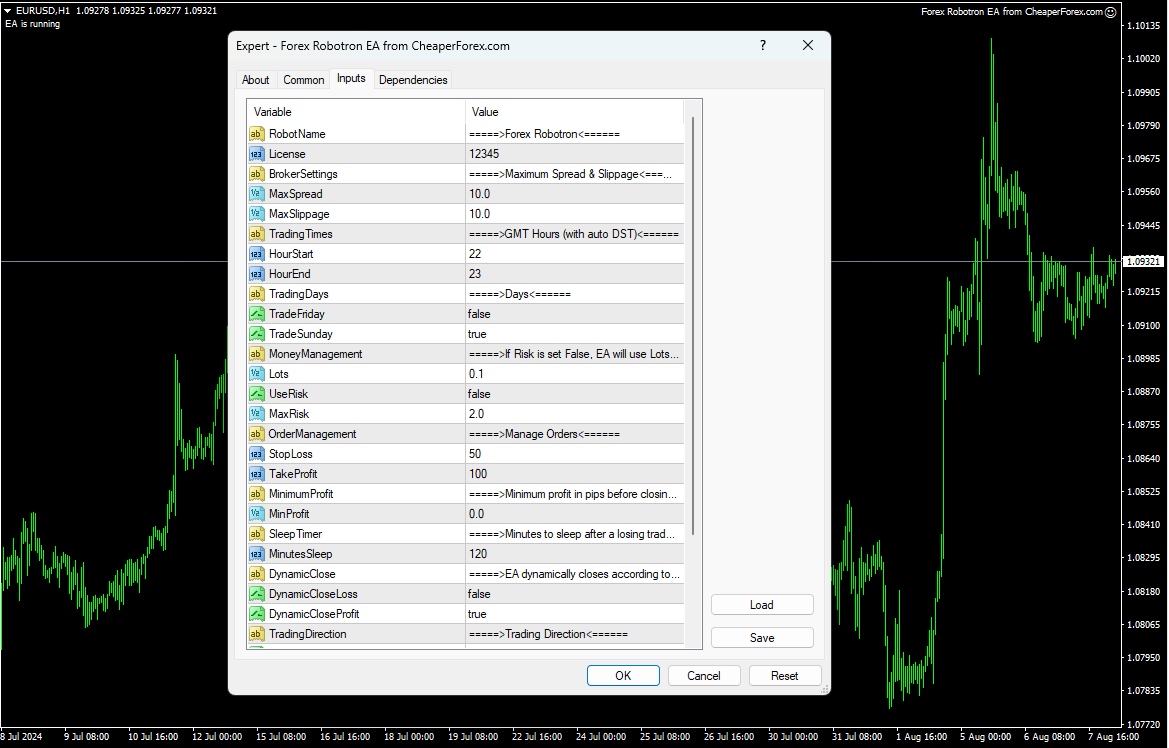
Forex Robotron has a built-in money management system that you can adjust according to your preferences. The system avoids high-risk strategies such as martingale, hedging, and arbitrage, focusing instead on sustainable trading practices.
Trading Hours
Forex Robotron operates during specific trading hours, from 21:00 to 23:00 GMT. This time frame is optimized to capture profitable trading opportunities while minimizing risk.
Trading Account
There is no minimum deposit required to use Forex Robotron. It is compatible with any MT4 broker and trading account type, offering flexibility and convenience for traders of all levels.
Backtesting and Strategy Tester Results
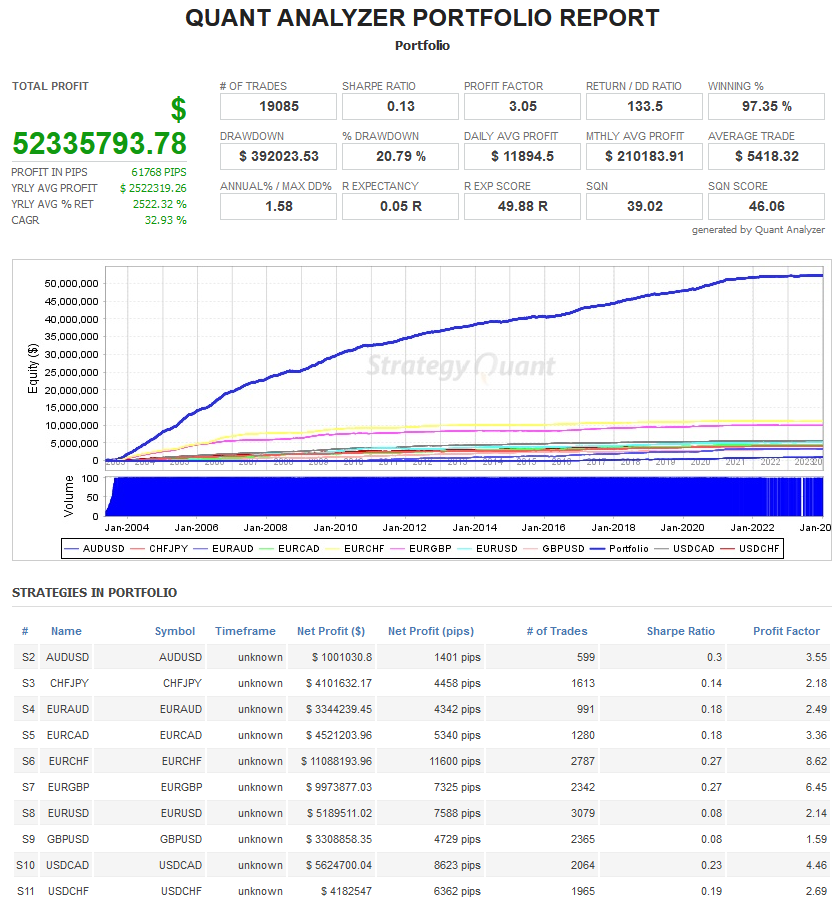
Forex Robotron stands out for its thorough backtesting using real tick data, real variable spreads, real slippage, and trade commissions. This rigorous testing approach ensures the most accurate historical results possible in the MT4 strategy tester. The backtesting results, spanning from 2003 to 2024, showcase Forex Robotron’s impressive performance across various currency pairs.
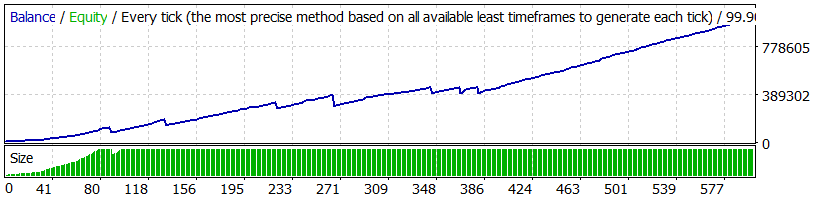
AUDUSD
- Deposit: $10,000
- Profit: $1,001,030
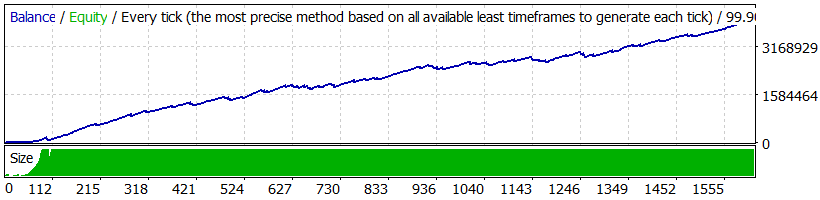
CHFJPY
- Deposit: $10,000
- Profit: $4,101,632
EURAUD
- Deposit: $10,000
- Profit: $3,344,239
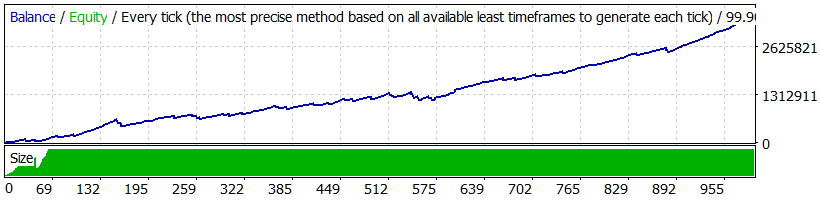
All Pairs Combined
- Deposit: $10,000
- Profit: $52,335,793
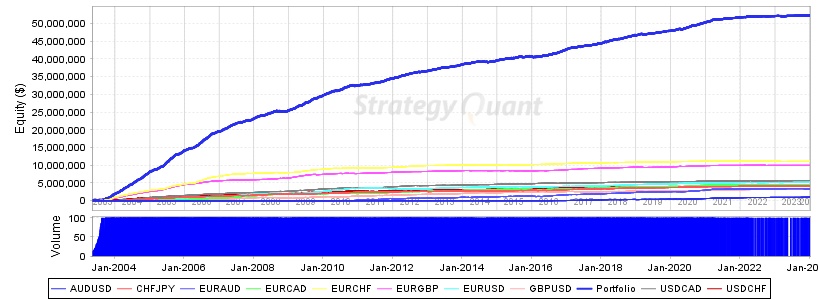
These results highlight the potential of Forex Robotron to generate substantial profits over an extended period, though it’s important to note that past performance does not guarantee future results.
Trading Specifications
- Recommended Pairs: Works on any pair; best results on AUDUSD, CHFJPY, and EURAUD
- Recommended Timeframe: H1
- Minimum Balance: No minimum deposit
- Leverage: 1:30
Our Thoughts About Forex Robotron EA
Forex Robotron EA impresses with its robust performance and adaptability. Its high win rate across multiple currency pairs and extensive backtesting history make it a reliable choice for both novice and experienced traders. The EA’s ability to adjust to various market conditions and broker settings ensures consistent performance, providing traders with a dependable tool for optimizing their trading strategies. According to The Forex Geek, a well-known forex robot reviewer, “The Forex Robotron EA is hands down one of the best forex robots in my humble opinion and I have tested practically all of them!”
Reviews
Jessica L., Professional Trader
Rating: ★★★★★
“Forex Robotron has transformed my trading approach. The EA’s ability to consistently generate profits across different market conditions is remarkable. Its ease of use and robust support make it an invaluable tool in my trading arsenal.”
Mark R., Forex Enthusiast
Rating: ★★★★★
“As someone who has tried multiple EAs, Forex Robotron stands out for its reliability and performance. The detailed backtesting results gave me confidence in its capabilities, and it has not disappointed. Highly recommended for anyone serious about forex trading.”
Anna B., Financial Analyst
Rating: ★★★★☆
“Forex Robotron is a powerful EA that delivers consistent results. The ability to customize settings and the comprehensive support provided are fantastic. My only wish is for more advanced customization options, but overall, it’s an excellent product.”
Conclusion
In conclusion, the Forex Robotron EA for MT4 is an essential tool for any serious forex trader looking to achieve consistent profitability with minimal risk. Its advanced trading features, rigorous backtesting, and ease of use make it a top choice for optimizing trading performance. Available now on CheaperForex.com, the Forex Robotron EA is your gateway to a more profitable and stress-free trading experience.
Experience the future of automated trading with the Forex Robotron EA for MT4 and take your trading strategy to new heights.
Every order
What’s included with Forex Robotron
- Instant downloadReady after checkout and kept in your account
- Free future updatesIncluded when we receive them, every version kept in your account
- Unlimited activationsUnlimited live and demo accounts
- Setup helpReal people on Telegram or email
- 7-day money-back guaranteeIf the EA fails to attach to your chart because of errors we can replicate, you get a full refund.
- Excellent on Trustpilot 4.6 out of 5 from 120 reviews (opens in a new tab)
- 28,000+ traders since 2019
- 1,180+ official EAs
- Card or crypto payments
Related EAs
Traders also explore
Premium expert advisors at vault-low prices, with your crypto price on every card.
 MT4Save 96%
 MT4Save 96%
 MT4Save 95%
 MT5Save 68%
Ready when you are
Forex Robotron EA MT4 – Premium Plan for $39.96 with crypto
Regular price was $997.00 · $49.95 with card · instant download · future updates included

Forex Robotron EA MT4 – Premium Plan$39.96with crypto$49.95 with card