
Logan MT5 EA
Version: Latest
Guaranteed genuine. No cracks, fakes or AI recreations. See why
Why we only sell the original
- Fakes are everywhere right now. AI recreations and cracked copies sell for $10 to $20 on other websites and channels. They are not the real EA.
- A fake doesn’t trade like the original. AI recreations only copy how an EA looks from the outside, so they can trade very differently.
- Cracks can hide malware that reaches your computer and your trading account.
- The real thing, with real support. The developer’s own, unmodified file, free updates, a setup guide, and real people on Telegram if you get stuck.
A $10 fake is your call. But with real money on the line, is it worth the risk? We only sell originals, at the lowest genuine price.
Free lifetime updates. You never pay twice.
When the market does move against it, additional entries use ATR-adaptive spacing rather than fixed grid steps. Capital protection comes from a configurable daily drawdown limit, maximum spread protection and session filters. Three public live signals track it across two brokers at different risk levels.
- ✅ Selective entries, not constant trading — six conditions must align before a position opens (multi-timeframe EMA alignment, ADX trend strength, tick volume, ATR volatility range, spread check and candle momentum), so most trades close on the initial entry alone
- ✅ ATR-adaptive recovery spacing — when recovery is needed, order distance expands or contracts with real market volatility instead of using fixed grid steps
- ✅ Configurable daily drawdown limit — once realised plus floating losses hit your chosen percentage, the EA stops opening new positions for the rest of the day, with an option to close all trades immediately; it resets on the new trading day
A selective XAUUSD M15 grid-recovery system with real guardrails and three public live signals. Read our editorial review, which explains exactly how the recovery grid behaves, before deciding.
 MT5Save 65%
What you receive
- Logan.ex5Genuine, unmodified developer file for MetaTrader 5Latest version
- Setup guide.pdfA general guide to installing expert advisors.Official step-by-step install guide
Delivered instantly to your account after payment
Free lifetime updates included
100% original. Never a crack, fake or AI recreation.
Regular priceRegular price was $289.00
$99.95 with card
Visa, Mastercard, Apple Pay and Google Pay accepted.
Card payments add bank fees, sales taxes and other charges.




 Apple Pay and Google Pay ready at checkout
- Official developer build · Latest version
- Instant downloadYour file is provided immediately after payment. In very rare cases we manually review an order first, then send your download straight after. If you don’t receive your file, you can request a full refund.
- Free lifetime updatesAll updates are free. They’re provided on a best-availability basis: we get new versions as fast as we can, led by customer demand, but we don’t guarantee them immediately. If you need every update the moment it’s released, our service may not be the best fit for you.
- 7-day money-backRefunds only cover an EA that fails to attach to your chart because of errors we can replicate. We don’t cover changing your mind or not liking the EA. All brokers are different, and results are never promised because markets are constantly changing.
- Unlimited activationsUse it on as many MT5 accounts and computers as you want, live or demo. There are no restrictions on how you use it.
What you receive
- Logan.ex5Genuine, unmodified developer file for MetaTrader 5Latest version
- Setup guide.pdfA general guide to installing expert advisors.Official step-by-step install guide
Delivered instantly to your account after payment
Free lifetime updates included
100% original. Never a crack, fake or AI recreation.


28,000+ tradersServed since 2019
Don’t miss thisSee the EA we recommend
The Gold EA we trade ourselves
DowGold for XAU and US30


We have tested thousands of EAs. DowGold is the one we use and recommend, and we rarely say that. We’re also an official reseller.
Real USD MyFXBook accounts. A live cloud, constantly evolving strategy.
See DowGoldOfficial versionsInstant downloadFree lifetime updatesExtra 20% off with cryptoReal people on support28,000+ tradersTrading since 2019Rated Excellent on Trustpilot
Product description
About Logan MT5 EA
Quick Summary:
Logan MT5 EA by Thierry Ouellet is a fully automated XAUUSD (Gold) Expert Advisor for MetaTrader 5, running on the M15 timeframe. It is a selective grid-recovery system — and the developer says so plainly rather than hiding it. Six entry conditions must align before a position opens, so the majority of trades close on the first entry without the recovery grid engaging; when recovery is needed, spacing adapts to current ATR instead of using fixed steps. Capital protection comes from a configurable daily drawdown limit, maximum spread protection and session filters. Three public live signals track it across two brokers at different risk levels.
Official MQL5 Listing:
Logan MT5 — MQL5 Marketplace
Live Signal (VT Markets, medium risk):
LoganEA — MQL5 live signal (VT Markets)
Live Signal (TitanFX, high risk):
Logan MT5 — MQL5 live signal (TitanFX, high risk)
Live Signal (TitanFX, extreme risk):
Logan MT5 — MQL5 live signal (TitanFX, extreme risk)

Why Logan MT5 EA
- Gold specialist on M15 — built specifically for XAUUSD rather than a generic multi-symbol EA
- Six-condition entry filter — multi-timeframe EMA alignment, ADX trend strength, tick volume against recent activity, ATR volatility range, spread suitability and candle momentum must all be satisfied before a trade opens
- Trades less, not more — selectivity means the majority of positions close on the initial entry without the recovery grid engaging
- ATR-adaptive recovery spacing — order distance expands or contracts with real volatility instead of using fixed grid steps
- Configurable daily drawdown limit — stops new positions once realised plus floating losses hit your chosen percentage, with an optional close-all, resetting the next trading day
- Execution filters — maximum spread protection and trading session filters restrict operation to suitable conditions and your preferred hours
- Broker profiles — a broker type setting applies the appropriate internal configuration, including a dedicated Exness profile
- Three public live signals — real-money monitoring across two brokers at different risk levels
Live Signal Snapshot
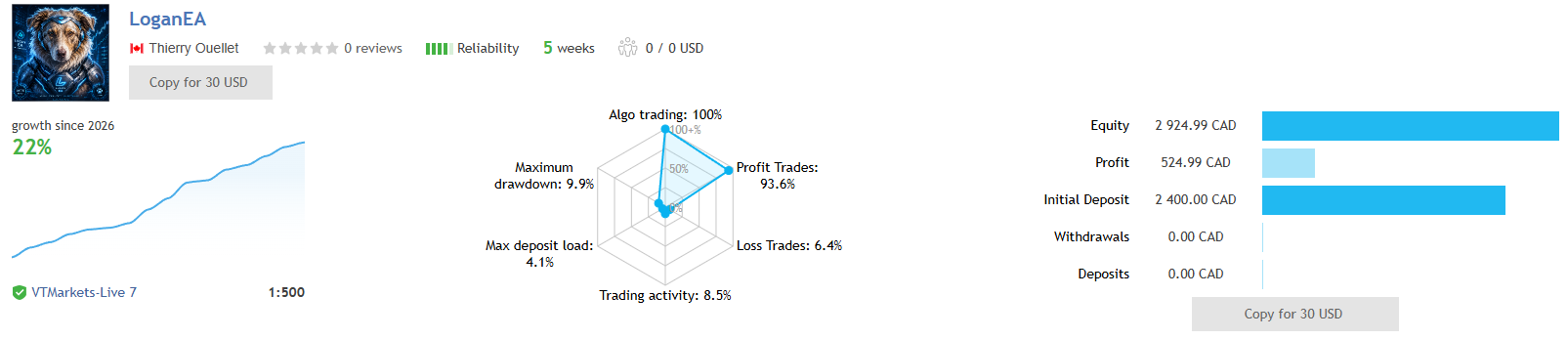
- Broker: VT Markets at 1:500 leverage, 5 weeks tracked
- Verifiable record: CAD 2,400 initial deposit to about CAD 2,925 equity — roughly 22% genuine growth with zero deposits and zero withdrawals
- Profit trades: 93.6% with 6.4% loss trades
- Max drawdown: 9.9%
- Max deposit load: 4.1% — low concurrent exposure, indicating the recovery grid stayed shallow
- Trading activity: 8.5% — selective rather than constant
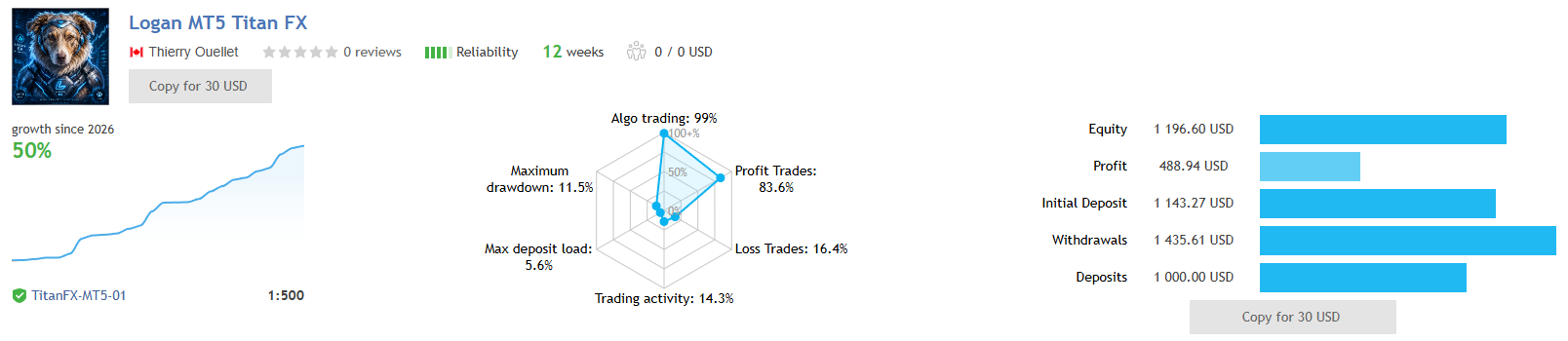
The TitanFX account is the longer record at 12 weeks, with an 11.5% maximum drawdown and a 5.6% deposit load. Its headline growth percentage is distorted by deposits and withdrawals during tracking, so read the drawdown and deposit-load figures rather than the percentage. The full read on all three signals is in our editorial review, linked below.
EA Setup at a Glance
- Platform: MetaTrader 5
- Instrument: XAUUSD (Gold)
- Timeframe: M15
- Account type: Hedge or netting; ECN or Raw Spread recommended
- Minimum balance: $1,000 (0.01 lots); $2,000 or more recommended
- Leverage: 1:100 or higher
- Lot sizing: Fixed lot, or automatic sizing based on account balance
- Risk management: Configurable daily drawdown limit (with optional close-all), maximum spread protection, trading session filters
- Broker profiles: Default, plus a dedicated Exness setting
- Developer’s recommended brokers: VT Markets, TMGM, TitanFX, GlobalPrime, Vantage
- VPS: Recommended for uninterrupted operation
What You Receive
- Logan MT5 EA for MT5 — available file
- Free lifetime updates
- Developer’s recommended settings, where supplied
Risk Disclaimer
Logan MT5 is a grid-based recovery system. It combines ATR-adaptive grid spacing with dynamic lot progression when a position moves against it, and it does not use a fixed per-trade stop loss — positions in a basket are closed together when the basket reaches its profit objective, with the configurable daily drawdown limit acting as the capital-protection backstop. That design has real implications: while the published backtests show modest balance drawdowns, their equity drawdowns are two to four times larger, and that gap is the floating loss carried while a recovery basket is open. Both live signals show low deposit loads, indicating the grid stayed shallow in practice, but a grid system’s risk is concentrated in the rare adverse run rather than in day-to-day trading. Set the daily drawdown limit conservatively, use lot sizing appropriate to your balance rather than the maximum available, respect the minimum and recommended balances, test thoroughly on demo first, and only deploy capital you can afford to lose. The live records span roughly five and twelve weeks and the backtests roughly one year, so all are best treated as encouraging evidence rather than a long-term track record. Past performance does not guarantee future results.
Full Editorial Review
📖 Read our complete Logan MT5 EA review →
A full editorial breakdown: exactly how the recovery grid behaves and what the balance-versus-equity drawdown gap tells you, all three live signals read honestly, both risk-level backtests in context, the audit report in perspective, who the product suits, and our verdict.
Standalone MT5 file. Follow the delivery instructions supplied with your order. Free lifetime updates are included, added as soon as we receive them. You never pay twice.
Every order
What’s included with Logan
- Instant downloadReady after checkout and kept in your account
- Free lifetime updatesAdded as soon as we receive them, every version kept in your account
- Unlimited activationsUnlimited live and demo accounts
- Setup helpReal people on Telegram or email
Product FAQs
Logan MT5 EA FAQs
Real people on support, by Telegram or our contact form.
What is Logan MT5 EA?
A fully automated XAUUSD (Gold) Expert Advisor for MetaTrader 5 by Thierry Ouellet, running on the M15 timeframe. It is a selective grid-recovery system: it waits for six entry conditions to align before opening a position, and most trades close on that first entry without the recovery grid engaging. When the market moves against it, additional entries use ATR-adaptive spacing. Protection comes from a configurable daily drawdown limit, maximum spread protection and session filters.
Is Logan MT5 a grid or martingale EA?
It is a grid-based recovery system, and the developer states that openly — it combines ATR-based grid spacing with dynamic lot progression when a position moves against it. What separates it from typical grid robots is selectivity: entries require six conditions to align, so the recovery grid engages relatively rarely, and both live signals show a low maximum deposit load (around 4–6%), meaning the grid stayed shallow in practice. There is no fixed per-trade stop loss; the basket closes together at a profit objective, with the daily drawdown limit as the safety net. Our full review explains exactly what that means for your risk.
How does the daily drawdown limit work?
You set a percentage. Once realised losses plus floating losses reach it, the EA stops opening new positions for the remainder of the trading day, and an optional setting closes all active trades immediately instead. Trading resumes automatically at the start of the next trading day. This is the main capital-protection control, and setting it conservatively is the most important decision you will make when configuring the EA.
What are the live signals showing?
Three public signals track it across two brokers at different risk levels. The VT Markets account is the cleanest read: a CAD 2,400 deposit grown to about CAD 2,925 over five weeks with zero deposits and zero withdrawals, so its roughly 22% growth is genuine, with a 9.9% maximum drawdown and a low 4.1% deposit load. The TitanFX higher-risk account shows an 11.5% maximum drawdown over twelve weeks, though its headline growth figure is distorted by deposits and withdrawals.
What broker and account do I need?
A broker offering XAUUSD with tight spreads on a hedge or netting account; ECN or Raw Spread is recommended. Minimum balance is $1,000 (trading 0.01 lots), with $2,000 or more recommended, and leverage of 1:100 or higher. The developer names VT Markets, TMGM, TitanFX, GlobalPrime and Vantage as recommended brokers, and includes a broker profile setting that applies the right internal configuration for Exness accounts.
How do I set it up?
Attach it to an XAUUSD M15 chart, choose your lot sizing method (fixed lot or automatic sizing based on account balance), set your daily drawdown limit, and select the broker profile matching your account. That is the whole configuration.
Do I need a VPS?
Yes — strongly recommended. A stable, low-latency VPS near your broker’s server keeps the EA running through the full session without gaps, which matters for a system that manages open baskets and needs its spread and session filters evaluated continuously.
Why buy from CheaperForex instead of the MQL5 marketplace?
This is the same EA supplied as a standalone file, with free lifetime updates. You pay less. For a grid-recovery system in particular you will want to run it on demo first and validate on your own broker with a conservative daily drawdown limit before committing capital, so paying less to do that testing is the practical approach. Our full review covers the strengths and the risks openly.
- Excellent on Trustpilot 4.6 out of 5 from 120 reviews (opens in a new tab)
- 28,000+ traders since 2019
- 1,580+ official EAs
- Card or crypto payments
Related EAs
Traders also explore
Premium expert advisors at vault-low prices, with your crypto price on every card.
 MT5Save 71%
 MT5Save 50%
 MT5Save 93%
 MT5Save 50%
Ready when you are
Logan MT5 EA for $79.96 with crypto
Regular price was $289.00 · $99.95 with card · instant download · free lifetime updates

Logan MT5 EA$79.96with crypto$99.95 with card