
MiloBot PRO MT5
Genuine files only. No cracks, fakes or AI copies. See why
Why our prices aren’t rock-bottom
- The official file. The developer’s own, unmodified EA. Never a crack, a decompiled copy or an AI recreation.
- It trades like the original, because it is the original. AI recreations only copy how an EA looks from the outside, so they can trade very differently.
- Safe to run. Cracked files can hide malware that reaches your computer and your trading account.
- Updates and help. Free updates, a setup guide, and real people on Telegram if you get stuck.
We keep prices as low as we can. We just won’t sell fakes to be the cheapest.
MiloBot PRO MT5 brings Sergey Ermolov’s three-stage Forex strategy to MetaTrader 5. It combines reversal detection with configurable locking and averaging, with separate controls for money management, trade spacing and exposure growth.
- Configure the entry, locking and averaging stages in MT5.
- Adjust lot progression and spacing for each currency setup.
- Assess MT5 execution separately from the developer’s MT4 signals.
 MT5Save 40%
What you receive
- MiloBot PRO.ex5Genuine, unmodified developer file for MetaTrader 5Version 1.10
- Setup guide.pdfA general guide to installing expert advisors.Official step-by-step install guide
Delivered instantly to your account after payment
Regular priceRegular price was $435.00
$259.95 with card
Visa, Mastercard, Apple Pay and Google Pay accepted.
Card payments add bank fees, sales taxes and other charges.




 Apple Pay and Google Pay ready at checkout
- Official developer build · Version 1.10
- Instant downloadYour file is provided immediately after payment. In very rare cases we manually review an order first, then send your download straight after. If you don’t receive your file, you can request a full refund.
- Free lifetime updatesAll updates are free. They’re provided on a best-availability basis: we get new versions as fast as we can, led by customer demand, but we don’t guarantee them immediately. If you need every update the moment it’s released, our service may not be the best fit for you.
- 7-day money-backRefunds only cover an EA that fails to attach to your chart because of errors we can replicate. We don’t cover changing your mind or not liking the EA. All brokers are different, and results are never promised because markets are constantly changing.
- Unlimited activationsUse it on as many MT5 accounts and computers as you want, live or demo. There are no restrictions on how you use it.
What you receive
- MiloBot PRO.ex5Genuine, unmodified developer file for MetaTrader 5Version 1.10
- Setup guide.pdfA general guide to installing expert advisors.Official step-by-step install guide
Delivered instantly to your account after payment


28,000+ tradersServed since 2019
Don’t miss thisSee the EA we recommend
The Forex EA we trade ourselves
PrismAlgo for Forex


We have tested thousands of EAs. PrismAlgo is the one we use and recommend for Forex, and we rarely say that. We’re also an official reseller.
Real USD MyFXBook account. A live cloud, constantly evolving strategy.
See PrismAlgoOfficial versionsInstant downloadFree lifetime updatesExtra 20% off with cryptoReal people on support28,000+ tradersTrading since 2019Rated Excellent on Trustpilot
Product description
About MiloBot PRO MT5
- Developer source link: Official MQL5 product listing
- Live signal link: Developer-linked MT4 signal — not an MT5 account
MiloBot PRO MT5 brings Sergey Ermolov’s three-stage Forex strategy to MetaTrader 5. It combines reversal detection with configurable locking and averaging, with separate controls for money management, trade spacing and exposure growth.
The MetaTrader 5 edition
MiloBot PRO MT5 implements the same broad reversal, lock and averaging concept in the newer platform. Its published release history includes MT5 order-filling corrections and custom money-management controls. Those platform changes do not mean the MT4 and MT5 editions will produce identical trades across different brokers.
- Configure the entry, locking and averaging stages in MT5.
- Adjust lot progression and spacing for each currency setup.
- Assess MT5 execution separately from the developer’s MT4 signals.
Build a currency portfolio carefully
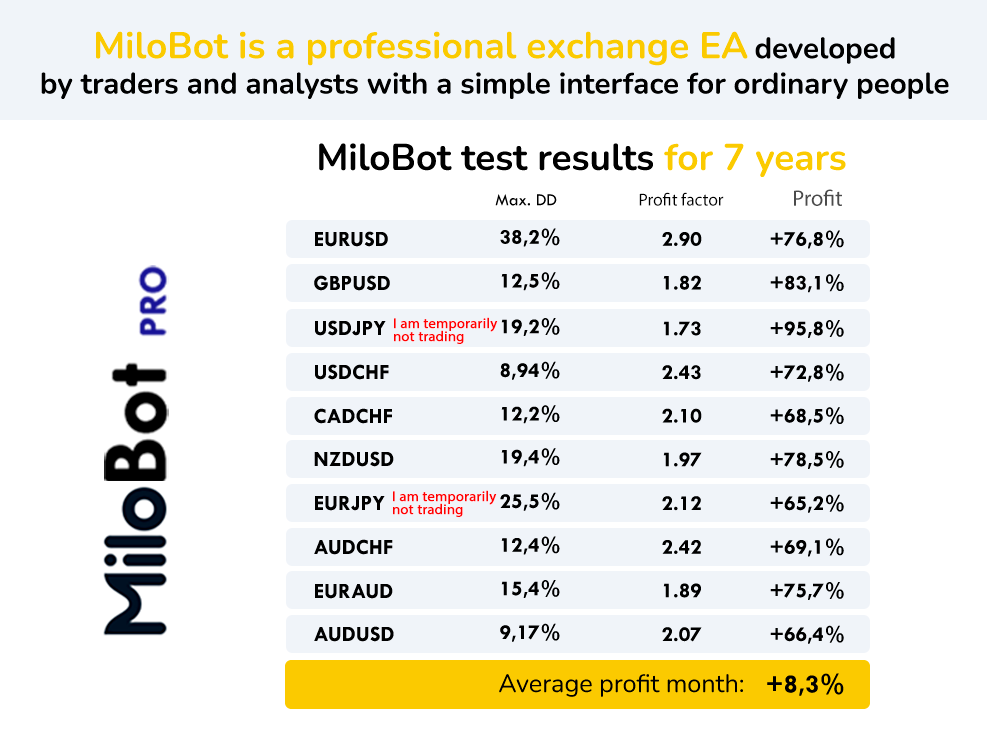
The listing names ten Forex pairs, including EURUSD, GBPUSD, USDJPY, EURJPY, AUDUSD and several crosses. The developer’s setup replies describe separate charts per pair. Choose compatible settings and assess aggregate margin, correlated currencies and concurrent positions. Lot multiplication and averaging can increase exposure during adverse movement.
MT5 account preparation
Confirm the account supports the EA’s intended locking behaviour and test the supplied settings on your broker. The source recommends $200 in a cent account or $20,000 in a standard account with high leverage; contract sizes and account units matter more than the headline deposit. Keep MT5 running for EA-managed functions and inspect the Experts log if entries are blocked.
MT4 results are context, not MT5 proof
Both editions link to an MT4 Weltrade signal. On 17 September 2026 it showed 56.42% maximum equity drawdown, substantial floating losses and blocked subscriptions. The older Myfxbook account is also MT4. These records help explain strategy risk but do not independently validate MT5 execution.
Read the shared MiloBot review with platform distinctions · View the MT4 edition and its setup context
Also from Sergey Ermolov: MiloBot PRO MT4 · MiloBot PRO MT5 · Dual Striker MT5. Compare the MiloBot signal review and Dual Striker review.
Standalone file. Follow the delivery instructions supplied with your order.
Every order
What’s included with MiloBot PRO
- Instant downloadReady after checkout and kept in your account
- Free lifetime updatesAdded as soon as we receive them, every version kept in your account
- Unlimited activationsUnlimited live and demo accounts
- Setup helpReal people on Telegram or email
- 7-day money-back guaranteeIf the EA fails to attach to your chart because of errors we can replicate, you get a full refund.
Product FAQs
MiloBot PRO MT5 FAQs
Real people on support, by Telegram or our contact form.
Does MiloBot use averaging?
Yes. Locking, averaging and configurable lot multiplication are part of the source strategy. Exposure and floating losses can grow.
Are the public signals MT5 results?
No. The linked current Weltrade signal and older Myfxbook account are MT4; they are not independent MT5 execution evidence.
Can I trade several currency pairs?
Yes. The developer describes separate charts for chosen pairs. Monitor their combined exposure and margin.
What is supplied?
The standalone file offer with post-purchase delivery instructions.
- Excellent on Trustpilot 4.6 out of 5 from 120 reviews (opens in a new tab)
- 28,000+ traders since 2019
- 1,570+ official EAs
- Card or crypto payments
Related EAs
Traders also explore
Premium expert advisors at vault-low prices, with your crypto price on every card.
 MT4Save 30%
 MT5Save 42%
 MT5Save 37%
 MT5Save 54%
Ready when you are
MiloBot PRO MT5 for $207.96 with crypto
Regular price was $435.00 · $259.95 with card · instant download · free lifetime updates

MiloBot PRO MT5$207.96with crypto$259.95 with card