
Official MT4 version · AI EA
NEXON Ai EA MT4
Latest version
We’re rated Excellent on Trustpilot · 4.6/5 (opens in a new tab)NEXON Ai is a high-performance, fully automated gold scalping EA designed for XAUUSD on the M5 chart.
Powered by machine learning and neural networks, it adapts in real-time to market shifts. Live-tested with smart filtering and risk control for consistent profits.
The Download Package Includes:
+ Expert: NEXON Ai EA (.ex4) – Version 1.4
+ Pairs/Timeframes.txt
+ How to Install MT4 files.pdf
More Information:
+ https://www.mql5.com/en/market/product/138530
Live Performance Signal:
+ Unknown
 MT4Save 57%
What you receive
- NEXON Ai.ex4Genuine, unmodified developer file for MetaTrader 4Latest version
- Setup guide.pdfA general guide to installing expert advisors.Official step-by-step install guide
Delivered instantly to your account after payment
Regular priceRegular price was $299.00
$129.95 with card
Visa, Mastercard, Apple Pay and Google Pay accepted.
Card payments add bank fees, sales taxes and other charges.
- Official developer build · Latest version
- Instant downloadYour file is provided immediately after payment. In very rare cases we manually review an order first, then send your download straight after. If you don’t receive your file, you can request a full refund.
- Free lifetime updatesAll updates are free. They’re provided on a best-availability basis: we get new versions as fast as we can, led by customer demand, but we don’t guarantee them immediately. If you need every update the moment it’s released, our service may not be the best fit for you.
- 7-day money-backRefunds only cover an EA that fails to attach to your chart because of errors we can replicate. We don’t cover changing your mind or not liking the EA. All brokers are different, and results are never promised because markets are constantly changing.
- Unlimited activationsUse it on as many MT4 accounts and computers as you want, live or demo. There are no restrictions on how you use it.
What you receive
- NEXON Ai.ex4Genuine, unmodified developer file for MetaTrader 4Latest version
- Setup guide.pdfA general guide to installing expert advisors.Official step-by-step install guide
Delivered instantly to your account after payment


28,000+ tradersServed since 2019
Orders over $300 include 3 months of PrismAlgo freeThe highly recommended cloud-connected EA, on all 28 Forex pairs for one MT5 account. Added to your cart automatically. View PrismAlgo
Official versionsInstant downloadFree lifetime updatesExtra 20% off with cryptoReal people on support28,000+ tradersTrading since 2019Rated Excellent on Trustpilot
Product description
About NEXON Ai EA MT4
Introduction to NEXON Ai for MT4
NEXON Ai is a next-generation scalping robot engineered specifically for XAUUSD (Gold) on the M5 timeframe. Developed by Hicham Chergui, this fully autonomous trading system leverages AI, neural networks, and real-time learning to make precise trading decisions — adapting to current market conditions and scalping gold with razor-sharp accuracy.
Whether you’re a beginner or a seasoned trader, NEXON makes trading smarter, faster, and simpler. All it takes is a one-time setup — from there, NEXON handles entries, exits, stop-losses, and even trade filtering for you.
Key Features
✅ AI & Machine Learning Engine
Built from adaptive neural networks, NEXON evolves with the market, learning from historical and real-time data.
✅ M5 Gold Scalping Power
Tailored exclusively for XAUUSD M5 — catching volatility-driven micro trends with split-second execution.
✅ Low Drawdown Protection
Internal equity and SL filters ensure your account is protected during news and high-risk conditions.
✅ Plug & Play Simplicity
No configuration headaches. Just attach it to the chart, adjust lot size, and press “Go”.
✅ Live Verified Performance
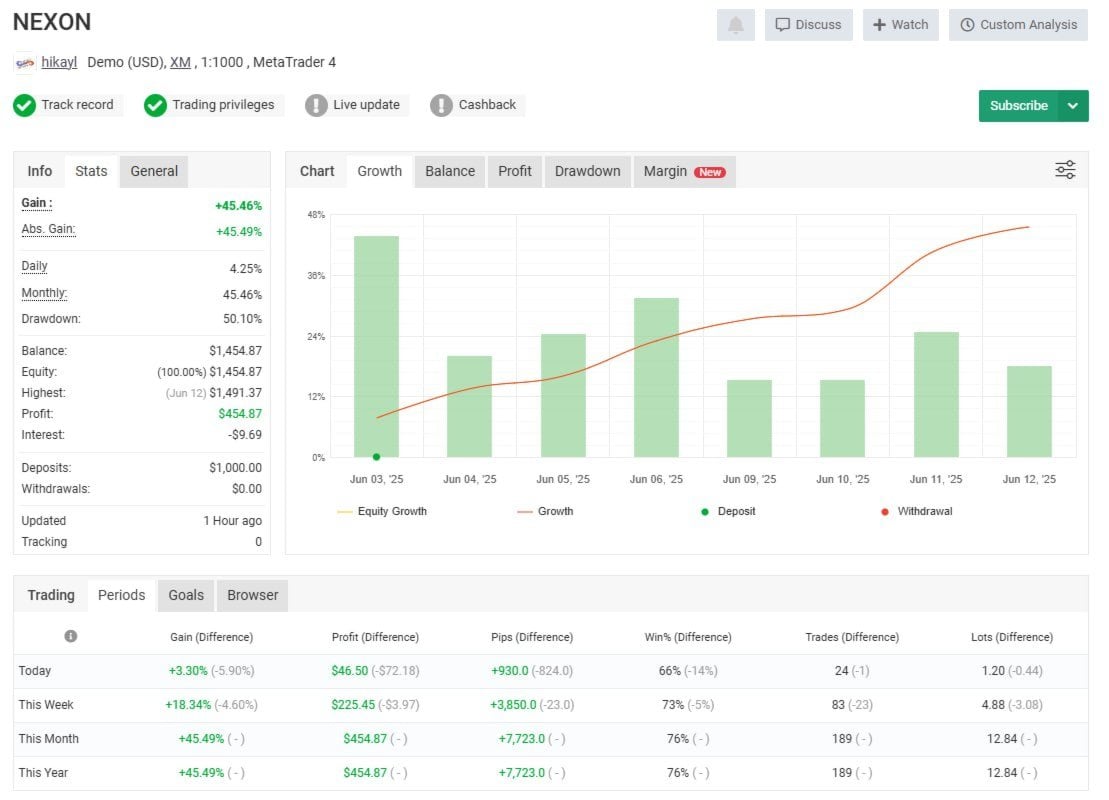
See real results on platforms like MyFXBook with over +45% growth in under two weeks.
✅ Smart Trade Filtering
Limits overtrading by selecting only the highest quality setups based on momentum and spread filters.
✅ Real-Time Exit Logic
Trailing stop, breakeven, and time-based exit logic maximize profits while limiting exposure.
Built-in Risk Management Tools
🔒 Fixed or % Lot Control
🔒 Max Spread & Slippage Protection
🔒 Breakeven & Trailing Stop
🔒 Momentum-based entry/exit
🔒 StopLoss + TakeProfit automation
🔒 Auto trade filtering during flat or risky periods
Live Results Snapshot
📊 +45.49% Growth
📉 Max Drawdown: 50.1%
💰 Monthly Return: 45.46%
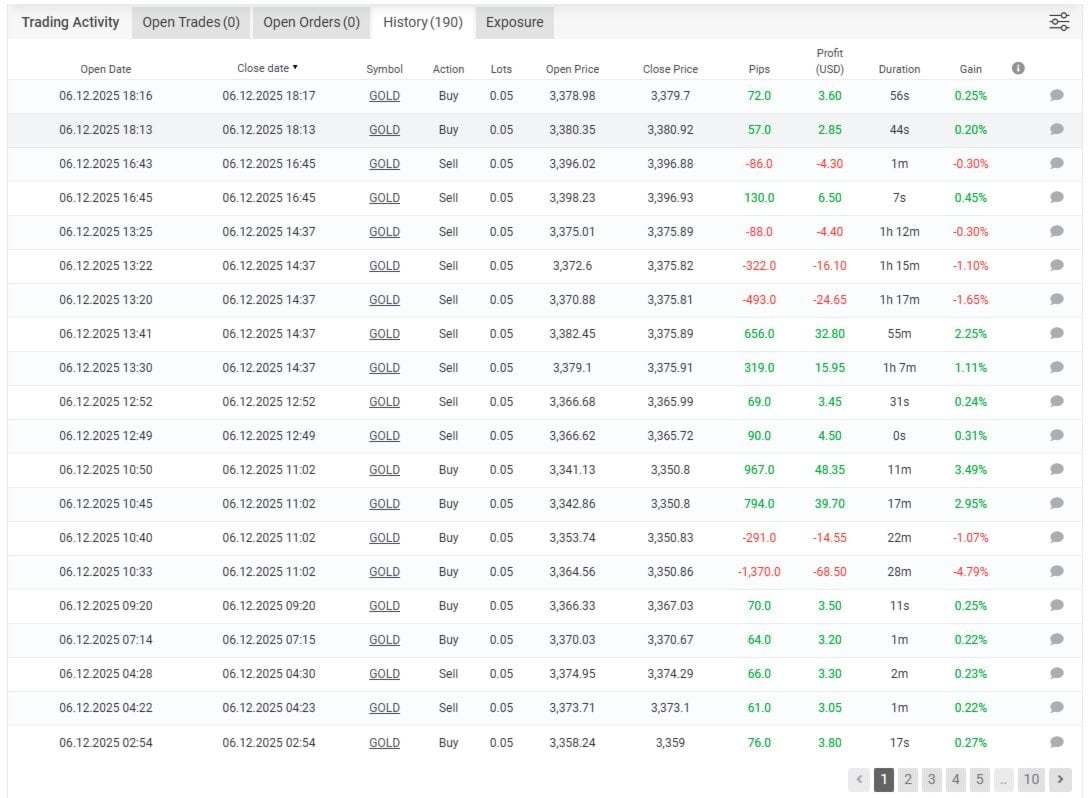
📈 Total Trades: 189 | Win Rate: 76%
⚙️ Average Trade Duration: 20–60 mins
Backtest Performance (2024–2025)
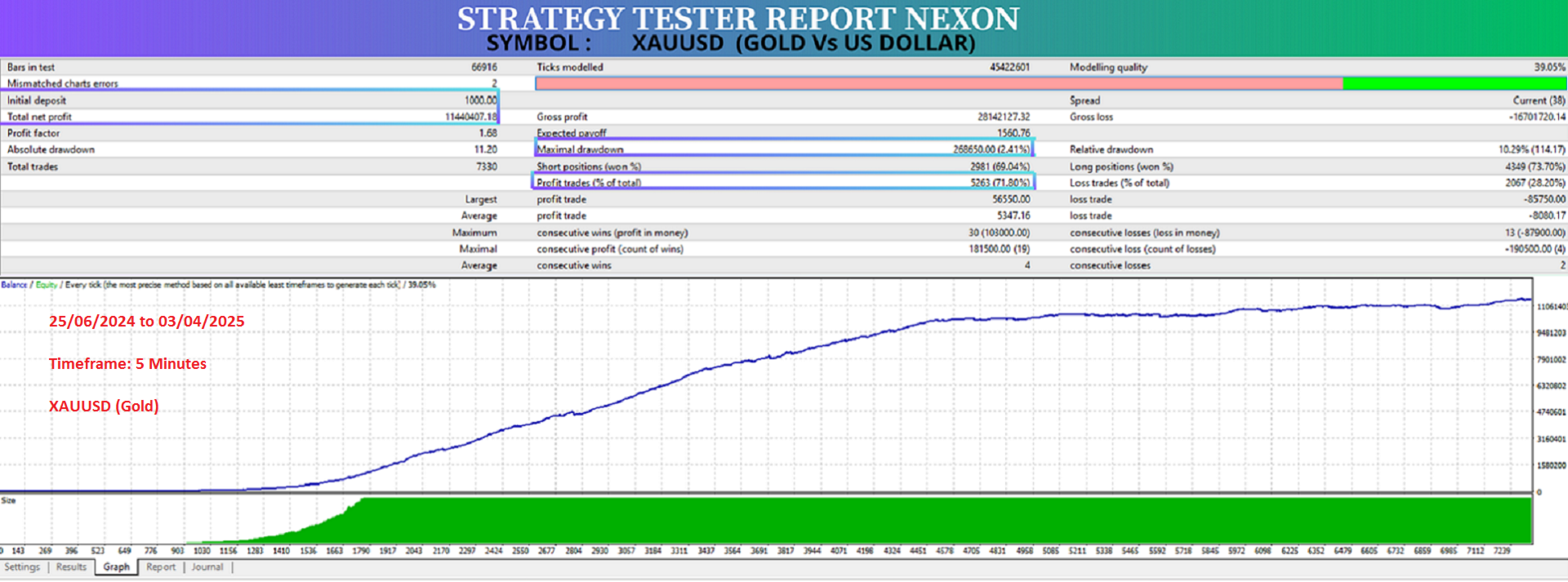
📆 Period: June 2024 – April 2025
💸 Initial Deposit: $1000
📈 Net Profit: $1,144,047
📊 Profit Factor: 1.68
📉 Max Drawdown: 10.29%
🔁 Total Trades: 7330
✅ Win Rate: 71.80%
User Reviews
⭐ Carlos33 – “So far so good. Fast scalp, looks safe, and the author answers all questions.”
⭐ zp152093 – “GOOD.”
⭐ Marco Scherer –
“First of all, the EA delivers what it promises. It opens trades within a single candle and closes with solid profit. It hasn’t made a single losing trade for me so far. It trades less than in the backtest, but it’s clearly worth the money.”
How to Use NEXON Ai
-
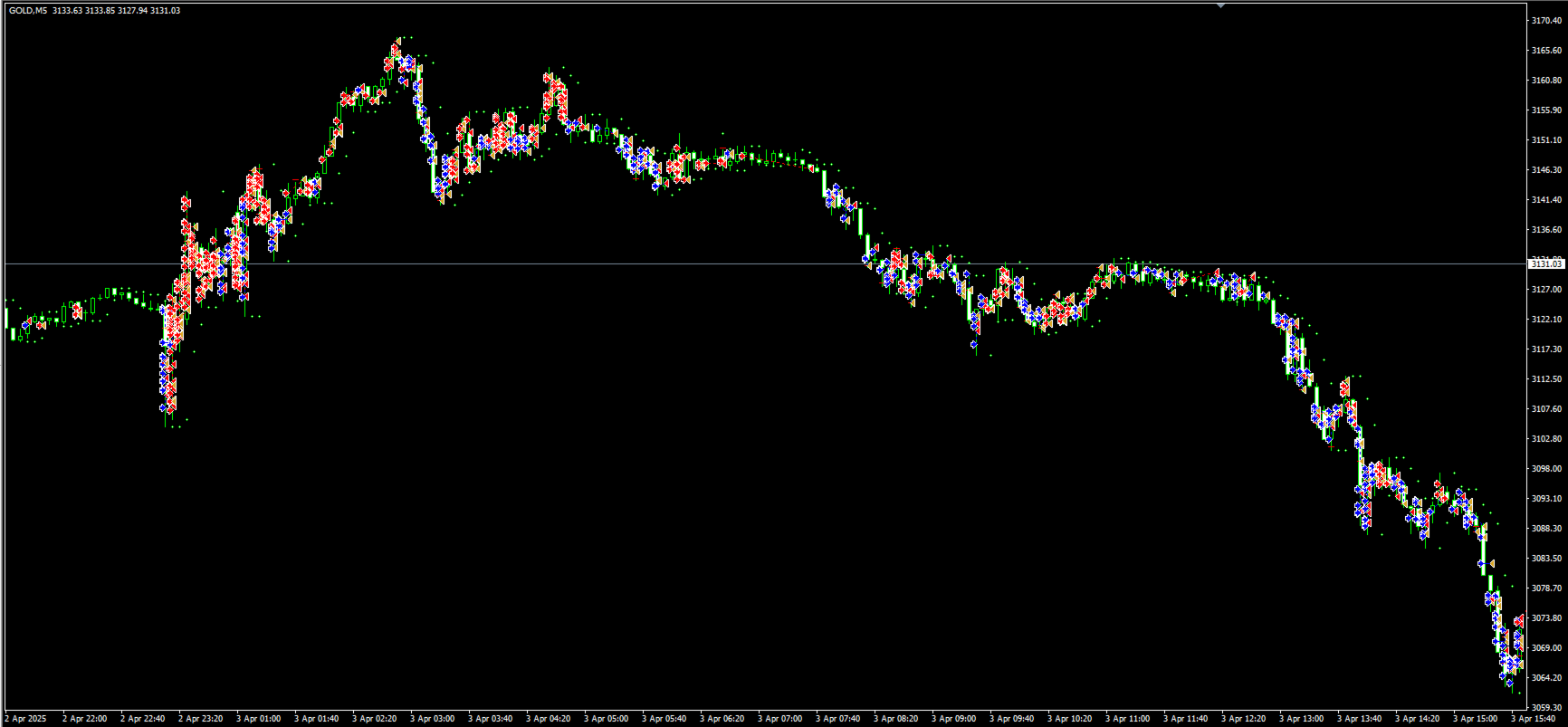
Attach to a XAUUSD M5 chart
-
Adjust your lot size or risk settings
-
Enable AutoTrading
-
Sit back and let the AI handle everything
Minimum Requirements
-
💵 Min Deposit: $300 (Recommended: $500+)
-
📈 Pair: XAUUSD only
-
⏱️ Timeframe: M5
-
💻 Platform: MetaTrader 4
-
📡 VPS: Optional but recommended for 24/7 uptime
Frequently Asked Questions (FAQs)
❓ What is the recommended deposit for running NEXON Ai?
While the minimum is $300, we strongly recommend starting with at least $500 for better risk-to-reward and margin control, especially on volatile days.
❓ Does NEXON Ai work on other pairs or timeframes?
No — NEXON is specifically optimized for XAUUSD (Gold) on the M5 timeframe. Using it on other pairs or timeframes is not advised and will likely produce worse results.
❓ Is NEXON safe for prop firm challenges?
Yes — NEXON includes built-in stop loss, trailing stop, and drawdown protection features. However, due to its scalping nature, it’s best suited for challenges that allow higher trade frequency and don’t restrict high lot usage.
❓ How often does NEXON Ai trade per day?
NEXON typically executes 10–30 trades daily, depending on volatility, spread, and your configured lot size. It avoids overtrading and focuses on high-probability scalping setups only.
❓ Can I run this EA on a Cent account or with a small broker?
Yes — NEXON supports Cent, Micro, and Standard accounts, provided the broker allows low spread trading and fast execution. Just make sure slippage and execution speed are within acceptable limits.
❓ Do I need to adjust any settings?
No optimization is required. The EA comes pre-configured with optimal default values. You only need to set your lot size or enable AutoLot, depending on your capital.
Conclusion
NEXON Ai is a serious tool for serious scalpers. If you’re looking for high-frequency precision, AI-powered adaptability, and real-time results — this bot checks every box. Its smart trade logic, backed by real MyFXBook stats, proves it’s more than just a theoretical performer. It’s fast, safe, and designed to grow your account day after day.
Don’t settle for outdated bots. Upgrade your gold trading with the AI-powered edge of NEXON.
Every order
What’s included with NEXON Ai
- Instant downloadReady after checkout and kept in your account
- Free lifetime updatesAdded as soon as we receive them, every version kept in your account
- Unlimited activationsUnlimited live and demo accounts
- Setup helpReal people on Telegram or email
- 7-day money-back guaranteeIf the EA fails to attach to your chart because of errors we can replicate, you get a full refund.
- Excellent on Trustpilot 4.6 out of 5 from 120 reviews (opens in a new tab)
- 28,000+ traders since 2019
- 1,560+ official EAs
- Card or crypto payments
Related EAs
Traders also explore
Premium expert advisors at vault-low prices, with your crypto price on every card.
 MT4Save 63%
 MT4Save 94%
 MT4Save 72%
 MT5Save 67%
Ready when you are
NEXON Ai EA MT4 for $103.96 with crypto
Regular price was $299.00 · $129.95 with card · instant download · free lifetime updates

NEXON Ai EA MT4$103.96with crypto$129.95 with card