
Official MT4 version · Gold EA
Scalping EA Robot for MT4
We’re rated Excellent on Trustpilot · 4.6/5 (opens in a new tab)The Scalping EA Robot for MT4 is engineered to capitalize on small market movements, making quick and precise trades to maximize your profit potential. It employs a sophisticated scalping strategy, leveraging advanced algorithms to identify and execute trades at optimal moments.
This approach is particularly effective in the H4 (four-hour) timeframe, providing a balance between trade frequency and reliability.
This Package Contains an Instant Download of:
+ Expert: Scalping EA Robot for MT4 (.ex4) – ALL MT4 Builds
+ Pairs/Timeframes
+ How to Install.pdf
More Information:
+ https://scalping-ea.com/
Live Signal:
+ https://www.myfxbook.com/members/ScalpingCompany/
 MT4Save 93%
What you receive
- Scalping EA Robot.ex4Genuine, unmodified developer file for MetaTrader 4
- Setup guide.pdfA general guide to installing expert advisors.Official step-by-step install guide
Delivered instantly to your account after payment
Regular priceRegular price was $499.99
$34.95 with card
Visa, Mastercard, Apple Pay and Google Pay accepted.
Card payments add bank fees, sales taxes and other charges.
- Instant downloadYour file is provided immediately after payment. In very rare cases we manually review an order first, then send your download straight after. If you don’t receive your file, you can request a full refund.
- Free lifetime updatesAll updates are free. They’re provided on a best-availability basis: we get new versions as fast as we can, led by customer demand, but we don’t guarantee them immediately. If you need every update the moment it’s released, our service may not be the best fit for you.
- 7-day money-backRefunds only cover an EA that fails to attach to your chart because of errors we can replicate. We don’t cover changing your mind or not liking the EA. All brokers are different, and results are never promised because markets are constantly changing.
- Unlimited activationsUse it on as many MT4 accounts and computers as you want, live or demo. There are no restrictions on how you use it.
What you receive
- Scalping EA Robot.ex4Genuine, unmodified developer file for MetaTrader 4
- Setup guide.pdfA general guide to installing expert advisors.Official step-by-step install guide
Delivered instantly to your account after payment


28,000+ tradersServed since 2019
Orders over $300 include 3 months of PrismAlgo freeThe highly recommended cloud-connected EA, on all 28 Forex pairs for one MT5 account. Added to your cart automatically. View PrismAlgo
Official versionsInstant downloadFree lifetime updatesExtra 20% off with cryptoReal people on support28,000+ tradersTrading since 2019Rated Excellent on Trustpilot
Product description
About Scalping EA Robot for MT4
Scalping EA Robot for MT4: Elevate Your Trading Game
Introduction
Welcome to the future of forex trading with the Scalping EA Robot for MT4. Designed for traders who seek efficiency, precision, and profitability, this Expert Advisor (EA) offers a fully automated trading experience that adapts to market conditions seamlessly. Available exclusively at CheaperForex.com, the Scalping EA Robot takes the guesswork out of trading and provides consistent results with minimal intervention. Whether you are new to trading or an experienced professional, this EA is your gateway to a more efficient and profitable trading journey.
Strategy Overview
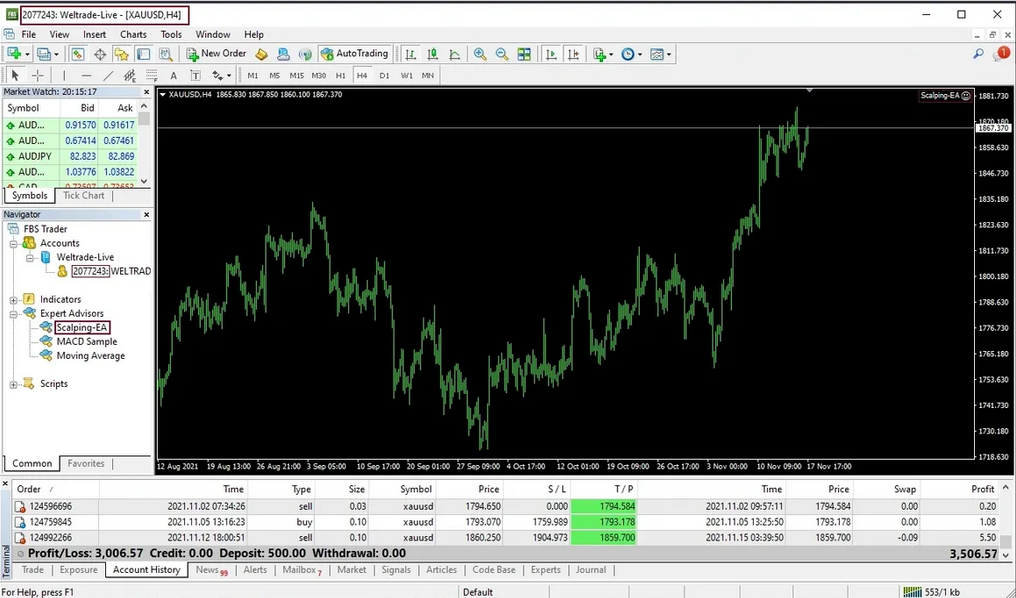
The Scalping EA Robot for MT4 is engineered to capitalize on small market movements, making quick and precise trades to maximize your profit potential. It employs a sophisticated scalping strategy, leveraging advanced algorithms to identify and execute trades at optimal moments. This approach is particularly effective in the H4 (four-hour) timeframe, providing a balance between trade frequency and reliability.
By maintaining default preset settings, the EA ensures that the strategy is applied consistently, minimizing human error and maximizing efficiency. The Scalping EA Robot also incorporates advanced risk management features to protect your investment, including stop-loss and take-profit mechanisms.
Trading Specifications
- Platform: MetaTrader 4 (MT4)
- Recommended Pair: XAUUSD / GOLD
- Timeframe: H4 (four-hour) timeframe for optimal performance
- Minimum Balance: Start trading with as little as $10
- Preset: Default settings optimized for performance
- VPS: Recommended for 24/7 operation to ensure continuous trading
- Broker: Preferably an ECN broker with low spread and minimal slippage for best results
Performance and Reliability
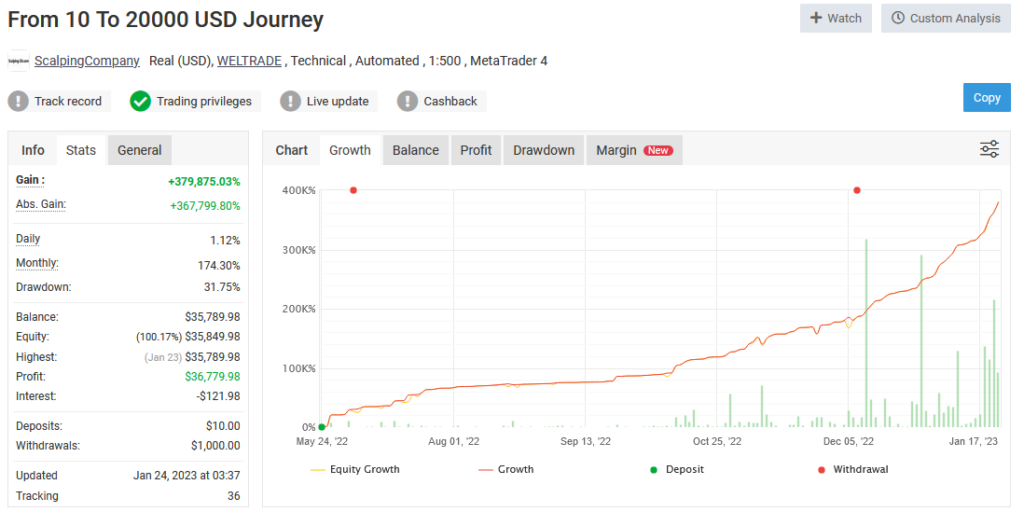
The Scalping EA Robot has demonstrated impressive growth on a real account. Starting with a modest deposit of just $10, it has generated over $35,000 in profits, with $1,000 withdrawn so far. The average daily returns exceed 1%, showcasing the EA’s capability to generate consistent profits. With a peak drawdown of 31%, the Scalping EA Robot balances high returns with effective risk management, ensuring that your investment is protected while achieving substantial growth.
Final Verdict
The Scalping EA Robot for MT4 stands out as a powerful tool for traders looking to enhance their trading strategies with automation. By combining advanced scalping techniques with robust risk management, this EA delivers consistent and reliable performance. Available exclusively on CheaperForex.com, the Scalping EA Robot is an excellent investment for those seeking to maximize their trading potential with minimal effort.
Key advantages of the Scalping EA Robot include its ability to operate continuously with a VPS, making it ideal for traders who want to benefit from the forex market around the clock. The use of an ECN broker with low slippage further enhances its effectiveness, ensuring that trades are executed at the best possible prices.
Invest in the Scalping EA Robot today and experience a new level of trading efficiency and profitability. Let this powerful EA handle the complexities of the market while you enjoy the rewards of automated trading success.
Every order
What’s included with Scalping EA Robot
- Instant downloadReady after checkout and kept in your account
- Free lifetime updatesAdded as soon as we receive them, every version kept in your account
- Unlimited activationsUnlimited live and demo accounts
- Setup helpReal people on Telegram or email
- 7-day money-back guaranteeIf the EA fails to attach to your chart because of errors we can replicate, you get a full refund.
Customer reviews
Reviews of Scalping EA Robot for MT4
You must be logged in to post a review.
- Excellent on Trustpilot 4.6 out of 5 from 120 reviews (opens in a new tab)
- 28,000+ traders since 2019
- 1,560+ official EAs
- Card or crypto payments
Related EAs
Traders also explore
Premium expert advisors at vault-low prices, with your crypto price on every card.
 MT4Save 98%
 MT4Save 86%
 MT4Save 98%
 MT5Save 50%
Ready when you are
Scalping EA Robot for MT4 for $27.96 with crypto
Regular price was $499.99 · $34.95 with card · instant download · free lifetime updates

Scalping EA Robot for MT4$27.96with crypto$34.95 with card
There are no reviews yet.