
Official MT5 version
Silent Exit MT5 EA
Version 2.78
We’re rated Excellent on Trustpilot · 4.6/5 (opens in a new tab)Silent Exit MT5 EA manages seven major currency pairs from one EURUSD M15 chart.
- Multi-pair operation: handles the other supported pairs internally.
- Entry approach: the developer combines volume acceleration with additional indicators.
- Exposure controls: balance/stop-distance sizing or fixed lots, plus a configurable loss threshold.
 MT5Save 30%
What you receive
- Silent Exit.ex5Genuine, unmodified developer file for MetaTrader 5Version 2.78
- Setup guide.pdfA general guide to installing expert advisors.Official step-by-step install guide
Delivered instantly to your account after payment
Regular priceRegular price was $199.00
$139.95 with card
Visa, Mastercard, Apple Pay and Google Pay accepted.
Card payments add bank fees, sales taxes and other charges.
- Official developer build · Version 2.78
- Instant downloadYour file is provided immediately after payment. In very rare cases we manually review an order first, then send your download straight after. If you don’t receive your file, you can request a full refund.
- Free lifetime updatesAll updates are free. They’re provided on a best-availability basis: we get new versions as fast as we can, led by customer demand, but we don’t guarantee them immediately. If you need every update the moment it’s released, our service may not be the best fit for you.
- 7-day money-backRefunds only cover an EA that fails to attach to your chart because of errors we can replicate. We don’t cover changing your mind or not liking the EA. All brokers are different, and results are never promised because markets are constantly changing.
- Unlimited activationsUse it on as many MT5 accounts and computers as you want, live or demo. There are no restrictions on how you use it.
What you receive
- Silent Exit.ex5Genuine, unmodified developer file for MetaTrader 5Version 2.78
- Setup guide.pdfA general guide to installing expert advisors.Official step-by-step install guide
Delivered instantly to your account after payment


28,000+ tradersServed since 2019
Official versionsInstant downloadFree lifetime updatesExtra 20% off with cryptoReal people on support28,000+ tradersTrading since 2019Rated Excellent on Trustpilot
Product description
About Silent Exit MT5 EA
Silent Exit MT5 EA by Fajar Dicky Firmansyah manages seven major FX pairs from one host chart. View the official Silent Exit listing.
The practical appeal is a central place to run a multi-pair setup, with a choice of position-sizing methods and controls you can review before trading. Start by defining that setup clearly, then keep a record of the inputs you intend to use.
Markets and chart setup · Read our Silent Exit review and evidence assessment
Seven FX pairs, one EURUSD M15 host chart
The supported pairs are EURUSD, USDCAD, USDJPY, NZDUSD, USDCHF, AUDUSD and GBPUSD. The current product instruction is to attach the EA to EURUSD M15; it handles the other pairs internally.
The author describes volume acceleration with additional indicators, balance/stop-distance sizing, a fixed-lot alternative and a configurable loss threshold. Our review explains the operating choices and the limits of what the public documentation specifies.
News connection and first operating checks
The developer’s shared setup guide specifies https://nfs.faireconomy.media for its news connection. In MT5, the allowed-address list is under Tools → Options → Expert Advisors → Allow WebRequest. Use the current product’s chart instruction above: the older shared guide also covers other EAs.
| Check | What to record | Why it helps |
|---|---|---|
| Sizing | The selected method and its input value | Avoid confusing a fixed lot amount with a different sizing mode. |
| News | Enabled event filters and exclusion windows | A pause may reflect a deliberate filter rather than a fault. |
| Operation | Connection, status and relevant terminal messages | Keep a concrete observation if you need help. |
After setup, use a broker demo account to inspect operation before committing live funds. Save a configuration change separately so you can distinguish an intentional adjustment from an unexpected behaviour.
Current release notes
The current research snapshot is version 2.78; its 29 August 2026 release note reports an entry-filter correction.
See the public record before deciding
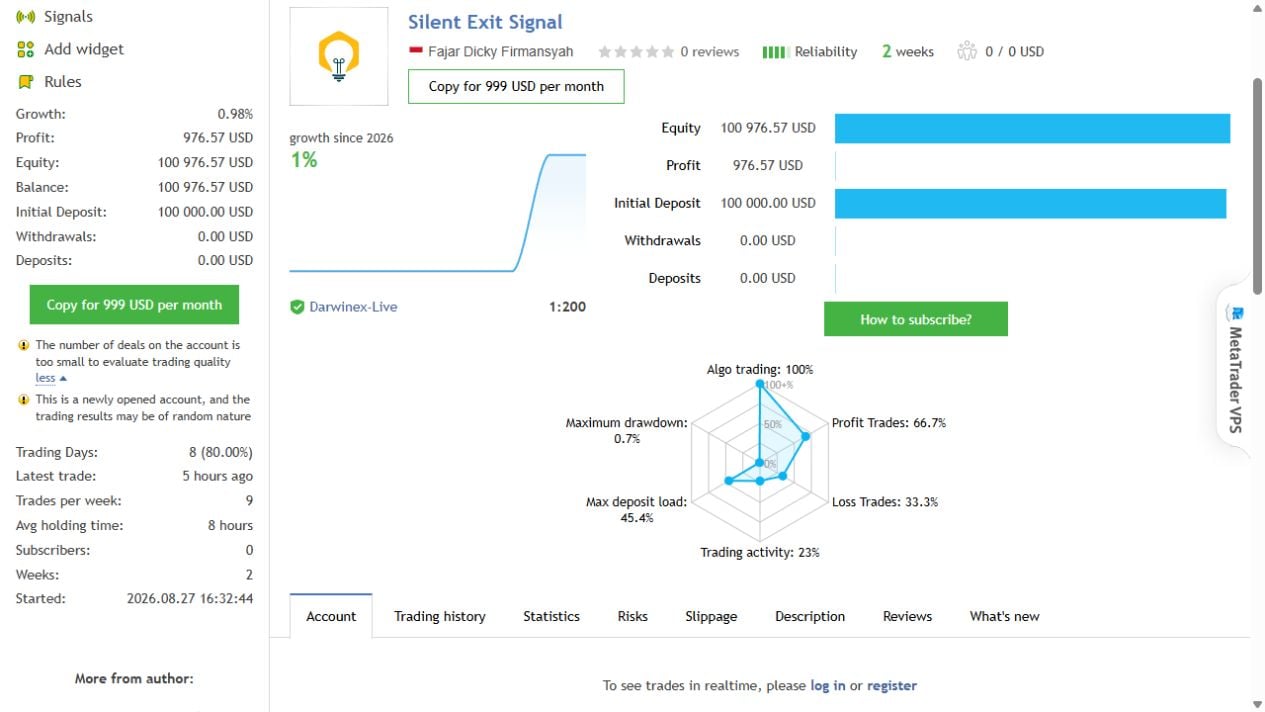
Read our Silent Exit review for an analysis of the signal’s short history, profit concentration, developer backtest and early customer feedback.
Read the Silent Exit MT5 EA review →
Delivery: Standalone MT5 file. Follow the delivery instructions supplied with your order. Free lifetime updates are included, added as soon as we receive them. You never pay twice. Managed installation is also available on request.
Every order
What’s included with Silent Exit
- Instant downloadReady after checkout and kept in your account
- Free lifetime updatesAdded as soon as we receive them, every version kept in your account
- Unlimited activationsUnlimited live and demo accounts
- Setup helpReal people on Telegram or email
- 7-day money-back guaranteeIf the EA fails to attach to your chart because of errors we can replicate, you get a full refund.
Product FAQs
Silent Exit MT5 EA FAQs
Real people on support, by Telegram or our contact form.
How is Silent Exit MT5 delivered?
This offer supplies the standalone MT5 file. Follow the delivery instructions supplied with your order. Free lifetime updates are included, added as soon as we receive them. You never pay twice. If you prefer managed installation, request it using your order instructions.
Can I request managed installation instead?
Yes. Standalone file delivery is the default; managed installation is available on request. Follow your order instructions and quote your order number when contacting CheaperForex.
Which file version is supplied, and how do updates work?
This offer supplies the standalone MT5 file. Follow the delivery instructions supplied with your order. Free lifetime updates are included, added as soon as we receive them. You never pay twice. If you prefer managed installation, request it using your order instructions.
Do I need to attach Silent Exit to every supported pair?
No. Use one EURUSD M15 host chart. Silent Exit manages its seven supported major FX pairs internally; the product description above lists them.
Does the $139.95 offer include the signal subscription or developer bonuses?
The offer covers Silent Exit with standalone file delivery. It does not include the separate MQL5 copy subscription. Bonus products, private-channel access and direct-purchase developer entitlements are not promised as part of this offer.
Where do I ask for help with standalone file delivery?
Use the contact route in your order’s README and quote your order number. For an operating issue, a clear description and the relevant terminal message can help explain what happened.
Customer reviews
Reviews of Silent Exit MT5 EA
You must be logged in to post a review.
- Excellent on Trustpilot 4.6 out of 5 from 120 reviews (opens in a new tab)
- 28,000+ traders since 2019
- 1,560+ official EAs
- Card or crypto payments
Related EAs
Traders also explore
Premium expert advisors at vault-low prices, with your crypto price on every card.
 MT5Save 53%
 MT5Save 30%
 MT5Save 30%
 MT4Save 69%
Ready when you are
Silent Exit MT5 EA for $111.96 with crypto
Regular price was $199.00 · $139.95 with card · instant download · free lifetime updates

Silent Exit MT5 EA$111.96with crypto$139.95 with card
There are no reviews yet.