
VolumeHedger EA MT5
Genuine files only. No cracks, fakes or AI copies. See why
Why our prices aren’t rock-bottom
- The official file. The developer’s own, unmodified EA. Never a crack, a decompiled copy or an AI recreation.
- It trades like the original, because it is the original. AI recreations only copy how an EA looks from the outside, so they can trade very differently.
- Safe to run. Cracked files can hide malware that reaches your computer and your trading account.
- Updates and help. Free updates, a setup guide, and real people on Telegram if you get stuck.
We keep prices as low as we can. We just won’t sell fakes to be the cheapest.
VolumeHedger EA MT5 combines indicator-driven entries with configurable hedging and recovery sequences for gold, Bitcoin and other tested markets.
- Build entries using built-in or compatible custom indicators.
- Set lot sequences, position limits and execution controls.
- Coordinate strategies across charts with magic-number rules.
 MT5Save 44%
What you receive
- VolumeHedger.ex5Genuine, unmodified developer file for MetaTrader 5Version 10.55
- Setup guide.pdfA general guide to installing expert advisors.Official step-by-step install guide
Delivered instantly to your account after payment
Regular priceRegular price was $449.00
$249.95 with card
Visa, Mastercard, Apple Pay and Google Pay accepted.
Card payments add bank fees, sales taxes and other charges.




 Apple Pay and Google Pay ready at checkout
- Official developer build · Version 10.55
- Instant downloadYour file is provided immediately after payment. In very rare cases we manually review an order first, then send your download straight after. If you don’t receive your file, you can request a full refund.
- Free lifetime updatesAll updates are free. They’re provided on a best-availability basis: we get new versions as fast as we can, led by customer demand, but we don’t guarantee them immediately. If you need every update the moment it’s released, our service may not be the best fit for you.
- 7-day money-backRefunds only cover an EA that fails to attach to your chart because of errors we can replicate. We don’t cover changing your mind or not liking the EA. All brokers are different, and results are never promised because markets are constantly changing.
- Unlimited activationsUse it on as many MT5 accounts and computers as you want, live or demo. There are no restrictions on how you use it.
What you receive
- VolumeHedger.ex5Genuine, unmodified developer file for MetaTrader 5Version 10.55
- Setup guide.pdfA general guide to installing expert advisors.Official step-by-step install guide
Delivered instantly to your account after payment


28,000+ tradersServed since 2019
Don’t miss thisSee the EA we recommend
The Gold EA we trade ourselves
DowGold for XAU and US30


We have tested thousands of EAs. DowGold is the one we use and recommend, and we rarely say that. We’re also an official reseller.
Real USD MyFXBook accounts. A live cloud, constantly evolving strategy.
See DowGoldOfficial versionsInstant downloadFree lifetime updatesExtra 20% off with cryptoReal people on support28,000+ tradersTrading since 2019Rated Excellent on Trustpilot
Product description
About VolumeHedger EA MT5
VolumeHedger: build and manage an MT5 hedging strategy
VolumeHedger EA MT5 combines configurable entries with a recovery loop that can open reversing positions and adjust trade sizes. Its appeal is flexibility: use manual entries, built-in indicator conditions or compatible custom indicators, then define how the EA manages the resulting trades. XAUUSD and BTCUSD are prominent applications; Forex and other CFDs require their own tested settings.
What can you configure?
- Entry logic: indicator-based conditions, custom buffers, a second indicator and signal filtering allow strategies beyond one fixed preset.
- Recovery behaviour: select the position limit and lot sequence. Increasing lots introduces martingale exposure; equal lots remove that increase, while a single-position configuration avoids the recovery sequence.
- Execution controls: first-entry spread limits, critical-spread handling, slippage adjustments and swap-aware targets address practical trading costs.
- Scheduling and coordination: trading hours, weekdays, cooldowns and allowed/blocked magic-number lists help organise entries across charts.
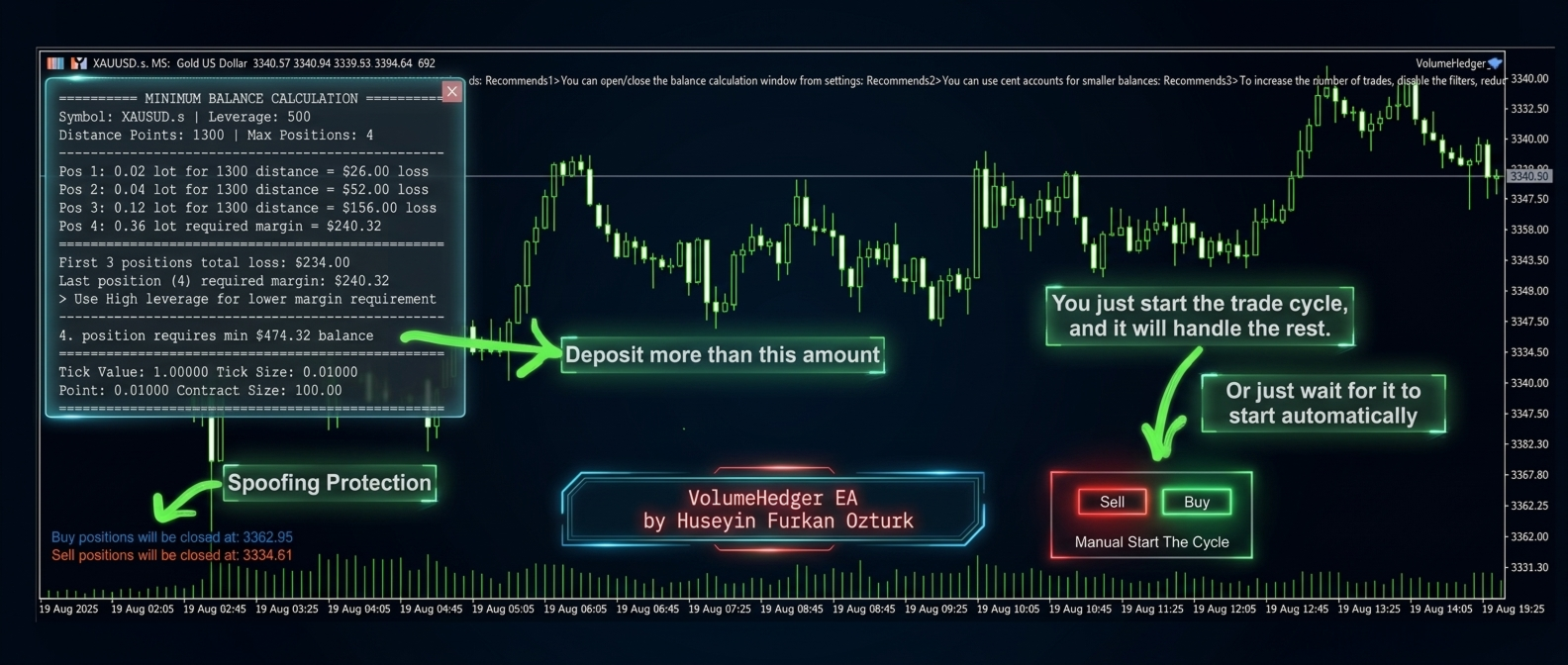
- On-chart controls: inspect balance requirements, position settings and manual start/stop controls before enabling a strategy.
Before choosing your settings
- Platform
- MetaTrader 5; use an account that supports the hedging functions you intend to run.
- Markets and timeframe
- Use a preset designed for the exact instrument. Indicator timeframe is configured in the inputs; the host chart alone does not define it.
- Capital and margin
- No universal minimum balance. Review the chosen set’s full losing-cycle exposure, margin requirement, broker contract size and leverage.
- Terminal
- Keep MT5 or a suitable VPS running for automated management. Broker execution, spread and slippage affect results.
- Optional indicators
- Some custom-indicator presets need separate indicators. Paid third-party tools and VPS costs are not included in this offer.
Understand the recovery risk: a capped sequence can still produce a substantial loss. “RiskLow” settings can add a recovery position and increase potential loss. Several simultaneous sets share the same account margin; their individual limits are not an account-wide drawdown cap.
The developer’s latest release checked on 13 September 2026 is 10.1. The release notes describe an order-confirmation lock for delayed broker responses. Preset changes have continued separately, including a September correction to a custom-indicator configuration.
Read our VolumeHedger review: live accounts, settings and customer feedback for the detailed evidence. We also carry HFT Spike EA MT5 from the same developer; it is a separate product, not an included component.
Source: official VolumeHedger listing.
Delivery: Standalone MT5 file. Follow the delivery instructions supplied with your order. Free lifetime updates are included, added as soon as we receive them. You never pay twice. Managed installation is also available on request.
Every order
What’s included with VolumeHedger
- Instant downloadReady after checkout and kept in your account
- Free lifetime updatesAdded as soon as we receive them, every version kept in your account
- Unlimited activationsUnlimited live and demo accounts
- Setup helpReal people on Telegram or email
- 7-day money-back guaranteeIf the EA fails to attach to your chart because of errors we can replicate, you get a full refund.
Product FAQs
VolumeHedger EA MT5 FAQs
Real people on support, by Telegram or our contact form.
Does VolumeHedger use martingale?
It can. A rising lot sequence uses martingale recovery. Equal lots remove lot escalation, and a single-position configuration avoids the recovery loop. The selected preset determines the exposure.
What balance does VolumeHedger need?
There is no universal minimum. Check the preset’s potential losing cycle and margin needs against the broker’s contract size, leverage and stop-out rules. Multiple sets share the same account capital.
Which markets and timeframe does it trade?
Gold and Bitcoin are prominent applications. Forex and other CFDs need suitable instrument-specific settings. Indicator timeframe is set in the inputs rather than determined solely by the host chart.
Is RiskLow the smallest possible loss?
No. The developer guide describes RiskLow as adding a recovery position, which can increase the loss and capital needed when a sequence fails.
Are all custom indicators included?
No. Some presets require separate indicators, and paid third-party indicators or VPS services can have additional costs.
Is it suitable for a prop-firm account?
Do not assume so. Check the firm’s current rules and whether the preset’s hedging, martingale exposure and potential drawdown fit its limits. This offer does not promise challenge compliance.
How is VolumeHedger supplied and updated?
This offer supplies the standalone MT5 file. Follow the delivery instructions supplied with your order. Free lifetime updates are included, added as soon as we receive them. You never pay twice. If you prefer managed installation, request it using your order instructions.
- Excellent on Trustpilot 4.6 out of 5 from 120 reviews (opens in a new tab)
- 28,000+ traders since 2019
- 1,570+ official EAs
- Card or crypto payments
Related EAs
Traders also explore
Premium expert advisors at vault-low prices, with your crypto price on every card.
 MT5Save 50%
 MT5Save 75%
 MT5Save 50%
 MT5Save 50%
Ready when you are
VolumeHedger EA MT5 for $199.96 with crypto
Regular price was $449.00 · $249.95 with card · instant download · free lifetime updates

VolumeHedger EA MT5$199.96with crypto$249.95 with card