Last updated: April 2026 | Rated: 4.5/5
Most EAs on the MQL5 marketplace fight for attention by trading the same handful of instruments — Gold, GBPUSD, EURUSD, US30. Walk through the top 100 best-sellers and you’ll see the same five symbols repeated until you wonder if any other currency pair exists.
Then there’s Quantum King EA, which trades AUDCAD.
AUDCAD is the pair nobody talks about at forex meetups. The pair that doesn’t spike $50 on an NFP release. The pair that moves in slow, mean-reverting oscillations while Gold is having violent mood swings on the other side of your portfolio. And that — counterintuitively — is exactly why Quantum King has earned a perfect 5-star rating from 99+ verified MQL5 reviews and become one of the fastest-growing products in Bogdan Ion Puscasu’s Quantum lineup.
This guide covers everything: where to download Quantum King legitimately (both MT4 and MT5 builds), why AUDCAD was deliberately chosen over Gold, how the volatility-aware grid actually works, the live signal data, full installation walkthrough, broker requirements, the portfolio mathematics that make King + Queen + Emperor work together, and the honest grid risks that no marketing copy will mention.
⚠️ Searching for Quantum King EA free download? Quantum King is an official MQL5 marketplace product with built-in DRM. Cracked .ex5 or .ex4 files do not exist for marketplace EAs. Sites offering “free downloads” deliver malware, fake EAs that won’t execute, or funnel you into Telegram VIP signal scams. CheaperForex offers Quantum King MT5 and Quantum King MT4 at a significant discount with official activation and a 7-day money-back guarantee.

Quantum King EA — Quick Specifications
Product: Quantum King EA (MT4 and MT5 builds)
Developer: Bogdan Ion Puscasu
Trading instrument: AUDCAD only
Timeframe: M5
Strategy: Volatility-aware grid + adaptive martingale recovery
Platforms: MetaTrader 5 and MetaTrader 4 (separate builds, shared signal)
MQL5 rating: 5.0 stars / 99+ reviews
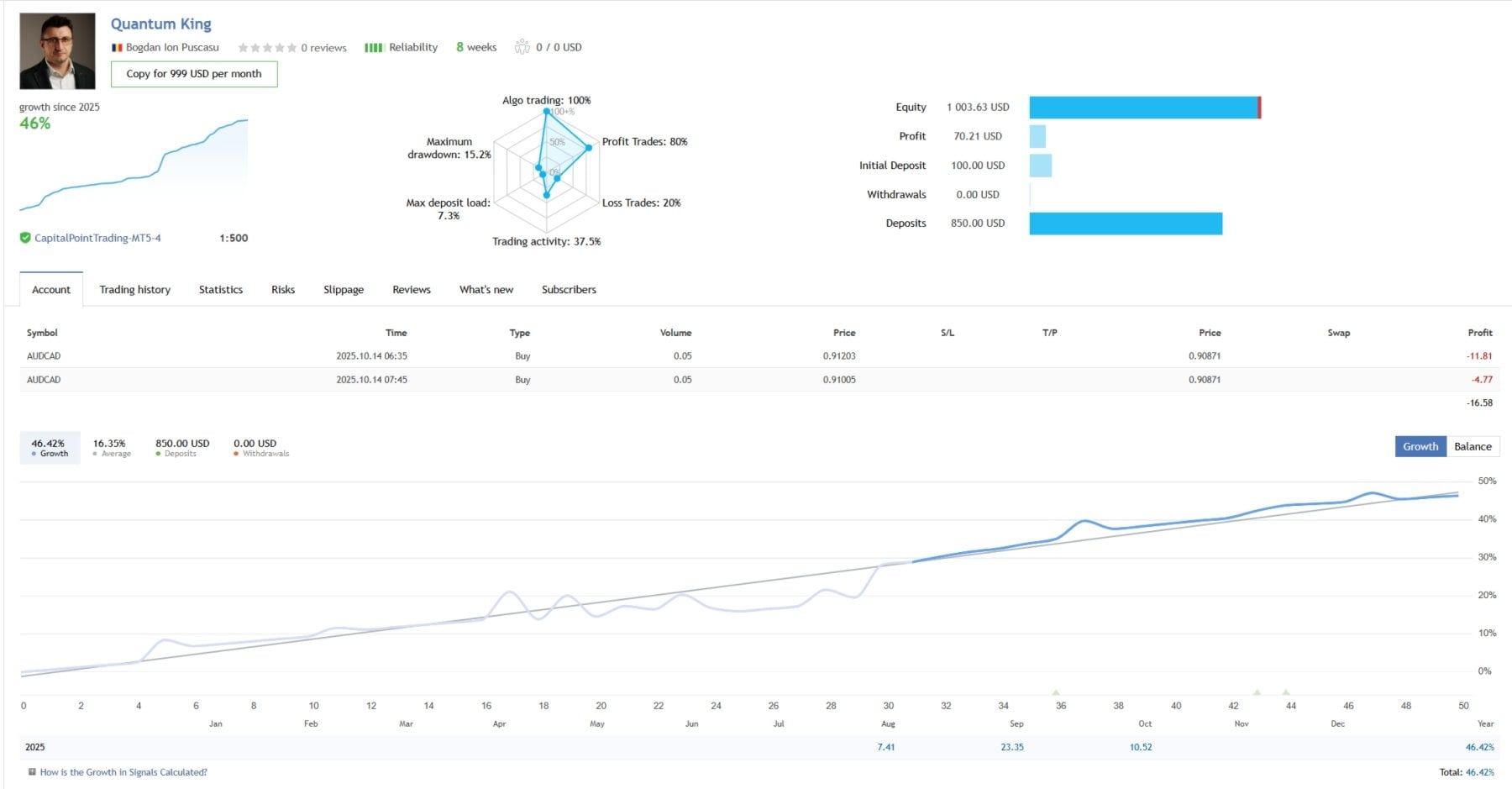
Live signal: 146% growth, 22+ weeks, IC Markets 1:500
Win rate: 78.61% across 159 trades
Profit factor: 3.44
Max equity drawdown: 21.23%
Minimum deposit: $200 (recommended $500+)
Risk presets: Conservative / Balanced / Aggressive
VPS: Strongly recommended
Price: $549 on MQL5 / discounted on CheaperForex
Why AUDCAD? The Strategic Logic Behind the Pair Selection
Every potential Quantum King buyer asks the same question: with hundreds of Gold EAs already dominating MQL5 — including Bogdan’s own Quantum Queen — why build a grid system for a pair most traders ignore? The answer reveals what separates serious portfolio thinking from EA-of-the-month marketing.
AUDCAD is a commodity cross. The Australian dollar is heavily linked to mining exports (iron ore, coal, copper). The Canadian dollar is heavily linked to oil exports. When commodities move, both currencies respond — but they often respond in opposite directions, which means the AUDCAD pair oscillates within a relatively predictable range rather than trending hard in one direction for months.
This commodity-cross dynamic creates exactly the conditions grid trading needs. Grid systems profit from oscillation — they place orders above and below current price, banking small profits as price bounces back and forth. AUDCAD oscillates more reliably than most major pairs, which is why the same grid engine that powers Queen on Gold has been re-tuned for AUDCAD as Quantum King.
The pair is also structurally quieter than Gold. AUDCAD doesn’t gap $30 on a tweet. It doesn’t spike $100 during NFP. The maximum adverse moves are smaller, which means grid levels are less likely to be blown through by a single news event. For a grid + adaptive martingale system, lower volatility ceiling translates directly to lower blow-up risk.
Multiple reviewers have independently arrived at the same conclusion. One described AUDCAD as “a relatively stable pair, so there are never many positions stacked at once.” Another said King provides “the perfect synergy” when paired with Queen. A third reported running Queen, Emperor, and King together as “the best and most stable EA portfolio I have ever used.”
Active Development and Recent Refinements
Bogdan’s update cadence is one of the strongest signals in the EA space — frequent point releases mean active development, not launch-and-abandon. Recent improvements include: refined volatility detection for AUDCAD’s specific oscillation patterns, improved broker symbol auto-detection (handles AUDCAD, AUDCAD.r, AUDCADm, AUDCAD#, and other prefix/suffix variants), updated risk preset calibration following observed live behaviour, smoother handling of low-liquidity periods (Sunday opens, holidays), and improvements to the panel display.
Updates install automatically through MQL5 — no licence reactivation required if you bought through the official channels. You always receive the latest version when buying through CheaperForex.
MT4 vs MT5 — Which Build Should You Choose?
Quantum King is available in both MetaTrader 4 and MetaTrader 5 builds. The strategy logic is identical between platforms; the choice comes down to your existing infrastructure and broker situation.
Choose Quantum King MT5 if: you already run MetaTrader 5, you want to combine Quantum King with MT5-only Quantum products (Queen, Athena, Valkyrie), you have a modern broker offering MT5, or you want native MT5 hedge mode and order management.
Choose Quantum King MT4 if: your broker only offers MT4 (some regulated brokers still don’t provide MT5), you have existing MT4 infrastructure you don’t want to migrate, you run other MT4 EAs you want to keep alongside King, or you prefer MT4’s older but more familiar interface.
Both builds use the same verified MQL5 live signal as their performance reference — so whichever platform you choose, you’re evaluating the same proven strategy logic.
Where to Download Quantum King EA Legitimately
For each platform, two sources, and only two:
MQL5 Marketplace — the official developer pages. Quantum King MT5 at $549, Quantum King MT4 at the equivalent price. Instant activation through MQL5’s built-in licensing, direct support from Bogdan in the product comments, full price.
CheaperForex — authorised reseller pricing significantly below MQL5’s price for both builds, with the same official activation, the same EA file, the same updates, plus a 7-day money-back guarantee before activation and an extra 20% discount for crypto payments.
Anywhere else claiming to offer Quantum King — for free, at suspiciously discounted prices, via Telegram, via cracked .ex5 or .ex4 files, via “private group” downloads — is a scam. The MQL5 DRM cannot be cracked. Files downloaded from those sources either won’t execute, will execute as fake EAs that don’t trade AUDCAD, or contain malware that compromises your trading account credentials.
Why “Free Download” Sites Are Lying
The free-download playbook follows the same script every scam site uses:
You search “Quantum King EA free download.” A site appears in the top results promising the file. You scroll through 1,500 words of generic AI-written review content — vague descriptions, made-up settings, recycled stock images, no real signal data — looking for the download button. You eventually find it near the bottom. You click. A new page loads with a 30-second countdown timer. The timer ends. You’re redirected to a Telegram group.
The Telegram group is the actual product. They’ll either pitch you “VIP signals” at $99/month, push a sketchy broker affiliate link where they earn commission on your deposits, or — in the worst cases — distribute a file that contains a credential stealer targeting your MT4 or MT5 login details.
The reason these sites rank in Google despite providing no actual product: the algorithm sees matching keywords (“free download”), reasonable dwell time (because users scan-read looking for the link), a click-through to a secondary page (engagement signal), and no immediate bounce. From Google’s perspective it looks like a satisfied search journey. From your perspective it’s wasted time and a potentially compromised trading account. The “free EA” never existed.
Quantum King Live Signal Performance

The verified MQL5 signal has been running since September 2025 on IC Markets at 1:500 leverage. The numbers after 22+ weeks:
146% total growth. Steady accumulation rather than dramatic spikes — exactly what you’d expect from a grid EA running on a stable mean-reverting pair. Monthly growth averages 7.11%, which is modest by aggressive-EA standards but consistent week-on-week.
78.61% win rate across 159 trades. Six trades per week average. Most close profitably as the AUDCAD oscillation cycles through the grid. Losing trades typically belong to recovery sequences during deeper drawdown periods.
3.44 profit factor. Winning trades generate 3.44× the gross losses of losing trades. Above 3.0 is strong for any grid system. King’s PF reflects AUDCAD’s structural advantage — the lower-volatility instrument means fewer catastrophic recovery sequences eating into profits.
17.04 recovery factor. This is the metric most retail traders ignore but that institutional risk managers care about. It measures how efficiently the system recovers from drawdowns — net profit divided by maximum drawdown. 17 is excellent, indicating drawdowns get recouped quickly relative to their size.
21.23% max equity drawdown. Here’s the grid honesty. During adverse AUDCAD moves, positions accumulated and floating loss reached 21% of account equity before the pair reverted and the grid closed profitably. 21% is meaningful — but notably the same drawdown level Queen produces on Gold, despite AUDCAD being a far quieter instrument. Translation: King runs at moderately aggressive grid settings.
The signal is still relatively young. 22 weeks isn’t a full AUDCAD cycle. We haven’t seen how King handles a sustained AUD or CAD trend driven by a major commodity shock — an oil crash, a China slowdown, an Australian mining disruption. Grid systems are most vulnerable during these one-directional moves, and AUDCAD hasn’t produced one during the signal’s lifetime yet.
How the Volatility-Aware Grid + Adaptive Martingale Works
Quantum King uses a volatility-aware grid with adaptive martingale recovery. In plain English: it opens positions at calculated intervals on AUDCAD, and when the market moves against the grid, it opens recovery positions with adjusted lot sizes to bring the basket back to profit when price reverts.
The “volatility-aware” component is what separates it from a basic grid. Grid spacing adjusts based on current AUDCAD volatility. When the pair is calm, the grid tightens — closer entries, faster cycling, more frequent small profits. When volatility spikes (typically during commodity news or risk events), the grid widens — more distance between levels, less risk of over-stacking positions during fast moves.
The “adaptive martingale” component handles drawdown recovery. When price moves against the initial position, recovery positions open at calculated intervals with sizing designed to bring the basket back to break-even or profit on the eventual reversion. The “adaptive” qualifier means the recovery lot sizing adjusts to current market conditions rather than blindly doubling — which is what blows up traditional martingale systems.
This is the same grid architecture that powers Queen, adapted for a completely different instrument. Queen’s grid is calibrated for Gold’s explosive volatility. King’s grid is calibrated for AUDCAD’s quieter oscillation. Same underlying engine, different tuning.
The EA ships with three preset risk profiles — conservative, balanced, and aggressive — so you don’t need to touch internal parameters. The closed-system design prevents users from accidentally misconfiguring the grid spacing or recovery logic, which is how most grid EAs get their operators in trouble.
Quantum King Risk Presets Explained
The choice of risk preset is the most important configuration decision you’ll make. Get this wrong and even a well-engineered EA can produce drawdowns your psychology can’t tolerate.
Conservative — slower grid cycling, wider spacing, smaller initial position sizes. Realistic monthly target: 3–5%. Drawdowns typically capped well below 15%. Best for new buyers, larger accounts where capital preservation matters more than aggressive returns, and traders who want to test King’s behaviour for several months before increasing risk.
Balanced — middle-ground spacing and sizing. The most common starting point. Realistic monthly target: 5–10%. Drawdowns 15–20% range. Suitable for most users with $1,000+ deposits.
Aggressive — closer to the published signal’s settings. Tighter grid, larger sizing, faster recovery. Realistic monthly target: 8–15%. Drawdowns can approach the signal’s 21%+ figures. Recommended only for traders who’ve seen King’s behaviour on their account through a full drawdown cycle and are comfortable with the volatility.
Default starting point recommendation: Conservative for the first 4–6 weeks. Observe behaviour. Move to Balanced once you’ve seen drawdowns recover. Only consider Aggressive after several months and a full cycle of grid extension and recovery.
Quantum King Installation Guide (MT5)
Once you’ve purchased Quantum King MT5 from MQL5 or CheaperForex, follow these steps:
Step 1: Activation. If you bought from MQL5, the EA appears automatically in your MT5 Navigator under Market. If you bought from CheaperForex, we activate it remotely on your MT5 terminal in around 2 minutes via UltraViewer or AnyDesk.
Step 2: Open an AUDCAD chart on M5 timeframe. Find your broker’s AUDCAD symbol (might be AUDCAD, AUDCAD.r, AUDCADm, AUDCAD# — King auto-detects). Set timeframe to M5 (this is non-negotiable; the EA is calibrated for M5).
Step 3: Enable Algo Trading. Click the Algo Trading button in the MT5 toolbar so it turns green. No EA will trade without this.
Step 4: Drag Quantum King onto the chart. Find King in the Navigator under Expert Advisors. Drag it onto the open AUDCAD M5 chart. The settings dialog appears.
Step 5: Select your risk preset. On the Inputs tab, choose Conservative, Balanced, or Aggressive. New users should start with Conservative regardless of account size.
Step 6: Confirm Common tab settings. Ensure Allow Algo Trading is ticked. Click OK.
Step 7: Verify the EA is running. A smiley face icon appears in the top-right of the chart when running correctly. A sad face means Algo Trading isn’t enabled or there’s a license issue.
Quantum King Installation Guide (MT4)
For Quantum King MT4, the installation is slightly different because MT4 uses local file installation rather than marketplace activation:
Step 1: Receive the .ex4 file. After purchase from CheaperForex, you receive the Quantum King MT4 .ex4 file via email and your customer dashboard. If purchased from MQL5, the file installs through MT4’s marketplace automatically.
Step 2: Open MT4 and locate the data folder. In MT4, click File → Open Data Folder. A Windows Explorer window opens.
Step 3: Copy the EA into the Experts folder. Navigate to MQL4 → Experts and paste the Quantum King MT4 .ex4 file there.
Step 4: Refresh MT4. Close and reopen MetaTrader 4, or right-click Expert Advisors in the Navigator and select Refresh.
Step 5: Open an AUDCAD M5 chart. Set timeframe to M5.
Step 6: Enable AutoTrading. Click the AutoTrading button in MT4’s toolbar so it turns green.
Step 7: Drag Quantum King onto the chart. Find King in the Navigator under Expert Advisors. Drag it onto the AUDCAD M5 chart.
Step 8: Load preset and confirm. Select your risk preset on the Inputs tab. Ensure Allow live trading is ticked on the Common tab. Click OK.
Step 9: Verify. A smiley face appears in the top-right when the EA is running.
Broker Requirements for Quantum King
King is sensitive to broker conditions. The wrong broker can degrade performance even with the EA configured perfectly.
Account type: ECN, Raw Spread, or Razor account with low AUDCAD spreads. Standard accounts with wider spreads will eat into the small grid-level profits.
Hedge mode: Mandatory. The EA opens positions in both directions simultaneously and cannot function on netting accounts. Most brokers offer both options at signup.
Leverage: Minimum 1:100. 1:500 strongly recommended — the live signal runs at 1:500 on IC Markets. EU-regulated 1:30 accounts will struggle to provide enough margin headroom for the grid to extend during adverse moves.
AUDCAD pricing: Standard 5-decimal pricing. Most brokers use this format for AUDCAD; King handles symbol naming variants automatically.
Recommended brokers: IC Markets (where the official signal runs), IC Trading, Pepperstone, or any reputable ECN broker with tight AUDCAD spreads. All three support both MT4 and MT5.
VPS Requirements
A VPS is strongly recommended for Quantum King. Grid EAs manage baskets of open positions that require continuous monitoring. If your home internet drops while a grid is open during an adverse AUDCAD move, those positions become unmanaged — and unmanaged grids during one-directional moves are how grid systems blow up.
A forex VPS costs $13–25/month, runs MT4 or MT5 24/5, and stays online when your home connection doesn’t. Choose a VPS provider with a data centre near your broker’s server (most brokers publish their server location); lower latency means better fills on grid orders.
Minimum Deposit and Account Sizing
Technically you can run Quantum King from $200, but realistic minimums depend on your chosen risk preset.
Aggressive preset: $1,000+ minimum. Smaller accounts will hit margin warnings during the deeper grid extensions that produce the published signal’s returns.
Balanced preset: $500+ comfortable. The middle-ground risk profile suits this size band well.
Conservative preset: $200+ technically possible, $500+ comfortable. Lower lot sizes and wider spacing mean smaller margin requirements.
For traders building a Quantum portfolio with King + Queen + Emperor running simultaneously, $3,000+ per EA on separate accounts (or $9,000+ on a single account split across the three) provides comfortable margin headroom without forcing you into overly conservative settings on any individual product.
99 Reviews, Perfect Score — What the Community Is Saying
A perfect 5-star rating from 99 verified MQL5 reviews on a grid EA is genuinely remarkable. Grid systems typically attract complaints during drawdown periods — users who don’t understand the strategy panic when positions accumulate and leave negative reviews. That this hasn’t happened across 99 reviews suggests either the drawdowns have been manageable enough not to trigger panic, or the community understanding of what they’re running is unusually high.
The review themes tell a consistent story. One buyer recovered the purchase cost “within about a week” and now runs King alongside Queen. Another described “consistent profits trading AUDCAD” matching demo and live results. A third specifically praised the low number of stacked positions — confirming that AUDCAD’s stability keeps the grid from overextending. A recent reviewer called the drawdown “incredibly low” combined with “massive profitability” and recommended running King + Queen together as “the best and most stable EA portfolio I have ever used.”
77 purchases per month at $549 on MQL5 indicates strong sustained demand, not a launch spike. The EA continues selling at high velocity many months after release. For context, that monthly purchase volume puts King in the top revenue bracket of the entire MQL5 marketplace.
The Quantum Portfolio Strategy: King + Queen + Emperor + Valkyrie
This is where Quantum King’s value becomes clearest. Running it alone is fine — 146% growth with a 3.44 PF is strong in isolation. But running it alongside other Quantum EAs is where the portfolio mathematics start working in your favour.
Queen + King: Gold grid + AUDCAD grid. Different instruments, different volatility profiles, different correlation structures. When Gold is ranging quietly (Queen sitting idle), AUDCAD may be oscillating perfectly for King. When Gold is trending hard (Queen accumulating positions through drawdown), King may be quietly cycling its grid on a calm AUDCAD day. The instruments are uncorrelated, which means simultaneous drawdowns are statistically improbable.
Queen + King + Emperor: Adds GBPUSD into the mix. Three completely different instruments, three independent grid systems, three sets of conditions that need to go wrong simultaneously to produce a portfolio-level crisis. Any one EA might draw down on any given week — but the probability of all three drawing down at the same time is significantly lower than any individual drawdown probability.
Add Valkyrie: Now you’ve got a non-grid Gold EA running alongside the grid-based ones. Strategy diversification on top of instrument diversification. When grid mechanics are struggling (sustained one-directional moves), Valkyrie’s fixed-SL approach is in its element.
This portfolio thinking is why Bogdan built King on AUDCAD instead of another Gold EA. He didn’t need a fourth Gold product. He needed a low-correlation diversifier his existing customers could slot into their portfolio. The 77 purchases/month suggests those customers understood exactly what he was offering.
Quantum King vs Other Quantum EAs
How King compares to its Quantum siblings:
vs Quantum Queen: Queen trades XAUUSD (Gold) with a different grid calibration. Queen has 480+ reviews and 93+ weeks live; King has 99+ reviews and 22+ weeks live. Queen produces higher peak returns (1,385% live) at the cost of greater drawdown variability. King produces steadier, lower returns (146% live) with more predictable behaviour due to AUDCAD’s stability. They’re complementary, not competitive.
vs Quantum Emperor: Emperor trades GBPUSD with its own grid logic. Emperor has 503+ reviews and a longer track record. King and Emperor are designed to run together — different majors, different correlation, complementary risk profiles.
vs Quantum Valkyrie: Valkyrie trades Gold with fixed stop-losses (no grid). Polar opposite mechanic to King. Running both gives you grid + non-grid strategy diversification within the same developer ecosystem.
vs Quantum Athena: Athena is the lighter “current-conditions Queen” for Gold. Trades Gold with Queen’s grid engine stripped to current-conditions tuning. Athena and King don’t overlap — different instruments, different roles in the portfolio.
The Grid Risk (The Honest Bit)
Grid + martingale carries structural risk that no amount of adaptation eliminates. During a sustained one-directional move on AUDCAD — which can happen during commodity shocks, risk-off events, or central bank divergence — positions accumulate, floating loss grows, and the system relies on eventual mean reversion to recover. If reversion doesn’t come, the drawdown deepens.
AUDCAD’s natural mean-reversion tendency reduces this risk compared to trending instruments like Gold, but doesn’t eliminate it. The 21% max equity drawdown on the live signal shows the system has already been tested by some adverse moves. What we haven’t seen yet is how King handles a truly exceptional move — a 500-pip AUDCAD trend that doesn’t revert for months. Such moves are rare in AUDCAD’s history but they do occur.
The Conservative preset exists for this reason. Start there. Use adequate capital ($500+ minimum, ideally $1,000+ per EA). Run on a VPS so the grid can be managed 24/5. And understand that grid drawdowns are temporary by design — but only if you don’t manually close positions during them. The single most common way grid traders destroy their accounts isn’t bad markets; it’s intervening during normal drawdown sequences and locking in losses the system would have recovered.
Who Quantum King Works For (and Who It Doesn’t)
This isn’t about account size or technical skill. It’s about what you actually need from an EA.
King works for you if: you’re already running Queen and want a low-correlation diversifier; you want exposure to a quieter instrument than Gold; you’re building a Quantum portfolio and need the AUDCAD slot filled; you can sit through 15–20% drawdowns on Conservative or Balanced settings without intervening; you understand grid mechanics and accept the structural risks.
King doesn’t work for you if: you can’t psychologically handle floating drawdowns; you want exciting screenshots and dramatic monthly returns (King is deliberately boring); you’re trading prop firm challenges that prohibit grid systems; you’re running EU-regulated 1:30 leverage; you need exposure to majors and don’t want a niche pair.
Frequently Asked Questions
Where can I download Quantum King EA MT4 or MT5?
Two legitimate sources for each platform: MQL5 marketplace at $549, or CheaperForex at a significant discount with a 7-day money-back guarantee before activation. Quantum King MT5 | Quantum King MT4.
Can I download Quantum King for free?
No. Quantum King is an MQL5 marketplace product with built-in DRM that cannot be cracked or pirated. Sites offering “free downloads” distribute malware, fake EAs, or funnel you into Telegram VIP signal scams. The only legitimate sources are MQL5 and CheaperForex.
What’s the difference between Quantum King MT4 and MT5?
The strategy logic is identical between platforms — same volatility-aware grid, same adaptive recovery, same AUDCAD-only calibration, same shared live signal. The differences are platform-native order management and broker compatibility. Choose MT5 if you run modern MT5 brokers and want access to the wider Quantum ecosystem (Queen, Athena, Valkyrie are MT5-only). Choose MT4 if your broker doesn’t offer MT5 or you have existing MT4 infrastructure.
What’s the difference between Quantum King and Quantum Queen?
Queen trades XAUUSD (Gold) with a Gold-calibrated grid. King trades AUDCAD with a volatility-aware grid + adaptive martingale tuned for AUDCAD’s commodity-cross dynamics. Different instruments, different strategies, designed to complement each other in a portfolio.
Why does Quantum King trade AUDCAD instead of a major pair?
AUDCAD’s mean-reverting commodity-cross dynamics suit grid strategies better than trending majors. The pair oscillates reliably, doesn’t spike as violently as Gold on news, and has low correlation with XAUUSD and GBPUSD — making it ideal for portfolio diversification alongside Queen and Emperor.
Does Quantum King work on prop firm accounts?
No. Grid + martingale is prohibited by most prop firms, and the 21% drawdown profile would exceed most funded account drawdown limits. King is designed for personal accounts with flexible rules. For prop firms, look at Quantum Valkyrie instead — it uses fixed stop-losses and is prop-firm compatible.
Is 22 weeks of live signal data enough?
It’s a solid start but not a full commodity cycle. We haven’t seen how King handles a sustained AUD or CAD trend driven by a major commodity shock. The developer’s broader track record (Queen’s 93+ weeks live, Emperor’s extensive history, 1,600+ combined reviews across the Quantum line) provides confidence in the engineering quality, but King specifically would benefit from another 6+ months of public live data.
Do I need a VPS for Quantum King?
Strongly recommended, bordering on mandatory. Grid EAs manage baskets of open positions that require 24/5 monitoring. If your connection drops while positions are open during an adverse AUDCAD move, the grid becomes unmanaged. A forex VPS costs $13–25/month.
Can I run King and Queen together?
Yes — this is the intended use case and the most common buyer profile. Run them on separate charts (AUDCAD M5 for King, XAUUSD for Queen) within the same MT5 terminal. The instruments are uncorrelated, so the EAs diversify each other’s risk. Multiple reviewers describe this combination as their preferred setup. Note: Queen is MT5-only, so portfolio combinations require the MT5 build of King.
What broker should I use for Quantum King?
IC Markets (where the official signal runs), IC Trading, or Pepperstone. ECN/Raw/Razor account with tight AUDCAD spreads, hedge mode enabled, minimum 1:100 leverage (1:500 recommended). All three support both MT4 and MT5.
What’s the minimum deposit?
Technically $200 on the Conservative preset. Realistically $500+ for comfortable Conservative operation, $1,000+ for Balanced, $1,500+ for Aggressive. Larger deposits provide grid extension headroom during adverse moves.
Which risk preset should I start with?
Conservative, regardless of account size or experience. Run for 4–6 weeks. Observe how drawdowns feel on your account in real money. Move to Balanced only after you’ve seen at least one full grid extension and recovery cycle. Aggressive should only be considered after several months of comfortable Balanced operation.
Does the EA work on AUDCAD only or other pairs?
AUDCAD only. The grid spacing, volatility detection, and recovery logic are calibrated specifically for AUDCAD’s price behaviour. Running King on other pairs is not supported and will produce poor results.
How often does Quantum King update?
Bogdan ships frequent point releases across his entire Quantum product line. Updates install automatically through MQL5 — no reactivation needed if you bought legitimately. You always receive the latest version when buying through CheaperForex.
The Verdict on Quantum King EA
Quantum King doesn’t try to be exciting. It trades AUDCAD on M5 with a volatility-aware grid. It doesn’t make headlines. It doesn’t produce screenshots that make you gasp. What it does is fill the gap in a portfolio where everything else is correlated to Gold, GBPUSD, or the US dollar — and it does it with a perfect 5-star rating from 99+ verified reviews, 146% verified growth over 22+ weeks, and the engineering quality of MQL5’s most successful developer.
The grid + martingale risk is real and unavoidable. The 21% drawdown happened. More drawdowns will happen. If that’s incompatible with your psychology, King isn’t for you. But if you’re already running Queen and you understand grid dynamics, King on AUDCAD provides exactly the kind of uncorrelated diversification that turns a single-EA gamble into a portfolio strategy.
We rate Quantum King 4.5 out of 5. The half-star held back reflects the inherent structural risk of grid + martingale and the need for more signal history through a full AUDCAD commodity cycle. For traders building a Quantum portfolio or looking for automated AUDCAD exposure with genuine community validation, King delivers.