- Official listing: Squid X MT5
- Public account: Developer-linked signal — currently unavailable
Squid X MT5 is an H1 gold EA with a recovery component and configurable cash-based risk controls. Duy Van Nguy describes entries using price action, trendlines, Fibonacci levels and EMA context. The questions that matter are how its recovery exposure builds, how the USD stop interacts with lot sizing, and what can currently be verified outside a simulation.
Our assessment: the cash stop, entry-frequency cap and configurable session offer practical controls to inspect. The key limitations are the recovery exposure and an unavailable developer-linked signal. This is a candidate for controlled testing, not a substantiated promise of a low-drawdown live record.
View product details and current pricing.

Reviewed 23 September 2026 using the public MT5 listing, release history, seller page and customer feedback. We have not independently traded or backtested the executable.
Why this MT5 review differs from the older MT4 page
The existing MT4 product remains available on CheaperForex, with its original offer unchanged. This article examines the current MT5 material. It does not assume that a feature introduced in an MT5 update also exists in the older MT4 file.
That distinction is important here because the release notes document changes to recovery, risk calculation, cash stops and daily trade limits. Copying the older edition’s performance figures or “no grid” wording into an MT5 page would conceal those changes. Choose the edition that matches your terminal, and test its actual inputs.
View the separate Squid X MT4 product
What the recovery illustration tells us
The developer’s gallery shows layered buy entries during a decline and a later exit target. It is useful as an explanation of the advertised recovery concept, but it is not a broker statement, a software execution log or a guarantee that price reaches the illustrated exit.
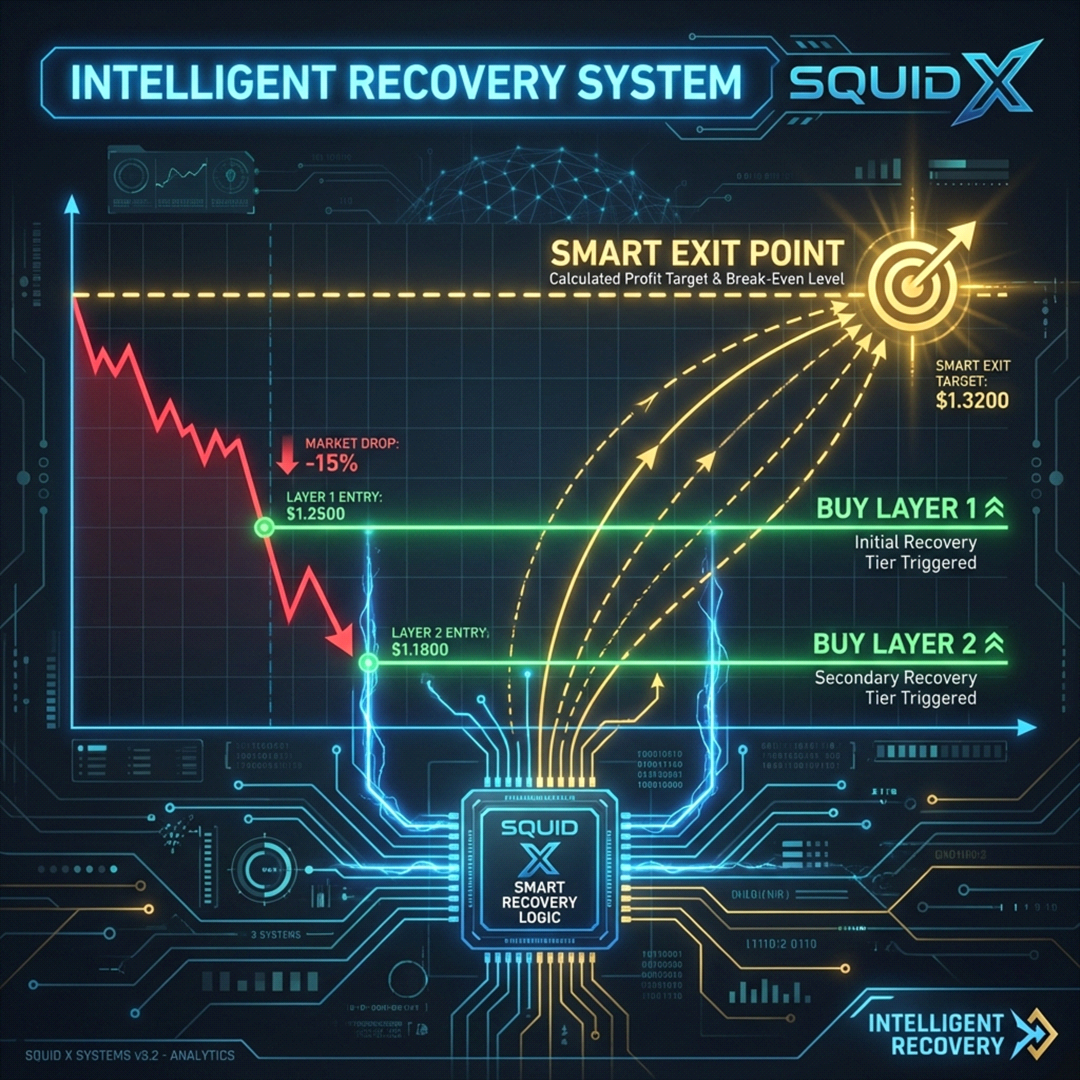
The update history introduced Trade Recovery and later Recovery Speed Mode. An earlier note also refers to a grid-order issue. These sources do not fully disclose the lot progression or every trigger, so a categorical claim that the current EA never averages or increases exposure would be unjustified.
In practice, inspect the maximum position count, combined volume, stop handling and recovery behaviour through an extended adverse move. Multiple entries in the same gold move remain correlated. More entry layers should not be mistaken for diversification.
The USD stop is the most consequential setup change
April 2026 release notes describe replacing a pip stop with STOP_LOSS_USD and revising the equity-risk sizing calculation. With fixed lots, the user chooses a cash stop; with risk-percent sizing, the intended loss follows the selected share of equity. This links the sizing and stop decisions more explicitly than an isolated lot-number input.
A cash label does not prove that every exit is a broker-held hard stop. The historical notes also mention an option to hide the stop loss. Check the supplied setting and whether continued terminal connectivity is required to enforce it. Spread, gaps, slippage and broker volume increments can cause the realised loss to differ from the intended cash amount.
Daily entries and session controls
The May 2026 update added an optional daily order cap and improved panel reporting. The cap pauses new entries until the next trading day after its configured limit. It does not necessarily close existing trades or cap the money already at risk.
Trading-hour selection and spread/slippage controls are also documented. Several updates address broker time-zone synchronisation. This makes checking the session against broker time a concrete setup task, especially around daylight-saving changes. The developer’s claim that a time fix makes live results fully match backtests should not be accepted as a guarantee: execution and market data can still differ.
Live monitoring: the advertised link is unavailable
The current listing links to MQL5 signal 2375199. On 23 September 2026 that address returned a message that the signal could not be found. The seller page displayed a signal for a different product, DVN Core Trendline Breakout; that record cannot be substituted as Squid X evidence.
This means we cannot verify current growth, equity drawdown, broker, trade count or floating exposure for Squid X through the advertised link. A removed signal does not establish why it was removed or how the EA performed. It does mean old screenshots and marketing references should not be described as a currently monitored result.
What the five MQL5 reviews add
At the review date, the listing had five customer reviews. JiangGui reported using it for about six months. Other comments praised developer responsiveness, while one explicitly described only a week of demo testing and another was written early in live use.

Those observations provide some support for usability and support experience. They do not provide account-level evidence of profitability, and the longer-use comment does not disclose sizing, drawdown or cash flows. The reviews also predate the latest risk-control changes, so they cannot all be treated as direct assessments of today’s configuration.
Read the full Squid X MQL5 feedback
A practical evaluation sequence
- Use the MT5 edition on an XAUUSD H1 demo chart with the broker you intend to test.
- Record fixed-lot or equity-risk mode, the USD stop and the recovery settings before enabling trading.
- Check the actual volume and stop behaviour on the first orders, rather than relying on the panel alone.
- Observe a losing sequence, including any layered entries, recovery exit and overnight exposure.
- Compare trading-hour and daily-order settings with the times and entries actually recorded.
- Assess equity drawdown and open exposure, not just the proportion of trades that eventually close in profit.
The advertised $100 starting-capital guideline for 0.01 lot is a technical starting point, not an assurance that the account can tolerate a sustained gold move. Funding firms may impose stricter limits; generic prop-firm marketing does not override a specific account’s rules.
Squid X or XAU Sniper Pro?
Both are gold EAs from Duy Van Nguy, but the advertised trading mechanisms differ. Squid X centres on recovery and its risk settings. XAU Sniper Pro describes three independent liquidity-sweep strategies with fixed stops and no averaging. Their evidence also differs, so neither product’s reports should be reused to validate the other.
Compare XAU Sniper Pro MT5 · Read the XAU Sniper Pro review
Squid X MT5 release history · Developer’s public seller page
Choose Squid X MT5 if its configurable recovery approach matches a strategy you are prepared to evaluate and monitor. The offer is a standalone MT5 file, with delivery instructions after purchase.