
Scalping Robot Pro EA MT5 Review: An Honest Look at MQL TOOLS SL’s New XAUUSD M1 Scalper
Last updated: June 2026
Scalping Robot Pro MT5 launched on the MQL5 marketplace on 2 June 2026 — three days before this review. That alone tells you most of what you need to know about evaluating it. It’s version 1.0 of a high-frequency gold scalper from an established developer, with a real-tick backtest stretching back to 2020 and a live signal that started days ago. The proof on this product is the developer’s catalogue and the way the system is built, not the trading history of the EA itself — there isn’t enough of one yet to draw conclusions from.
This review takes Scalping Robot Pro seriously where the developer has done credible work and pushes back honestly where the evidence isn’t there yet. The genuine positives — established developer with 36 products and a strong overall reputation, real-tick backtest with proper history quality, built-in news filter, recovery and aggressive modes both off by default — sit alongside genuine reasons for caution: a one-week-old live signal, a backtest with a Linear Regression correlation of 1.00 that’s too clean to take at face value, and the structural reality that high-frequency M1 scalpers diverge from tester to live more than any other category.
Below: who the developer actually is, how the system is constructed, what the backtest does and doesn’t prove, how to read a one-week-old live signal honestly, the recovery-mode question, who Scalping Robot Pro suits and who it doesn’t, and our verdict — including the practical question of whether to buy at launch or wait.
⚠️ Looking for a Scalping Robot Pro “free download”? Don’t.
Every MQL5 marketplace EA ships with built-in DRM. There is no working cracked file in existence — so a “free” copy is always one of two things:
- malware, or
- bait for a Telegram payment scam where you pay and get nothing.
The only safe routes are the MQL5 marketplace or a reputable reseller. CheaperForex offers it at a significant discount versus the marketplace price — see the product page here.
The Developer: MQL TOOLS SL
This is the section that matters most for a brand-new product. With a v1.0 EA and a one-week live signal, you’re not buying the trading history of this specific product — you’re buying the credibility of the developer who built it. So who is that developer?
MQL TOOLS SL is a Spanish-based developer with a multi-year MQL5 presence and a catalogue of 36 products spanning Expert Advisors, indicators, and trading utilities. Their developer rating sits at 4.4 stars across more than 1,765 verified reviews — not a launch-week flurry but a long-tail body of buyer feedback. Their listing references 17 years of forex programming experience and consistent product updates across their catalogue.
CheaperForex stocks several of their other products, and you can use them to triangulate the kind of work they ship. The original Scalping Robot EA MT4 is the long-running MT4 sibling to this product. Their AI Forex Robot EA MT4 earned an 8.5/10 in our full editorial review. Big Forex Players EA MT4 has accumulated 4.81 stars from 42 verified reviews over more than two years of public trading. Forex Trading Bot AI MT4 and FX EURUSD Robot MT4 round out the catalogue.
That catalogue credibility is the floor of trust for Scalping Robot Pro. It doesn’t transfer automatically — every product stands on its own — but it does change the starting position from “anonymous debut seller” to “established team with a track record of shipping and maintaining gold and forex systems.” Combine that with the fact that the developer has put a public live signal on the new product from day one (rather than hiding behind cherry-picked backtests), and you have a defensible reason to look at this seriously rather than dismiss it as another launch.
The rest of this review is about the evidence on Scalping Robot Pro specifically — which, given how new it is, is mixed.
How the Scalping Engine Is Built
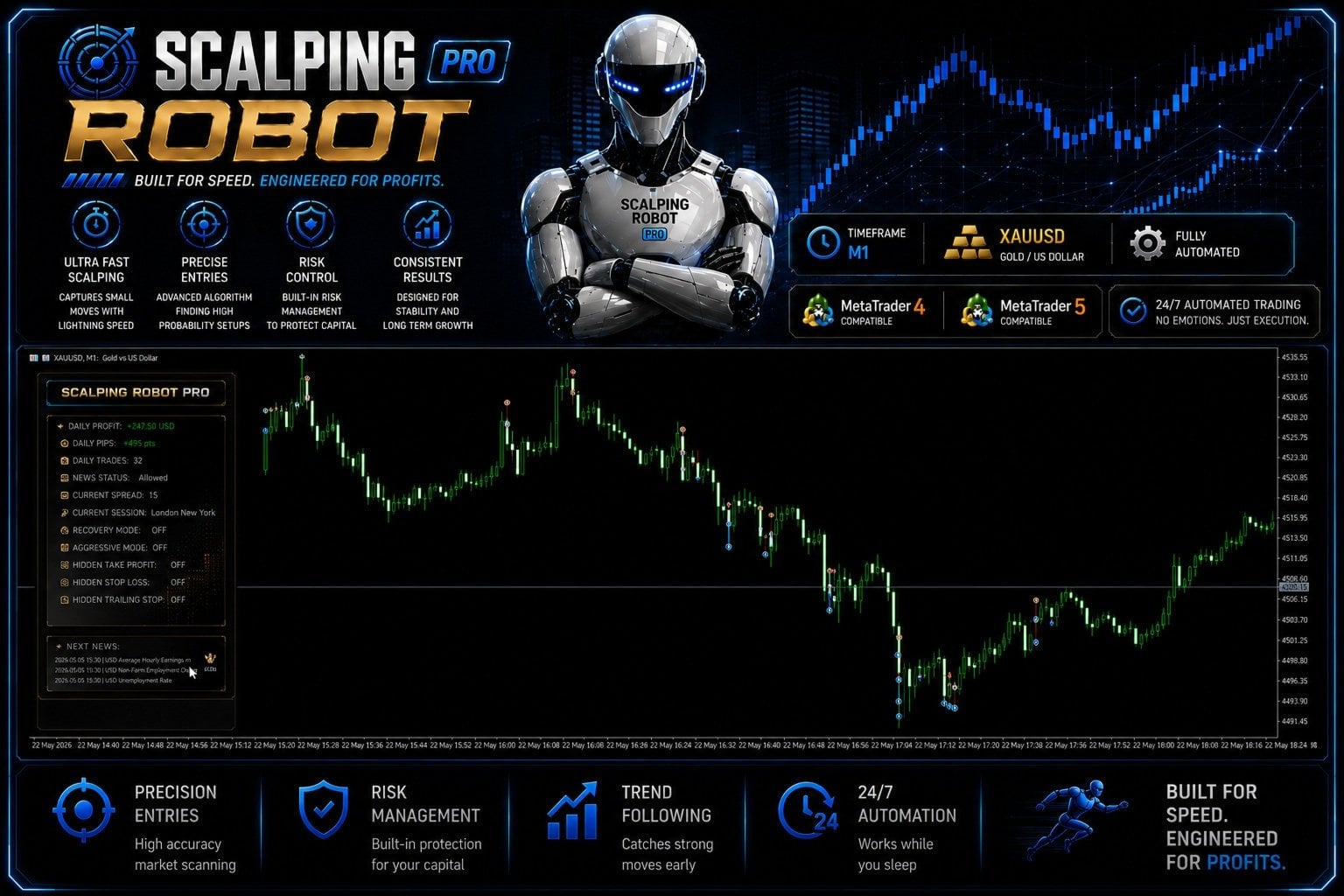
The on-chart panel is a useful tell. A lot of marketplace EAs hide their state behind generic comments and force you to dig through Journal logs to understand what’s happening. Scalping Robot Pro puts everything visible: today’s profit and pip count, the trade count for the session, the current spread (so you know whether execution conditions are favourable), the active trading session, the news filter status, and the state of optional modes. The “next news” block lists upcoming high-impact releases so you can see exactly when the EA will be cautious.
Three architectural choices stand out as genuine positives.
Recovery Mode and Aggressive Mode are off by default. Both are configurable — the user can enable them — but the system as shipped (and as the developer’s live signal runs it) doesn’t use grid recovery or aggressive lot sizing. That single choice makes Scalping Robot Pro a fundamentally different product than the typical “gold scalper” that quietly enables martingale recovery on losses and produces beautiful charts until the recovery mode hits its margin ceiling. Out of the box, this is a straight scalper.
The news filter is built-in and visible. XAUUSD scalpers that get caught by NFP, CPI, or FOMC releases are the textbook way these systems lose months of gains in single minutes. Having the news status visible on the chart and the upcoming releases listed is the right design.
Hidden TP / SL / Trailing Stop are options. Some brokers exploit visible take-profit and stop-loss levels — hiding them server-side and managing exits from the EA’s logic instead removes that attack surface. This is a small detail but it tells you the developer has thought about real broker behaviour, not just paper conditions.
The honest qualification: features in v1.0 are not the same as features that have been proven robust over months of live trading. The architecture looks right. Whether it actually delivers on live execution is what the rest of the year will tell us.
The Real-Tick Backtest — And Why LR 1.00 Needs a Closer Look
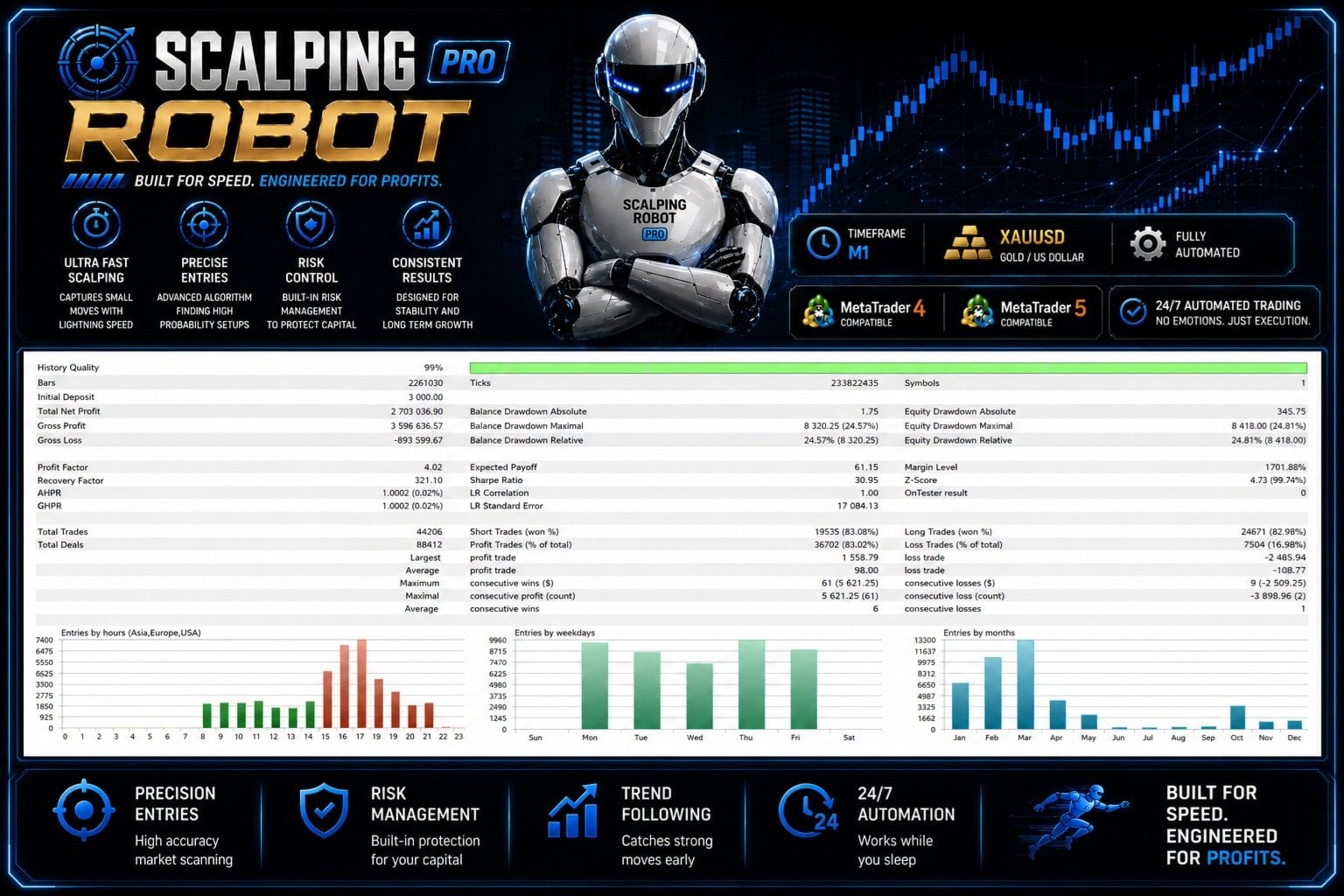
The depth of the backtest is genuinely impressive on the right metrics. 99% history quality across roughly 233 million ticks tells you the developer used real tick data — which is the only kind of backtest worth running on a scalper. Across 44,206 trades the report shows a 4.02 profit factor, an 83% win rate, and a Sharpe ratio of 30.95.
And then there’s the Linear Regression correlation: 1.00. That number deserves an honest moment of skepticism, because it’s mathematically how much the equity curve resembles a perfectly straight line on a scale where 1.0 is the absolute maximum. In practice, even excellent real-world trading systems land somewhere between 0.85 and 0.98 — there’s always some variance in real returns. An LR of 1.00 means the tester equity curve climbs in a mathematically perfect line.
What does that actually mean? Two possibilities, both worth being honest about.
One: the strategy was optimised against this specific historical dataset until the parameters produced exactly this curve. That’s curve fitting, and the resulting backtest is closer to a description of the past than a prediction of the future. The system will look very different on data it wasn’t optimised for — which is the live market starting now.
Two: the developer ran multiple test variations and is showing the most favourable one. This is selection bias rather than curve fitting, but the effect on what you should expect from live trading is similar.
Either way: do not extrapolate from a 1.00 LR backtest to a 1.00 LR live result. The backtest tells you the strategy can produce a strong-looking result in optimised conditions. It does not tell you what will happen on your broker, with your spread, on the next year of unseen gold data.
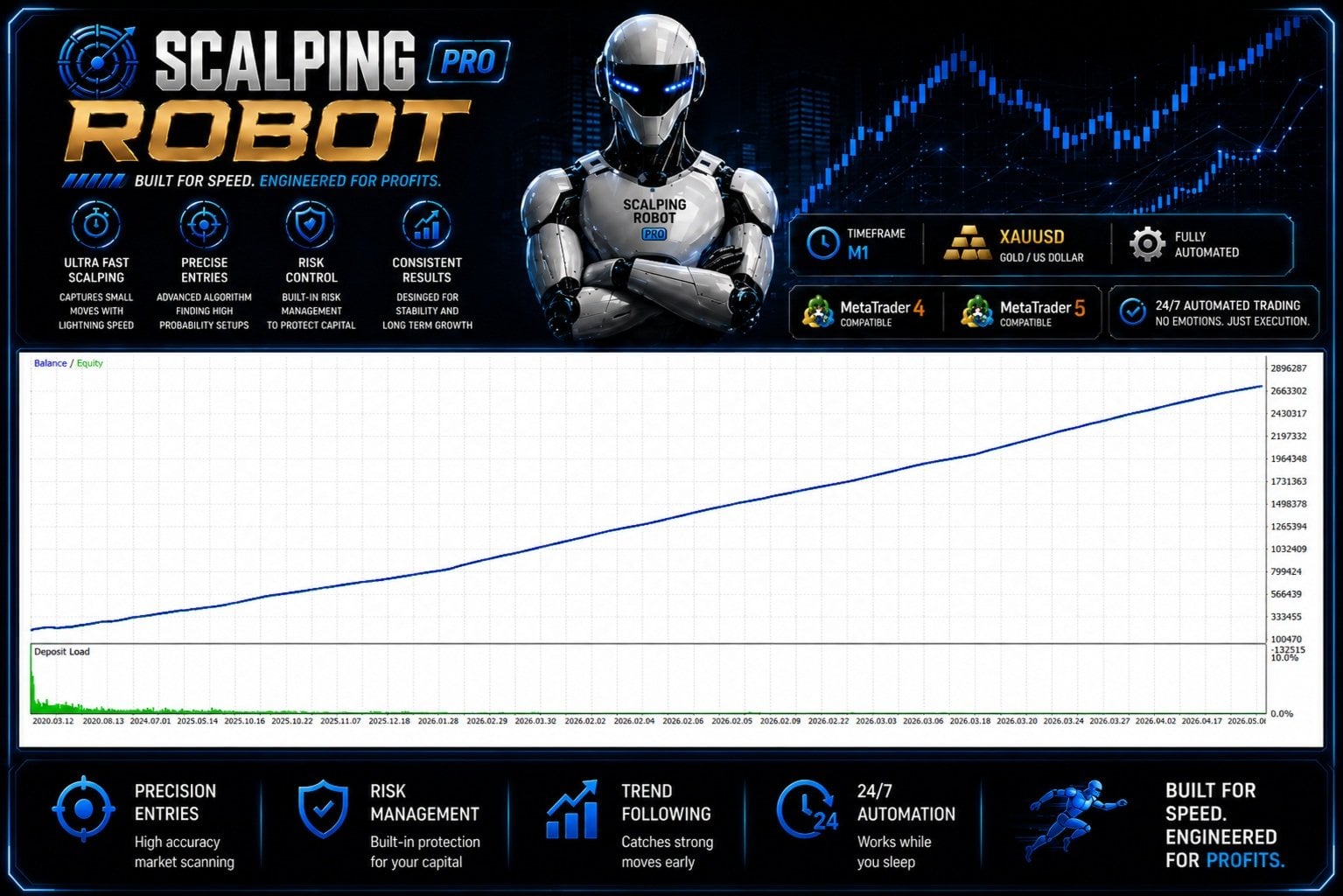
Look at the equity curve and you can see the issue at a glance. A near-perfectly straight diagonal line from $3,000 to over $2.6M across six years of gold trading, through the 2020 crash, the 2022 inflation regime, the 2024 cuts, the 2026 corrections, every single one. Real gold strategies don’t trade gold like that. They have stretches that work and stretches that don’t, and the curve reflects it.
A separate honest note: the report shows ~24.6% maximum balance drawdown. That figure is real — gold scalpers do produce drawdowns — and it’s worth taking seriously even while discounting the rest of the backtest’s clean numbers.
The Live Signal — Read One Week Honestly
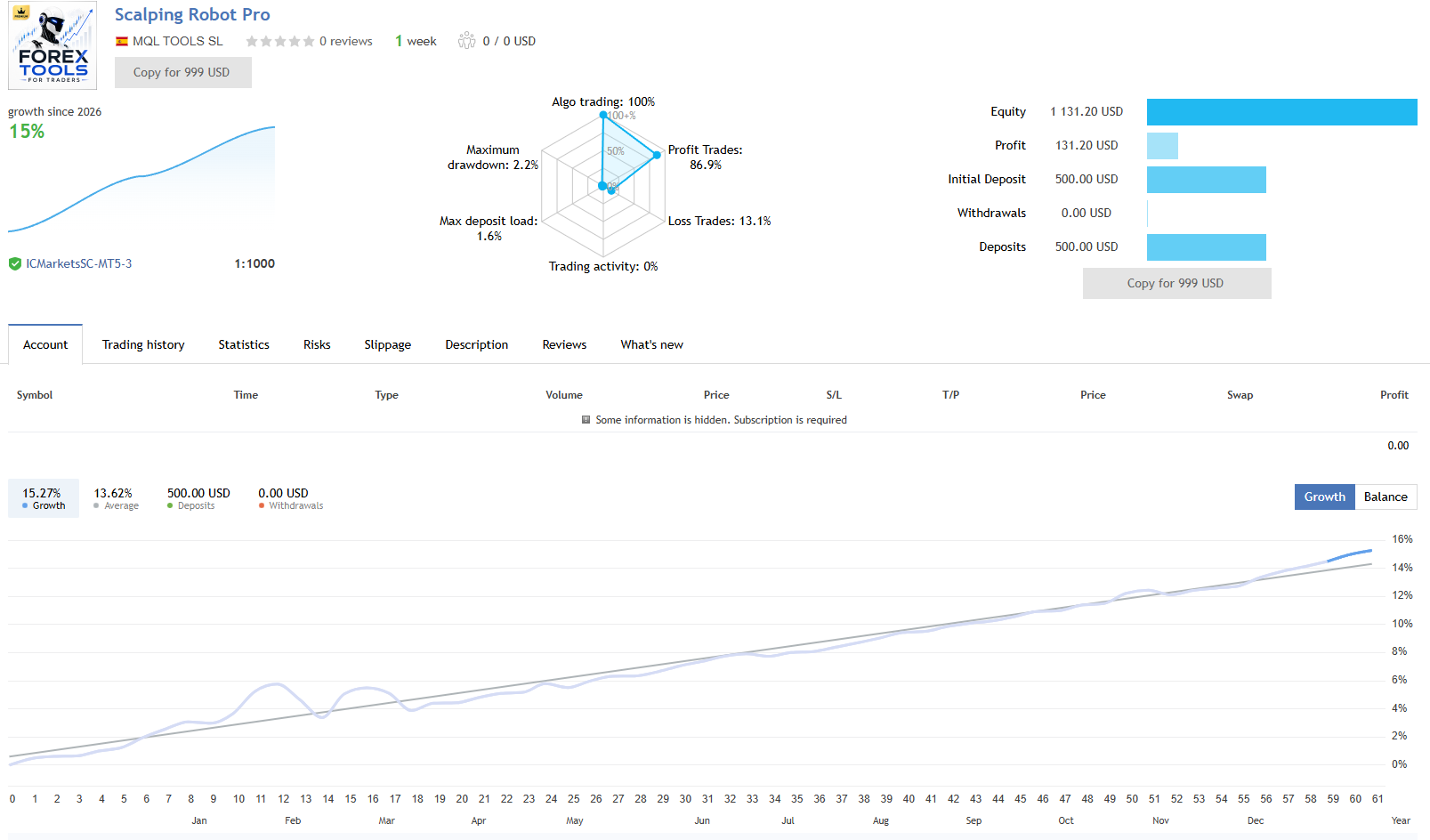
The live signal is published, real-money, on IC Markets at 1:1000 leverage. Several things are worth noting before you read the numbers.
The signal is days old, not weeks. The MQL5 signal page labels it “1 week” — and that’s roughly the genuinely tracked period. The chart shows an extended timeline because MQL5’s display covers a full annualised year, but the actual real-money data is the very recent tail. The lighter portion of the curve is projected; the meaningful evidence is the few real-money trading days at the right edge.
The numbers from a few days mean almost nothing about what comes next. A 15% gain at 86.9% win rate over a handful of days is encouraging — and entirely consistent with what almost any reasonable scalper produces during a brief favourable stretch. The high-impact test of any scalping system isn’t whether it can produce a good first week, it’s what happens during a hostile week, and how the curve looks after three months of mixed conditions. Neither has happened yet.
The 2.2% maximum drawdown is genuinely too low to be meaningful. Compare it to the 24.6% in the backtest. The live signal hasn’t seen anything difficult yet. When it does, the realistic drawdown profile will look closer to the backtest figure than the headline 2.2% — and that’s just what a young signal looks like before it’s tested.
None of this means the signal is bad. It means there’s not enough of it to support strong claims either way. Read it as “the developer has put real money on the system from day one” — which is a positive signal of confidence — rather than as evidence the strategy works.
The Recovery Mode Question
The on-chart panel includes a toggle for Recovery Mode — and Aggressive Mode. Both ship off by default, and the developer’s live signal runs with both off. That’s the configuration you should evaluate the system on.
What does Recovery Mode actually do if you enable it? The listing is sparse on technical detail, but for a scalper the conventional implementation is some form of grid or martingale recovery on adverse trades — adding positions during drawdown to lower the average entry and close the basket on reversion. That mechanic can produce great-looking curves when conditions cooperate, and it’s exactly how scalper accounts blow up when they don’t.
Our honest advice: leave Recovery Mode and Aggressive Mode off until the strategy has earned the right to your trust at default settings. Months of clean live trading, on your own broker, at default sizing, before you reach for the toggles that change the system’s risk profile. The default configuration is what the developer published the signal on; deviating from it puts you in territory the public live signal doesn’t cover.
What Early Buyers Are Saying
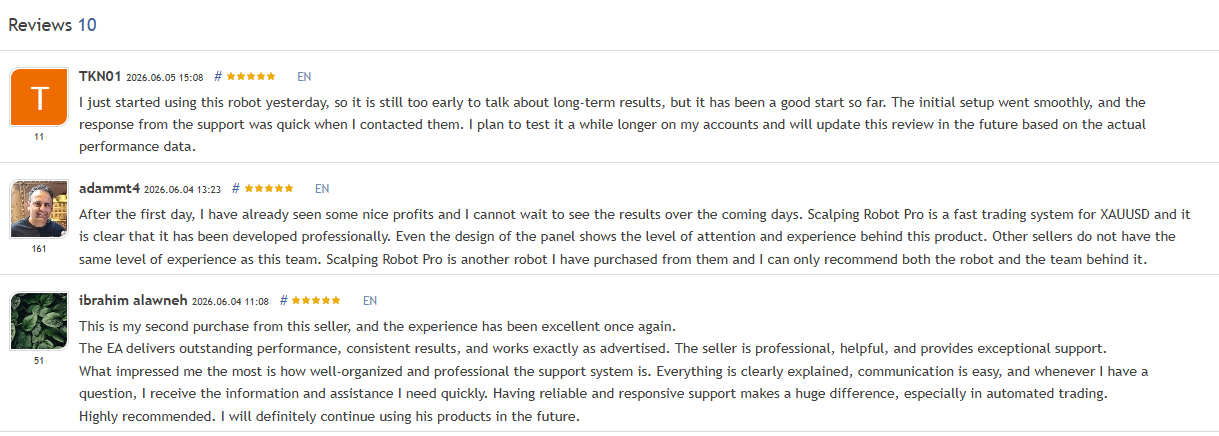
The early reviews are positive and recent. The substantive themes that recur across the buyer comments — and which are worth more than the star ratings — are the perceived polish of the product and the developer’s catalogue. Multiple buyers reference owning other MQL TOOLS SL products and treating Scalping Robot Pro as the team’s latest release rather than an unknown launch. One review specifically calls out the design of the on-chart panel as evidence of “the level of attention and experience behind this product.”
That’s the right read on the early sentiment: not “this scalper has proven itself” — it can’t have, the product is days old — but “the team that built it has a reputation that survives this kind of launch scrutiny.” The trust signal is in the catalogue, not in the trade history. Weight the early reviews accordingly.
Who Scalping Robot Pro Is For
It’s a worth a careful look if you:
- Already trust the MQL TOOLS SL catalogue and want their latest gold release
- Want a XAUUSD M1 scalper with a real news filter and visible on-chart status
- Will run it at default settings (Recovery Mode and Aggressive Mode off) — the way the dev’s signal runs
- Are comfortable buying at launch and treating the first months as validation rather than scaling
- Trade on a reputable ECN/RAW broker with tight XAUUSD spreads and a low-latency VPS
Wait or look elsewhere if you:
- Want a multi-month proven live track record before buying — this is days old at the time of writing
- Read the LR 1.00 backtest as a forward-looking forecast rather than a curve-fitted artefact
- Plan to enable Recovery Mode or Aggressive Mode on day one
- Trade only on MT4 — see the Scalping Robot EA MT4 from the same developer instead
- Run prop-firm challenges where high-frequency scalping or aggressive drawdown profiles are typically restricted
Our Verdict
We rate Scalping Robot Pro 4 out of 5.
The score reflects what’s actually defensible. MQL TOOLS SL is an established developer with 36 products and a multi-year body of verified reviews — that catalogue credibility is the strongest part of the case for this EA, and it’s why we’re rating it as a credible buy rather than parking it until proven. The architecture looks right: news filter built in, recovery and aggressive modes off by default, on-chart panel showing genuine operational state, real-tick backtest with proper history quality. None of that is faked.
The score also reflects what isn’t there yet. The live signal is days old and tells you almost nothing about how the system handles a hostile gold week. The backtest’s LR 1.00 is too clean to be a forecast — it’s an optimised description of history, useful for seeing the strategy’s theoretical capability but not for predicting forward returns. Version 1.0 of any product carries the launch risk of bugs and behaviours that only surface on real accounts.
The practical recommendation: if you want to buy at launch, do it at conservative sizing on your own demo or smallest live account, run the default configuration (modes off) for at least a few weeks of validation, and don’t scale up until the live behaviour earns it. If you’d rather wait, that’s a defensible choice too — three months from now there’ll be a real live history to judge from, and the catalogue credibility will still be there.
And because the system is genuinely new, paying significantly less for it through CheaperForex is the sensible way to take the position — you cap the cost of finding out how a v1.0 product behaves on your account, and the EA, the licence, and the future updates are identical to the marketplace product.
How to Get Scalping Robot Pro Safely
Two legitimate sources, and only two.
The MQL5 marketplace — direct from MQL TOOLS SL’s developer page. Here is the official MT5 listing.
CheaperForex — the same EA as a standalone file at a significant discount versus the marketplace price, installable on your own terminals without activation limits. Here is the product page.
Anywhere else offering it free or via a Telegram seller is a trap — there’s no working cracked file, only malware or pay-and-vanish scams.
Frequently Asked Questions
Is Scalping Robot Pro legit, or a scam?
Legitimate. It’s a published MQL5 marketplace product from MQL TOOLS SL, an established developer with 36 products and over 1,765 verified reviews across their catalogue. The scams in this space are the “free download” sites and Telegram sellers offering cracked copies that can’t exist. Buy from MQL5 or a reputable reseller.
How seriously should I take the live signal?
As a signal of developer confidence, take it positively — the developer has put real money on the system from day one rather than relying on backtests alone. As evidence the strategy works, it’s too young to support strong claims. Days of trading on one account in one gold environment doesn’t prove a scalping strategy; months of live data through different gold regimes would.
Should I trust the LR 1.00 backtest?
Trust the structure (real-tick data, 99% quality, proper trade volume) and discount the headline number. An LR correlation of exactly 1.00 means a perfectly linear equity curve, which real strategies don’t produce. It’s either curve-fit or cherry-picked. Use the backtest to confirm the system was tested properly; don’t use it to forecast live returns.
What does Recovery Mode do, and should I enable it?
The listing is sparse on technical detail, but for scalpers the conventional implementation is some form of grid or martingale recovery on adverse trades. Both Recovery Mode and Aggressive Mode ship off by default, and the developer’s live signal runs with both off. Leave them off until the strategy has earned your trust at default settings — that’s the configuration you can actually evaluate the live signal against.
What broker and account should I use?
A reputable ECN or RAW broker with tight XAUUSD spreads — the developer’s live signal runs on IC Markets, which is a sensible reference. High-frequency scalpers are extremely execution-sensitive, so spread quality and latency matter more here than on most strategies. A low-latency VPS near your broker’s server is recommended.
What’s the realistic drawdown on a real account?
The backtest shows ~24.6% maximum balance drawdown across multi-year data, which is more representative of the long-term risk profile than the 2.2% on the days-old live signal. Plan around the backtest figure as the historical worst case; the live signal will eventually produce something closer to it once it’s been through a hostile period.
Should I buy at launch or wait?
Defensible either way. Buying at launch makes sense if you trust the MQL TOOLS SL catalogue, will run at conservative sizing on default settings, and treat the first months as validation rather than scaling. Waiting makes sense if you want to see a real multi-month live track record on this specific product before committing. Three months from now, both the live history and the catalogue credibility will still be there to evaluate.
Why buy from CheaperForex instead of MQL5?
The product is identical — same EA, same future updates. You pay significantly less. For a brand-new v1.0 product you’re going to demo and validate before scaling, paying less to test it is the practical move — you cap the cost of finding out whether a young system suits your account.