Get DowGold — Our #1 EA

Sale!

What's Included

Installation Guide
Step-by-step PDF with screenshots
Optimized Presets
Ready-to-use configuration files
Lifetime Updates
All future versions included free
Email Support
Help with setup & technical issues
Need help? Message us on Telegram, or contact us

Our Customer Reviews

Real reviews from our 28,000+ customers

Scalping Robot Pro EA MT5

Scalping Robot Pro for MT5 by MQL TOOLS SL is a XAUUSD-only Expert Advisor built for fast, precision scalping on the M1 timeframe. It targets short-term gold moves with structured entry logic, an on-chart panel showing live trade context (daily profit, daily pips, spread, session, news status), and a built-in economic news filter so positions aren’t sitting through high-impact releases. Optional recovery and aggressive modes are configurable but off by default — there is no forced grid or martingale behaviour out of the box.

The system is published by an established marketplace developer with a multi-year catalogue (XIRO Robot, Price Action Robot, Wall Street Robot, Big Forex Players, AI Forex Robot, and the original Scalping Robot EA for MT4). A public MQL5 live signal sits alongside the listing on IC Markets. The EA ships as a standalone file with no activation limits.

  • XAUUSD M1 scalping engine — structured entry logic for fast short-term gold moves, with on-chart status panel and built-in news filter
  • Recovery and aggressive modes off by default — no forced grid or martingale; opt-in only if you choose to enable them
  • Standalone unlocked file + public live signal — install on unlimited MT5 terminals; transparent MQL5 monitoring on IC Markets

Fast XAUUSD M1 scalper from an established developer. News filter built in. Standalone unlocked file.

Instant Download

The lowest legitimate price — anywhere.
7-day full refund in the rare event of problems.

Pay
lowest legit price
Download
instantly
Trade
no restrictions
Official Product Free Updates 30-Day Free Exchange

Don't risk being scammed by fake resellers. We are the only EA reseller rated Excellent on Trustpilot — check it yourself.

Original price was: $1,099.00.Current price is: $599.95.

🏷️ Save 60-70%

Two Ways to Buy

The lowest genuine reseller price. Includes free future updates.

Customer Customer Customer Customer Customer
Excellent ★★★★★ on Trustpilot by 28,000+ traders
Choose your license to see pricing
Pay with crypto and get 20% off — discount automatically shown at checkout.
BTC ETH USDT
You'll also get 3 months free PrismAlgo MT5
Diversify across 28 FX pairs, Gold and Bitcoin alongside your purchase. Learn more at PrismAlgo.com →
View Signal
If your EA isn't profitable after 30 days of proper use, we'll exchange it for another product of equal or lesser value. No questions asked.
HOW IT WORKS
  1. 1Use the EA for 30+ days with recommended settings
  2. 2Send us your trading logs and settings screenshots
  3. 3Get a free exchange for another EA
Applies to products $150+. Requires proof of proper installation and use per documentation. One exchange per customer.

What's Included

Installation Guide
Step-by-step PDF with screenshots
Optimized Presets
Ready-to-use configuration files
Lifetime Updates
All future versions included free
Email Support
Help with setup & technical issues
Need help? Message us on Telegram, or contact us

Quick Summary:
Scalping Robot Pro for MT5 by MQL TOOLS SL is a XAUUSD-only Expert Advisor built for fast, precision scalping on the M1 timeframe. It uses structured entry logic to react to short-term price behaviour on gold, with an on-chart panel surfacing live trade context (daily profit, daily pips, spread, session, news status) and a built-in economic news filter. Optional recovery and aggressive modes are configurable but off by default — there is no forced grid or martingale behaviour out of the box. The EA is published by MQL TOOLS SL, an established marketplace developer with a multi-year catalogue, alongside a public MQL5 live signal on IC Markets.

Official MQL5 Listing:
Scalping Robot Pro MT5 — MQL5 Marketplace

Developer’s Live Signal:
Scalping Robot Pro — MQL5 live signal (IC Markets)

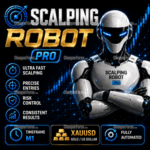
Scalping Robot Pro EA MT5 — fast XAUUSD M1 gold scalper by MQL TOOLS SL with precise entries, risk control and news filter

Why Scalping Robot Pro

  • Gold specialist — designed exclusively for XAUUSD on the M1 timeframe, not a multi-symbol system stretched to fit Gold
  • Structured short-term entry logic — fast reactions to momentum shifts and price behaviour rather than indicator-stack noise
  • Built-in economic news filter — high-impact releases visible on the on-chart panel; configurable to pause trading around them
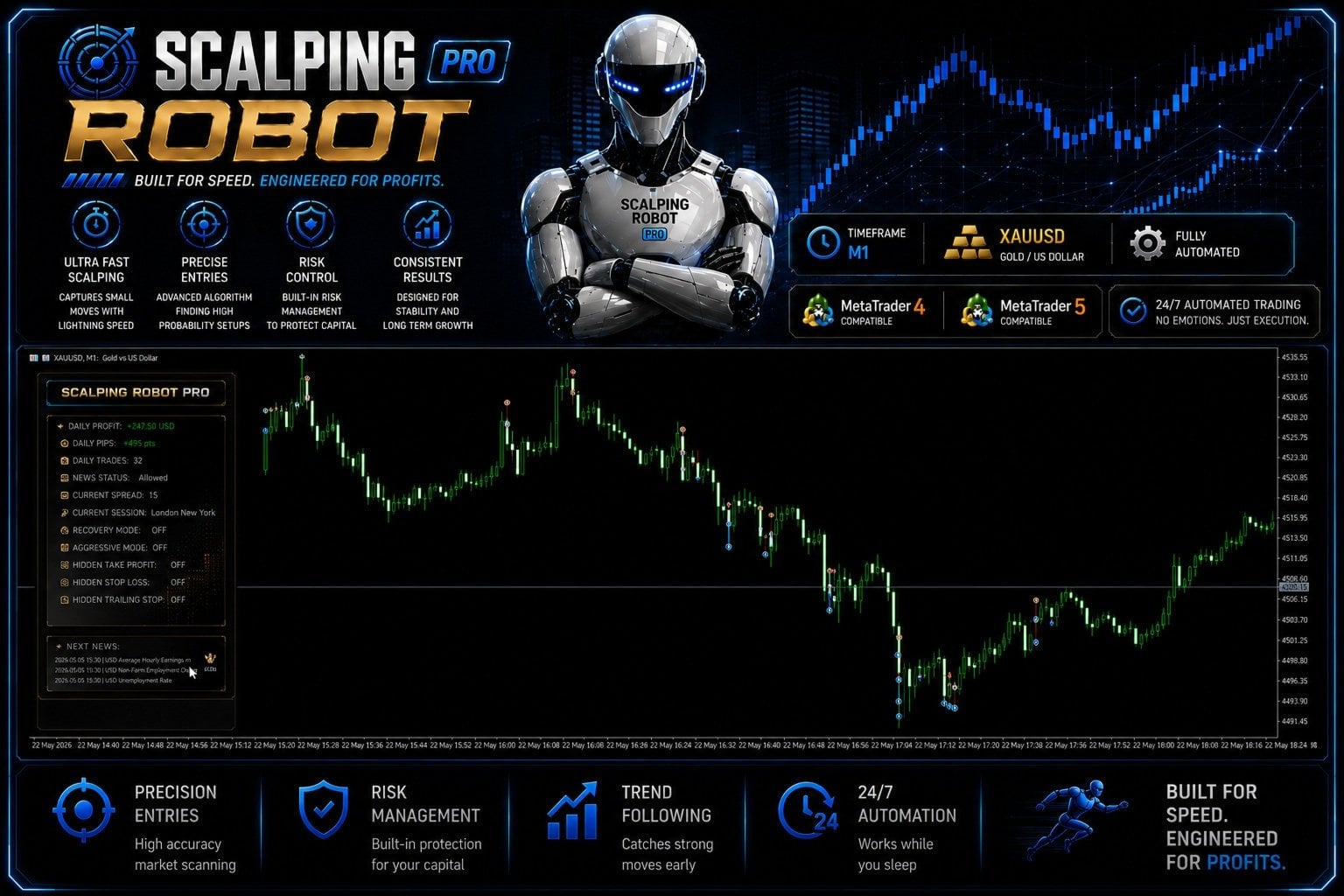
  • Live status panel — daily profit, daily pips, daily trades, current spread, session, recovery/aggressive mode flags, and upcoming news, all visible at a glance
  • Recovery and aggressive modes off by default — no forced grid or martingale; opt-in only if you choose to enable them
  • Hidden TP / SL / Trailing Stop options — broker-visible orders can be hidden when needed
  • Public MQL5 live signal on IC Markets — real-money transparent monitoring from launch
  • Established developer catalogue — MQL TOOLS SL has a multi-year MQL5 presence with a wide catalogue spanning AI, multi-strategy, and scalping systems
  • Standalone file — install on unlimited MT5 terminals with no activation limits

How It Works

Scalping Robot Pro reads XAUUSD on M1 and looks for short-term setups — momentum shifts, volatility expansions, and clean directional moves where a quick scalp has a defined edge. When the conditions align, the EA opens a trade with controlled risk parameters and manages it through to exit, typically within minutes rather than hours.

The on-chart panel shows what the system is doing in real time: today’s profit and pip count, current spread, the active trading session (London / New York), whether the news filter is allowing trades, and the state of the optional recovery and aggressive modes. The next-news block lists upcoming high-impact releases so you can see when the EA will be cautious. This level of on-screen transparency is unusual for a scalper and useful when you’re validating live behaviour on your own broker.

Recovery and aggressive modes are configurable but off by default. The developer’s published live signal runs with both off — meaning the system you see on the signal is the system without grid recovery or aggressive sizing escalation engaged.

Live Signal & Backtest Snapshot

Scalping Robot Pro MQL5 live signal on IC Markets at 1:1000 leverage showing about 15 percent growth, 86.9 percent profit trades, 2.2 percent maximum drawdown, 1.6 percent max deposit load
The developer’s public MQL5 live signal on IC Markets — read the conditions, not just the headline.
  • Live signal: IC Markets, real money, started early June 2026 (very young — only days of tracked data so far)
  • Live growth: ~+15% with low maximum drawdown to date
  • Profit trades: ~86.9% on the early sample
  • Real-tick backtest: 99% history quality across 233M+ ticks, profit factor 4.02, 83% win rate, ~24.6% balance drawdown
  • Backtest period: multi-year XAUUSD M1 data, 44,000+ trades

The backtest depth is genuinely impressive. The live signal is encouraging but new — the headline numbers above all reflect a very young account. Our full review explains how to read both honestly and what to weight versus what to wait on.

EA Setup at a Glance

  • Platform: MetaTrader 5 (MT4 sibling product also available)
  • Instrument: XAUUSD only (Gold)
  • Timeframe: M1
  • Strategy: Short-term scalping with structured entries, on-chart status panel, built-in news filter
  • Optional modes: Recovery Mode and Aggressive Mode configurable (both off by default)
  • Account: ECN or Raw Spread with tight XAUUSD spreads
  • Leverage: 1:1000 used on live signal — adjust for your jurisdiction
  • Minimum deposit: ~$500+ recommended; more headroom is sensible while validating
  • VPS: Strongly recommended low-latency VPS near broker server

From the MQL TOOLS SL Catalogue

Scalping Robot Pro is the latest release from MQL TOOLS SL, an established Spanish-based developer with a multi-year MQL5 catalogue. CheaperForex also stocks several of their other titles at significant discounts versus the marketplace:

What You Receive

  • Scalping Robot Pro for MT5 — Latest Version
  • Standalone file — install on your own MT5 terminals with no activation limits

Risk Disclaimer

High-frequency scalping on XAUUSD M1 is highly sensitive to broker execution quality, spread, slippage, and latency — results on one broker can differ meaningfully from results on another, and tester results often diverge from live trading on real fills. The developer’s live signal is currently young (days rather than months), so the long-term behaviour of the strategy across different gold regimes is not yet established. Gold is subject to sharp news-driven volatility (NFP, CPI, FOMC, geopolitical events) that can stretch the strategy beyond normal parameters. The backtest shows roughly 24.6% maximum drawdown, which is the historical worst-case rather than an upper bound. Test on demo on your intended broker first, use conservative position sizing while validating, and never deploy capital you cannot afford to lose. Past performance — backtest or live — does not guarantee future results.

Full Review & Analysis

📖 Read our complete Scalping Robot Pro EA review →

An honest editorial breakdown: how the M1 scalping logic works, the LR 1.00 backtest examined critically, the very young live signal read honestly, the MQL TOOLS SL catalogue context, the recovery/aggressive mode question, and our verdict on whether to commit at v1.0 or wait.

FAQs

What is Scalping Robot Pro EA?

A XAUUSD-only Expert Advisor for MetaTrader 5 by MQL TOOLS SL, designed for fast precision scalping on the M1 timeframe. It uses structured entry logic to react to short-term price behaviour and momentum shifts on gold, with an on-chart panel showing daily profit, daily pips, current spread, session, news status, and current mode flags (recovery, aggressive, hidden TP/SL). The MT4 sibling product is the long-running Scalping Robot EA MT4.

What do I receive, and can I run it on more than one terminal?

You receive Scalping Robot Pro as a standalone file for MetaTrader 5. There are no activation limits, so you can install it across your own MT5 terminals and VPS setups. CheaperForex supplies it at a significant discount versus the MQL5 marketplace price.

What broker and account type do I need?

A broker offering XAUUSD with tight spreads on M1. ECN or Raw Spread accounts are strongly preferred — high-frequency scalpers live or die on spread quality and execution latency. The developer’s live signal runs on IC Markets at 1:1000 leverage; match leverage to your jurisdiction’s availability.

What deposit should I start with?

The developer’s live signal started with around $500 in deposits, but a higher starting balance gives the scalper more headroom for normal drawdown. Start with the smallest sensible balance you’re comfortable losing, run conservative lot sizes, and step up only after you’ve watched live behaviour on your own broker for several weeks.

Does it use martingale or grid?

Not by default. The on-chart panel shows Recovery Mode and Aggressive Mode as toggleable settings, both off by default — meaning out of the box there is no forced grid or martingale. Those modes can be enabled by the user but are not how the developer’s live signal runs.

Does it work on MT4?

This product is the MT5 version. The developer also publishes the MT4 sibling product as Scalping Robot EA MT4, which has a longer history on the platform.

Do I need a VPS?

Yes — strongly recommended for any M1 scalper. Latency and uptime matter enormously on a high-frequency strategy, and your home machine and connection aren’t sufficient. A low-latency VPS near your broker’s server is the right setup.

Why buy from CheaperForex instead of the MQL5 marketplace?

The product is identical — same EA, same future updates. You pay significantly less. Our full review covers both the strengths (established developer catalogue, real-tick backtest, news filter) and the honest caveats (v1.0 launch, very young live signal) before you buy.

Reviewed by Our Trader

Picture of Peter Jones

Peter Jones

Peter Jones is a full-time trader, forex software developer, and founder of CheaperForex.com. With over 10 years of experience in algorithmic trading, he helps traders gain an edge using reliable EAs and strict risk control.

Pre-Purchase FAQs

Are updates always free?

Yes, all updates are completely free—you'll never pay twice.

We receive updates from developers and upload them to your account when they're available. Please be patient, as we're managing hundreds of products at discounted prices. More popular products are updated more frequently.

All versions are stored in your account for easy access.

What's your refund policy?

We offer a 7-day technical guarantee. If the EA fails to attach to your chart due to verified errors we can replicate, we'll issue a full refund.

However, we cannot refund based on trading performance or profit expectations—forex markets are unpredictable, and results vary by broker, spread, and market conditions. We provide tools, not guarantees.

I need assistance installing this?

Yes, we'd be happy to assist you!

We can advise you on the best settings for your account or create custom presets tailored to your needs. Additionally, we offer a one-time free installation service using AnyDesk for remote setup.

Please note, however, that we cannot provide advice on how to make money with any of our products.

Can I use this on multiple accounts?

Absolutely. Once you purchase, the EA is yours to use on unlimited live and demo accounts—no restrictions.

You can run it on multiple brokers, VPS servers, or trading accounts simultaneously.

There are no license limits or activation keys. Buy once, use everywhere.

How do I download after payment?

After successful payment, your product will be available for download instantly:

  • Displayed on the screen immediately after checkout
  • Emailed to the address you provided during purchase
  • Stored in your account if you created one at checkout

In rare cases (about 1% of high-value premium products), orders may be held for manual review to prevent fraud. If you don't see a download link, contact us for assistance.

Is this an original product?

Yes, absolutely.

We do not sell fake products, and our customer reviews, along with our pricing, reflect the quality and authenticity of what we offer.

Why Traders Trust Us

Excellent on Trustpilot
4.5★ from real customers
In Business Since 2019
28,000+ customers served
Instant Access
No group buys or waiting
7-Day Refund Policy
For product errors
Remote Installation
We can install for you
Flexible Payments
Cards, Apple Pay, Crypto
Card Crypto