Get DowGold — Our #1 EA

Our Customer Reviews

Real reviews from our 28,000+ customers

Genuine MQL5 install · Reseller price

Save over 50%. The same product, for less.

Buy the latest version through CheaperForex, installed the proper way through the MQL5 marketplace. Identical to buying direct, not a cracked or modified copy, just at a reseller price.

Why's it cheaper? We license marketplace EAs in volume and pass the saving straight on.
7-Day Refund Buy with confidence
Full refund within 7 days of purchase, as long as the EA has not yet been activated on your MT5 platform. Once it is activated the licence is permanently assigned and can no longer be refunded.
No random file downloads. Updates are handled through MT5 when the developer releases a new version.
How Buying From Us Works
Same Official EA The exact marketplace product, latest version.
You Add to Cart No cracks, no modified files, ever.
Checkout Card, Apple Pay, Google Pay or crypto.
Install An official activation. You're eligible for a refund right up until it's activated.
Use It for Life One payment. Yours to keep, no subscription.
Enjoy All Future Updates New builds arrive through MT5 when the developer releases them.

DAX Robot EA MT5

DAX Robot EA for MT5 by MQL Tools is the MetaTrader 5 release of the developer’s Germany 40 (DE40) index specialist Expert Advisor, trading the DAX on the H1 timeframe. Buyers receive the developer’s official setup guide alongside the EA itself, covering broker configuration and the recommended parameter ranges for the Low / Medium / High Trade Risk Level settings.

The matching MT4 version is available separately. MQL Tools’ wider catalogue on CheaperForex includes the customer-rated Scalping Robot Pro MT5 and several other established products.

  • DAX H1 specialist for MT5 — runs on the modern MetaTrader 5 platform with the developer’s official setup guide included
  • Three Trade Risk Levels — Low, Medium, and High configurable position-sizing modes documented in the included setup guide
  • From an MQL Tools developer with positive CF reviews on sister products — including Scalping Robot Pro MT5

The MT5 release of DAX Robot with the developer’s official setup guide. Read our editorial review first.

Latest Version

7-Day Refund Buy with confidence
Full refund within 7 days of purchase, as long as the EA has not yet been activated on your MT5 platform. Once it is activated the licence is permanently assigned and can no longer be refunded.
No random file downloads. Updates are handled through MT5 when the developer releases a new version.

Original price was: $699.00.Current price is: $369.95.

🏷️ Save 60-70%

Two Ways to Buy

This is the latest version with ALL future updates, delivered instantly.

Buy with Card

Secure checkout with card, Apple Pay or Google Pay. The price is shown above.

Buy with Crypto

Pay with BTC, ETH or USDT and save 20%, applied automatically at checkout.

In stock and available now.
Customer Customer Customer Customer Customer
Trusted by 28,000+ traders since 2019 Rated Excellent · read our Trustpilot reviews
Choose your license to see pricing
Pay with crypto and get 20% off, applied automatically at checkout.
BTC ETH USDT
What you get that a free or cracked copy never will
The genuine latest version The current official build, not an outdated file pulled from a cracked site.
Every future update, included When the developer ships a new build, you update straight from MT5. No extra cost, ever.
The full official package Everything the developer provides, the manual and any setfiles, exactly as intended. Nothing stripped out.
You'll also get 3 months free PrismAlgo MT5
Diversify across 28 FX pairs, Gold and Bitcoin alongside your purchase. Learn more at PrismAlgo.com →
View Signal
Need Help? Message us on Telegram, or contact us

Quick Summary:
DAX Robot EA for MT5 is the MetaTrader 5 release of MQL Tools‘ Germany 40 (DE40) index trading system, operating on the H1 timeframe with three configurable Trade Risk Levels (Low, Medium, High). The MT5 buyer package includes the developer’s official setup guide — useful reference material for configuring the EA on different brokers and choosing the right risk level for your account. MQL Tools is the developer behind several established CheaperForex products with positive customer reviews, including Scalping Robot Pro MT5, providing developer-level trust context while DAX Robot accumulates its own review base. The MT4 version is available separately for traders on that platform.

Official MQL5 Listing:
DAX Robot EA — MQL5 Marketplace

Matching MT4 Version:
DAX Robot EA MT4 — same strategy compiled for MetaTrader 4

Full Editorial Review:
Read our DAX Robot EA editorial review

DAX Robot EA MT5 by MQL Tools — Germany 40 DE40 index trader on the H1 timeframe with high precision entries, adaptive system, risk control, and consistent results design pillars

The MT5 Release Includes the Setup Guide

One specific advantage worth noting on the MT5 version: the package includes the developer’s official setup guide. The guide covers broker selection (DAX is listed variously as DE40, DAX40, GER40, or GERMANY40 across different brokers — the guide documents which name to look for on the major ones), recommended parameter starting points for each Trade Risk Level (Low, Medium, High), and operational best practices for running the EA on a VPS. For first-time buyers configuring an index EA on their preferred broker, that reference material removes some of the trial-and-error that usually accompanies new EA deployments.

Why DAX Robot EA on MT5

  • Modern MetaTrader 5 platform — built natively for MT5’s execution model, more robust connection management than MT4, and better Strategy Tester capabilities for buyers who want to validate the system on their own data
  • Includes the developer’s official setup guide — broker configuration documentation, recommended parameter ranges for each Trade Risk Level, and VPS deployment best practices
  • DAX H1 specialist — designed exclusively for Germany 40 (DE40) trading rather than a generic multi-symbol EA repurposed for indices
  • Three Trade Risk Levels — Low / Medium / High configurable position-sizing modes, with the included setup guide documenting the developer’s recommended ranges for each
  • Visible on-chart panel — live spread, current session, volatility level, market status, daily pips and profit, and an integrated news event readout
  • From an established MQL Tools developer — sister products Scalping Robot Pro MT5, AI Forex Robot, Big Forex Players and others carry positive CheaperForex customer review histories

The On-Chart Operational Panel

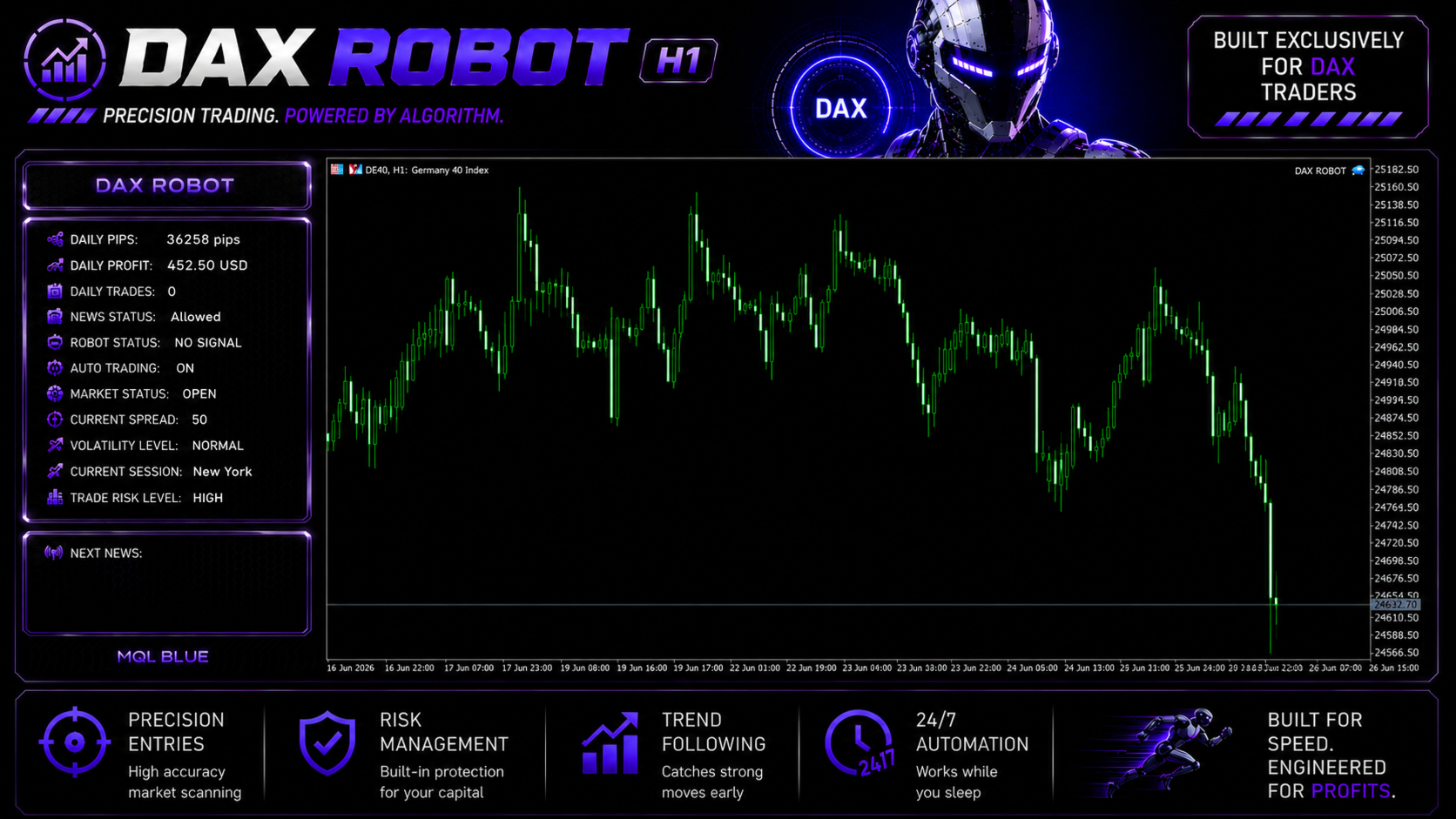
DAX Robot EA MT5 on-chart operational panel running on DE40 Germany 40 H1 chart displaying daily pips 36258, daily profit 452.50 USD, daily trades, news status allowed, robot status no signal, auto trading on, market status open, current spread 50, volatility level normal, current session New York, trade risk level high, next news section
The on-chart operational panel — live market state, configurable risk level, and the next news event in a single glance.

The panel surfaces operational context every index trader benefits from seeing in real time: daily pips and profit, current spread (which matters significantly for DAX where broker pricing varies materially), volatility classification (NORMAL/HIGH), the active trading session (the screenshot shows New York), news event status, and the current Trade Risk Level setting (visible as HIGH in this configuration — adjustable via the EA inputs).

On the MT5 platform specifically, this panel design integrates with MT5’s chart rendering more cleanly than the equivalent on MT4. The included setup guide explains how to adjust the panel positioning and the underlying parameters to suit your trading style.

EA Setup at a Glance (MT5)

  • Platform: MetaTrader 5
  • Instrument: DAX index (DE40, DAX40, GER40, or GERMANY40 — see the included setup guide for broker-specific symbol names)
  • Timeframe: H1
  • Account type: ECN or Raw Spread MT5 account with the DAX index available
  • Leverage: Index leverage (typically 1:20 to 1:50, jurisdiction-dependent)
  • Trade Risk Level: Setup guide recommends Low as the starting setting for evaluation, stepping up only after live behaviour on your own broker is validated
  • VPS: Strongly recommended — European datacenter preferred given DAX’s primary trading hours

The MQL Tools Catalogue on CheaperForex

DAX Robot is MQL Tools’ DAX-index specialist. Their broader CheaperForex catalogue includes:

For buyers new to MQL Tools, reading the review history on the established sister products is the practical way to evaluate the developer’s general competence and the quality of their customer support before committing to the newer DAX-focused release.

What You Receive

  • DAX Robot EA for MT5 — Latest Version
  • The developer’s official setup guide (broker configuration, parameter ranges, VPS best practices)
  • All future product updates via the marketplace

Risk Disclaimer

DAX is a major European equity index with significant intraday volatility, particularly around the European market open and US session overlap. Index spreads vary materially by broker and the strategy’s edge will be sensitive to execution quality. DAX Robot is a relatively new release without a long public live signal track record at the time of writing — the trust signal here comes from MQL Tools’ established CheaperForex catalogue performance on sister products, not from this specific product’s evidence base, which will mature over the coming months. The included setup guide is helpful reference material but cannot substitute for testing on your own broker first. Use the Low Trade Risk Level setting for evaluation, validate live behaviour for at least a few weeks before scaling, and never deploy capital you cannot afford to lose. Past performance — backtest or live — does not guarantee future results.

Full Editorial Review

📖 Read our complete DAX Robot EA editorial review →

The editorial review covers the developer-trust-based positive case, the operational architecture, the honest early-product caveats around limited live evidence, comparison with MQL Tools’ sister products, and our verdict.

FAQs

What is DAX Robot EA for MT5?

The MetaTrader 5 release of MQL Tools’ DAX index specialist Expert Advisor. It trades the Germany 40 (DE40) index on the H1 timeframe with an on-chart operational panel and three configurable Trade Risk Levels (Low, Medium, High). The MT5 version ships with the developer’s official setup guide covering broker configuration and the recommended parameter ranges.

What’s in the setup guide that comes with the MT5 version?

The developer’s official setup guide covers broker selection (which DAX symbol naming conventions to look for — DE40, DAX40, GER40, GERMANY40), recommended parameter starting points for each Trade Risk Level, and the operational best practices for running the EA on a VPS. Useful reference material for first-time buyers configuring the EA on their preferred broker.

Should I buy the MT4 or MT5 version?

Buy the version that matches the platform you actually trade on. If your broker only supports MT4 (or you prefer MT4 for habit and broker compatibility), the MT4 version is the natural choice. If you’re already on MT5 or your broker supports both, this MT5 release is the modern-platform option — and the setup guide bundled here is a useful addition for first-time buyers.

Which DAX broker symbol should I look for?

DAX is listed variously by different brokers — DE40, DAX40, GER40, GERMANY40 are all common variants of the same instrument. The included setup guide documents the symbol-naming conventions across major brokers. Most tier-one brokers (IC Markets, Vantage, FP Markets, Pepperstone, ICTrading) offer it; verify your broker’s exact symbol name and configure the EA accordingly.

How do the three Trade Risk Levels behave differently?

The Trade Risk Level setting (Low / Medium / High) adjusts position sizing relative to your account equity. Low is the appropriate starting setting — once live behaviour is validated on your own broker over at least a few weeks, you can consider stepping up. The setup guide provides the developer’s recommended parameter ranges for each level.

How does it relate to MQL Tools’ other CF products?

MQL Tools publishes several products on CheaperForex, with their forex-focused releases including the customer-rated Scalping Robot Pro MT5, Scalping Robot Pro MT4, AI Forex Robot, and Big Forex Players. DAX Robot is their dedicated index specialist — different instrument focus from the forex products, but built by the same team using comparable development practices.

Do I need a VPS for the MT5 version?

Strongly recommended, particularly for the DAX which trades through European market hours into the US session overlap. A stable 24/5 low-latency VPS near your broker’s server is the right setup, and a VPS in a European datacenter is typically preferable for DAX-specialist EAs. MT5’s connection management is generally more robust than MT4’s, but a VPS is still the right call for automated trading.

Why is the MT5 version cheaper at CheaperForex?

The product is identical — same EA, same future updates from the developer through the marketplace, same setup guide. You pay significantly less. For a newer product where reviews are still accumulating, paying less to test it on demo and validate before scaling is the practical approach. Our editorial review covers the architectural strengths and the honest early-product caveats.

Frequently Asked Questions

Yes! All products listed on our site are in stock and ready for immediate activation.

No waiting periods, no group buys. Purchase today, get it activated today.

We purchase licenses in bulk, then pass the wholesale savings to you. MQL5 charges full retail because they're a marketplace with fees and overhead. We buy direct and operate lean.

Buying directly on MQL5 means paying full price — often $500–$1,500 — without knowing if the EA will work for you. If it doesn't perform, there's no refund. With us, you get the exact same official lifetime-licensed copy for up to 70% less. Test it at lower risk before committing full price elsewhere.

You get the exact same product:

  • Same official MQL5 license (not cracked or pirated)
  • Same lifetime updates from the developer
  • Same technical support
  • We handle the activation for you (under 2 minutes)
The only difference? You pay 50–80% less.

We're an EA reseller that's been operating since 2019. We purchase official licenses in bulk from the MQL5 marketplace and pass the savings on to you.

Every product is 100% genuine — activated directly from the developer's official MQL5 marketplace listing through MQL5's one-click activation system. You get the real product with full functionality and automatic updates.

We accept card payments via Stripe — only registered, verified businesses can process card transactions. Crypto is also available with an extra 20% discount.

We respond on Telegram and email within minutes during business hours, and with 28,000+ customers rated Excellent on Trustpilot, our track record speaks for itself.

Your EA is activated directly inside your MT5 terminal — the same way it would be installed if you bought from MQL5 at full price. We handle the activation for you remotely, and it takes under 2 minutes.

Because it's an official MQL5 marketplace activation, you receive all future updates automatically — they arrive straight to your MT5 from the developer, no action needed on your part.

This is actually how you know you're getting the real thing. MQL5 marketplace EAs are protected and can only be installed through official activation. Anyone offering a downloadable .ex5 file is selling a fake or cracked copy that won't work properly and won't receive updates.

Read our full guide: How MT5 EA Installation Works

Yes — this is a lifetime license. Once activated, it's yours permanently with no expiry, no renewals and no ongoing fees.

Each purchase covers a single computer activation. On that machine you can run it across multiple MT5 terminals and use it with as many broker accounts as you like. If you need it on a second computer, you'd need a second license.

Most customers install on a VPS they'll run for years and never need to think about it again. It's the trade-off for getting the same official product at a fraction of the MQL5 price.

You receive the official MQL5 license activated directly in your MT5 terminal, lifetime updates from the developer delivered automatically, and fast support from our team via Telegram and email.

If the developer provides any official user guides, presets or set files, we'll get them from the developer and send them straight to you. If the EA has an official community group, we'll do our best to get you access to that too.

If you change your mind before we activate the product in your MT5 terminal, you get a full refund — no questions asked.

Once activated, refunds are no longer available. This isn't a policy choice on our end — MQL5 licenses can't be deactivated once issued. The license is permanently yours and cannot be revoked or transferred back, so we can't reclaim it to refund the cost.

Why Traders Trust Us

Excellent on Trustpilot
4.5★ from real customers
In Business Since 2019
28,000+ customers served
Instant Access
No group buys or waiting
7-Day Refund Policy
Before activation
Remote Installation
We can install for you
Flexible Payments
Cards, Apple Pay, Crypto

Us vs MQL5 Marketplace

See why 28,000+ customers choose us

CheaperForex
Best Value
MQL5 Direct
Price Save 50-80% Full price
Crypto Discount Extra 20% off Not available
Refund Policy Full refund before activation Store credit only
Payment Options Cards, Apple Pay, Crypto Cards only
Activation Support We install for you Self-install
Ownership Lifetime, no expiration Lifetime, no expiration
Hardware Activations 1 (up to 10 MT5s) 5 activations
Trustpilot Rated "Excellent" Seller ratings vary
Latest Version
Card Crypto