Gold Trade Pro EA trades gold breakouts around daily support and resistance, with eight selectable strategies and configurable position sizing. The MT4 and MT5 editions share that approach, but their news handling and testing features have developed separately. Our assessment: it offers a more inspectable entry-and-stop framework than a system judged only by a smooth backtest. Its public signals show positive cumulative growth alongside substantial losing periods, so configuration matters as much as the strategy name.

Checked 28 September 2026. This review uses the developer’s two product listings, release notes, parameter explanation, public settings and two MQL5 signals. We have not independently tested the executable. CheaperForex sells the standalone editions. The account screenshots below render the retrieved MQL5 HTML with its original charts; they are attributed source evidence, not screenshots from our trading terminal.
What the eight strategies actually have in common
The EA looks for breakouts of gold support and resistance rather than adding an averaging grid as price moves against an initial entry. Strategy switches let the user change which setups participate. Pending-entry behavior, stop loss, take profit and trailing controls define how orders are placed and managed.
Eight strategies do not create eight separate markets. They all trade gold, so several positions can depend on the same move. Compare their combined volume and cash exposure before enabling every strategy at once. The recommended attachment is a Gold/XAUUSD D1 chart; this does not mean every internal rule is daily, since strategy 8 is documented as using H4 calculations.
The developer describes the system as no grid and no martingale. That is a statement about its strategy structure, not protection against account losses. The parameter explanation also describes an option for brokers that require stops to be attached after entry. Check which configuration is actually running before assuming every pending order already carries a broker-side stop.
MT4 or MT5: choose the actual platform features
Gold Trade Pro MT4
The MT4 release history shows version 6.1 dated 11 February 2026. That release corrected a hardcoded NFP date; the preceding update refreshed the 2026 event schedule. Checking event dates and broker-time settings is therefore a practical part of maintaining this edition.
The MT4 overview still mentions seven strategies, but its own release notes document the eighth strategy and both public live presets contain eight switches. The old seven-strategy paragraph should not be used as a current platform comparison.
Gold Trade Pro MT5
The MT5 listing shows version 6.70 dated 19 May 2026. Its recent changes include native MQL5 Calendar handling, a saved OnlyUp high-water balance across restarts, and options intended to speed testing, including real-tick tests.
Those are concrete reasons to consider MT5 if its broker environment and testing workflow suit you. They do not establish better trading returns than MT4. The two linked signal accounts are MT5; no equivalent MT4 account was established in this research.
These are dated developer-release details. Confirm the delivered file’s inputs before importing settings; an old preset name is not a build-identification system.
Two real-account listings, two different risk profiles
MQL5 classifies both linked accounts as Real Account. That is the platform’s classification, not our audit of account ownership or execution. The accounts began at different times, use different stated sizing and currently show different servers, so this is not a controlled experiment.
Goldtrade Pro ICM
- MT5 on ICMarketsSC-MT5-4; leverage shown 1:500.
- Started field: 29 September 2023; 741 closed trades, all XAUUSD in the displayed distribution.
- Growth: 636.04%; profit factor 1.58.
- Relative balance drawdown: 31.95%; relative equity drawdown: 12.17%.
- Provider’s stated LotsizeStep: 1000.
Goldtrade Pro High Risk
- MT5 on CapitalPointTrading-MT5-4; leverage shown 1:500.
- Started field: 10 July 2024; 539 closed trades, all XAUUSD in the displayed distribution.
- Growth: 507.74%; profit factor 1.34.
- Relative balance drawdown: 60.45%; relative equity drawdown: 31.28%.
- Provider’s stated LotsizeStep: 450; explicitly high risk.
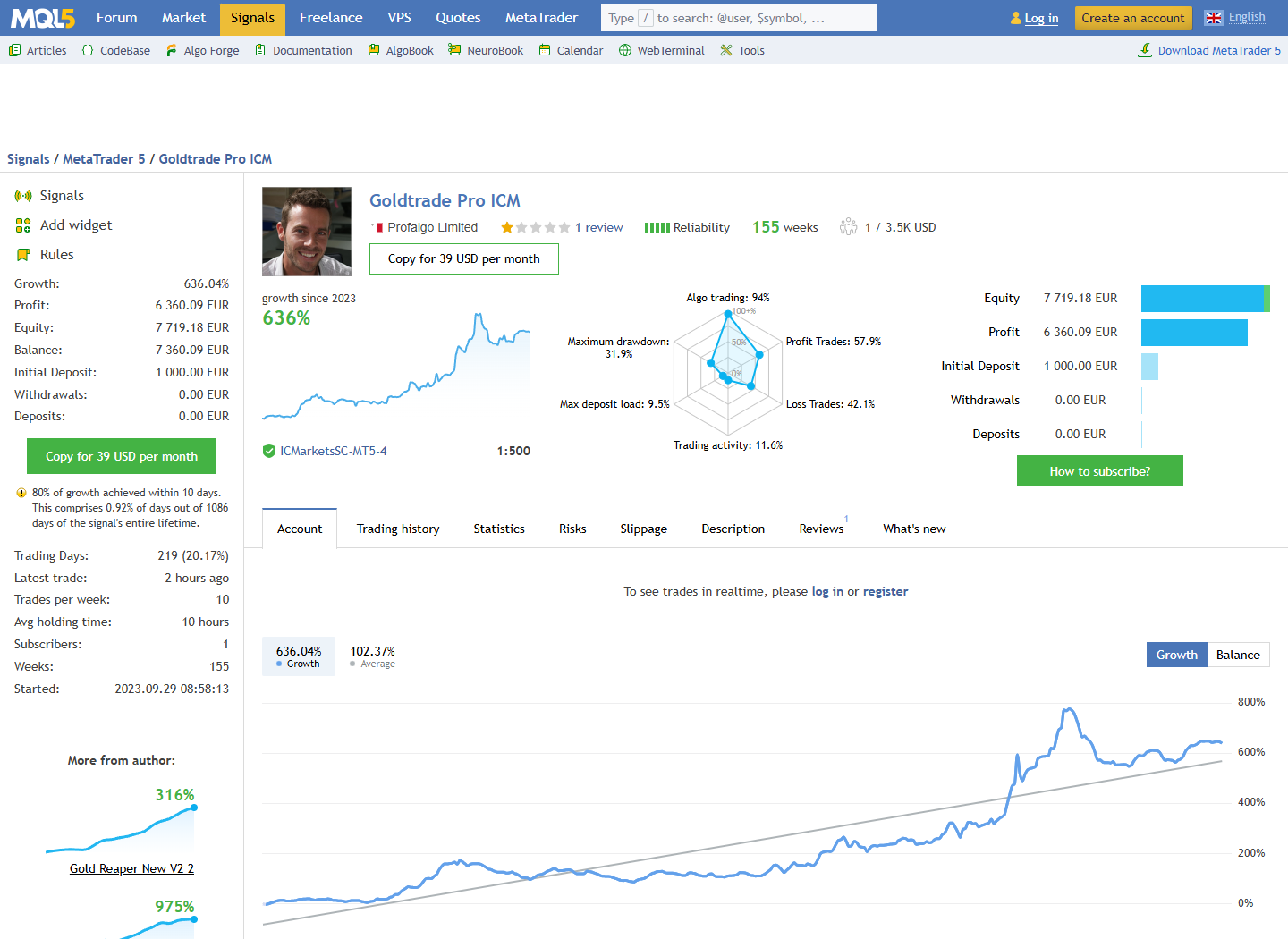
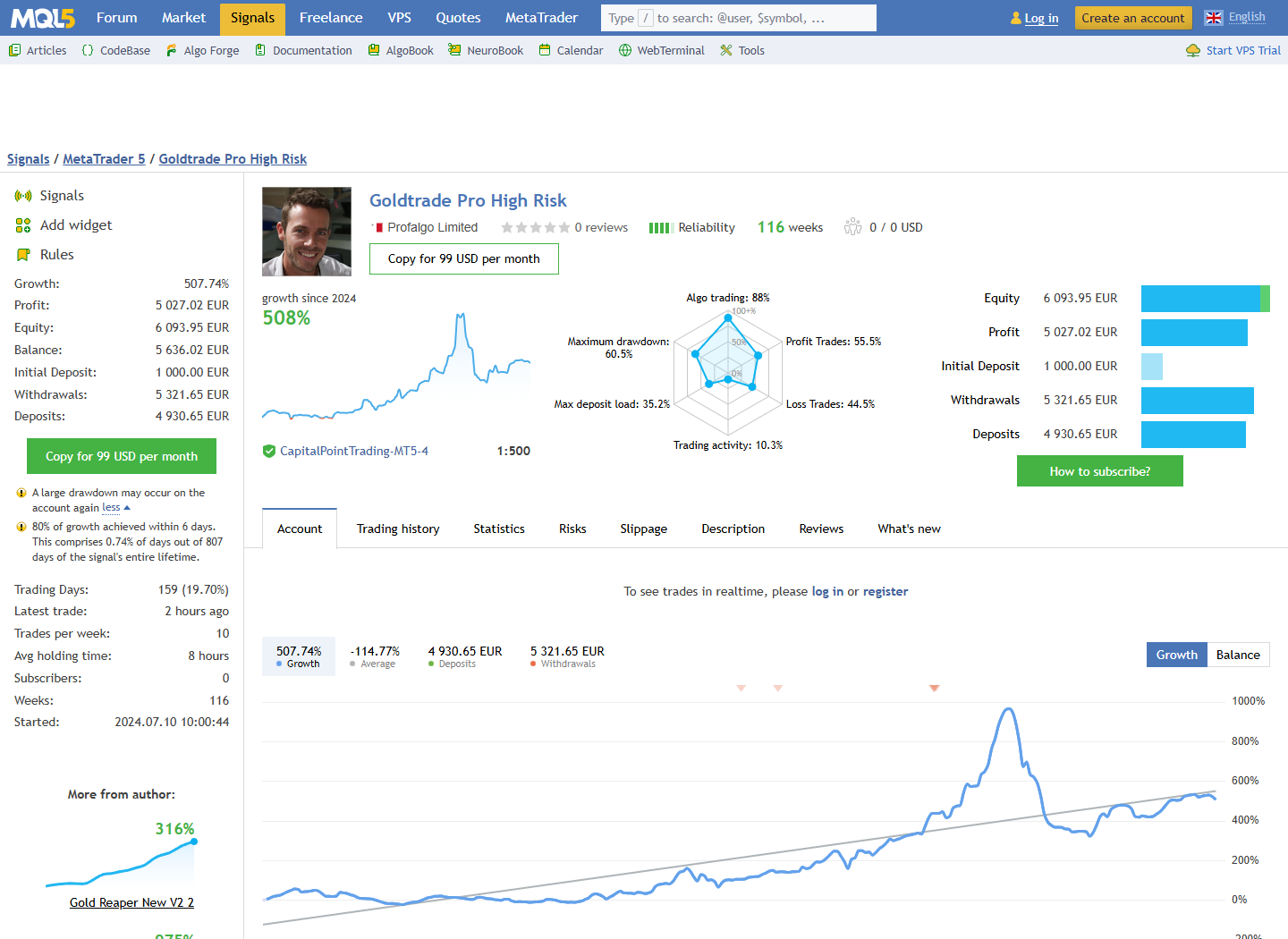
The smaller equity percentages do not replace the balance-drawdown fields. Reporting only 12.17% or 31.28% would leave out larger recorded balance declines. The platform also lists maximum monetary drawdown separately. We retain those labels rather than inventing an explanation for why the measures differ.


The losing months matter more than the cover’s headline
Both accounts rose strongly in March 2026 and then lost money in April and May. ICM recorded −12.41% and −13.50% in those two months. High Risk recorded −29.00% and −38.97%. These are calendar-month figures from the original tables, not the separate rolling monthly-growth field.
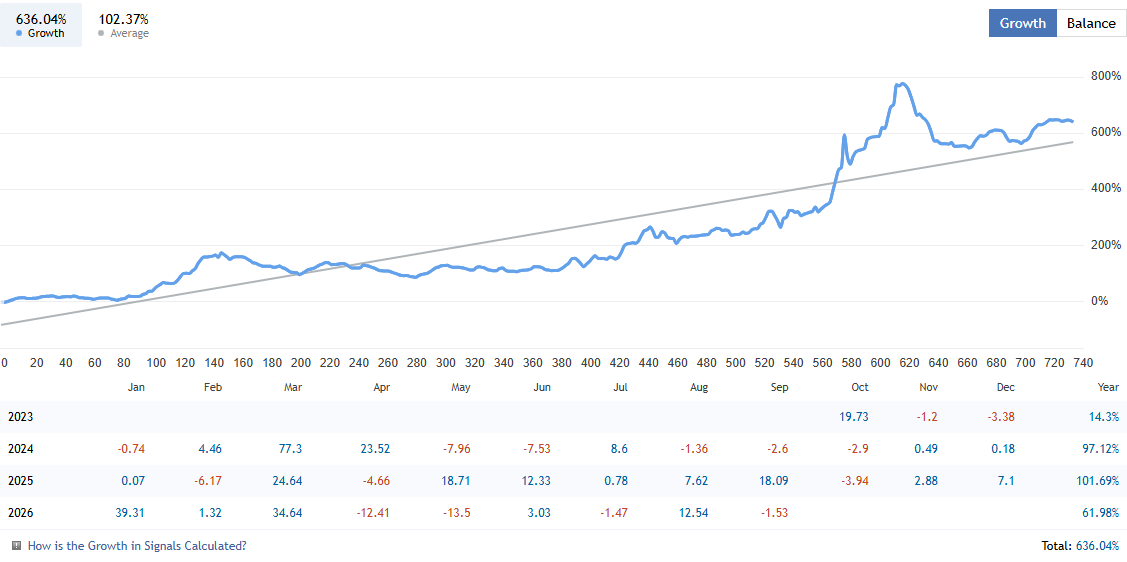
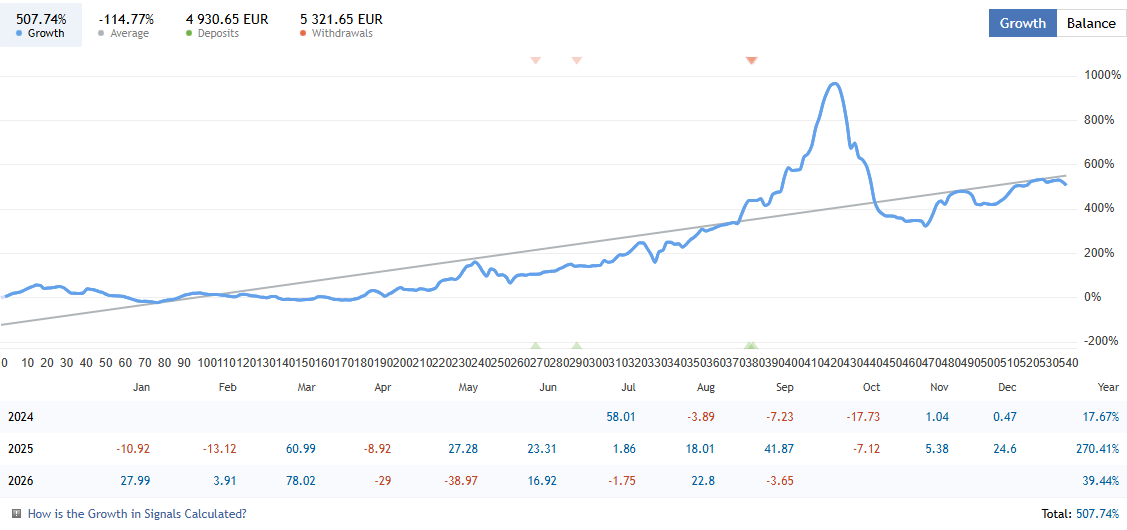
MQL5 warns that 80% of ICM’s growth occurred within 10 days; for High Risk it reports six days. The high-risk page also warns that large drawdown may recur. This concentration helps explain why buying after an impressive growth burst can produce a very different experience from holding through the entire account history. It does not establish when the next profitable period will arrive.
The high-risk account shows €4,930.65 of additional deposits and €5,321.65 of withdrawals. Net withdrawals are therefore €391, not the full withdrawal headline. Cash movements should not be presented as additional trading profits. The records show transfers; they do not establish why those transfers occurred.
Both accounts reported a recent trade at retrieval, despite intermittent historical inactivity warnings. The Started dates and results are a dated snapshot, not a promise of daily activity or future performance.
OnlyUp sizing and presets need particular attention
The linked parameter explanation describes fixed lots, balance-scaled sizing and risk-per-trade sizing. OnlyUp prevents lot reduction after losses, so the same nominal position can become larger relative to the account’s remaining equity. MT5’s later persistence of its high-water balance makes checking this setting after a restart especially relevant.
The two public V2 “live” preset filenames mention different risk numbers, yet their downloaded values both set Manual_RiskPerTrade to 1.6, enable OnlyUp and leave the daily-drawdown field at zero. They are historical settings references, not proof of the exact configuration on today’s signals.
Public prop presets also differ. The MT4 file uses 0.27 for its manual-risk field, a daily-drawdown value of 4 and OnlyUp off. The MT5 V4 prop preset uses risk-per-strategy 1, daily drawdown 4 and OnlyUp on; the archive also includes low, medium and high settings. Those parameters are not interchangeable risk units. A “prop” label does not certify compliance with a particular firm’s limits or guarantee a challenge pass.
The daily-loss control is described as closing positions and pending orders before waiting for the next day. That is a software action, not a guaranteed execution price through gaps or slippage. Confirm how the setting treats floating losses and the trading-day boundary in the actual supplied build.
A useful setup check before deployment
- Match the edition and gold symbol. MT4 and MT5 files are not interchangeable. Check broker suffixes, contract size and minimum lot.
- Start from a recorded configuration. Record active strategies, sizing mode, OnlyUp and the minimum-lot field before comparing tests.
- Check time and news behavior. Historical instructions use a WorldTimeServer WebRequest for AutoGMT and manual winter/summer offsets in testing. Inspect the actual build; MT4’s event schedule and MT5’s calendar are different.
- Test the combined exposure. Inspect concurrent orders, initial stops, trailing changes and the daily-loss action on demo.
- Use comparable execution assumptions. Record spread, commission, slippage and the data period. A fast tester option is useful only if the test still answers the intended question.
The source pages give different minimum-balance suggestions: the MT5 overview says USD 1,000, while older MT4 wording says USD 200. Neither figure establishes that every strategy selection is suitable for that balance. Minimum lot size, simultaneous exposure and broker margin can make an apparently small account unsuitable for a selected configuration.
Customer feedback: praise and difficult periods

The short April 2026 review above praises the EA and developer. Other feedback is more mixed: one customer describes an extended flat or losing period before adding a later positive update, while another reports substantial losses. A February 2026 positive reviewer explicitly credits favorable gold-market conditions. These are account-specific opinions from different periods and configurations, not directly comparable audited statements.
The developer’s later replies also discuss improved subsequent performance. Preserve that chronology when reading older complaints, while recognizing that a later gain does not remove the loss a different customer may have experienced. MQL5 stars remain separate from CheaperForex purchase ratings.
Which edition fits your workflow?
MT4 remains relevant when that is the terminal supported by your broker and you are prepared to check its event schedule. MT5 offers the documented native-calendar and newer testing features, plus the platform used by the two public signals. Choose the edition for its operating requirements; the evidence does not show that switching platforms by itself improves returns.
The central trade-off is unchanged across editions: configurable gold breakout entries can still experience clustered losses, especially with aggressive sizing. The more useful comparison is between recorded settings and tolerable account exposure, rather than between promotional growth percentages.
Verify it yourself
- Gold Trade Pro MT4 listing and MT4 release notes.
- Gold Trade Pro MT5 listing and public settings and MT5 release notes.
- Goldtrade Pro ICM live source and Goldtrade Pro High Risk live source.
- Developer parameter explanation, dated December 2023.
- Original short customer review; the full product feedback includes the differing experiences discussed above.
Ready to Buy Gold Trade Pro EA MT5?
$263.99 with crypto · $329.99 by card
Official version · Instant download · Free lifetime updates · 7-day money-back guarantee