Gold Tarantula EA MT5 is an XAUUSD H1 breakout system with six strategies, S1–S6, and configurable participation profiles. Our verdict: its attraction is control over which setups can trade and how exposure is managed. It is worth comparing for gold traders prepared to test those choices; the public evidence does not establish a current-build live track record.

Our top pick: DowGold
Explore DowGold’s cloud-connected approach to Gold, US30 and optional Silver. It runs on MT4 and MT5, with selectable risk modes, news filtering, and daily and overall drawdown controls.
- Public MyFXBook records
- 1, 2 or 6 account slots
- Future updates included
Explore DowGold & live results
Compare the account histories and drawdowns on the product page. Past performance does not guarantee future results.

Sources checked 28 September 2026. This review examines the current developer listing, release notes, public ACTIVE preset, original gallery images and one customer review. We have not independently traded or audited the executable.
Six engines do not mean six uncorrelated risks
The system can coordinate multiple breakout entries using pending orders. Manual selection lets you isolate individual engines; profiles adjust which strategies participate and how selectively they operate. That is useful for diagnosing behavior, but the shared gold market remains the central exposure.
For example, several engines could become eligible during the same volatile move. Separate entry rules do not prevent their losses from overlapping. Before treating a more active profile as an upgrade, compare total open volume, simultaneous positions and the worst combined loss with a quieter configuration on the same dates and broker data.
The source describes no grid or martingale. That addresses how exposure is added; it does not establish a fixed maximum realized loss. Stops can execute away from their intended level during gaps or poor liquidity, and spread can affect both pending-order fills and exits.
What the public ACTIVE preset actually contains
The developer’s September setup article links a readable settings file. It is more useful than a profile label because it exposes concrete choices. At our check, the following values were present (input names below omit their shared Tarantula prefix): FixedLot=0.02, AdaptiveLotScaling=true, NeverReduceLots=true, StrategyRiskLimit=1.0 and DailyDrawdownLimit=0.0, with MarginGuard enabled.
Do not assume that the fixed-lot field makes every position constant when adaptive scaling is also enabled. Likewise, the existence of a daily-loss control is not evidence that a protective threshold is active in this preset: its displayed daily-drawdown value is zero. Confirm the meaning of zero in the actual inputs and test the resulting behavior before relying on it.
The file also uses a numeric profile value of 3 and a spread ceiling of 500. The public explanation does not map that profile number to a named mode or establish a broker-independent spread cost. We therefore do not relabel the enum or convert the spread field into a universal dollar allowance.
A practical comparison before using real money
- Match the environment. Use the specified hedging account, gold symbol and H1 chart. Confirm suffix detection, contract size and lot step.
- Isolate strategy participation. Record the active S1–S6 selections and compare which orders each produces. Preserve the preset used for each run.
- Test sizing and stops together. Check actual volume and cash exposure as balance changes. Inspect initial stops, break-even and trailing adjustments separately.
- Trigger the configured protections. Check what the selected news and drawdown actions do to pending orders and open positions. A control that pauses fresh entries may leave existing exposure intact.
- Compare realistic execution. Use real-tick tests for a detailed evaluation, then demo-test the chosen setup. Spread, commission and slippage assumptions should be recorded with the result.
The current source gives no numerical minimum account balance or leverage requirement. Choosing those from an attractive historical report would turn an undocumented example into a recommendation. Size the configuration for the account’s actual margin and acceptable loss instead.
Read the original tester report, not just its curve
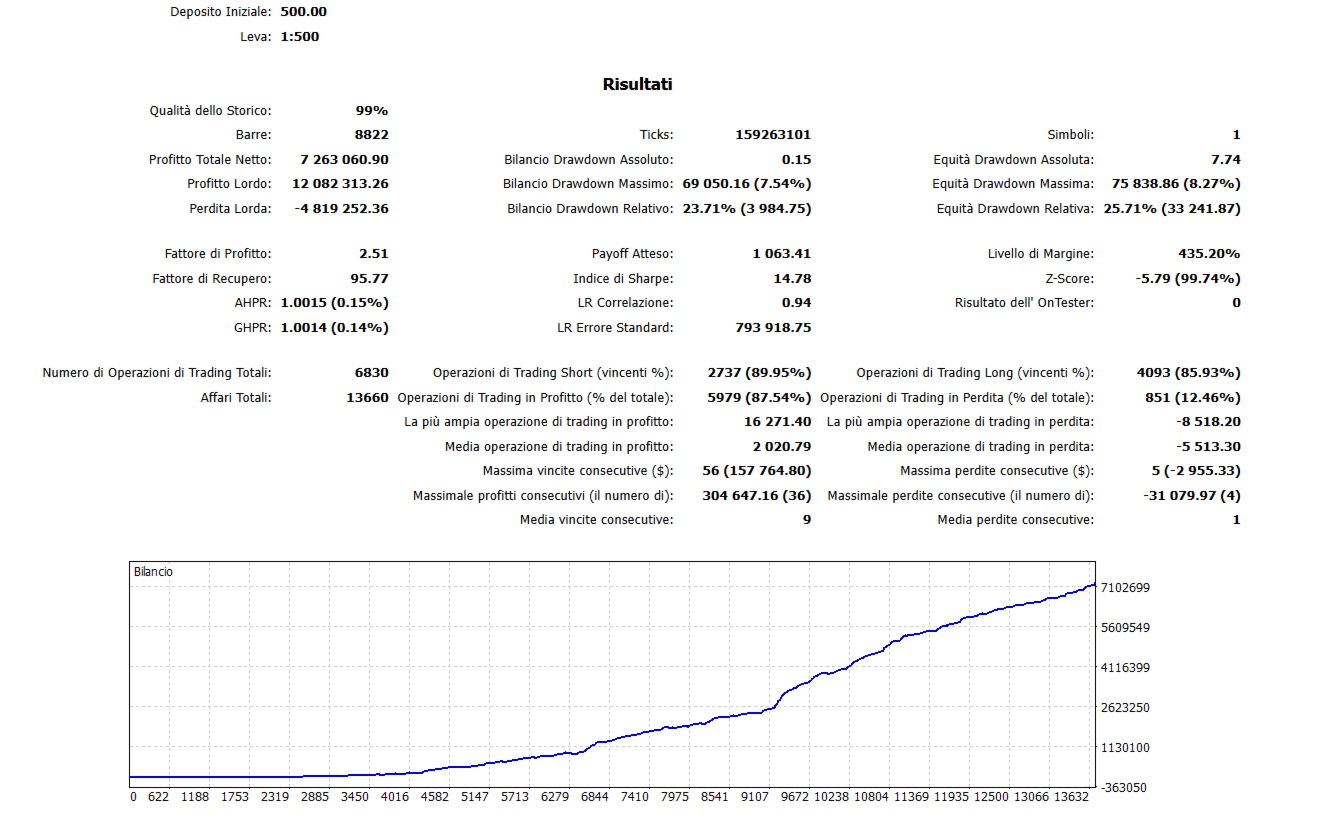
The gallery report displays a 500 initial deposit, 1:500 leverage, 6,830 trades and a profit factor of 2.51. Its 99% figure is labeled history quality, not predictive accuracy. The very large simulated ending result does not show what another account should expect.
The key distinction is between 25.71% relative equity drawdown and the 8.27% shown beside the largest monetary equity drawdown. They are different report fields. Quoting only the smaller percentage would omit the larger peak-relative decline recorded by the tester.
The reported average losing trade is about 2.7 times the average winner, despite 87.54% profitable trades. That combination illustrates why a high hit rate alone does not establish low risk: occasional larger losses can matter disproportionately.
The source image does not show the test’s date range, build, broker or settings. The image carries a July 2026 CDN file-modification date, which does not establish the test date or make it a reproduced test of the September release. Without a matched configuration, we cannot attribute every chart in the gallery to one run.
What the excursion plots add
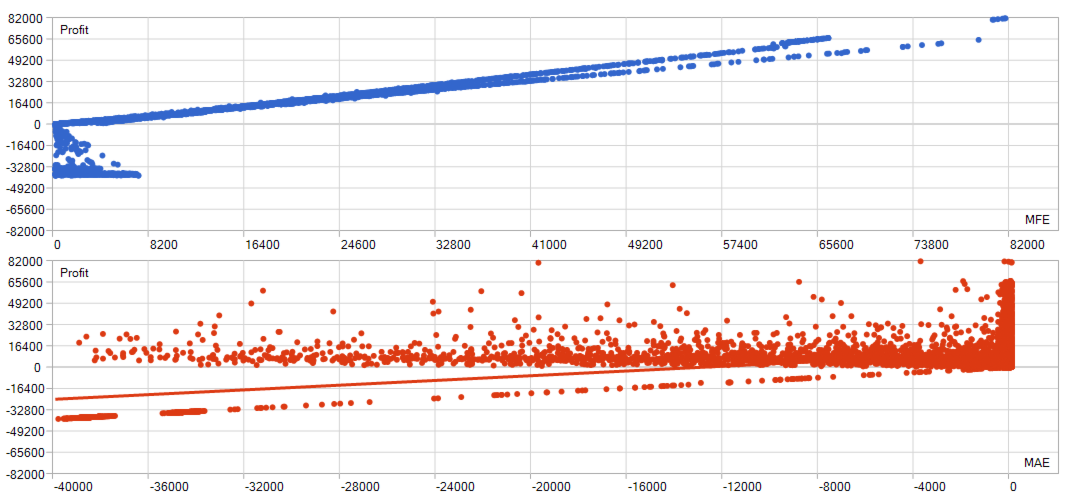
MFE describes the largest favorable movement during a trade; MAE describes the largest adverse movement. These plots help separate a trade’s final result from the path taken to get there. A position that eventually closes profitably may still have experienced a substantial floating loss.
The axes show amounts rather than percentages, and the test’s currency and changing position sizes are not disclosed here. They cannot be converted into a current per-trade risk allowance. Their useful lesson is to inspect open-position pressure as well as the smoothness of the aggregate balance curve.
Current release versus older evidence
The live MQL5 listing showed version 1.44, dated 27 September 2026. Its release notes address strategy activation and initialization, differences between selected inputs and runtime behavior, and fixed-lot processing. That makes checking the supplied file’s settings and actual behavior especially relevant; the older gallery does not independently validate those fixes.
We found no Gold Tarantula-specific public live signal linked from the current listing or setup article. The seller’s two displayed signals relate to Chrysos Unified, a different EA, and are not used as Tarantula evidence here.
Customer feedback in context

The one public reviewer praises the results and the developer’s responsiveness. It is an individual opinion from August, before release 1.44, without the account statements, broker settings or drawdown history needed to assess reproducibility. The stars shown in the source excerpt are MQL5 feedback, not ratings from CheaperForex customers.
Who is the better fit?
Gold Tarantula is most relevant to someone who wants to compare a configurable collection of gold breakout engines and is comfortable verifying how presets, exposure and execution interact. It is a less convincing choice if the buying decision depends on a verified current-version live record, which was not available in the sources we checked.
For another way to organize gold strategies, compare Cepheus MT5 EA or Smart Gold Hunter EA MT5. Those links compare product design, not controlled evidence that one produces better returns.
Developer reference
The MQL5 marketplace listing is the developer reference for specifications and release information.
Verify it yourself
- Gold Tarantula specifications and MQL5 customer feedback.
- Developer setup explanation and public ACTIVE preset.
- Gold Tarantula release notes.
Read the full original MQL5 review.
Inspect the public Gold Tarantula ACTIVE settings file before treating it as a suitable configuration for your account.