/* Only complements native navigation; native search and Woo actions stay unchanged. */ (()=>{ const key='cfHeaderDraft40435'; window[key]?.dispose?.(); const abort=new AbortController(),media=matchMedia('(max-width:1024px)'); const header=()=>document.querySelector('.elementor-40435.elementor-location-header'); const toggle=()=>header()?.querySelector('.cf-header-nav .elementor-menu-toggle'); const expanded=t=>t&&(t.getAttribute('aria-expanded')==='true'||t.classList.contains('elementor-active')); const close=focus=>{const t=toggle();if(expanded(t)){t.click();if(focus)t.focus();}}; document.addEventListener('keydown',event=>{ if(event.key==='Escape'&&expanded(toggle())){close(true);event.preventDefault();} },{signal:abort.signal}); document.addEventListener('pointerdown',event=>{ const nav=header()?.querySelector('.cf-header-nav'); if(media.matches&&expanded(toggle())&&nav&&!nav.contains(event.target))close(false); },{signal:abort.signal}); const change=()=>close(false);media.addEventListener('change',change); const disposeCart=cfEnhanceDraftCart(header()); window[key]={dispose(){abort.abort();media.removeEventListener('change',change);disposeCart();}}; /* Proposal only. Call inside the draft header's existing behaviour IIFE: * const disposeCart = cfEnhanceDraftCart(header()); * Include disposeCart() in that IIFE's existing dispose method. * Native cart toggling, fragments and checkout links remain untouched. */ function cfEnhanceDraftCart(header) { if (!header || header.getAttribute('data-elementor-id') === '353') return () => {}; const abort = new AbortController(), owned = new Map(); let wasOpen = false, closing = false, frame = 0; const refs = () => { const widget = header.querySelector('.cf-header-cart'); return {widget, pane:widget?.querySelector('.elementor-menu-cart__main'), trigger:widget?.querySelector('.elementor-menu-cart__toggle_button'), close:widget?.querySelector('.elementor-menu-cart__close-button, .elementor-menu-cart__close-button-custom')}; }; const open = r => !!r.widget?.classList.contains('elementor-menu-cart--shown'); const attribute = (el, name, value) => { if (!el || el.getAttribute(name) === value) return; if (!owned.has(el)) owned.set(el, new Map()); const values = owned.get(el), old = values.has(name) ? values.get(name).old : el.getAttribute(name); values.set(name, {old, value}); el.setAttribute(name, value); }; const prepare = r => { if (!r.pane) return; if (!r.pane.id) attribute(r.pane, 'id', 'cf-cart-dialog-' + header.getAttribute('data-elementor-id')); attribute(r.pane, 'role', 'dialog'); attribute(r.pane, 'aria-modal', 'true'); if (!r.pane.hasAttribute('aria-label') && !r.pane.hasAttribute('aria-labelledby')) attribute(r.pane, 'aria-label', 'Shopping cart'); attribute(r.pane, 'tabindex', '-1'); attribute(r.trigger, 'aria-haspopup', 'dialog'); attribute(r.trigger, 'aria-controls', r.pane.id); if (r.close) { if (!r.close.matches('button, input[type="button"]')) attribute(r.close, 'role', 'button'); attribute(r.close, 'tabindex', '0'); if (!r.close.hasAttribute('aria-label') && !r.close.hasAttribute('aria-labelledby')) attribute(r.close, 'aria-label', 'Close shopping cart'); } }; const focusable = pane => [...pane.querySelectorAll('a[href],button,input,select,textarea,summary,[tabindex],[contenteditable="true"]')] .filter(el => el.tabIndex >= 0 && !el.matches(':disabled') && !el.closest('[hidden],[inert],[aria-hidden="true"]') && el.getClientRects().length && getComputedStyle(el).visibility === 'visible'); const focusInside = () => { const r = refs(); if (!open(r) || closing || !r.pane) return; (focusable(r.pane)[0] || r.pane).focus({preventScroll:true}); }; const returnFocus = () => { const t = refs().trigger; if (t?.isConnected) t.focus(); }; const sync = () => { const r = refs(); prepare(r); const now = open(r); if (now && !wasOpen) { closing = false; cancelAnimationFrame(frame); frame = requestAnimationFrame(focusInside); } else if (!now && wasOpen) { closing = true; cancelAnimationFrame(frame); returnFocus(); closing = false; } else if (now && r.pane && !r.pane.contains(document.activeElement) && !closing) { cancelAnimationFrame(frame); frame = requestAnimationFrame(focusInside); } wasOpen = now; }; const closeNative = () => { const r = refs(); if (!open(r)) return; closing = true; returnFocus(); // Invoke the existing handler; never change its internal isCartOpen state. (r.close || r.trigger)?.click(); if (open(refs())) { closing = false; focusInside(); } }; document.addEventListener('keydown', event => { const r = refs(); if (!open(r) || !r.pane) return; if (event.key === 'Escape') { event.preventDefault(); event.stopPropagation(); closeNative(); return; } if ((event.key === 'Enter' || event.key === ' ') && r.close?.contains(event.target) && !r.close.matches('button, input[type="button"]')) { event.preventDefault(); closeNative(); return; } if (event.key !== 'Tab') return; const list = focusable(r.pane), first = list[0], last = list[list.length - 1], current = document.activeElement; if (!first) { event.preventDefault(); r.pane.focus({preventScroll:true}); } else if (!r.pane.contains(current) || (event.shiftKey && (current === first || current === r.pane))) { event.preventDefault(); (event.shiftKey ? last : first).focus({preventScroll:true}); } else if (!event.shiftKey && current === last) { event.preventDefault(); first.focus({preventScroll:true}); } }, {capture:true, signal:abort.signal}); // Move focus before native click handlers apply aria-hidden to the pane. document.addEventListener('click', event => { const r = refs(); if (!open(r) || !r.pane) return; if (r.close?.contains(event.target) || !r.pane.contains(event.target)) { closing = true; returnFocus(); queueMicrotask(() => { if (open(refs())) { closing = false; focusInside(); } }); } }, {capture:true, signal:abort.signal}); document.addEventListener('focusin', event => { const r = refs(); if (!closing && open(r) && r.pane && !r.pane.contains(event.target)) focusInside(); }, {capture:true, signal:abort.signal}); const observer = new MutationObserver(sync); observer.observe(header, {subtree:true, childList:true, attributes:true, attributeFilter:['class','aria-hidden']}); sync(); return () => { observer.disconnect(); abort.abort(); cancelAnimationFrame(frame); for (const [el, attrs] of owned) for (const [name, {old, value}] of attrs) { if (el.getAttribute(name) !== value) continue; if (old === null) el.removeAttribute(name); else el.setAttribute(name, old); } }; } })();

New MT5 arrival

Quantum Commander EA MT5

Latest version

Quantum Commander EA MT5 trades US30 trend pullbacks with one position at a time, a stop loss and configurable exits. It suits traders seeking an index-focused alternative to a gold grid.

  • One position, several ways to manage the exit.
  • Keep the US30 contract in view.
  • Prepare the running environment.

Quantum Commander EA MT5: detailed review

Quantum Commander EA MT5 Product LogoMT5Save 59%

Regular priceRegular price was $899.99

$295.96Crypto priceUSDT, USDC, BTC or ETH. Extra 20% off at checkout.Save 67%You save $604.03 with crypto

$369.95 with card

Visa, Mastercard, Apple Pay and Google Pay accepted.

Card payments add bank fees, sales taxes and other charges.

  • Latest version
  • Instant downloadYour file is provided immediately after payment. In very rare cases we manually review an order first, then send your download straight after. If you don’t receive your file, you can request a full refund.
  • Free future updatesAll updates are free. They’re provided on a best-availability basis: we get new versions as fast as we can, led by customer demand, but we don’t guarantee them immediately. If you need every update the moment it’s released, our service may not be the best fit for you.
  • 7-day money-backRefunds only cover an EA that fails to attach to your chart because of errors we can replicate. We don’t cover changing your mind or not liking the EA. All brokers are different, and results are never promised because markets are constantly changing.
  • Unlimited activationsUse it on as many MT5 accounts and computers as you want, live or demo. There are no restrictions on how you use it.

Source code (.mq5) available at checkout.

Orders over $300 include 3 months of PrismAlgo freeThe highly recommended cloud-connected EA for 28 FX pairs, Gold and Bitcoin. Added to your cart automatically. View PrismAlgo

Official versionsInstant downloadFuture updates includedExtra 20% off with cryptoReal people on support28,000+ tradersTrading since 2019Rated Excellent on Trustpilot

Product description

About Quantum Commander EA MT5

Quantum Commander EA MT5 trades US30 trend pullbacks with one position at a time, a stop loss and configurable exits. It suits traders seeking an index-focused alternative to a gold grid; the CheaperForex offer makes its MT5 requirements and current price easy to compare before purchase.

Read the full Quantum Commander EA MT5 review

One position, several ways to manage the exit

The design avoids grid, martingale and averaging into a losing basket. Entry and exit management still matter: fixed take profit, dynamic trailing and the opposing M1 signal exit serve different purposes. Decide which exit behaviour you are testing rather than switching controls after individual losing trades.

Keep the US30 contract in view

US30 names and contract values vary between brokers. Check the symbol, minimum lot, tick value and trading sessions on the actual account. An index move of the same number of points can represent a different money result on another broker. Low spreads do not remove commission, slippage or gap risk.
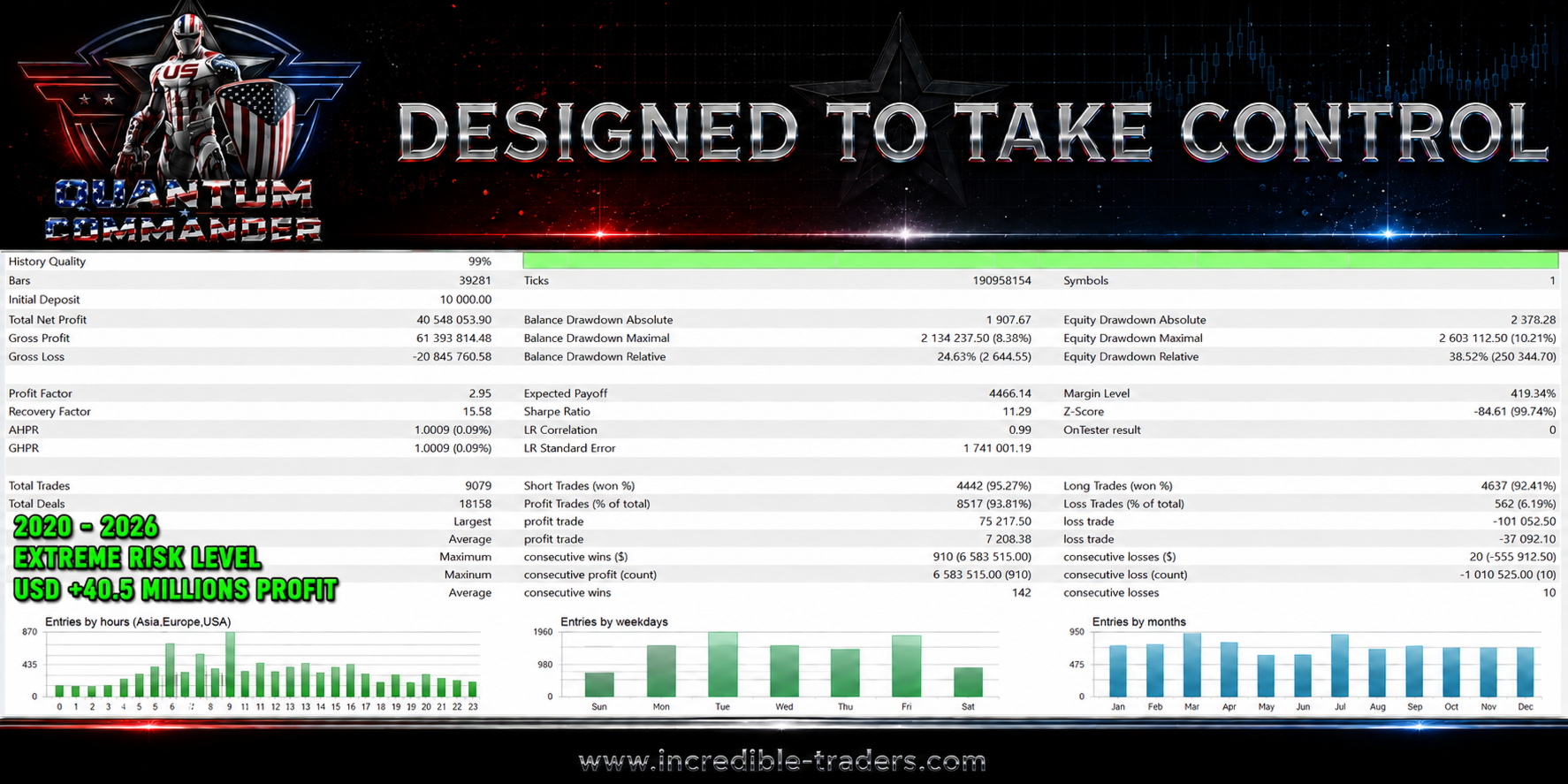
Quantum Commander EA backtest report at 99 percent history quality from a 10000 USD initial deposit covering 2020 to 2026 at an extreme risk level, showing 40548053.90 USD total net profit, a profit factor of 2.95, 9079 total trades with 8517 profit trades at 93.81 percent and 562 loss trades at 6.19 percent, an average profit trade of 7208.38 against an average loss trade of 37092.10, a maximum balance drawdown of 8.38 percent but a relative balance drawdown of 24.63 percent, and a maximum equity drawdown of 10.21 percent against a relative equity drawdown of 38.52 percent
Original image retained from the earlier article: promotional product artwork, not a trading-results image. Evidence reviewed 24 September 2026; this is not a new capture.

Prepare the running environment

The developer calls for a hedging account, low-spread execution and an always-running terminal or VPS. The strategy uses internal timing, so changing the visible chart period is not a simple way to make it more conservative. Test the intended settings and confirm normal order handling before increasing exposure.

Compare it with the gold products sensibly

Commander trades a different instrument from Quantum Titan, Queen X and Athena X. That is useful for product selection, but it does not establish that losses will be independent in a wider portfolio. Our review examines the published backtest and account evidence separately from the current trading controls.

Setup questions

Is Commander a grid EA?

The current developer listing describes one position at a time, without grid, martingale or loss averaging.

Will identical lots have identical risk at every broker?

No. US30 contract size, tick value, lot steps, spreads and execution can differ. Compare monetary risk on your actual symbol.

Do I need a particular visible chart timeframe?

The strategy uses internal timing. Follow the current setup instructions and test the configured exits; changing chart period alone is not a risk adjustment.

Related editions and comparisons

Compare Quantum Queen X EA MT5 · Quantum Titan MT5 EA · Quantum Athena X EA MT5 · Quantum King EA MT5.

Your CheaperForex offer

The latest version is supplied as a standalone file. Follow the delivery instructions in your order; the instructions document is not the trading executable. Future file updates are included when we receive them. Email setup help is available.

7-day money-back guarantee. If the EA fails to attach to your chart because of errors we can replicate, you get a full refund. Trading results are not covered.

Verify it yourself

Every order

What’s included with Quantum Commander

Download it, install it and keep it current: everything comes with your license.

  • Instant download

    Ready the moment checkout completes, and kept in your customer portal.

  • Installation guide

    Step-by-step PDF with screenshots.

  • Optimized presets

    Ready-to-use configuration files.

  • Future updates

    Included free when we receive them. You never pay twice, and every version stays in your account.

  • Unlimited activations

    Use it on as many terminals as you like: unlimited live and demo accounts, no activation keys.

  • Free remote installation

    Optional, if you need help: a one-time free install over AnyDesk, plus settings advice and custom presets for your account.

7-day money-back guarantee

If the EA fails to attach to your chart because of errors we can replicate, you get a full refund.

*Refunds don’t cover changing your mind or not liking the EA. All brokers are different, and results are never promised because markets are constantly changing.

Product FAQs

Quantum Commander EA MT5 FAQs

Still deciding?

Real people on support, by Telegram or our contact form.

Is Commander a grid EA?

The current developer listing describes one position at a time, without grid, martingale or loss averaging.

Will identical lots have identical risk at every broker?

No. US30 contract size, tick value, lot steps, spreads and execution can differ. Compare monetary risk on your actual symbol.

Do I need a particular visible chart timeframe?

The strategy uses internal timing. Follow the current setup instructions and test the configured exits; changing chart period alone is not a risk adjustment.

The CheaperForex difference

Why 28,000+ traders choose CheaperForex

Trustpilot rating Excellent 4.6 out of 5 Based on 120 reviews on Trustpilot Read the reviews on Trustpilot (opens in a new tab)
“Bought 2 EAs from them. Requested update for new version and was sent within 24hrs. Great support. Recommended, 5 STARS.”
Aceman · Trustpilot review (opens in a new tab)
“Fantastic service as always. Have gotten a lot from them in the past and never been disappointed.”
Paul Michael Lawrence · Trustpilot review (opens in a new tab)
“They were friendly and helpful in setting up my expert advisor.”
Sarah Francis · Trustpilot review (opens in a new tab)
  • Instant accessNo group buys or waiting
  • 7-day refund policyRefunds only cover an EA that fails to attach to your chart because of errors we can replicate. We don’t cover changing your mind or not liking the EA. All brokers are different, and results are never promised because markets are constantly changing.For product errors
  • Remote installationOptional: we can install it for you
  • Flexible paymentsCards, Apple Pay, Crypto
Official EAs1,180+
Customers28,000+
Trading since2019

Ready when you are

Quantum Commander EA MT5 for $295.96 with crypto

Regular price was $899.99 · $369.95 with card · instant download · future updates included

Quantum Commander EA MT5$295.96with crypto$369.95 with card