
Quantum OmniGold EA MT5
Version: Latest
Guaranteed genuine. No cracks, fakes or AI recreations. See why
Why we only sell the original
- Fakes are everywhere right now. AI recreations and cracked copies sell for $10 to $20 on other websites and channels. They are not the real EA.
- A fake doesn’t trade like the original. AI recreations only copy how an EA looks from the outside, so they can trade very differently.
- Cracks can hide malware that reaches your computer and your trading account.
- The real thing, with real support. The developer’s own, unmodified file, free updates, a setup guide, and real people on Telegram if you get stuck.
A $10 fake is your call. But with real money on the line, is it worth the risk? We only sell originals, at the lowest genuine price.
Quantum OmniGold EA by Bogdan Ion Puscasu is a XAUUSD (Gold) Expert Advisor for MetaTrader 5 from the Quantum studio — the team behind Quantum Emperor and Quantum Queen. Unlike many gold robots, it runs a complete defined-risk trade-management stack: a fixed stop loss, two staged take-profit levels, and a trailing stop, so every position opens with a hard risk cap and locks gains in stages.
An auto-lot risk selector (Medium recommended) sizes exposure to your account, trading is disabled on NFP Friday by default, and the system carries a public MQL5 live signal running on IC Markets at 1:500 leverage.
- ✅ Defined-risk trade management — a fixed stop loss plus two take-profit levels and a trailing stop, visible directly in the EA inputs (not just a marketing claim), so each trade has a hard risk cap and staged profit-locking
- ✅ Built by the Quantum studio (Bogdan Ion Puscasu) — the developer behind Quantum Emperor, Quantum Queen and the wider Quantum range, one of the most recognised names in MQL5 gold automation
- ✅ Built-in news protection and risk selector — trading is disabled on NFP Friday by default, and an auto-lot risk level (Medium recommended) lets you match exposure to your account size
XAUUSD gold specialist with a fixed-SL trade-management stack and a public MQL5 live signal. Read our editorial review before deciding.
 MT5Save 55%
What you receive
- Quantum OmniGold.ex5Genuine, unmodified developer file for MetaTrader 5Latest version
- Setup guide.pdfA general guide to installing expert advisors.Official step-by-step install guide
Delivered instantly to your account after payment
100% original. Never a crack, fake or AI recreation.
Regular priceRegular price was $1,099.99
$499.95 with card
Visa, Mastercard, Apple Pay and Google Pay accepted.
Card payments add bank fees, sales taxes and other charges.




 Apple Pay and Google Pay ready at checkout
- Official developer build · Latest version
- Instant downloadYour file is provided immediately after payment. In very rare cases we manually review an order first, then send your download straight after. If you don’t receive your file, you can request a full refund.
- Free lifetime updatesAll updates are free. They’re provided on a best-availability basis: we get new versions as fast as we can, led by customer demand, but we don’t guarantee them immediately. If you need every update the moment it’s released, our service may not be the best fit for you.
- 7-day money-backRefunds only cover an EA that fails to attach to your chart because of errors we can replicate. We don’t cover changing your mind or not liking the EA. All brokers are different, and results are never promised because markets are constantly changing.
- Unlimited activationsUse it on as many MT5 accounts and computers as you want, live or demo. There are no restrictions on how you use it.
What you receive
- Quantum OmniGold.ex5Genuine, unmodified developer file for MetaTrader 5Latest version
- Setup guide.pdfA general guide to installing expert advisors.Official step-by-step install guide
Delivered instantly to your account after payment
100% original. Never a crack, fake or AI recreation.


28,000+ tradersServed since 2019
Don’t miss thisSee the EA we recommend
The Gold EA we trade ourselves
DowGold for XAU and US30


We have tested thousands of EAs. DowGold is the one we use and recommend, and we rarely say that. We’re also an official reseller.
Real USD MyFXBook accounts. A live cloud, constantly evolving strategy.
See DowGoldOfficial versionsInstant downloadFree lifetime updatesExtra 20% off with cryptoReal people on support28,000+ tradersTrading since 2019Rated Excellent on Trustpilot
Product description
About Quantum OmniGold EA MT5
Quick Summary:
Quantum OmniGold EA by Bogdan Ion Puscasu is a XAUUSD (Gold) Expert Advisor for MetaTrader 5 from the Quantum studio. What sets it apart from many gold robots is a complete, conventional defined-risk trade-management stack: a fixed stop loss on every position, two staged take-profit levels, and a trailing stop that protects open profit. Position sizing is handled by an auto-lot risk selector (Medium recommended for a ~$1,000 balance), trading is disabled on NFP Friday by default, and the product carries a public MQL5 live signal running on IC Markets at 1:500 leverage.
Official MQL5 Listing:
Quantum OmniGold EA — MQL5 Marketplace
Developer’s Live Signal:
Quantum OmniGold — MQL5 live signal (IC Markets)
Why Quantum OmniGold EA
- Gold specialist — built specifically for XAUUSD trading rather than a generic multi-symbol EA repurposed for Gold
- Fixed stop loss on every trade — a hard price-based stop (30 points in the developer’s defaults) caps the risk on each position, in contrast to gold systems that run with no static stop at all
- Staged take-profit + trailing stop — two take-profit levels (40 and 60 points) bank gains in stages, and a trailing stop protects open profit as price moves in your favour
- No grid, no martingale recovery — the system does not stack a ladder of grid orders or double lots after a loss to dig out of drawdown; any position scaling happens only as a trend runs in your favour
- Auto-lot risk selector — position sizing scales with your account through a selectable risk level (Medium recommended for around a $1,000 balance), with a fixed-lot manual override available
- Built-in news protection — trading is disabled on NFP Friday by default to sidestep one of gold’s most volatile scheduled events
- Quantum studio pedigree — developed by Bogdan Ion Puscasu, the team behind Quantum Emperor, Quantum Queen and the wider Quantum range
- Prop-firm positioning — the fixed stop and defined drawdown profile are built with funded-account and challenge rules in mind (set the risk level conservatively on those accounts)
- Public MQL5 live signal — real-money monitoring on IC Markets at 1:500 leverage
Defined-Risk Trade Management
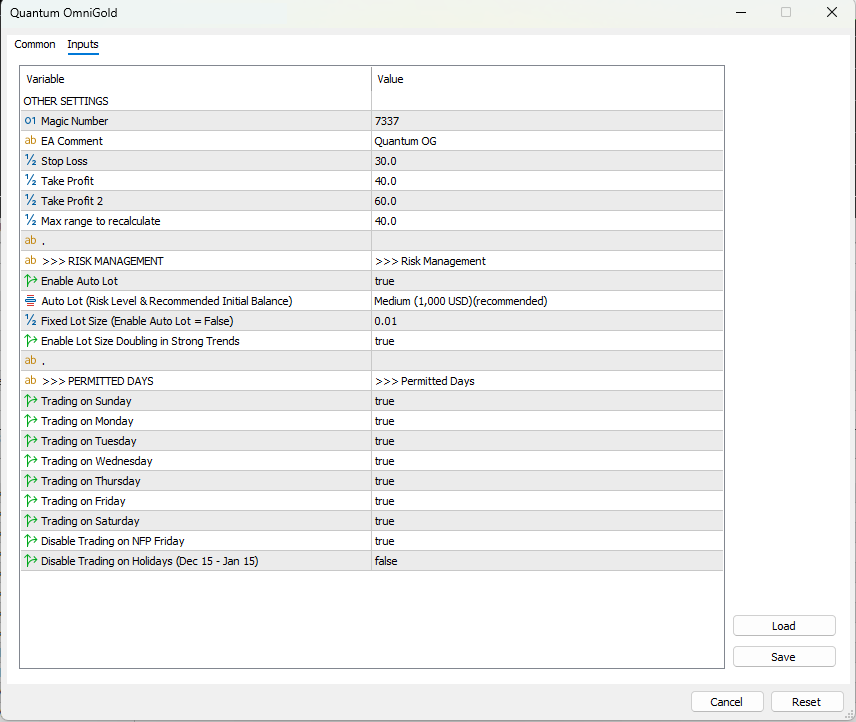
The inputs panel shows what the marketing headlines actually mean in practice. Stop Loss is set to 30 points, so every position opens with a hard risk cap. Take Profit and Take Profit 2 (40 and 60 points) close the trade in stages rather than all at once, and a trailing stop protects profit as the move extends. This is a conventional, understandable trade-management approach — a real advantage over gold robots that leave losing trades open with no static stop.
Position sizing is handled by the auto-lot selector, which recommends a Medium risk level for around a $1,000 starting balance. There is one input worth understanding before you go live: “Enable Lot Size Doubling in Strong Trends” is on by default. This is a trend-following scaling feature — it adds size when the market is moving in the trade’s favour, not after losses (so it is not loss-averaging martingale) — but it does amplify exposure, which is why keeping the risk level at the recommended Medium setting is the sensible way to run it. Trading is disabled on NFP Friday by default for news protection.
Live Signal Snapshot
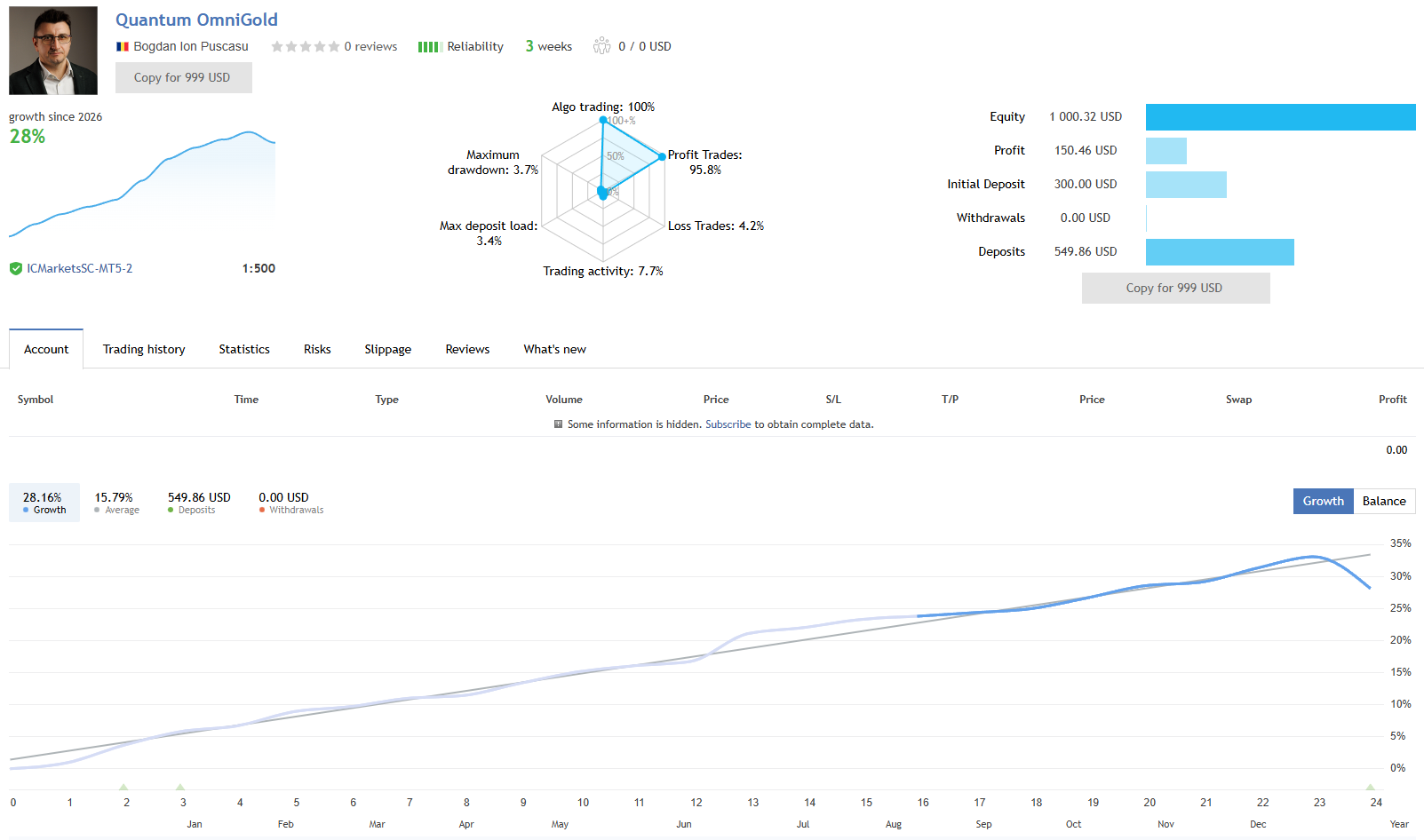
- Live signal broker: IC Markets at 1:500 leverage, roughly 3 weeks tracked
- Live profit trades: 95.8% with 4.2% loss trades — a high win rate typical of a small-take-profit style (the figure to watch is the size of the occasional loss, not the loss frequency)
- Live max drawdown: 3.7% on the young sample
- Trading activity: 7.7% (selective rather than constant)
- Headline live growth: ~28% — note this is calculated against the $300 initial deposit; additional deposits during the period bring total capital to around $850, so the cleaner absolute read is roughly $150 profit on that total (closer to 18% absolute)
- Backtest period (per report): 2022–2026 on 99% history quality — a multi-year window across several gold regimes
The live signal is early, encouraging evidence rather than a proven multi-month record — three weeks is a short sample. The high win rate reflects the defined take-profit style banking frequent modest gains; the fixed stop loss is what caps the downside on the trades that go against it. For forward expectations, anchor on the deposit-adjusted absolute return rather than the headline percentage.
EA Setup at a Glance
- Platform: MetaTrader 5
- Instrument: XAUUSD (Gold)
- Account type: ECN or Raw Spread account with competitive XAUUSD spreads
- Leverage: 1:500 used on the developer’s live signal — match to your jurisdiction’s availability
- Starting deposit: Auto-lot recommends around $1,000 at the Medium risk level; the live signal opened on $300
- Risk management: Fixed stop loss (30), two take-profits (40 / 60), trailing stop, selectable auto-lot risk level, lot-size doubling in strong trends (on by default)
- News protection: Trading disabled on NFP Friday by default
- VPS: Strongly recommended — 24/5 low-latency connection near your broker’s server
What You Receive
- Quantum OmniGold EA for MT5 — available file
- Access to their private Discord
- Official OmniGold user manual
- Free lifetime updates
- Developer’s recommended settings
Risk Disclaimer
Trading XAUUSD involves significant volatility (NFP, CPI, FOMC, geopolitical events). Quantum OmniGold uses a fixed stop loss on every position, which caps single-trade risk — but the “lot size doubling in strong trends” feature amplifies exposure while it is active, and the auto-lot risk selector directly affects how much can be lost in a single stretch. Keep the risk level at the recommended Medium setting (or lower) while validating, and understand the doubling behaviour before scaling. The developer’s backtests show very large compounded totals ($1.2 million at Medium risk, and a far higher figure at the Extreme risk level); these are illustrations of compounding behaviour under specific risk settings, not forecasts of forward returns. The live signal is roughly three weeks old — encouraging early evidence, not a multi-month track record — and its headline growth figure is amplified by additional deposits during tracking, so anchor expectations on cumulative profit relative to total capital deployed. Test on demo on your intended broker first, use conservative position sizing while validating, and never deploy capital you cannot afford to lose. Past performance — backtest or live — does not guarantee future results.
Full Editorial Review
📖 Read our complete Quantum OmniGold EA review →
A full editorial breakdown: the fixed-SL trade-management stack analysed in detail, the lot-size doubling feature explained honestly, the three-week live signal read in deposit context, both backtest risk levels interpreted for what they do and don’t tell you, who the product suits, and our verdict.
Standalone MT5 file. Follow the delivery instructions supplied with your order. Free lifetime updates are included, added as soon as we receive them. You never pay twice. Free remote installation is available if you need it.
Every order
What’s included with Quantum OmniGold
- Instant downloadReady after checkout and kept in your account
- Free lifetime updatesAdded as soon as we receive them, every version kept in your account
- Unlimited activationsUnlimited live and demo accounts
- Free remote installationOptional: a one-time install over AnyDesk, with settings advice and custom presets
Product FAQs
Quantum OmniGold EA MT5 FAQs
Real people on support, by Telegram or our contact form.
What is Quantum OmniGold EA?
A XAUUSD (Gold) Expert Advisor for MetaTrader 5 from Bogdan Ion Puscasu’s Quantum studio. It trades Gold using a conventional defined-risk approach — a fixed stop loss on every position, two staged take-profit levels, and a trailing stop to protect open profit. An auto-lot risk selector matches position sizing to your account, and trading is disabled on NFP Friday by default. The developer publishes a live MQL5 signal running on IC Markets.
Is there a stop loss on every trade?
Yes. Unlike many gold robots that run without a hard stop, Quantum OmniGold uses a fixed stop loss (30 points in the developer’s defaults) alongside two take-profit targets (40 and 60 points) and a trailing stop. That means every trade opens with a defined risk cap rather than relying on dynamic exit logic to close losers. This is the single most important thing that separates it from no-stop gold systems, and it is one of the main reasons it is positioned as prop-firm friendly.
What is “lot size doubling in strong trends”, and is it martingale?
It is a trend-following scaling feature, not loss-averaging martingale. Classic martingale increases lot size after losing trades to try to recover them; Quantum OmniGold’s doubling triggers in strong trends — it adds size when the market is moving in the trade’s favour (pyramiding into momentum), and it is still bounded by the fixed stop loss. That said, doubling does amplify exposure, so it is the feature to size around. Keeping the auto-lot risk selector at the recommended Medium level (rather than a higher setting) is the sensible way to run it. Our full review covers this in detail.
Is the live signal’s 28% growth realistic?
Read it in deposit context. The signal is roughly three weeks old and the 28% headline is measured against the $300 initial deposit, but additional capital was added during the tracking period, bringing total deposits to around $850. The cleaner read on actual absolute return is roughly $150 profit against that total capital — closer to 18% — which is a stronger figure to anchor forward expectations on. It is early, encouraging evidence rather than a proven multi-month track record.
What broker and account do I need?
A broker offering XAUUSD with competitive spreads. ECN or Raw Spread accounts are preferred. The developer’s published live signal runs on IC Markets at 1:500 leverage. The auto-lot selector recommends a starting balance around $1,000 at the Medium risk level — match leverage and deposit to your jurisdiction’s availability and your own risk tolerance.
Can I run it on a prop firm account?
It is positioned as prop-firm ready, and the fixed stop loss plus defined drawdown profile genuinely help with the rules most firms enforce. The important caveat: the lot-size doubling feature and the risk-level selector both affect how much you can lose in a single stretch, so on a funded or challenge account you should set the risk level conservatively and understand the doubling behaviour to stay inside daily and maximum loss limits. Test on the firm’s demo first.
Do I need a VPS?
Yes — strongly recommended for any automated system. A stable 24/5 VPS near your broker’s server keeps the EA running through the full session without gaps and ensures the trailing stop and take-profit management execute promptly. Running an EA on a home PC that sleeps or drops connection is not reliable for live trading.
Why buy from CheaperForex instead of the MQL5 marketplace?
This is the same EA supplied as a standalone file, with free lifetime updates. You pay significantly less. For a Quantum-studio gold EA with a genuine defined-risk stack and a young public live signal, paying less to test it on demo and validate on your own broker before scaling is the practical approach. Our full review walks through the strengths and the honest caveats openly.
- Excellent on Trustpilot 4.6 out of 5 from 120 reviews (opens in a new tab)
- 28,000+ traders since 2019
- 1,580+ official EAs
- Card or crypto payments
Related EAs
Traders also explore
Premium expert advisors at vault-low prices, with your crypto price on every card.
 MT5Save 50%
 MT5Save 17%
 MT5Save 83%
 MT5Save 50%
Ready when you are
Quantum OmniGold EA MT5 for $399.96 with crypto
Regular price was $1,099.99 · $499.95 with card · instant download · free lifetime updates

Quantum OmniGold EA MT5$399.96with crypto$499.95 with card