SharkHunter Fusion EA MT5 trades gold and named Forex majors by combining a higher-timeframe EMA trend filter with lower-timeframe pullback, RSI and breakout conditions. Its distinctive controls are the stated single-position design, an initial stop loss and take profit on every order, and a timed exit for stalled trades.
Our assessment: the published rules provide a useful starting point for traders who want directional entries without a recovery basket. The main questions are how the filters behave in sideways conditions and whether the loss limits, lot sizing and execution match the intended account. This review examines the developer’s description and original screenshots; it is not an independent trading test. CheaperForex sells this product.
Ready to Buy SharkHunter Fusion EA MT5?
$639.99 with crypto · $799.99 by card
Official version · Instant download · Free lifetime updates · 7-day money-back guarantee

From the wider trend to a pullback entry
The MQL5 listing calls the product SharkHunter Fusion EA, while its description uses the name Shark Hunter AI. Both refer to this MT5 listing by Quoc Dung Le.
The entry sequence begins with higher-timeframe direction, using EMA 50/200 settings. A lower chart then looks for a pullback toward an equilibrium area, followed by RSI momentum and breakout confirmation. The listed execution charts are M5 and M15. This approach waits for several conditions to align; the number of trades will depend on the symbol, timeframe and settings.
The page mentions several higher-timeframe combinations: H1/M30 in the overview, H1 or H4 in the setup guidance, and H1 as the input default. Treat the actual higher-timeframe input as the configuration authority rather than assuming every chart uses the same pairing. The published lower-timeframe EMA periods are 9 and 21, with RSI period 14.
Single-position exposure and trade exits
The developer explicitly describes no grid, no martingale and no averaging down. The maximum-open-trades input defaults to one, and the listing says each order receives a hard stop loss and take profit on entry. This is a defined trade-by-trade approach, although gaps, slippage and execution failures can still produce a loss different from the planned amount.
Stop placement combines recent swing structure with volatility information, subject to minimum and maximum stop-distance settings. The stated reward-to-risk default is 1.8. Breakeven is triggered at a default 1.2R, with a points buffer, while the trailing function has its own start and step inputs. These settings describe trade management; they do not establish a winning-trade rate.
The timeout defaults to 30 chart bars. Its elapsed duration therefore changes with the execution timeframe: it is a bar-count limit, not a universal number of minutes. The important configuration check is whether that exit cuts off a valid setup too early or permits too much time in an unproductive position.
Daily limits, lot sizing and cent accounts
- Fixed lots
- A specified volume per order; the published default is 0.01 lot.
- Dynamic sizing
- A percentage-of-equity risk calculation; check the result against the symbol’s lot step and minimum volume.
- Daily loss guard
- The published default is 5%. This setting must be matched to the account’s actual rules and reset behavior.
- Spread filter
- A points-based ceiling. Broker digits and gold symbol specifications change what a numerical value means.
- Cent accounts
- The developer recommends fixed-lot mode. USC balances and contract sizes must be checked rather than treated as standard-dollar balances.
The listing markets the system for prop firms. A stop, single-trade limit and daily guard are relevant controls, but they do not certify compliance with every firm’s equity-loss calculation, reset time, news rules or holding restrictions. The default daily threshold should not be assumed to leave enough room for open losses, commissions or execution effects.
What the original images show
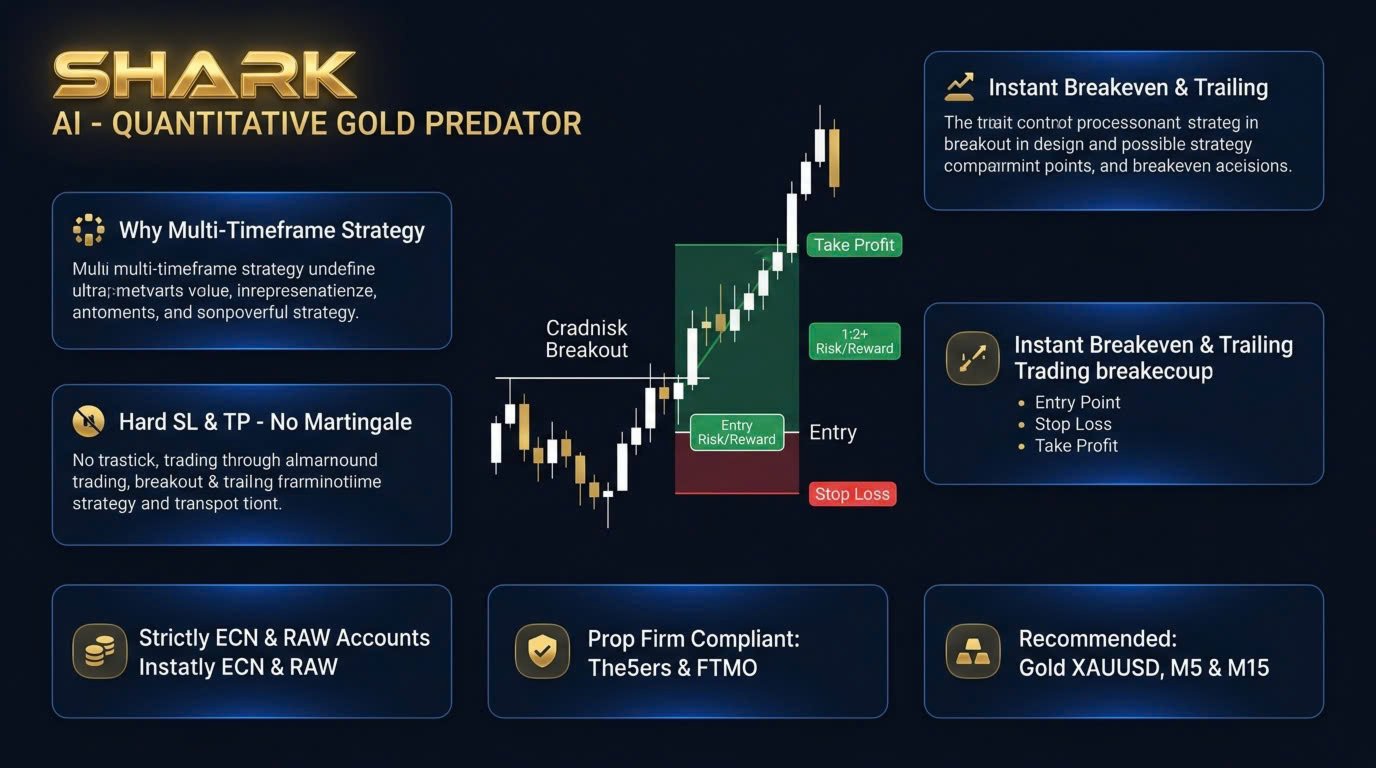
The first gallery image illustrates an entry, stop and target alongside feature headings. Some of its text is unclear, and its “strictly ECN/RAW” wording is narrower than the current description, which also mentions standard and cent accounts. We use the detailed current specification for setup information and do not treat the diagram as a trading record.
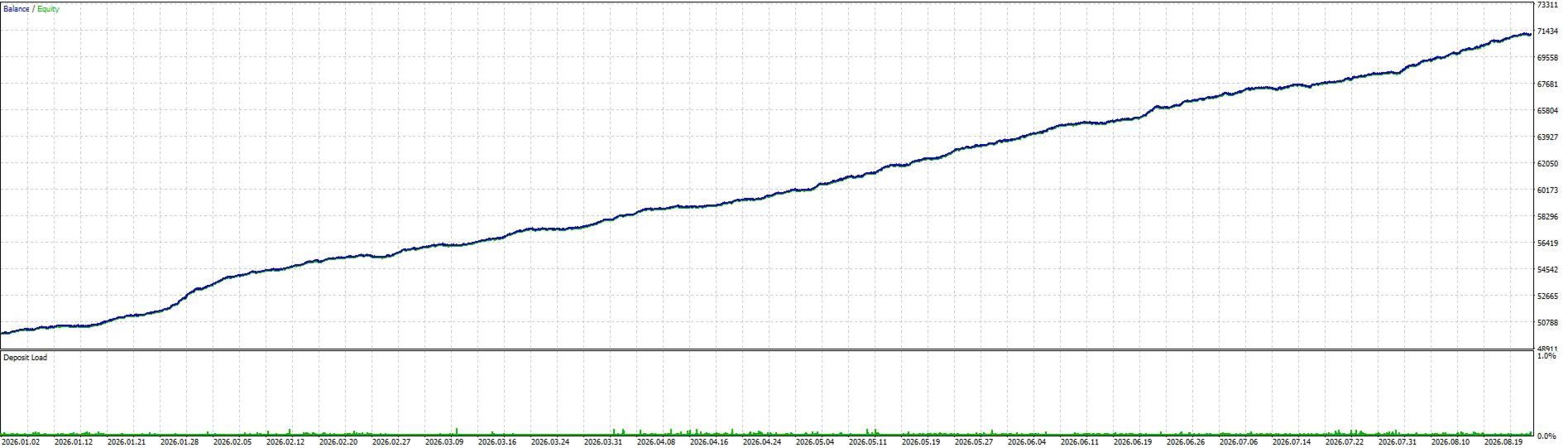
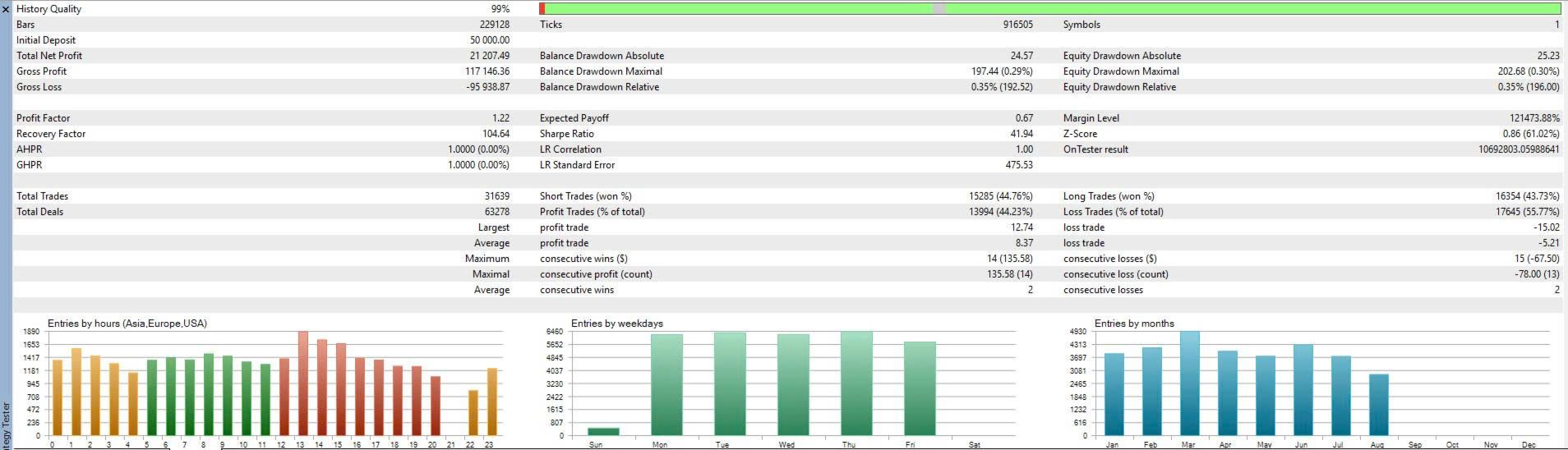
The Strategy Tester report shows an initial deposit of 50,000, total net profit of 21,207.49 and 31,639 trades. It reports a profit factor of 1.22, 44.23% profitable trades and 0.35% relative equity drawdown, alongside 99% history quality. The curve’s visible labels run from January to August 2026.
These figures belong to the developer’s historical simulation. The cropped report does not identify the complete configuration, tested build or all cost assumptions. Its smooth curve and low reported drawdown therefore cannot be carried over to a live account or to a different lot setting. A 1.22 profit factor also makes realistic execution costs an important part of any attempt to reproduce the result.
Public evidence and setup checks
At our September 29, 2026 check, the listing did not link a product-specific public signal or manual, and no product customer reviews or comments were visible on the inspected pages. The input guide and original test images provide the available detail; they do not substitute for a verified forward record. We have not added third-party ratings or inferred missing live results.
The linked developer website markets SharkHunter Omni and a wider Spartan system with different strategy wording and account figures. It does not establish those figures as results for this SharkHunter Fusion listing, so we have not attributed them to this EA.
Before evaluating results, check that Algo Trading is enabled in MT5 and the EA, that the intended symbol is selected, and that the magic number will not clash with another installation. The developer recommends a nearby VPS. Test fixed and calculated volumes on the broker’s demo environment, including the daily guard, timeout, spread filter and behavior after restarting the terminal.
Gold, EURUSD and GBPUSD have different volatility and trading costs. A setup that runs on all three is not evidence that one preset suits every symbol. Backtests should include realistic spreads, commissions and execution assumptions, followed by a forward test using the intended settings.
SharkHunter Fusion or Spartan Gold Sniper?
SharkHunter’s published description is the more explicit of the two about higher-timeframe confirmation, maximum concurrent trades and stop-management inputs. Spartan Gold Sniper AI MT5 focuses on XAUUSD, with separate scalp and H1 swing modes, adaptive spread handling and a minimum-lot mechanism. That makes the choice about strategy and controls, not a demonstrated performance ranking.
Read the Spartan Gold Sniper review for its execution requirements and the implications of minimum-lot enforcement.
Frequently asked questions
Why do higher-timeframe settings need checking?
The source overview names H1/M30, setup guidance mentions H1 or H4, and the input default is H1. The actual selected input determines the filter; the public text should not be read as one mandatory pairing for every execution chart.
What does a 30-bar timeout mean?
It limits trade duration by the number of execution-chart bars. Its elapsed time therefore differs between M5 and M15, rather than always representing the same number of minutes.
Does the one-position design eliminate trading risk?
No. It limits concurrent exposure under that configuration, but direction errors, gaps, slippage and consecutive losses remain possible.
Have you independently tested SharkHunter Fusion?
No. This review examines the developer specification and original published screenshots. It is not a hands-on test or a reproduced backtest.
Sources reviewed September 29, 2026: official SharkHunter Fusion listing and its original developer gallery. Historical images retain their original labels and figures.