
Official MT5 version · Gold EA
AI Quantum Scalper EA MT5
Latest version
AI Quantum Scalper EA MT5 trades Bitcoin, gold, EURUSD and USDJPY with five selectable strategies and an AI entry filter.
- Instrument-specific M1 presets and separate chart instances.
- Initial stops and targets with optional trailing.
- Fixed or percentage sizing, daily-loss and drawdown controls.
 MT5Save 53%
Regular priceRegular price was $949.00
$449.95 with card
Visa, Mastercard, Apple Pay and Google Pay accepted.
Card payments add bank fees, sales taxes and other charges.
- Latest version
- Instant downloadYour file is provided immediately after payment. In very rare cases we manually review an order first, then send your download straight after. If you don’t receive your file, you can request a full refund.
- Free future updatesAll updates are free. They’re provided on a best-availability basis: we get new versions as fast as we can, led by customer demand, but we don’t guarantee them immediately. If you need every update the moment it’s released, our service may not be the best fit for you.
- 7-day money-backRefunds only cover an EA that fails to attach to your chart because of errors we can replicate. We don’t cover changing your mind or not liking the EA. All brokers are different, and results are never promised because markets are constantly changing.
- Unlimited activationsUse it on as many MT5 accounts and computers as you want, live or demo. There are no restrictions on how you use it.
Source code (.mq5) available at checkout.
28,000+ tradersServed since 2019
Orders over $300 include 3 months of PrismAlgo freeThe highly recommended cloud-connected EA for 28 FX pairs, Gold and Bitcoin. Added to your cart automatically. View PrismAlgo
Official versionsInstant downloadFuture updates includedExtra 20% off with cryptoReal people on support28,000+ tradersTrading since 2019Rated Excellent on Trustpilot
Product description
About AI Quantum Scalper EA MT5
AI Quantum Scalper EA MT5 combines five selectable trading strategies across Bitcoin, gold, EURUSD and USDJPY. Each instrument uses its own M1 chart and preset, with an entry filter, initial protective orders and configurable account-loss controls. It suits traders who want to choose their markets and strategy mix without buying a separate robot for every instrument. CheaperForex provides setup help by email and future file updates when we receive them.
Read our AI Quantum Scalper MT5 review for the current signal, four original backtests and a closer look at its risk settings.
Choose the strategies you want to run
Each of the five strategies can be switched on or off. The developer describes the system as selective rather than high-frequency: it waits for qualifying setups and uses its Regime AI filter to reject unsuitable entry conditions. Conservative, balanced and aggressive filter modes change that gate. The filter decides whether a new entry is permitted; position management remains governed by the stop, target and trailing settings.
- Four supported instruments: BTC/BTCUSD, XAUUSD, EURUSD and USDJPY, using their appropriate presets.
- Defined exits: initial stop loss and take profit, with optional strategy-level trailing under a master switch.
- Flexible sizing: fixed lots or percentage risk based on stop distance, with balance/equity selection.
- Exposure controls: limits for daily loss, total drawdown, positions and pending orders.
- Trading schedule: server-time trading hours, a skip window and scheduled pending-order removal.
The developer states that grid and martingale are excluded. Protective settings still need to match the broker’s execution and your total exposure across all active charts; a stop is not a guarantee against slippage or losses.
One chart for each market
- Platform
- MetaTrader 5 with hedging execution.
- Timeframe
- M1 on each selected instrument.
- Chart setup
- Attach one instance per instrument: four charts if you trade all four markets.
- Account reference
- The listing specifies at least 1:100 leverage. Public presets are recommended for accounts of $5,000 or more.
- Configuration
- Load the correct instrument preset and use distinct magic numbers for separate instances.
- Availability
- A VPS is recommended by the developer to keep MT5 connected.
Although the overview does not impose a universal minimum balance, that does not make its published presets appropriate for every small account. Verify the risk percentage, minimum lot size and resulting cash loss at the stop before trading. Defaults are explicitly not optimized for a particular instrument. The public setup and input guides below explain the controls; we do not promise private developer-group access or a separate bespoke preset service.
What the evidence shows
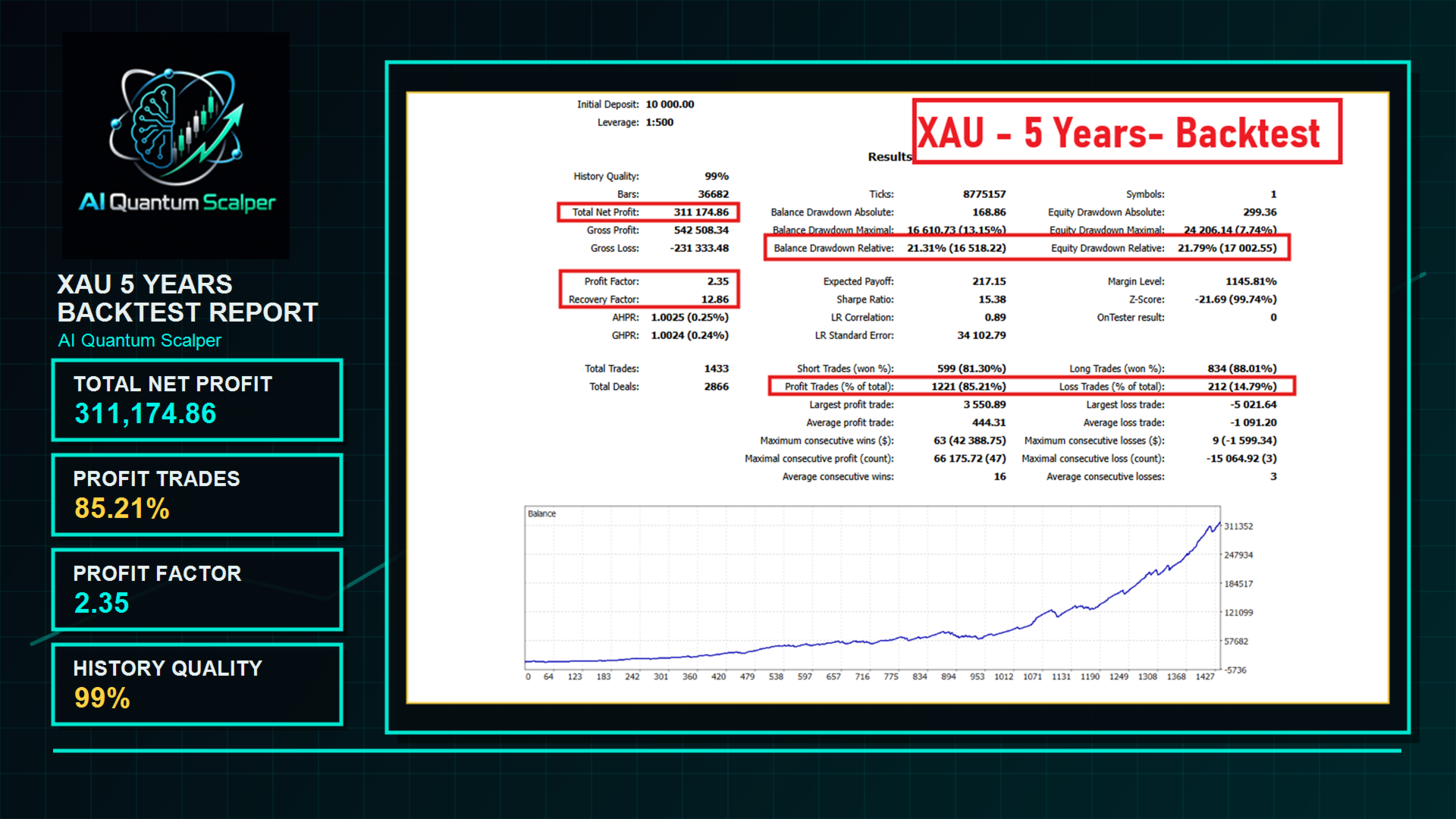
The developer’s original tests cover all four instruments. They report relative equity drawdowns of about 20% to 31%, depending on the market and test. The current MT5 signal had 126 trades and 10.26% growth when checked on 25 September 2026, with MQL5 warning that 80% of growth was concentrated in two days. These are different forms of evidence and should not be treated as interchangeable forecasts.
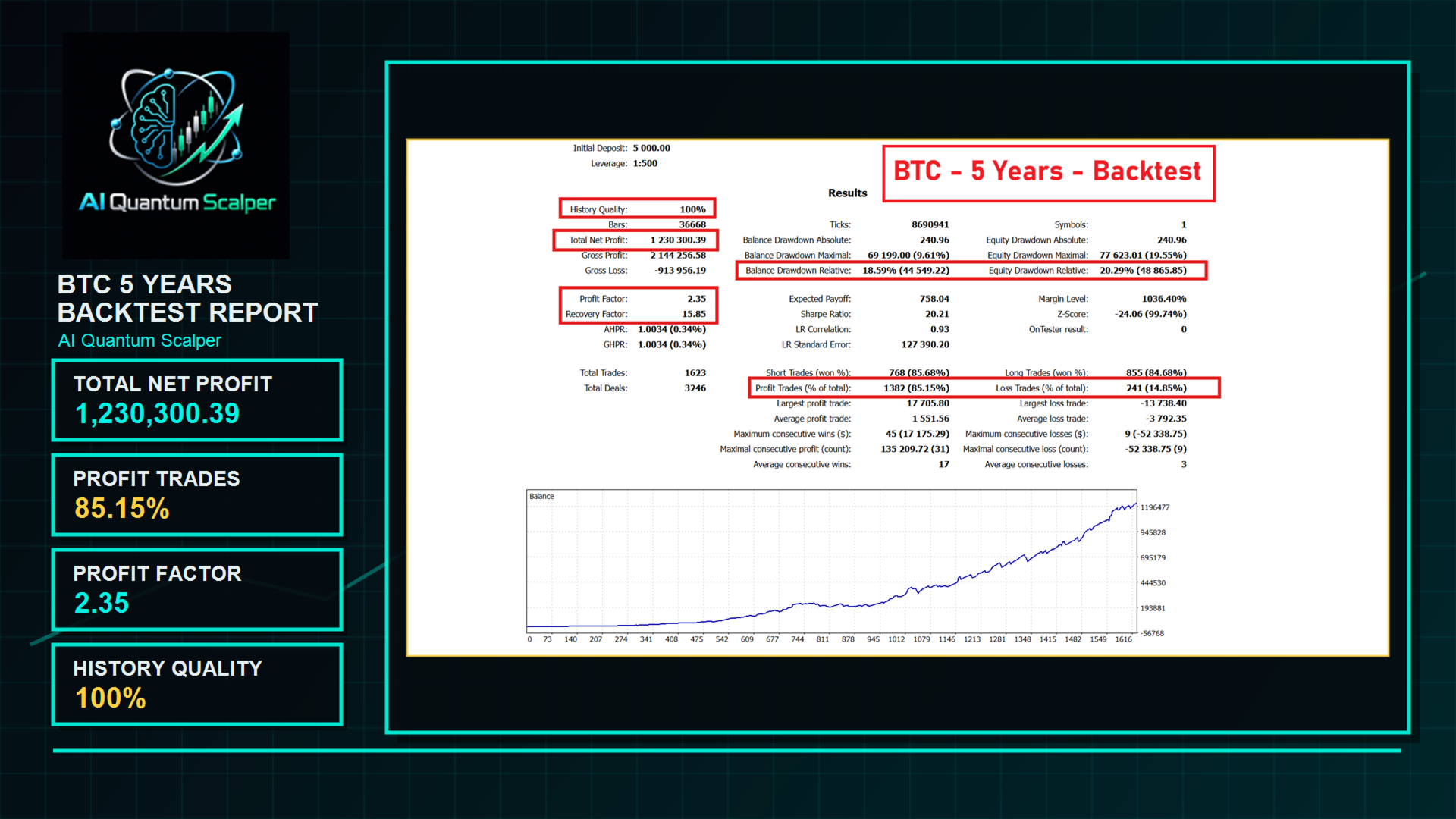
Use the full-size reports to inspect the settings and drawdown fields, then compare them with the current signal. Our review discusses the difference between a high win rate and the size of a losing trade, as well as the practical effect of enabling several strategies together.
More from Lo Thi Mai Loan
Compare the markets and evidence for each system from this developer:
- Bitcoin Scalping EA MT5 — read the review.
- Golden Blitz EA MT5 — read the review.
- Diamond Scalper EA MT5 — read the review.
- AI Scalping EA MT5 — read the review.
- AI Aurum Pivot EA MT5 — read the review.
Purchase and setup support
7-day money-back guarantee if it fails to install or run. Setup help by email whenever you need it. Trading results are not covered by that guarantee. Check the actual preset and chart inputs on demo before committing live funds, especially when using daily-loss rules from a prop firm.
Verify it yourself
- Developer source link: AI Quantum Scalper on MQL5.
- Live signal link: AI Quantum Scalper MT5 account.
- Public input guide and four-chart setup guide.
- Public instrument presets and account-size guidance.
Delivery: latest-version standalone MT5 file offer. Follow the DeliveryInformation instructions in your account after checkout to obtain the file; that document is not the trading executable.
Every order
What’s included with AI Quantum Scalper
Download it, install it and keep it current: everything comes with your license.
Instant download
Ready the moment checkout completes, and kept in your customer portal.
Installation guide
Step-by-step PDF with screenshots.
Optimized presets
Ready-to-use configuration files.
Future updates
Included free when we receive them. You never pay twice, and every version stays in your account.
Unlimited activations
Use it on as many terminals as you like: unlimited live and demo accounts, no activation keys.
Free remote installation
Optional, if you need help: a one-time free install over AnyDesk, plus settings advice and custom presets for your account.
7-day money-back guarantee
If the EA fails to attach to your chart because of errors we can replicate, you get a full refund.
*Refunds don’t cover changing your mind or not liking the EA. All brokers are different, and results are never promised because markets are constantly changing.
Product FAQs
AI Quantum Scalper EA MT5 FAQs
Real people on support, by Telegram or our contact form.
Which markets and timeframe does it use?
Bitcoin, XAUUSD, EURUSD and USDJPY on M1. Use a separate chart and matching preset for each selected instrument.
Does one chart trade all four instruments?
No. The public setup guide specifies one instance per instrument, so running all four uses four charts.
What account setup is recommended?
MT5 hedging execution, at least 1:100 leverage according to the developer, and a stable connection. The public presets are recommended for accounts of $5,000 or more; check sizing before using a smaller account.
What does Regime AI do?
It allows or blocks new entries according to the selected filter mode. Stops, targets and trailing remain separate position-management controls.
Does it use grid or martingale?
The developer states that neither is used. Trades have protective stops and targets, but losses and execution slippage remain possible.
What version and delivery do I get?
The latest-version standalone MT5 file offer. Follow the DeliveryInformation instructions after checkout; that download is an instructions document, not the EA executable. Future file updates are included when we receive them.
The CheaperForex difference
Why 28,000+ traders choose CheaperForex


“Bought 2 EAs from them. Requested update for new version and was sent within 24hrs. Great support. Recommended, 5 STARS.”
 Aceman · Trustpilot review (opens in a new tab)
“Fantastic service as always. Have gotten a lot from them in the past and never been disappointed.”
Paul Michael Lawrence · Trustpilot review (opens in a new tab)“They were friendly and helpful in setting up my expert advisor.”
 Sarah Francis · Trustpilot review (opens in a new tab)
- Instant accessNo group buys or waiting
- 7-day refund policyRefunds only cover an EA that fails to attach to your chart because of errors we can replicate. We don’t cover changing your mind or not liking the EA. All brokers are different, and results are never promised because markets are constantly changing.For product errors
- Remote installationOptional: we can install it for you
- Flexible paymentsCards, Apple Pay, Crypto
Related EAs
Traders also explore
Premium expert advisors at vault-low prices, with your crypto price on every card.
 MT5Save 55%
 MT5Save 50%
 MT5Save 50%
 MT5Save 64%
Ready when you are
AI Quantum Scalper EA MT5 for $359.96 with crypto
Regular price was $949.00 · $449.95 with card · instant download · future updates included

AI Quantum Scalper EA MT5$359.96with crypto$449.95 with card