



Quick Summary:
Big Forex Players EA for MT5 is the MetaTrader 5 version of MQL TOOLS SL’s flagship 3-strategy forex automation system. It combines three independent trading approaches into a single EA: real-time bank and investment fund position data, technical indicator signals on H4 and D1 timeframes, and a multi-currency price action engine.
The system has accumulated 137 verified MQL5 reviews at 4.75★ across its history — making it one of MQL TOOLS SL’s most reviewed products and a frequent top-seller in the MQL5 forex EA category. Architecture is strictly no grid, no martingale, no hedging risk — every trade uses predefined Take Profit and Stop Loss levels.
The EA is compatible with any forex broker and prop trading firms, runs on H1 timeframe, and supports XAUUSD, EURUSD, GBPUSD, USDJPY, EURCHF, EURGBP, GBPCHF and more.
Official MQL5 Listing:
Big Forex Players MT5 — MQL5 Marketplace
👀 Trading on MetaTrader 4? Big Forex Players EA is also available for MT4 with identical trading logic. View Big Forex Players EA MT4 →
Why Big Forex Players EA MT5
The MT5 version delivers the same three-strategy architecture as the established MT4 version with MetaTrader 5’s faster execution and improved backtesting infrastructure:
- Strategy 1: Trading with Banks — receives real-time data from the developer’s database tracking the positions of major banks and investment funds. The EA opens trades based on this institutional intelligence, with predefined Take Profit and Stop Loss for each position. Focuses on medium to long-term gains aligned with institutional money flow.
- Strategy 2: Trading with Indicators — leverages RSI, MACD, and Stochastic indicators on H4 and D1 timeframes. Opens one position per pair when technical signals align, with predefined TP and SL. Focuses on medium to long-term trades catching higher-timeframe technical setups.
- Strategy 3: Trading with Robot — multi-currency engine using Price Action, Cycle Strength, SMA Strength, RSI, and two custom indicators. Operates on EURUSD, GBPUSD, USDJPY, GOLD, and Bitcoin. Risk modes (Low / Medium / High) determine how many positions can open per pair, each with predefined TP and SL.
- Each strategy independently toggleable — enable any combination using true/false parameters. Run all three for maximum diversification, or pick the strategy that best fits your trading style.
- Built-in news filter — blocks trading 60 minutes before and 60 minutes after high-impact economic events on selected currencies (USD, EUR, GBP, CAD, AUD, JPY, CHF, CNY, NZD).
- Max spread filter — protects against opening positions during abnormal volatility or wide-spread conditions.
- Risk modes — Low (most conservative, hidden TP/SL option available), Medium, and High. Choose based on account size and risk tolerance.
- Trailing stop and step controls — configurable per risk mode for active position management.
- Daily loss protection — “Disable EA after loss” feature stops trading until the next day if MaxDD threshold is reached.
- Time-of-day filtering — choose specific days and hours for the EA to operate, with local-PC time reference.
- Find Keyword news filter — beyond impact-based filtering, you can specify keywords (ECB, FOMC, BOE, etc.) to only block trades on news containing those specific terms.
EA Setup at a Glance
- Platform: MetaTrader 5
- Strategies: 3 independent (Bank Positions, Indicators, Multi-currency Robot), all toggleable
- Recommended pairs: XAUUSD, EURUSD, GBPUSD, USDJPY, AUDUSD, EURCHF, EURGBP, GBPCHF
- Timeframe: H1
- Risk management: No grid, no martingale, no hedging — defined TP/SL per trade
- Risk modes: Low, Medium, High (selectable per strategy)
- News filter: Built-in 60-min before/after high-impact event blocker, with keyword filtering
- Spread protection: Max spread filter against abnormal volatility
- Daily DD protection: Auto-disable after configured loss threshold
- Minimum deposit: $1,000
- Leverage: 1:30 up to 1:1000
- Account types: Hedging, Zero, Micro, Standard, Premium, ECN — and prop trading firm accounts
- VPS: Recommended for 24/7 operation
- MT4 Version: Available at CheaperForex
On-Chart Panel and Manual Controls
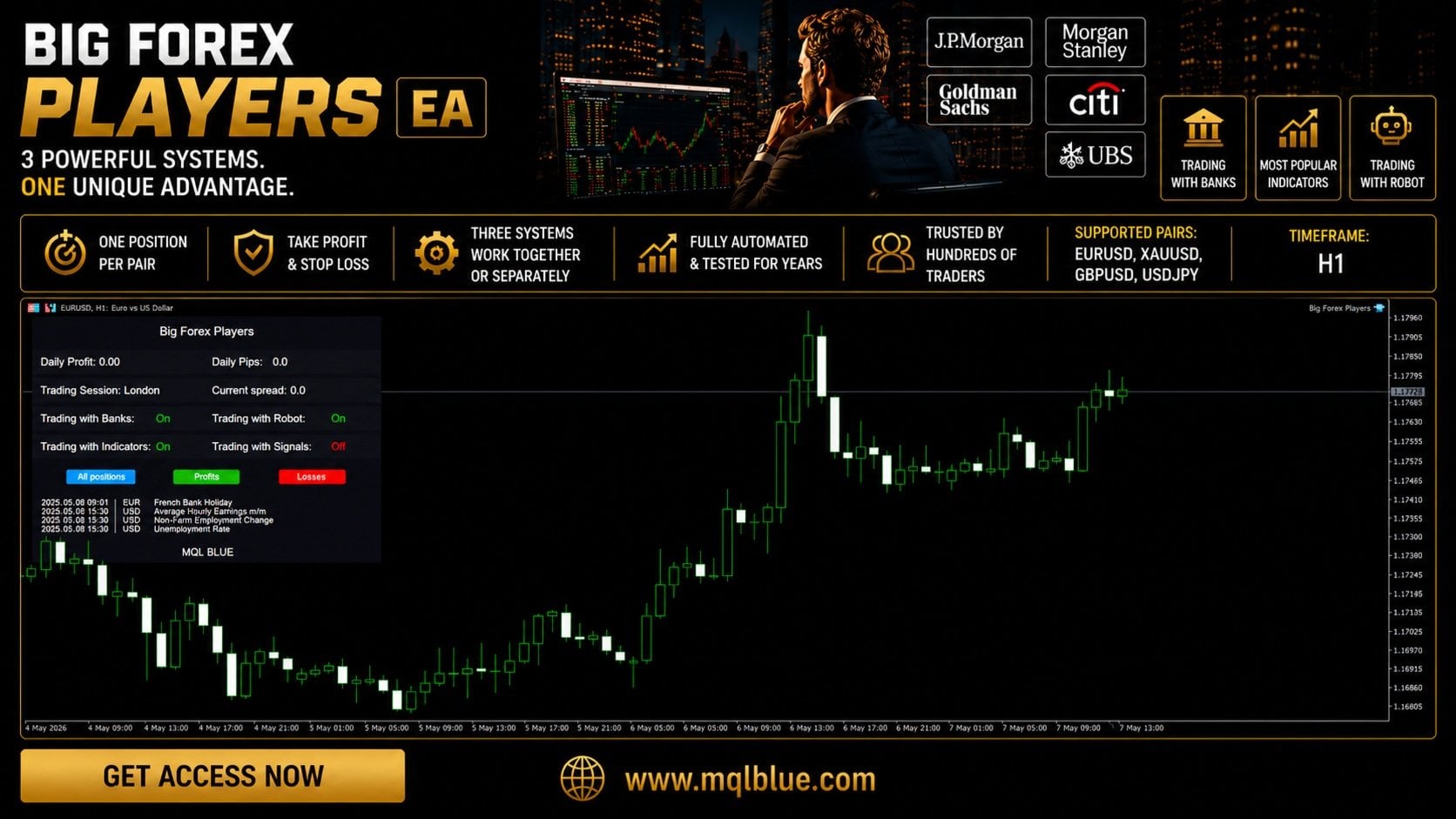
The on-chart panel displays daily profit, daily pips traded, current trading session, integrated forex calendar, and real-time spread. Manual close buttons let you intervene on positions at any time without disabling the EA. The same panel design is used across all MQL TOOLS SL EAs for visual consistency if you run multiple of their products on the same terminal.
From Established Developer MQL TOOLS SL
MQL TOOLS SL is one of the most active multi-product developers on MQL5. Their portfolio includes XG Gold Robot (140+ combined reviews across MT4/MT5), XIRO Robot, AI Forex Robot, AI Prop Firms, Bitcoin Robot, Wall Street Robot, and Big Forex Players (137 reviews on MT5, 4.75★).
The shared development philosophy across the portfolio is conservative risk architecture: no grid trading dependencies, no martingale lot escalation, defined Stop Loss on every trade, and explicit prop firm compatibility. Big Forex Players is the developer’s most reviewed forex EA and represents their flagship 3-strategy approach.
Who Big Forex Players EA MT5 Is For
Ideal for traders who:
- Want a diversified forex automation system rather than single-strategy dependency
- Are interested in bank position-based trade selection rather than purely indicator-driven systems
- Trade on MT5 specifically — same logic as the MT4 version with platform-native performance
- Need prop firm compatibility (no grid, no martingale, defined SL)
- Want established product history — 137 verified MQL5 reviews at 4.75★
- Have $1,000+ minimum, ideally $3,000+ for comfortable position sizing
- Use a broker offering competitive spreads on EURUSD, GBPUSD, USDJPY, XAUUSD
Consider alternatives if you:
- Want a single-instrument specialist EA rather than multi-strategy
- Prefer aggressive grid or scalping approaches over defined-risk medium-term trading
- Trade exclusively on MT4 — the MT4 version is available at CheaperForex
What You Receive
- Big Forex Players EA for MT5 — Latest Version
- The .ex5 file delivered for installation on your MT5(s)
- Free lifetime updates (when we get them)
Risk Disclaimer
Past performance does not guarantee future results. Trading forex and CFDs carries a high level of risk and is not suitable for all investors. The three strategies are designed to diversify trade entries but do not eliminate market risk. Stop losses can be hit during adverse moves, particularly during high-impact news events. Always test on a demo account before deploying real capital. Use the built-in news filter and max spread filter. Do not trade with funds you cannot afford to lose. Prop firm compatibility refers to the EA’s mechanical rule compliance (no grid, no martingale, defined SL) — verify your specific firm’s policies before deployment.
Want the Full Breakdown?
📖 Read our complete Big Forex Players EA review covering MT4 + MT5 →
Includes detailed breakdown of all three strategies, the bank position data architecture explained, news filter configuration walkthrough, risk mode comparison, prop firm setup guidance, broker recommendations, the verified MQL5 review analysis, and step-by-step installation instructions for both platforms.
FAQs
What is Big Forex Players EA for MT5?
Big Forex Players EA for MT5 is the MetaTrader 5 version of MQL TOOLS SL’s 3-strategy forex automation system. It combines real-time bank and investment fund position data, technical indicator signals (RSI, MACD, Stochastic on H4/D1), and a multi-currency price action engine into a single EA. All three strategies can be enabled independently or used together. The MT5 version runs on the same battle-tested logic that earned the MT4 version 137 verified MQL5 reviews at 4.75★.
What are the three trading strategies?
Strategy 1 — Trading with Banks: receives real-time data from the developer’s database tracking major bank and investment fund positions, opening trades with predefined TP/SL aligned with institutional flow. Strategy 2 — Trading with Indicators: uses RSI, MACD, and Stochastic on H4 and D1 timeframes to identify higher-timeframe technical setups. Strategy 3 — Trading with Robot: multi-currency engine using Price Action, Cycle Strength, SMA, and custom indicators on EURUSD, GBPUSD, USDJPY, GOLD, and Bitcoin. Each strategy toggles on/off independently.
What pairs does Big Forex Players EA trade?
The system supports XAUUSD (Gold), EURUSD, GBPUSD, USDJPY, AUDUSD, EURCHF, EURGBP, GBPCHF, and additional pairs. The recommended timeframe is H1. The multi-currency Robot strategy specifically operates on EURUSD, GBPUSD, USDJPY, GOLD, and Bitcoin pairs. Different brokers may use different symbol naming conventions — the EA supports configuration for various broker symbol formats.
Does the EA use grid or martingale?
No. The architecture is strictly grid-free, martingale-free, and hedging-free. Every trade has predefined Take Profit and Stop Loss levels set at entry. There is no averaging down, no doubling up after losses, and no position stacking. This makes the EA fully compatible with prop trading firm rules that prohibit those mechanics. The Low risk mode also offers hidden TP/SL functionality if you prefer not to display levels on the chart.
How does the news filter work?
The built-in news filter blocks trading 60 minutes before and 60 minutes after high-impact economic events. You can configure which currencies to monitor (USD, EUR, GBP, CAD, AUD, JPY, CHF, CNY, NZD) and the time window in minutes. There’s also a keyword filter — instead of blocking all high-impact news, you can specify keywords (ECB, FOMC, BOE, BOJ, Fed) and only block trades on news containing those terms. Additional automatic Stop Loss protection (as % of balance) can be applied during important news events.
What broker should I use for Big Forex Players EA MT5?
Any reputable broker with hedging-enabled accounts and competitive spreads on major forex pairs. The EA works with Standard, ECN, Zero, Cent, Micro, Premium, and Raw spread accounts. Minimum deposit is $1,000. Leverage between 1:30 and 1:1000 is supported. The EA is fully compatible with prop trading firm accounts since the architecture (no grid, no martingale, defined SL) meets typical prop firm rules.
What’s the minimum deposit?
$1,000 minimum. The recommended deposit depends on which strategies you enable and your selected risk mode. For comfortable operation across all three strategies on Low or Medium risk, $3,000+ provides comfortable margin headroom. Higher risk modes and multiple concurrent strategies need proportionally larger account balances. The developer recommends starting on a demo account to validate behavior on your specific broker before live deployment.
Do I need a VPS for Big Forex Players EA MT5?
Recommended for 24/5 operation. The H1 timeframe means the EA doesn’t need millisecond execution, but continuous market presence ensures you don’t miss entries during your offline hours. The news filter and time-based trading windows also work more reliably with a constant connection. A forex VPS costs $13–25/month — worth the cost for any actively deployed EA.
