
Two Ways to Buy
Choose card or crypto at checkout. Crypto payments receive 20% off.
Buy with Card
Secure checkout with card, Apple Pay or Google Pay. The price is shown above.
Buy with Crypto
Pay with BTC, ETH or USDT and save 20%, applied automatically at checkout.


Quick Summary:
DAX Robot EA for MT4 by MQL Tools is a Germany 40 (DE40) index specialist Expert Advisor trading the DAX on the H1 timeframe. The on-chart operational panel exposes live spread, current session, volatility level, market status, configurable Trade Risk Level, and an integrated news event readout. The product is a recent release from MQL Tools — the same developer behind several well-reviewed CheaperForex products including Scalping Robot Pro, AI Forex Robot, and Big Forex Players — so the developer-level trust signal carries forward even as DAX Robot accumulates its own review base. The matching MT5 version is available separately.
Official MQL5 Listing:
DAX Robot EA — MQL5 Marketplace
Matching MT5 Version:
DAX Robot EA MT5 — same product compiled for MetaTrader 5
Full Editorial Review:
Read our DAX Robot EA editorial review
Why DAX Robot EA on MT4
- Germany 40 index specialist — designed exclusively for DAX (DE40) on the H1 timeframe, not a generic multi-symbol EA repurposed for indices
- Visible operational panel on the chart — live spread, current session, volatility level, market status, daily pips and profit, and an integrated news event readout
- Configurable Trade Risk Level — Low, Medium, and High position-sizing modes to match account size and risk appetite
- News-aware — the panel displays upcoming news event status, with the EA’s news-handling logic running through MetaTrader’s standard mechanisms
- From a developer with a CheaperForex track record — MQL Tools also publishes Scalping Robot Pro MT4 (positive customer reviews on our site), AI Forex Robot MT4, Big Forex Players, and others
- Built for the MT4 platform specifically — separate executable from the MT5 version, optimised for MT4’s execution model and broker compatibility
The On-Chart Panel
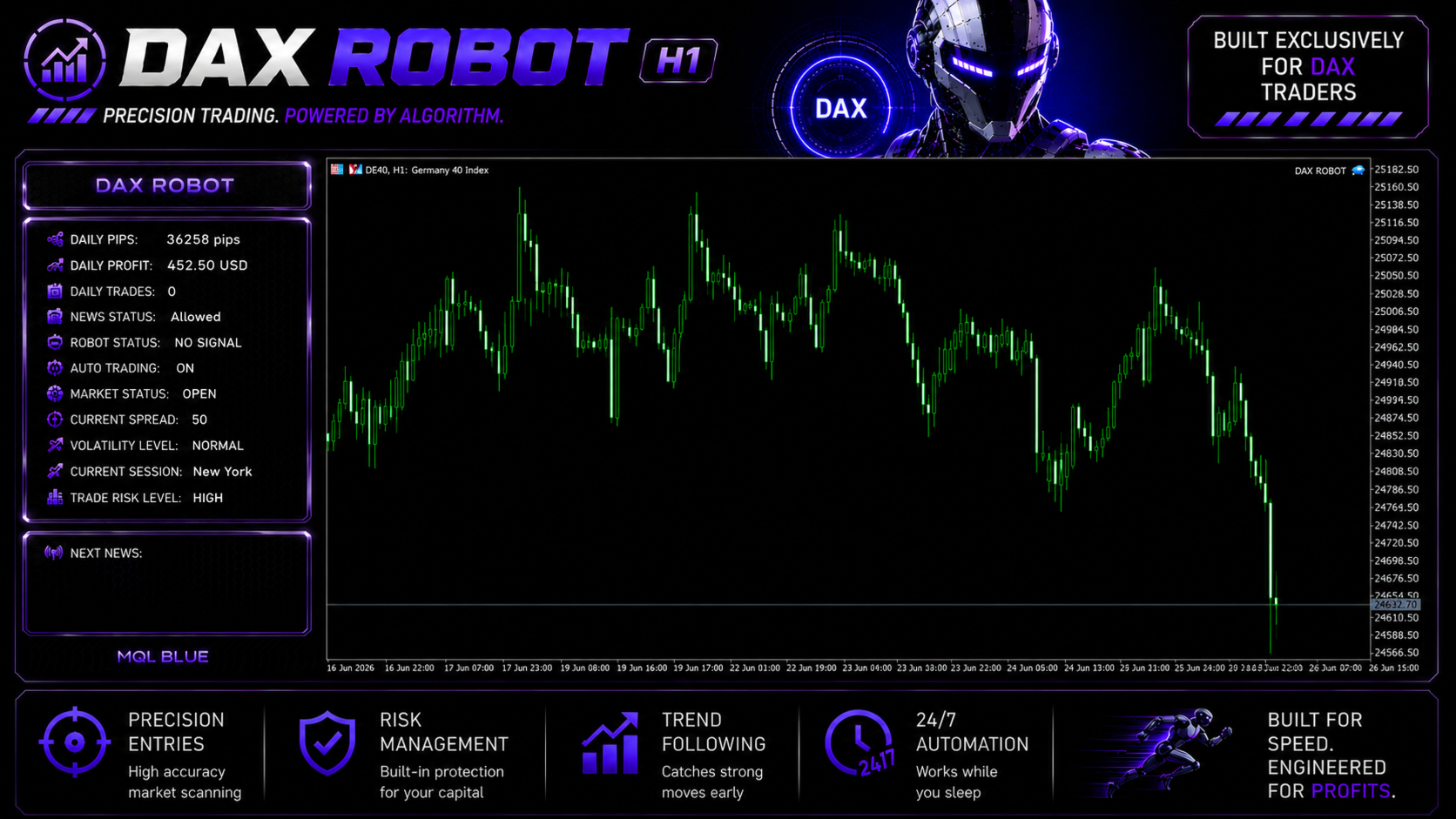
DAX Robot’s on-chart panel is the operational interface. Rather than running invisibly behind the scenes, it surfaces the context every index trader benefits from seeing in real time. The screenshot captures a representative live state: daily pips (36,258), daily profit (running), news status (Allowed), auto-trading (ON), market status (OPEN), current spread (50 points), volatility level (NORMAL), current session (New York), and Trade Risk Level (HIGH in this configuration — adjustable to Medium or Low per your preference). The lower section displays the next news event, so you can see at a glance what’s coming and when.
For MT4 traders specifically, this kind of always-visible operational state matters because MT4’s Strategy Tester and live deployment ecosystem isn’t quite as polished as MT5’s, and having key information surfaced on the chart compensates for the platform’s older interface conventions.
EA Setup at a Glance (MT4)
- Platform: MetaTrader 4
- Instrument: DAX index (DE40, DAX40, GER40, or GERMANY40 depending on your broker’s symbol naming)
- Timeframe: H1
- Account type: ECN or Raw Spread MT4 account with the DAX index available
- Leverage: Index leverage (typically 1:20 to 1:50, jurisdiction-dependent) — match to your broker’s offering
- Trade Risk Level: Start on Low while validating live behaviour, step up only after live evaluation on your own broker confirms the system behaves consistently
- Spread sensitivity: DAX spreads vary materially between brokers — the on-chart spread display will tell you exactly what you’re paying live
- VPS: Strongly recommended for continuous 24/5 operation, particularly useful for DAX’s European trading hours
The Developer’s Track Record
MQL Tools is the developer behind multiple products in CheaperForex’s catalogue, several of which have accumulated positive customer reviews over time:
- Scalping Robot Pro MT4 — forex scalping system with positive CheaperForex customer reviews
- Scalping Robot Pro MT5 — MT5 sibling of the above
- Scalping Robot EA MT4 — original scalping product
- AI Forex Robot MT4 (with editorial review) — AI-aided forex EA
- Big Forex Players — order-flow-aware EA with editorial guide
- Forex Trading Bot AI MT4
- FX EURUSD Robot MT4
That catalogue depth is the trust signal here while DAX Robot accumulates its own review base — buyers can evaluate the developer’s general competence and customer service approach by reading the existing review history on their sister products before committing to the newer DAX-focused release.
What You Receive
- DAX Robot EA for MT4 — Latest Version
- Standalone file
Risk Disclaimer
DAX is a major European equity index that exhibits significant intraday volatility, particularly around the European market open and US session overlap. Index spreads vary materially by broker, which affects execution-sensitive systems. DAX Robot is a relatively new product without a long public live signal track record at the time of writing — the developer-level trust signal comes from MQL Tools’ broader catalogue performance on CheaperForex, not from this specific product’s evidence base, which is still maturing. Test on demo on your intended broker first, use conservative position sizing (Low Trade Risk Level setting) while validating, plan capital around realistic index drawdown rather than just the headline figures, and never deploy capital you cannot afford to lose. Past performance — backtest or live — does not guarantee future results.
Full Editorial Review
📖 Read our complete DAX Robot EA editorial review →
A full editorial breakdown: the developer-trust-based positive case, the operational architecture, the honest early-product caveats around limited live evidence, comparison with MQL Tools’ sister products, and our verdict.
FAQs
What is DAX Robot EA for MT4?
A DAX-only Expert Advisor for MetaTrader 4 by MQL Tools. It trades the Germany 40 (DE40) index on the H1 timeframe with an on-chart panel that displays live spread, daily pips and profit, current session, volatility level, market status, and a built-in news event readout. The Trade Risk Level setting is configurable across Low, Medium, and High to suit different account sizes and risk appetites.
Which broker symbol do I need for DAX trading?
A broker offering the German DAX index — listed variously as DE40, DAX40, GER40, or GERMANY40 depending on the broker. Most major brokers (IC Markets, Vantage, FP Markets, Pepperstone, ICTrading, Tickmill) offer it. Confirm the exact symbol name with your broker before deploying the EA and configure the Symbol input accordingly.
Is this the same product as the MT5 version?
Same strategy, same developer, separate executable binary for each platform. MetaTrader 4 and MetaTrader 5 use different programming languages and EAs are compiled separately for each. If you trade on the MT5 platform or your broker supports both, the DAX Robot EA MT5 version is the natural choice. If you’re on MT4 (or your broker only supports MT4), this is the right version.
What account type and leverage do I need?
An ECN or Raw Spread MT4 account with the DAX index available. Leverage for indices is typically lower than for forex (1:20 to 1:50 is common, jurisdiction-dependent). DAX spreads vary significantly by broker — the current spread display on the EA’s on-chart panel will tell you what you’re paying live, which matters because index trading is spread-sensitive.
How does the Trade Risk Level setting work?
The on-chart panel shows three configurable risk levels: Low, Medium, and High. The setting adjusts position sizing relative to your account equity. Low is the appropriate starting setting for evaluation — once live behaviour is validated on your own broker over at least a few weeks, you can consider stepping up.
How does it compare to MQL Tools’ other products on CheaperForex?
DAX Robot is the developer’s DAX-index specialist. Their existing CheaperForex catalogue includes Scalping Robot Pro (forex scalping), AI Forex Robot, Big Forex Players, and others. The shared developer track record is the trust signal here while DAX Robot accumulates its own review base.
Do I need a VPS?
Strongly recommended for any automated system. A stable 24/5 low-latency VPS near your broker’s server is the right setup. DAX trades during European market hours (and into US overlap), so VPS location closer to European broker datacenters is preferable when available.
Why buy from CheaperForex instead of the MQL5 marketplace?
The product is identical — same EA, same developer. You pay significantly less. For a developer with an established CheaperForex review track record on sister products (Scalping Robot Pro, AI Forex Robot), paying less to add DAX Robot to your setup is the practical move. Our full review covers the architectural concept and the honest early-product caveats.
