
News Catcher Pro Review: MT4 vs MT5, Live Results and Risk
News Catcher Pro trades EURUSD, GBPUSD and EURGBP around high-impact news, seeking mean reversion with configurable position sizing and exits. Its appeal is selective timing and control over overlapping currency exposure. Our main reservation is the difference between a high win rate and the size of occasional losses: the current public MT5 record includes substantial equity drawdown.
Ready to Buy News Catcher Pro EA MT5?
$479.96 with crypto · $599.95 by card
Official version · Instant download · Future updates included · 7-day money-back guarantee
Using MT4? Get News Catcher Pro EA MT4 at CheaperForex.

Evidence checked 25 September 2026. We examined Valeriia Mishchenko’s two listings, release notes, public setup comments, original gallery, buyer feedback and linked signal. We have not independently run the EA or reproduced its backtests. This is a specification and evidence review, not a claim of our own trading performance.
What happens around the news event?
The stated strategy identifies intraday volatility patterns around major announcements and can enter shortly before the release. That makes timing, execution costs and the choice of event window part of the strategy itself. A label such as news filter should not be read as an unconditional promise to avoid news.
The developer describes the EA as infrequent. On the checked signal, the displayed average was two trades per week and the average holding time was three days. News-focused entries therefore do not necessarily mean positions close seconds after the announcement. A trader needs to be comfortable with both waiting for entries and carrying exposure afterwards.
MT4 versus MT5: choose the account, not a promised return
- MT4 edition
- Fits an existing MT4 terminal and its testing workflow. The developer discusses Tick Data Suite and a news-event file for historical testing.
- MT5 edition
- Explicitly requires a hedging account. A netting account is outside the documented requirements.
- Both editions
- Use one M5 host chart, the same three supported currency pairs and configurable risk/exit tools.
- Current signal
- The main live-performance link on both listings leads to an MT5 account, not two independently monitored platform records.
Neither platform label proves better returns. The meaningful checks are account compatibility, symbol specifications, intended risk settings and execution on the broker you actually use. The developer describes FIFO compatibility, but that does not establish compatibility with every firm’s news restrictions or every possible hedging/grid configuration.
Risk controls are broader than the overview suggests
The basic overview covers lot sizing, maximum symbols, net-currency exposure, free margin and floating-drawdown actions. The net-currency control is particularly relevant here: EURUSD and GBPUSD can both add exposure against USD even though they are different symbols.
The release history adds important context. Optional grid averaging, size multipliers, maximum grid trades and pauses between additions are documented. A stop-related option can set a very distant stop when grid is enabled. Rollover controls can remove protective levels or suspend drawdown checks. These settings should be inspected deliberately; the presence of a drawdown input alone does not mean it is active under every condition.
A high win rate can coexist with rare losses large enough to erase many small gains. Avoid treating this product as universally no-grid or no-martingale. Its grid behaviour is optional, but the chosen settings determine the exposure. We have not established the exact configuration used throughout the public signal’s history.
What the live account currently shows
The linked MQL5 account is labelled real on ICMarkets-MT5-2 with 1:500 leverage. It shows a monitoring start of 30 January 2023 and 190 weeks of account history. The last trade was about eleven hours before our check.
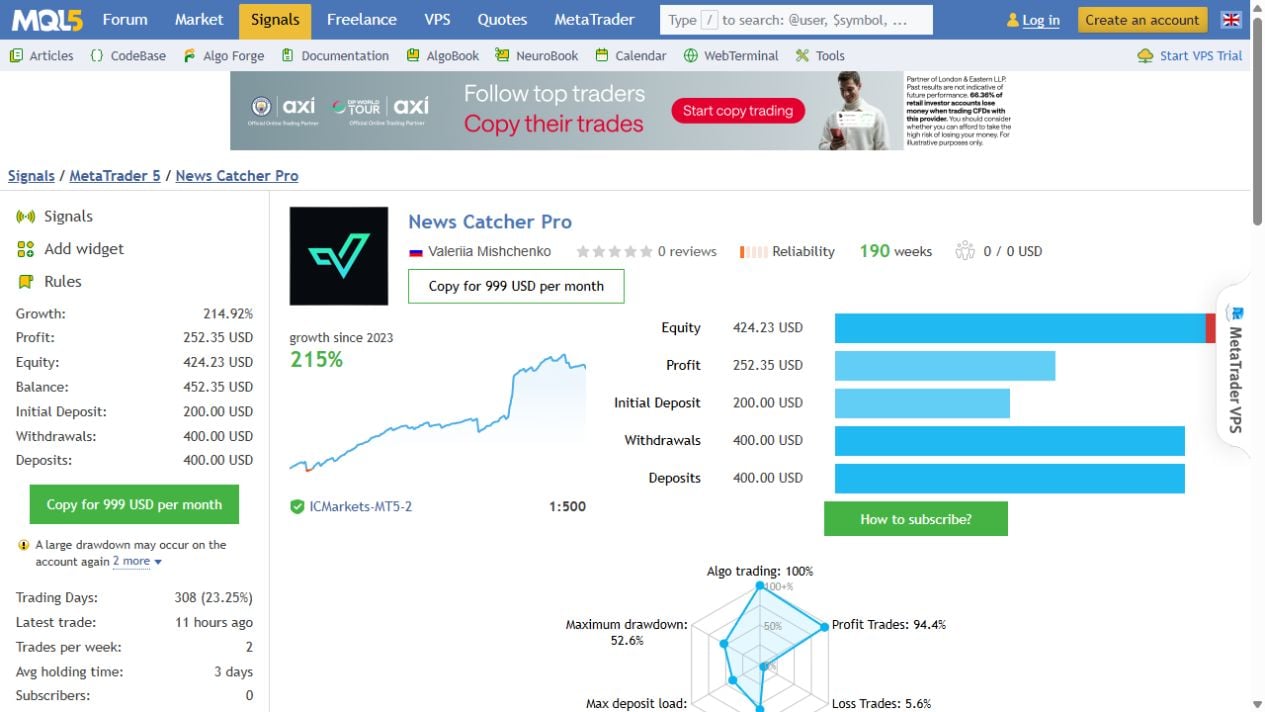
- Growth and profit
- 214.92% growth; $252.35 reported profit.
- Balance and equity
- $452.35 balance versus $424.23 equity: $28.12 of floating loss at the snapshot.
- Funding
- $200 initial deposit, with $400 additional deposits and $400 withdrawals shown.
- Trade sample
- 412 trades, including 389 profitable trades; 94.41% win rate and 1.67 profit factor.
- Historical drawdown
- 17.22% relative balance drawdown and 52.58% relative equity drawdown.
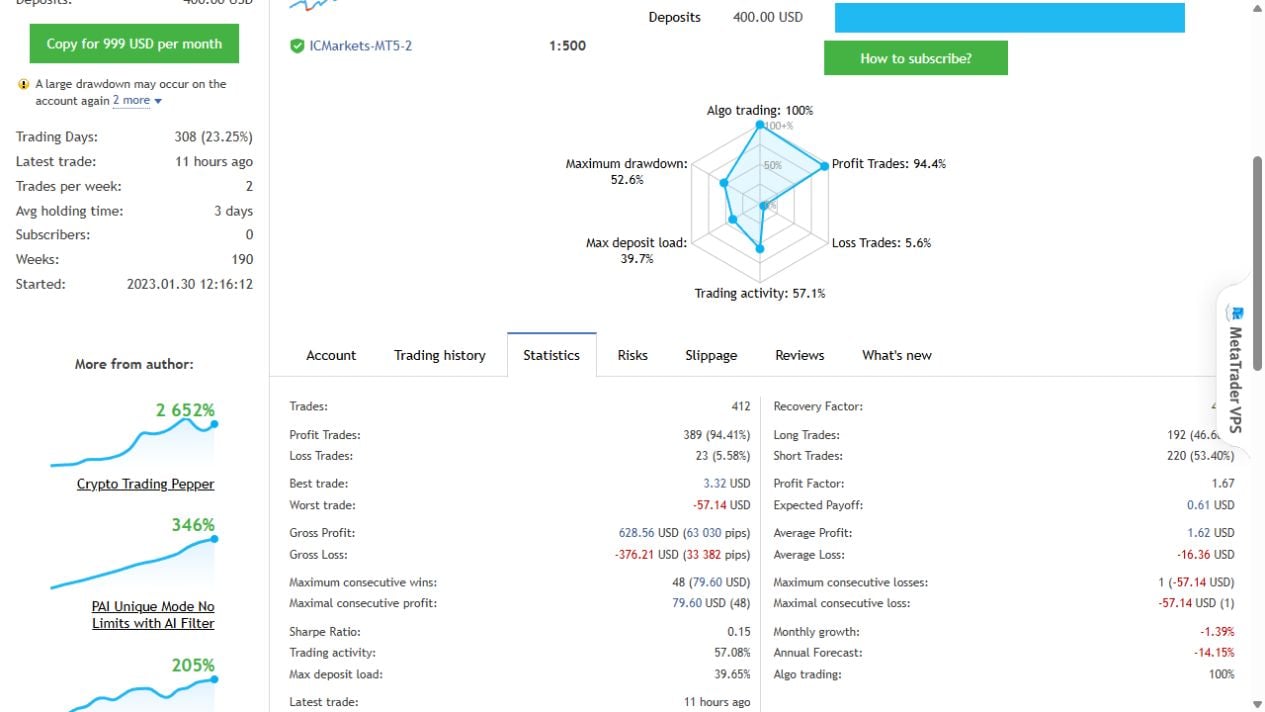
The balance/equity difference matters more than the rounded headline win rate. Average winning trades were $1.62, while average losing trades were $16.36 in magnitude. The worst trade lost $57.14; the best gained $3.32. That is a pattern of frequent small gains with occasional much larger losses, not proof of low risk.
The monthly table includes a 16.34% loss in March 2023 and a 10.96% loss in April 2025. September 2025 contributed a much stronger 45.78%, while 2026 growth through the current partial September was only 1.47%. Long-run growth therefore hides uneven periods. MQL5 also warns that a large drawdown could occur again.
An older signal link, 1849794, still appears in historic discussion and on the former CheaperForex page. It now reports that the signal cannot be found. We use the current main listing’s 1845908 link and do not present the unavailable account as current evidence. The record shown here spans earlier builds and settings; it is not a clean test of only today’s supplied file.
Original backtests: useful questions, not a forecast
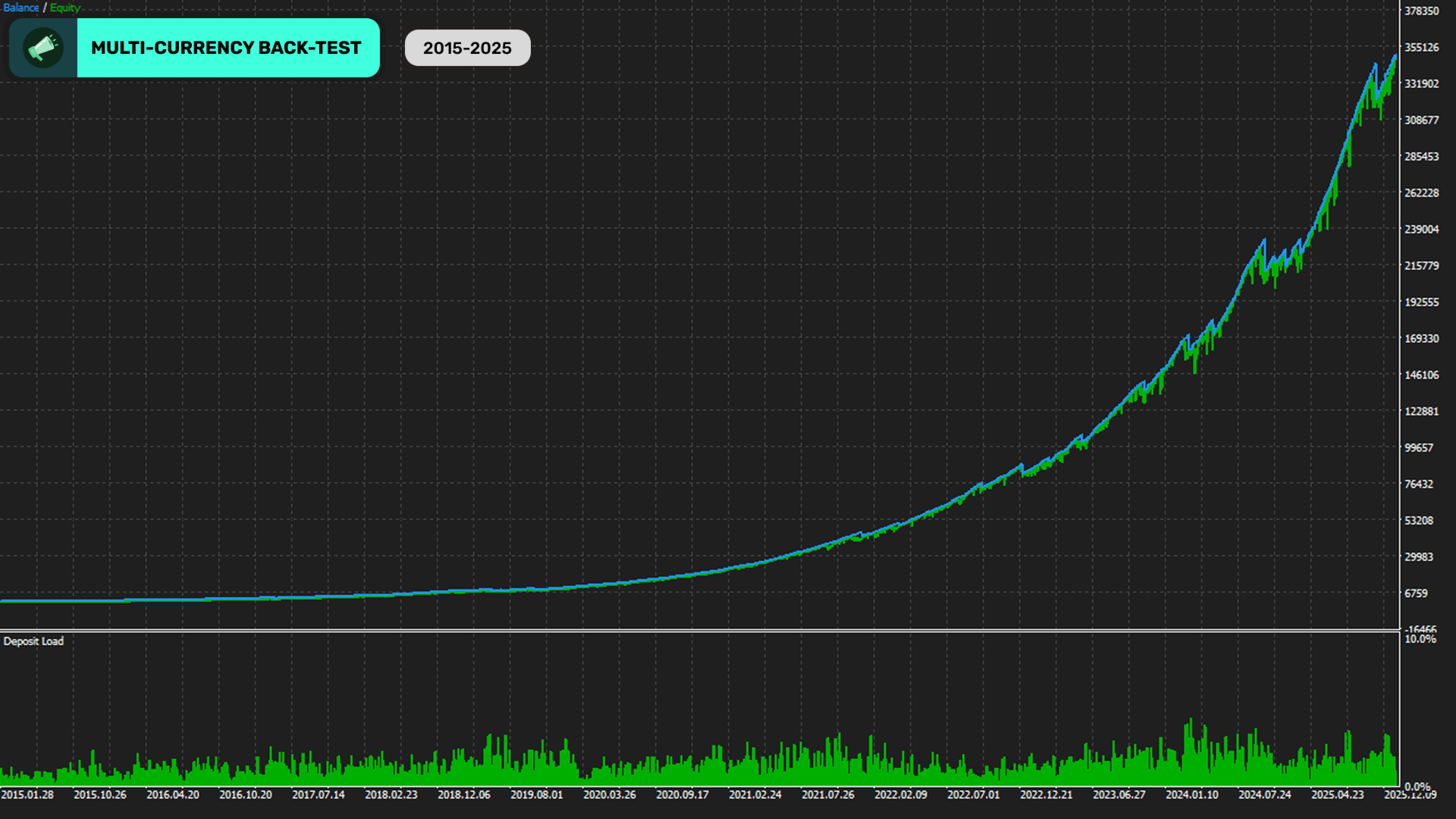
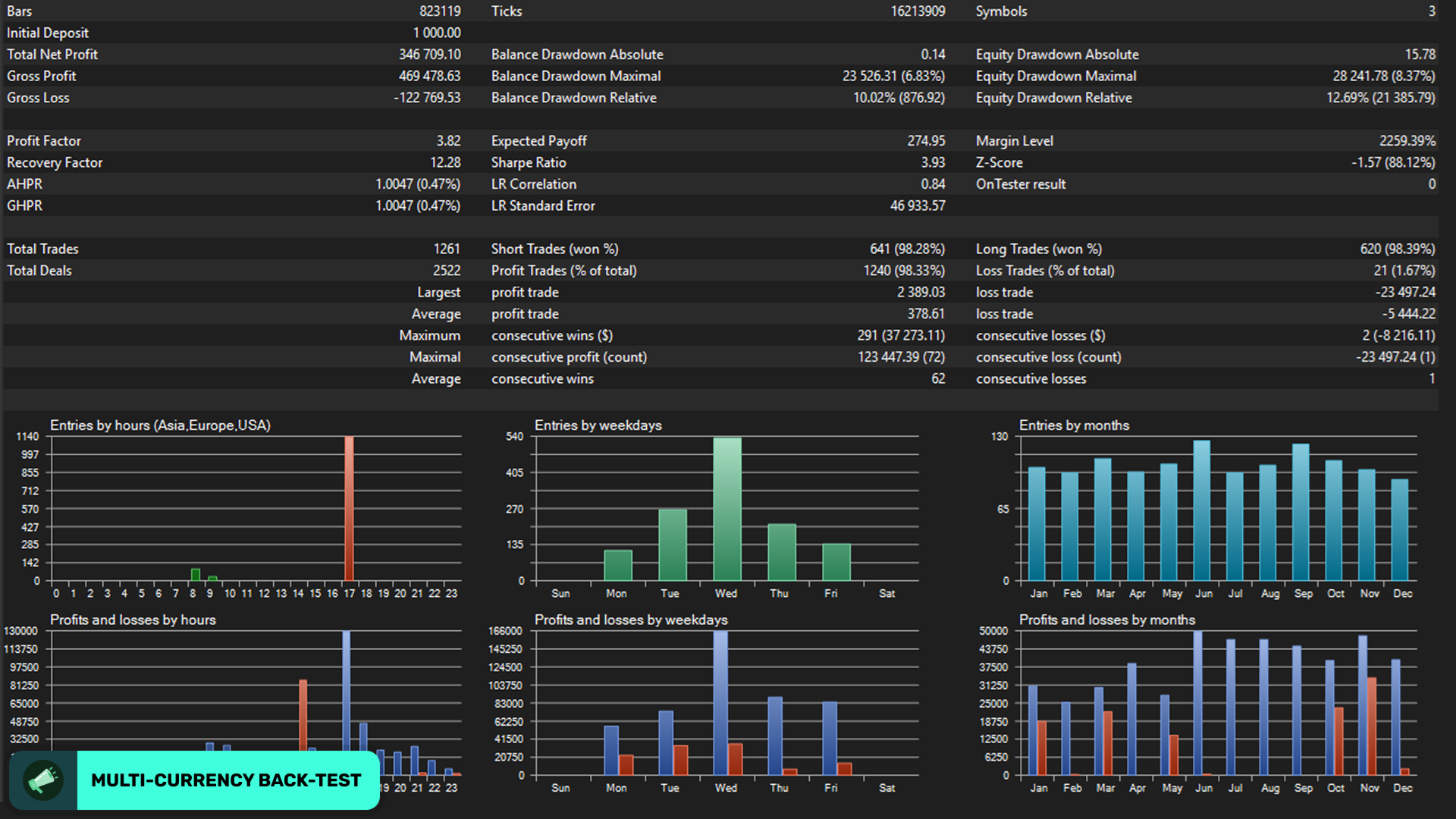
The developer’s gallery presents a 2015–2025 multi-currency simulation and a report with 1,261 trades, 3.82 profit factor and 12.69% relative equity drawdown. These are developer-supplied results, not our own test. The account history above has materially different drawdown and profit-factor readings.
These are not matched experiments with identical starting conditions. Even so, the comparison shows why the smooth-looking historical curve should not replace inspection of live losses. A reproducible check needs the exact settings, event database, historical prices, spreads, commissions and broker timing. A profitable tester curve without those inputs cannot establish what a new account will experience.
Forecast tools, portfolio mode and the gallery discrepancy
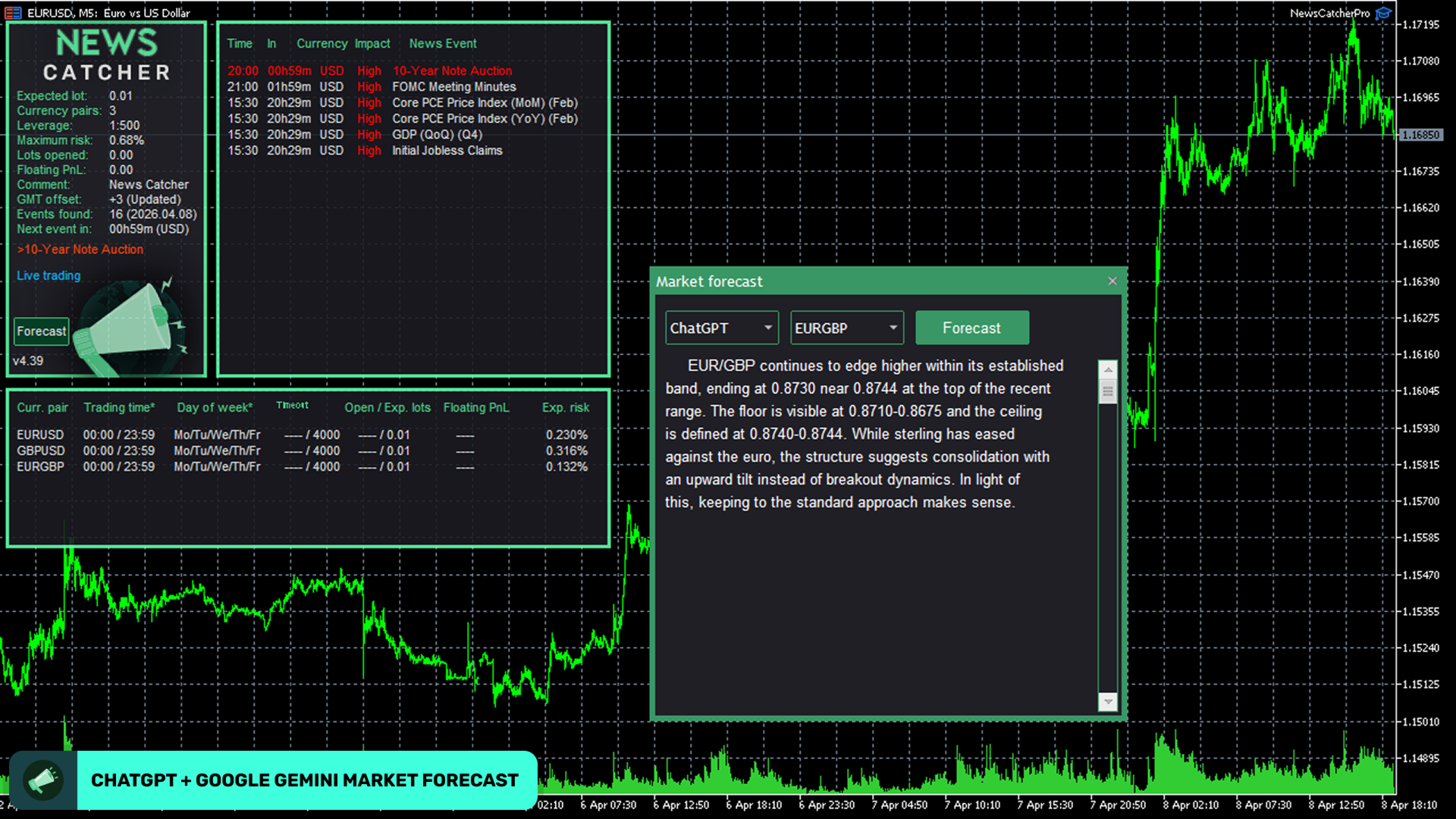
The March 2024 release notes document optional machine-learning pattern filtering and forecast filters named ChatGPT and Bard. July 2025 notes describe neural-network retraining; February 2026 notes describe terminal compatibility work. The current gallery uses Google Gemini wording and displays 4.39, while both public release headers show 4.38. We preserve the original image and identify the mismatch rather than inventing a release history.
These illustrations demonstrate the developer’s interface, not a promise that external AI access, credits or subscriptions are included. Check the supplied build’s connection requirements before enabling an optional forecast integration. The basic event-driven strategy and its broker execution still need evaluation independently of AI branding.
Portfolio Mode can coordinate initial entries with Perceptrader AI and Golden Pickaxe, and the notes describe considering Waka Waka orders as well. Unique instance identifiers and the documented delay settings matter when several instances share an account. This controls overlap; it does not cap the entire portfolio’s losses automatically.
Setup and historical-data checks
- Use one M5 chart and the exact EURUSD, GBPUSD and EURGBP names shown by your broker, including suffixes.
- For MT5, confirm a hedging account. Keep the terminal running continuously on a suitable VPS.
- Allow the listed WebRequest addresses:
http://timesrv.online,http://valerytools.comandhttp://valeryservice.com. Verify GMT/DST status rather than relying on the computer’s clock. - For tester work, check the date coverage of
NewsEvents.txtin the terminal’s sharedCommon/Filesfolder. The public comment attachments are historical; their presence does not prove coverage through today. - Inspect lot size, grid settings, stop behaviour and free-margin limits on demo before using live funds.
The basic setup uses internally stored settings; it does not require a separate SET file. The developer’s public comments discuss additional configurations privately, so we do not promise private-group membership or a custom preset collection. We did not find a separate public user manual linked from the inspected overview; the public overview, release history and setup comments provide the available instructions.
Customer feedback is mixed and mostly older
Kob Asi’s March 2024 review is a brief endorsement. Sattapong Soasa’s November 2023 review advises against buying and asks for improvement. The developer replied with a reference to public results and offered configuration help. These contrasting opinions are useful context, but neither supplies enough settings or account detail to resolve how the EA would perform for another buyer.
Other visible comments praise communication and support. Much of that feedback predates later releases, so it should not be treated as a fresh independent test. MQL5 customer reviews remain separate from CheaperForex verified-purchase ratings.
Related products from the same developer
Compare Perceptrader AI MT4 or Perceptrader AI MT5 with our Perceptrader review. For the gold-focused sister system, see Golden Pickaxe MT4, Golden Pickaxe MT5 and the Golden Pickaxe review. A stronger-looking result from one system should not be borrowed as evidence for another.
How to get News Catcher Pro
Choose the CheaperForex MT4 offer or CheaperForex MT5 offer for current pricing and platform-specific details. The developer’s MT4 listing and MT5 listing provide the direct MQL5 purchase references.
News Catcher’s most useful distinction is deliberate news timing combined with currency-exposure and exit controls. It is a more suitable research candidate for someone prepared to examine event execution and occasional large losses than for someone seeking frequent trades or a low-drawdown promise. Choose settings on the basis of exposure you can tolerate, not the highest historical win rate.
Developer references
- Developer source link: News Catcher Pro specification and original images.
- Live signal link: Developer-linked MT5 account.
- Release history and optional controls.