Mavrik Scalper EA MT5 is a selective XAUUSD M5 robot with individual stops, trailing exits and up to four concurrent positions. Its appeal is a ready-configured gold strategy with visible sizing and account-limit controls. The central trade-off is its payoff pattern: many small winners can be offset by a much larger loss. That matters more than the headline win rate.
Ready to Buy Mavrik Scalper EA MT5?
$159.96 with crypto · $199.95 by card
Official version · Instant download · Free lifetime updates · 7-day money-back guarantee
Get Mavrik Scalper EA MT5 at CheaperForex

Checked 24 September 2026. We examined the developer’s listing, linked public manuals, release notes, original tester images, MQL5 signal and three buyer reviews. This is a source-based assessment: we have not traded the EA or independently reproduced its backtests.
What its entry model does—and what we can verify
Vladimir Lekhovitser describes an attention-based neural model trained to select gold entries. That is the developer’s explanation of the signal engine, not independently inspected model code. What a buyer can assess directly is the surrounding behaviour: an M5 gold chart, variable waiting periods, predefined trade exits and the possibility of several positions being open together.
The listing describes no grid, martingale or averaging. This distinguishes Mavrik from the same author’s Loophole EA MT5, which uses RSI/CCI-based averaging on NZDCAD. Mavrik’s positions still share gold exposure, so four individual stops should not be mistaken for four independent risks.
The live signal: look beyond 98% winners
The linked account showed 140.53% growth, $702.63 profit and matching balance/equity of $1,202.63 from a $500 initial deposit. MQL5 labelled it a real account on Leverate-Live at 1:500 leverage, with no additional deposits or withdrawals displayed.
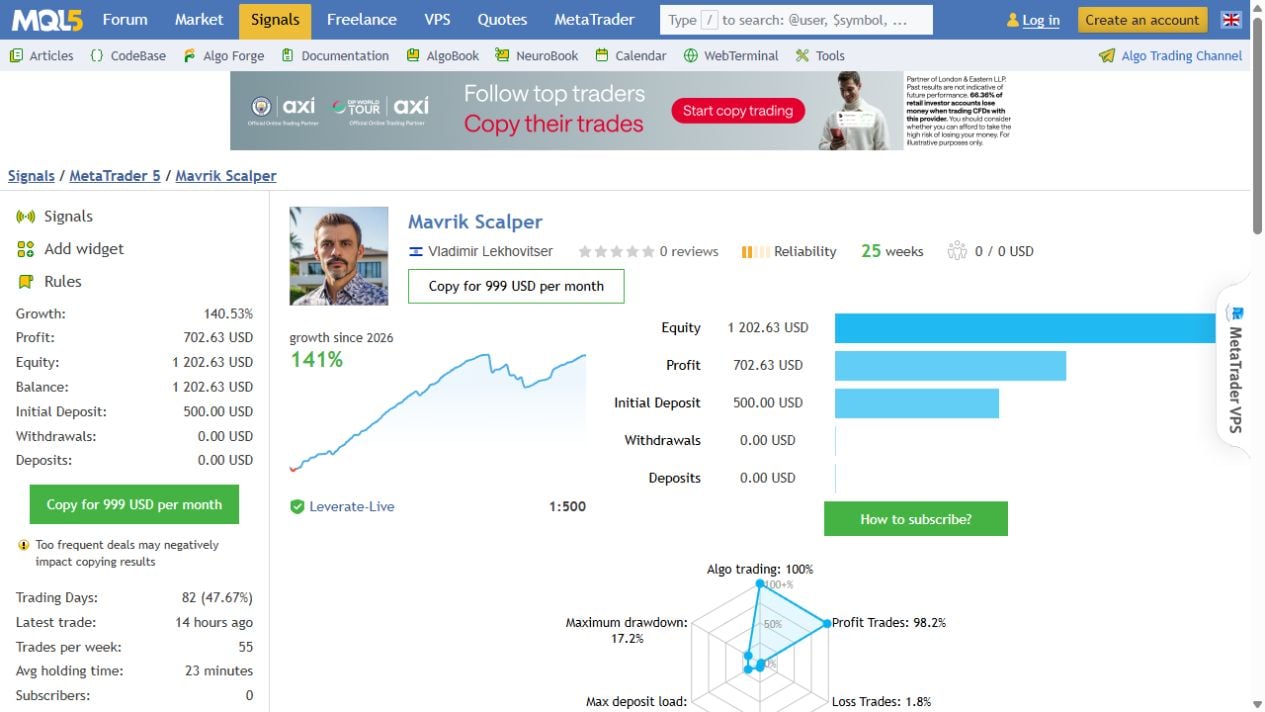
There were 971 closed trades: 954 winners and 17 losers, giving a 98.24% win rate. Yet the average gain was $1.18 and the average loss was $24.99. One average losing trade therefore offset roughly 21 average winners before considering the sequence of returns. The gross-profit-to-gross-loss ratio was 2.65, which is more informative than the win percentage alone.
The page reported 17.22% relative balance drawdown and 8.58% relative equity drawdown. We retain both as displayed, rather than replacing them with the smaller number or treating either as a promised limit. The overview’s maximum-drawdown radar rounded the balance figure to 17.2%. These fields reflect the service’s recorded statistics and should be inspected together with its history.
The account displayed 25 weeks of history, but monitoring began on 16 June 2026. Its older history is not equivalent to 25 weeks continuously observed by MQL5. The latest trade was approximately fourteen hours before our check, so it was active. A frequent-dealing warning also cautioned that signal-copying outcomes can differ. Running the EA locally and subscribing to the account are separate services.
Two backtests show the effect of lot sizing
Both developer reports cover 1 January 2020 to 3 July 2026 on XAUUSD M5, using real-tick mode, random delay, an initial $1,000 and 1:500 leverage. They each show 4,479 trades and 99.29% profitable trades. Their very different cash outcomes illustrate why the sizing configuration must accompany every performance comparison.
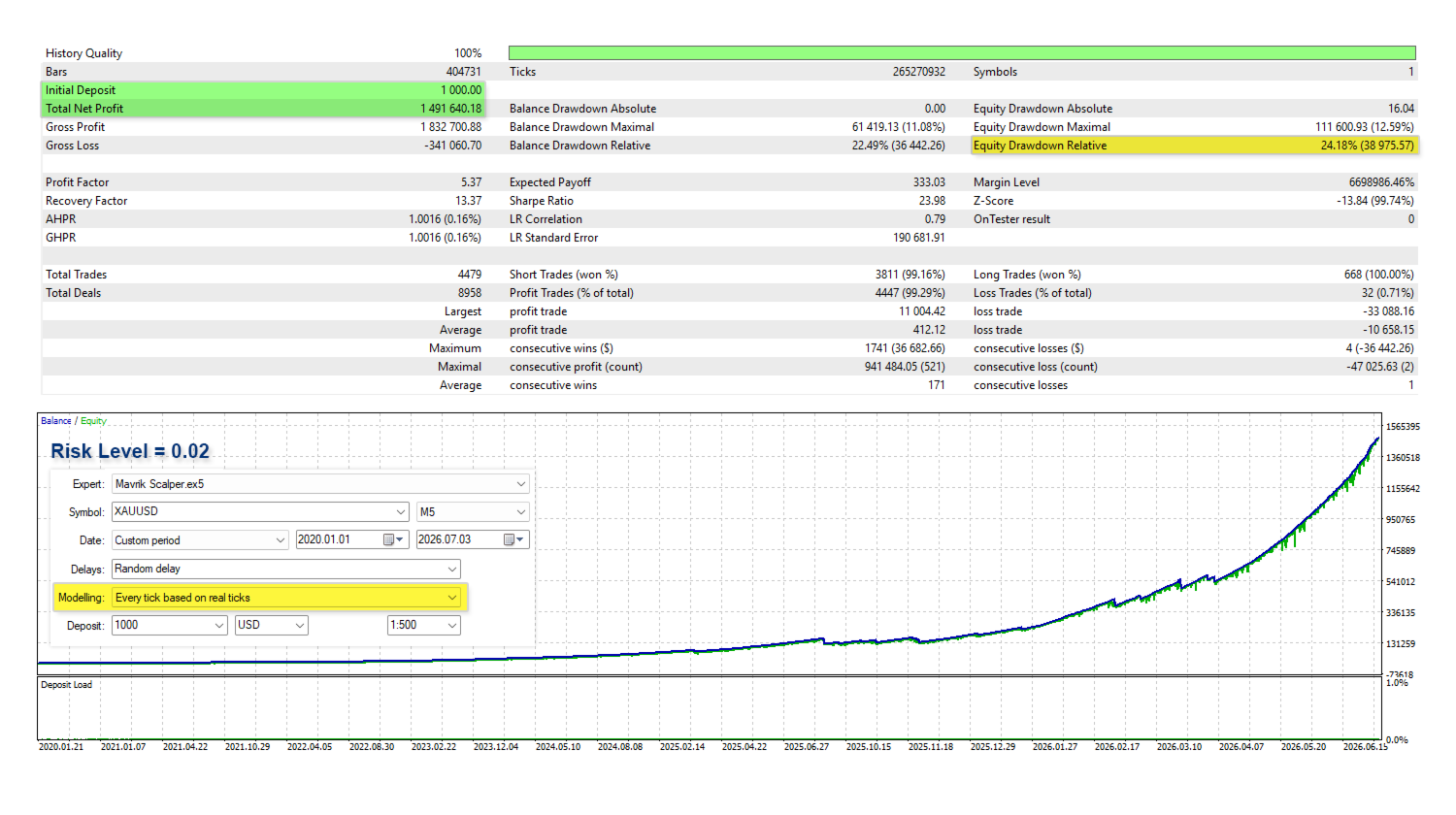
The variable-lot report is labelled Risk Level 0.02 and records 24.18% relative equity drawdown. Its very large ending profit depends on the test’s increasing position sizes. It cannot sensibly be used as a forecast for a small account or a different risk setting.
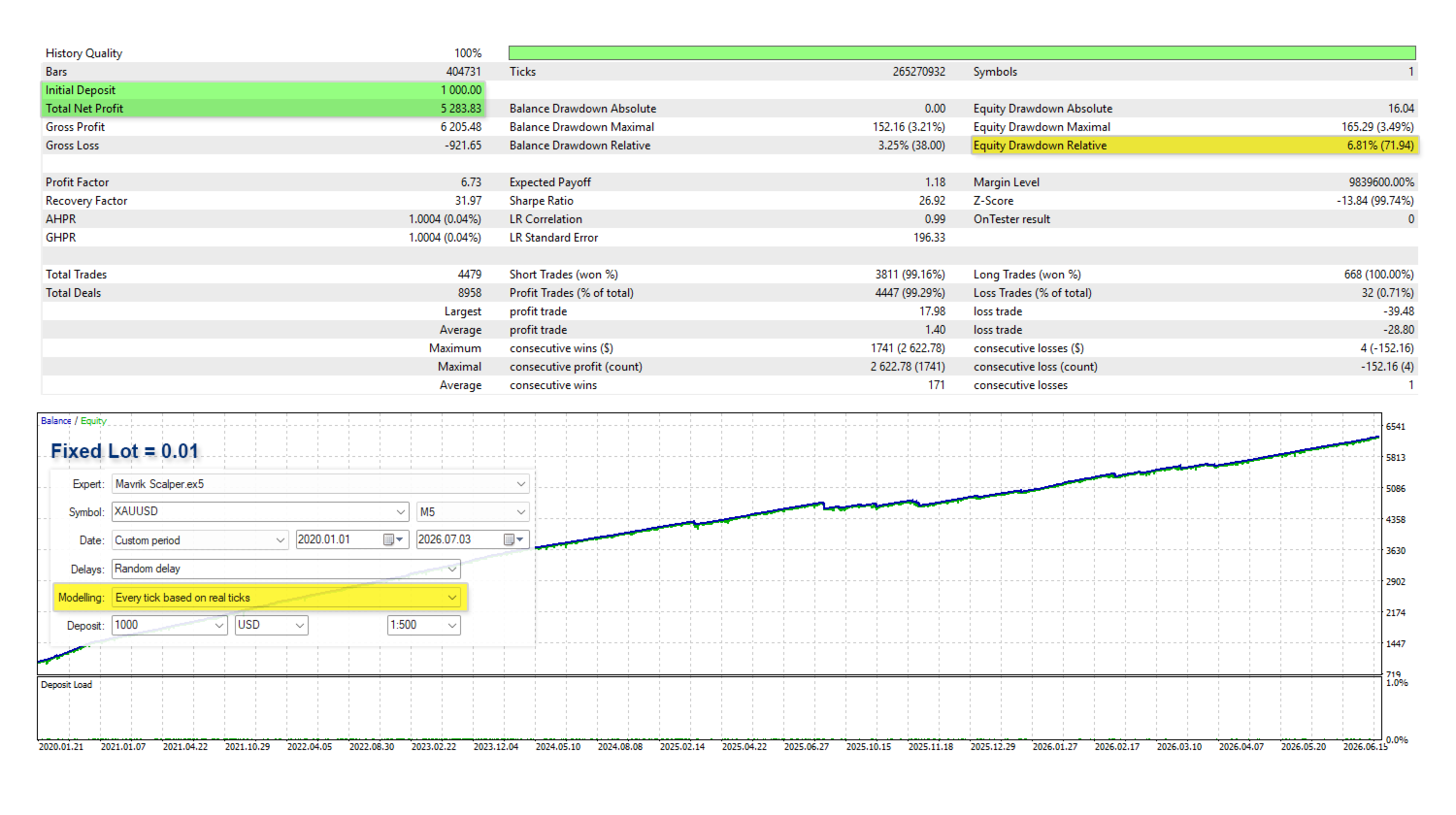
The fixed 0.01-lot report records $5,283.83 net profit and 6.81% relative equity drawdown. Even here, the average winner was about $1.40 versus an average loss of $28.80. The same small-win/large-loss structure appears in both the fixed-lot simulation and the live account.
The 17 August release notes describe re-optimising entries, stops, targets, breakeven levels and maximum concurrent trades. These gallery tests end before that update. They document a historical configuration, not proof that the currently supplied build reproduces the same curve.
Risk Level is not percentage risk per trade
The shared manual defines Risk Level as lots per 1,000 units of balance or equity. It also permits fixed-volume trading. A value that looks small is not a cash-loss cap: actual exposure depends on the stop, symbol contract, account currency and concurrent positions.
There are inconsistencies worth resolving before live use. Mavrik’s listing identifies 0.005 as its signal setting and associates it with an estimated 20% drawdown; the shared family manual gives different example estimates and names 0.007 for a signal. These are configuration claims and estimates, not verified present signal inputs or guaranteed loss ceilings. Use the product-specific guidance as your starting reference, then inspect the installed inputs and broker-specific results.
The guides also disagree about the Close All Trades on Limit option and restart behaviour. The general FAQ describes blocking entries versus closing trades; the separate risk guide describes account-wide closure versus closure of the EA’s own trades. Do not assume either interpretation without checking the supplied build on a demo account. This is especially important if other EAs or manual trades share the account. The presence of a prop-firm protection feature does not establish compliance with a particular firm’s rules.
Buyer feedback includes the same loss-size concern
The three visible MQL5 reviews included praise for easy setup and responsive communication. One July buyer nevertheless wanted editable stop controls; another liked the frequent small exits but was concerned about the wide stop. A third reported that a losing trade could erase a week’s gains and questioned suitability for strict drawdown limits.

In his July response, the developer acknowledged the intended pattern of frequent smaller profits and occasional larger stopped losses. That makes the criticism relevant to how the strategy operates, rather than evidence by itself of a malfunction. These are individual customer accounts, not our controlled tests; their configurations and experiences may differ. We do not transfer MQL5 stars into CheaperForex’s purchase ratings.
Practical buying and setup assessment
- Check account mode: use MT5 hedging and the broker’s XAUUSD symbol on M5.
- Measure cash exposure: inspect the actual volume and stop risk, including several simultaneous positions.
- Confirm server time: a broker’s location is not its trading-server UTC offset.
- Understand news pauses: the manual says they block new entries; existing positions still require management.
- Test account limits: verify reset time, closure scope and whether trading restarts automatically.
Mavrik is most relevant to traders who accept irregular entry frequency and a high-win-rate strategy with uneven loss sizes. It is less suitable for someone expecting freely adjustable trade exits or assuming that a tiny Risk Level number guarantees tiny drawdown. A broker-specific demo record covering stopped trades is more useful than selecting a preset from its best-looking historical curve.
CheaperForex’s offer is independent of a developer-direct MQL5 purchase. The source states that developer support and Market updates apply to direct purchases. Our standalone offer uses CheaperForex delivery and setup help, with free lifetime updates; it does not provide a Market-account activation entitlement.
For comparison, Pivot Breakout EA MT5 is the author’s M30 rule-based gold system with six selectable pivot strategies. Its separate Pivot Breakout review examines the newer public monitoring record, ideal-execution reports and shared-guide limitations; Mavrik’s results do not validate it.
Sources and further information
- Official listing: Mavrik Scalper features and customer feedback.
- Public account: Mavrik Scalper account and trading statistics.
- Developer manual: PrizmaL settings and FAQ; loss-limit guide.
- Developer release notes.
Get Mavrik Scalper EA MT5 at CheaperForex
For the author’s different NZDCAD approach, see Loophole EA MT5 features and current pricing.