Goldbot One EA MT5 and MT4 trade daily gold breakouts through eight variations with separate entry and exit settings. Our verdict: the strongest appeal is the ability to select strategies and inspect risk inputs in a focused XAUUSD system. The main consideration is concentration—eight variations of one gold strategy are not eight independent markets, and the public record includes substantial losing months.
Get Goldbot One EA MT5 at CheaperForex, or choose the Goldbot One EA MT4 edition.
Ready to Buy Goldbot One EA MT5?
$279.99 with crypto · $349.99 by card
Official version · Instant download · Free lifetime updates · 7-day money-back guarantee

Evidence checked: 24 September 2026. This review examines Profalgo Limited’s two listings, release histories, public settings ZIP, original tester images, customer feedback and linked trading account. We have not independently run the EA or reproduced its results.
How the breakout portfolio works
All eight strategies act around daily support and resistance, but use different entry and exit settings. Each may hold one trade, with its own stop loss and take profit. Trailing stops can follow an advancing price; the trailing take-profit logic attempts to exit earlier when a move reverses. This is more configurable than an all-or-nothing gold robot, but overlapping positions can still lose together when the same breakout fails.
The developer says internal parameters adjust to gold’s changing price level. That is a design claim about scaling, not evidence that a strategy remains profitable through every volatility regime. A useful demo check is to compare the actual trade volume and stop distance across gold prices, rather than infer constant cash risk from a profile label.
MT4 versus MT5: choose for the actual workflow
- Shared setup
- Both listings specify XAUUSD on D1, with strategy switches, sizing controls, NFP filtering and optional Friday closure.
- MT4 testing
- The source specifies Every Tick modeling. Its release history includes hardcoded news-date updates and a February NFP correction.
- MT5 testing
- The overview permits 1-minute OHLC research; later releases improve real-tick testing speed.
- MT5 news handling
- The December release notes describe MQL5 calendar integration and a subsequent non-English calendar correction.
- Public account
- Both listings link the same MT5 signal. We found no separately linked MT4 account in these listings.
There is no evidence here that one platform earns more. MT4 is the natural fit for an established MT4 environment; MT5 offers the documented tester and calendar changes. Neither file runs on the other platform. Recheck timing and order behavior on the chosen terminal instead of assuming platform parity.
Live signal: growth alongside real losing periods
The linked Goldbot One account displayed 124.19% growth and 410 trades at our check. MQL5 labelled it a real account on CapitalPointTrading-MT5-4 at 1:500 leverage. Initial funds were $786.24, with $195.82 in later deposits and no withdrawals; balance and equity were both $2,096.46. These are account statistics, not a recommended deposit or expected return.
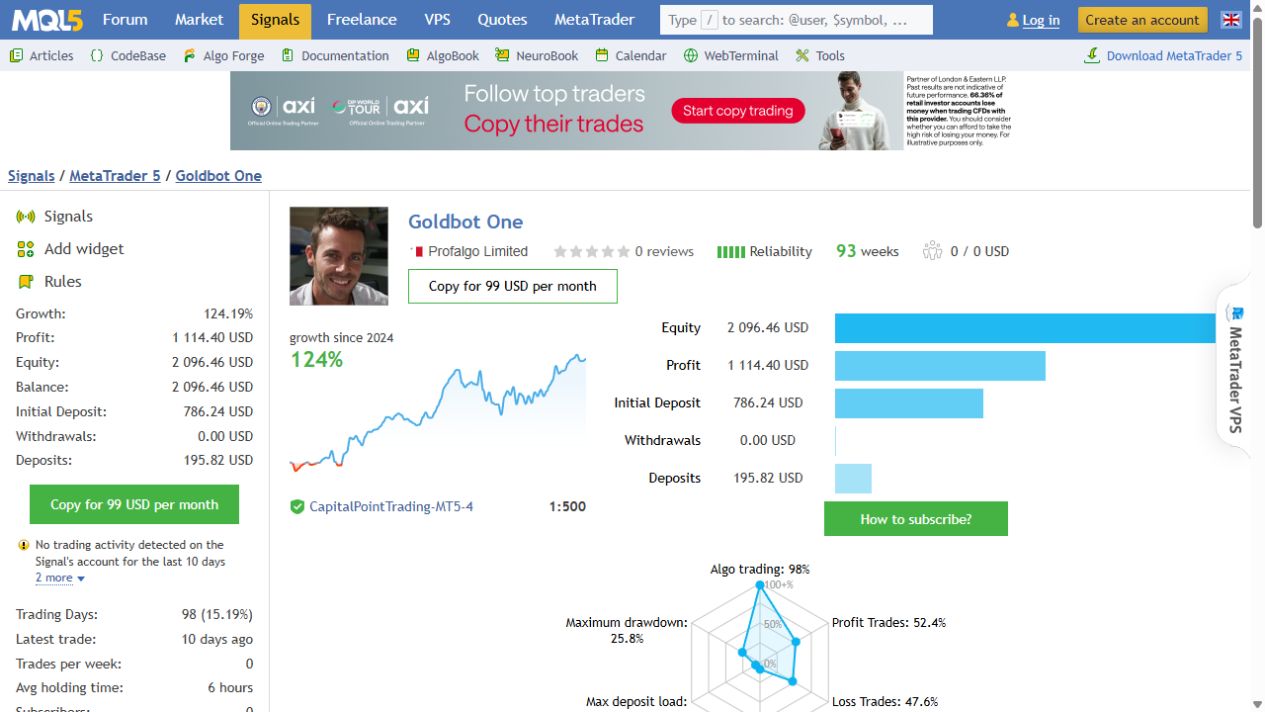
The account page showed monitoring beginning on 22 January 2025, alongside 93 displayed weeks of account history. Its description identifies a setting of 6% risk per strategy. It also warned that no trade had occurred for ten days. This is relevant for buyers expecting constant activity: breakout systems can spend extended periods waiting.
Profit factor was 1.40, with 215 winning trades and 195 losing trades. The longest losing sequence comprised twelve trades, totaling $333.49. February 2025 returned −15.18%, December 2025 −8.34%, and February 2026 −18.25%. A cumulative gain should be assessed with these periods in view.
The drawdown fields were inconsistent in scale: maximum balance drawdown was shown as $509.84 (28.60%), relative balance drawdown as 25.76%, and relative equity drawdown as 8.41%. We could not establish why the displayed measures differed so much. We therefore do not use the smallest figure as a summary of overall risk. The historical losses and balance drawdown remain material evidence. MQL5 classified 98% of trades as algorithmic, so the account is not proof of an entirely untouched automated run.
What the backtests do—and do not—show
The fixed-lot chart labels 2016–2023 as optimization and earlier history plus 2024 as out-of-sample. This is a useful way to present a robustness claim, but the boundaries and selection process are the developer’s. We have not independently established that those periods were never used in development.
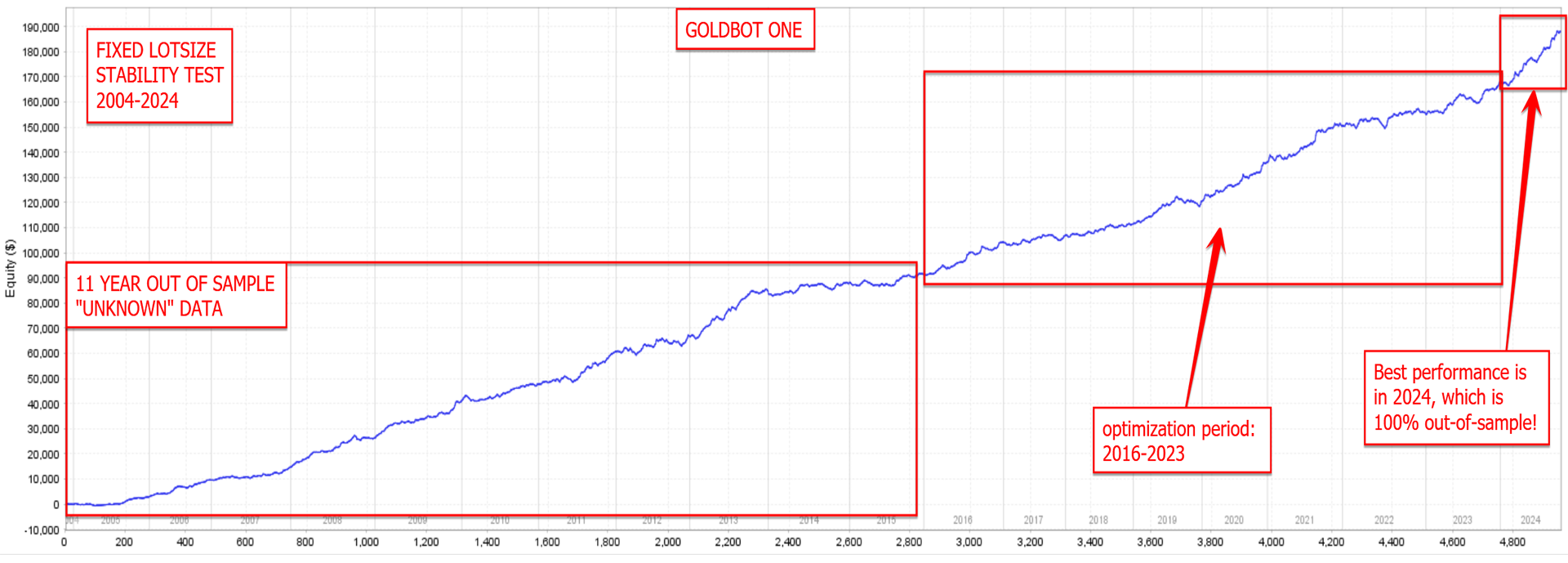
Fixed-lot analysis helps separate the strategy’s cash progression from compounding. A long rising line is still not a guarantee of future stability, and broker costs or execution assumptions can affect the reproduced result.
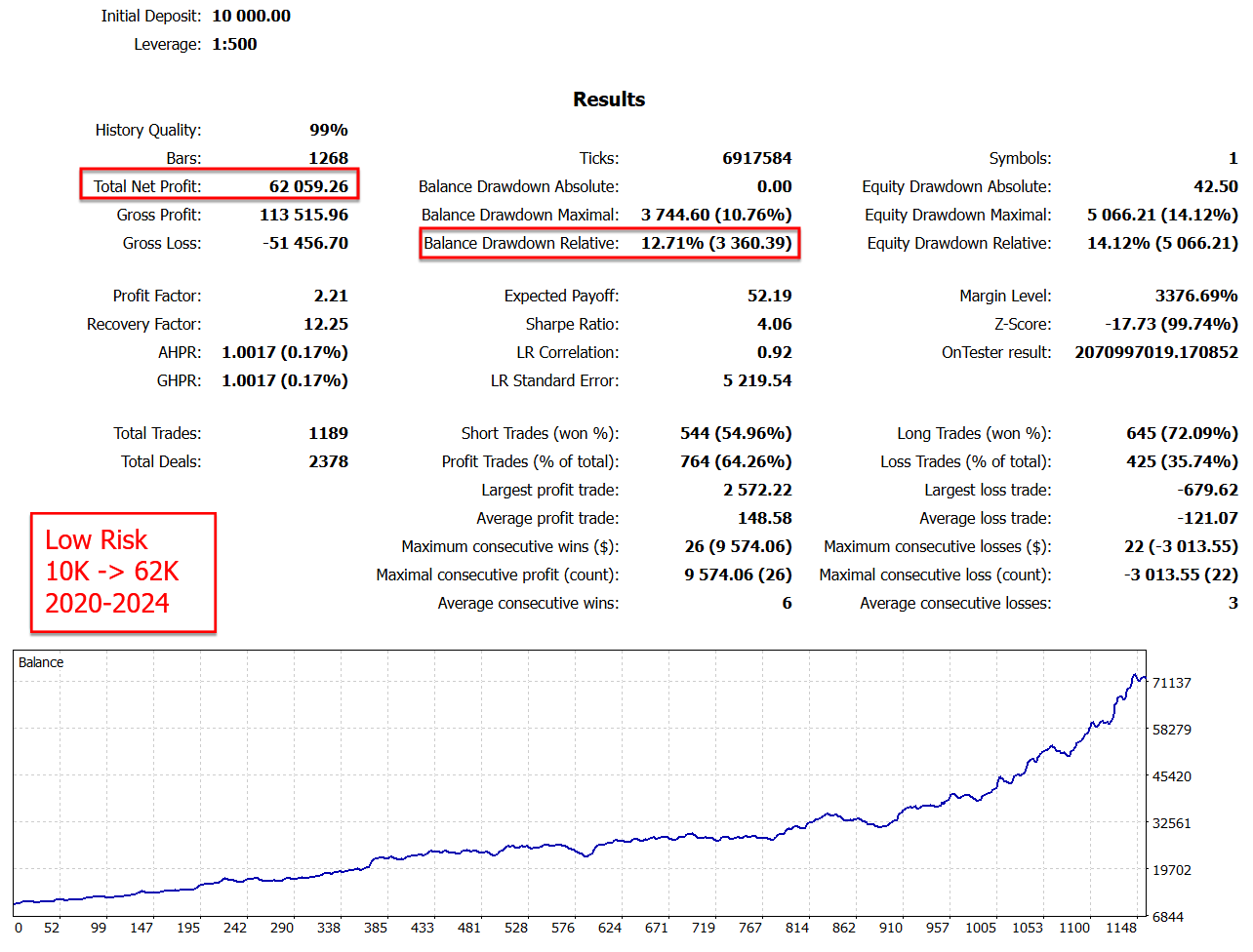
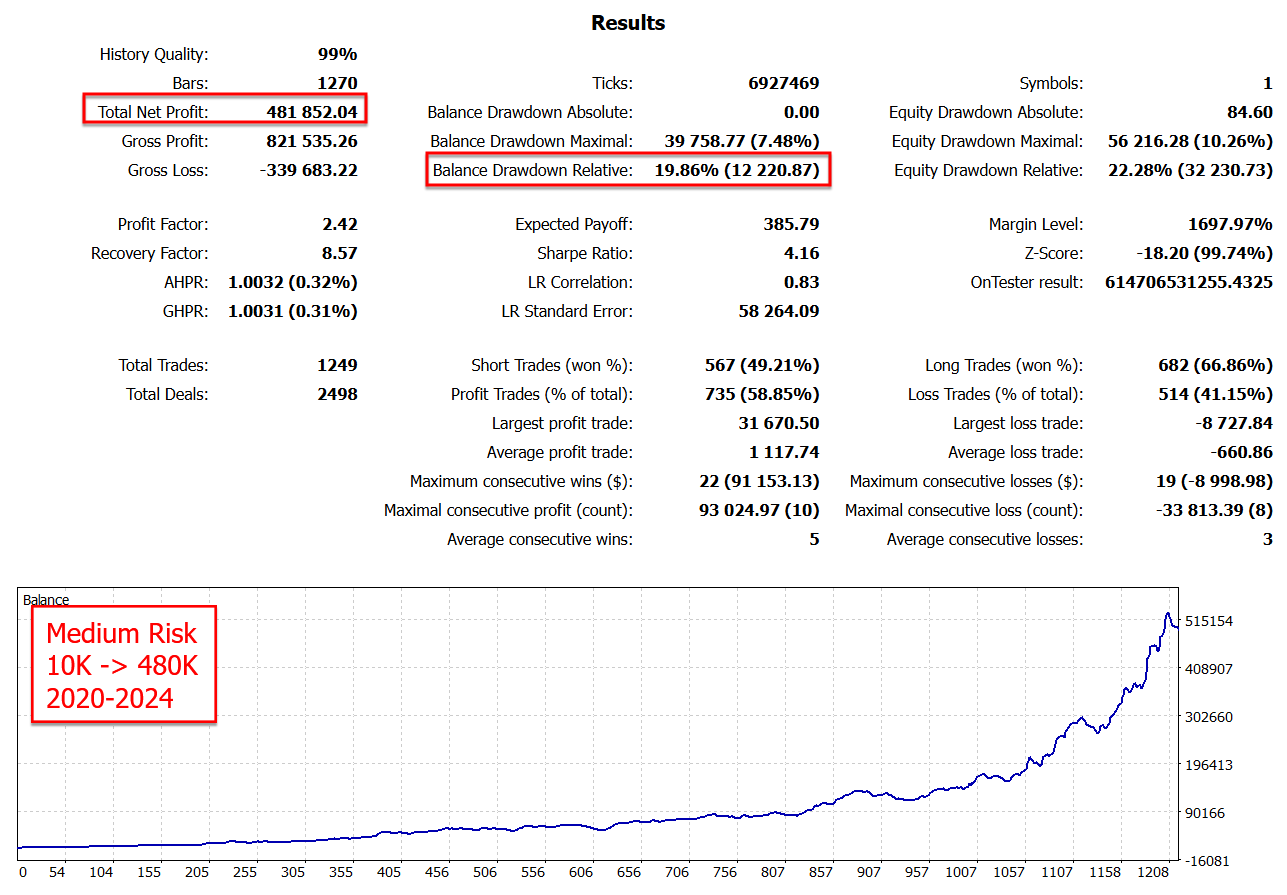
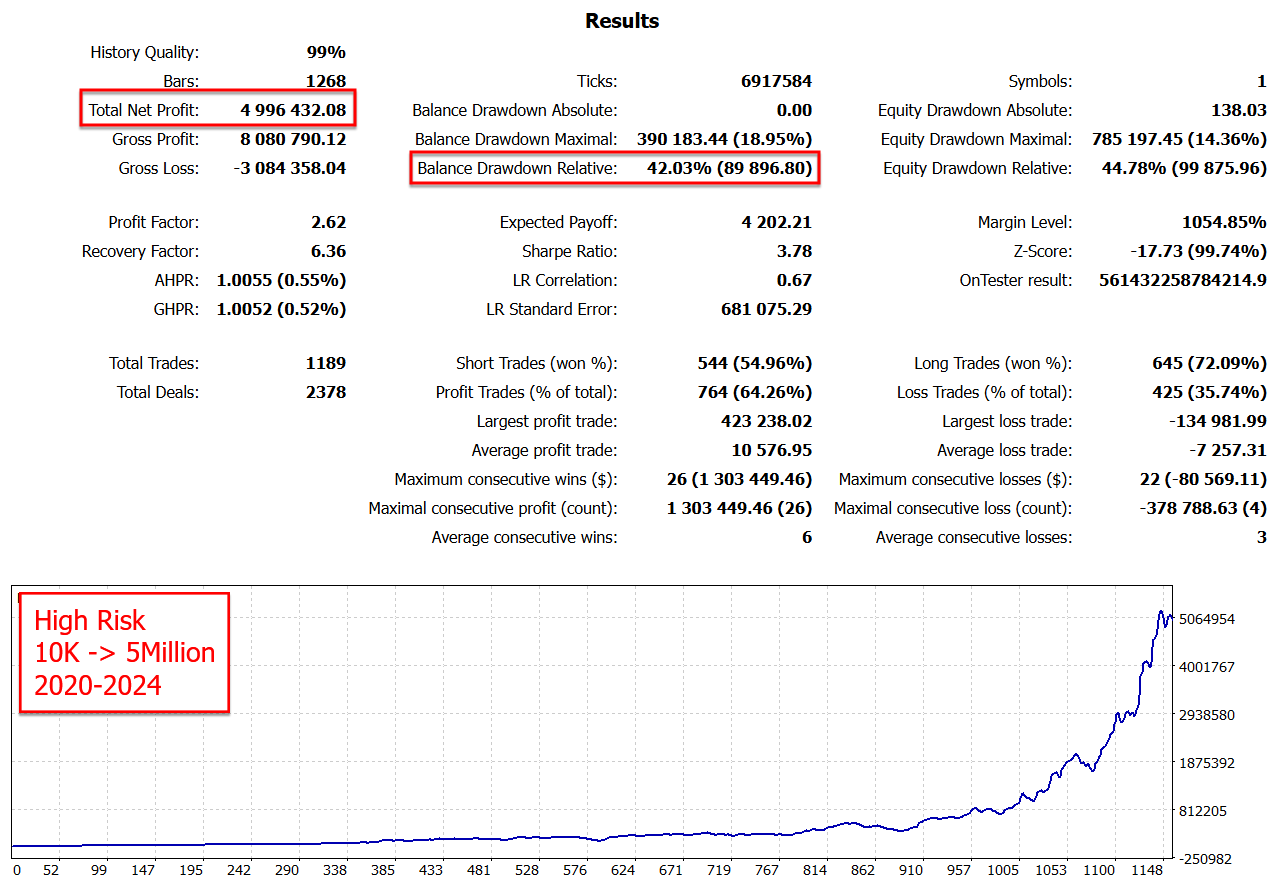
The 2020–2024 reports show relative equity drawdowns of 14.12% for the low-risk example, 22.28% for medium and 44.78% for high. The medium report contains 1,249 trades; the low and high reports contain 1,189. They should not be treated as perfectly matched runs differing only by lot size. Their final balances are historical simulations, not live-account achievements.
Several red highlights emphasize net profit and balance drawdown. For an open-position strategy, the equity figures deserve equal attention. The high-risk illustration roughly doubles the medium example’s relative equity drawdown; its much larger headline profit is inseparable from that exposure.
Preset inspection: a risk name is not a hard limit
The public ZIP contains low, medium and high risk SET files with MaxRiskPerStrategy values of 3, 6 and 10. According to the parameter explanation, this setting scales exposure against historical strategy drawdown. It is not a simple percentage stop loss on each order and not a guaranteed account-wide loss ceiling.
The filenames include maximum-drawdown labels, but the inspected low-risk file stores the separate daily drawdown field as zero. It also enables all eight strategies and uses FridayStopHour 25, which the listing identifies as disabled. Do not assume that loading the low-risk file activates a daily stop or avoids weekend positions. Inspect those controls separately in the supplied build.
OnlyUp is another consequential choice: holding sizing at a previous higher balance during a drawdown increases exposure relative to the reduced account. The public low-risk file has it off. Gold’s minimum lot and contract specification can also prevent a small account from achieving the intended scaling. Test those mechanics before relying on the profile name.
Customer reviews: helpful context, not audited results
The visible feedback includes praise for support, simple setup and use alongside the author’s other EAs. The short review below is an example of positive owner sentiment, rather than a detailed account statement.

A longer review by Aller Uja is more informative about expectations: the author initially criticized infrequent trades and an unsatisfactory test experience, then updated the review after five to six months to report a more positive assessment and a move to a live account. Both parts remain visible on MQL5. That change supports allowing a meaningful observation period, but does not independently establish the buyer’s returns.
Some launch-period reviews mainly express confidence in the developer’s previous products. Those comments should not carry the same evidential weight as a dated Goldbot One trade history. MQL5 customer opinions remain separate from CheaperForex verified-purchase ratings.
Our practical assessment
Goldbot One is most relevant to traders seeking a configurable, gold-only breakout allocation with explicit exits. Its public presets and individual strategy switches make it possible to inspect what is running. The main checks are combined gold exposure, the actual cash loss at the chosen lot size, calendar initialization and whether the daily control is configured as intended.
We would prioritize a broker-specific demo record and a repeatable low-exposure setup over the spectacular high-risk historical curve. Use more than one market regime when testing, include realistic costs, and keep the MT5 signal’s evidence separate from expectations for an MT4 account.
How to get Goldbot One safely
- Get Goldbot One EA MT5 at CheaperForex or Get Goldbot One EA MT4 at CheaperForex. Select the platform you actually use; each page shows current pricing and the standalone offer.
- Use the MQL5 MT5 listing and MQL5 MT4 listing as developer references for specifications and platform-specific changes. Developer-direct bonus bundles and private memberships are not promised as part of our offer.
Verify it yourself
- Official listing: Goldbot One MT5 features and release notes.
- Public account: Goldbot One MT5 account, trades and drawdown statistics.
- Settings files: Developer ZIP containing low, medium and high risk SET files.