
AI Quantum Scalper EA MT5 Review: Strategies, Signal and Risk
AI Quantum Scalper EA MT5 is a four-market system with five strategy switches, an entry filter and configurable loss limits. Its appeal is the control it gives traders over instruments, entries and exposure. The main consideration is the size of losses relative to wins: both the public signal and historical reports show why a high success rate alone is an incomplete measure of this EA.
Ready to Buy AI Quantum Scalper EA MT5?
$359.96 with crypto · $449.95 by card
Official version · Instant download · Future updates included · 7-day money-back guarantee

Evidence checked 25 September 2026. We examined Lo Thi Mai Loan’s listing, public setup and input guides, release notes, original reports, current MT5 signal and customer feedback. We have not run the software or reproduced these tests. The analysis below separates documented controls from developer claims and observed account statistics.
What its AI filter actually controls
The public input guide describes Regime AI as an entry gate: it can block a proposed trade when conditions fail its checks. Conservative, balanced and aggressive modes alter that decision. It does not replace stop loss, take profit or the position-management settings, and the public material does not establish a particular machine-learning architecture. The useful buyer question is how switching the filter changes trade frequency and results under the same test conditions.
Strategies one through five are independently selectable. Trailing requires both the global master switch and the relevant strategy setting. The developer also describes a day-trading configuration using strategy five with trailing disabled. That makes the word scalper an incomplete description of every possible configuration: holding behaviour depends on the selected strategy and exit setup.
Four charts, and a separate risk decision on each
The setup guide explicitly calls for an M1 chart for each instrument, loading its matching preset. Running all four markets therefore means four instances, not one chart that automatically trades an entire portfolio. Distinct magic numbers help avoid overlap with other instances or robots.
The sizing controls permit fixed lots or risk linked to the distance to the stop, based on balance or equity. The guide says the configured total risk per signal is divided across enabled sets. That should not be interpreted as an automatic cap on the combined risk of every signal across four charts. Inspect simultaneous positions and the account-wide guard mode before assuming that individual chart settings add up to a suitable portfolio limit.
The public BTC, EURUSD, USDJPY and gold presets are described as suitable for $5,000-plus accounts. The general listing’s absence of a minimum-balance restriction is not a recommendation to load those unchanged on a smaller balance. Broker contract sizes, minimum volumes and symbol suffixes can also change the actual exposure. Check those details and use demo trades to verify the resulting order sizes.
Loss guards and prop-account settings
The Drawdown Guard has its own enable switch, account-wide or EA-only scope, daily and total limits, reference values and buffers. It can block new orders when projected risk would exceed a limit, and its emergency settings can close positions and delete pending orders. The guide treats positions without a stop as unsafe. These controls are more informative than a generic prop-firm-compatible badge.
They still require careful configuration. A firm’s daily reset time, treatment of floating losses, permitted instruments and execution rules may differ from the EA’s defaults. Server-time sessions and daily baselines need to be checked explicitly. The baseline-reset input is a one-time action in the guide, not a switch to leave enabled. Stops and emergency closes also remain exposed to execution delays and gaps.
The current MT5 signal: a modest gain with concentrated returns
The seller profile links to AI Quantum Scalper account 2366679, described as a $10,000 account. MQL5 labels it real, on InstaForex-Server with 1:200 leverage. It showed 26 weeks of history and a start timestamp of 30 March 2026. An older signal address carried in the listing’s link tooltip was unavailable, so the current seller-profile link is the one used here.
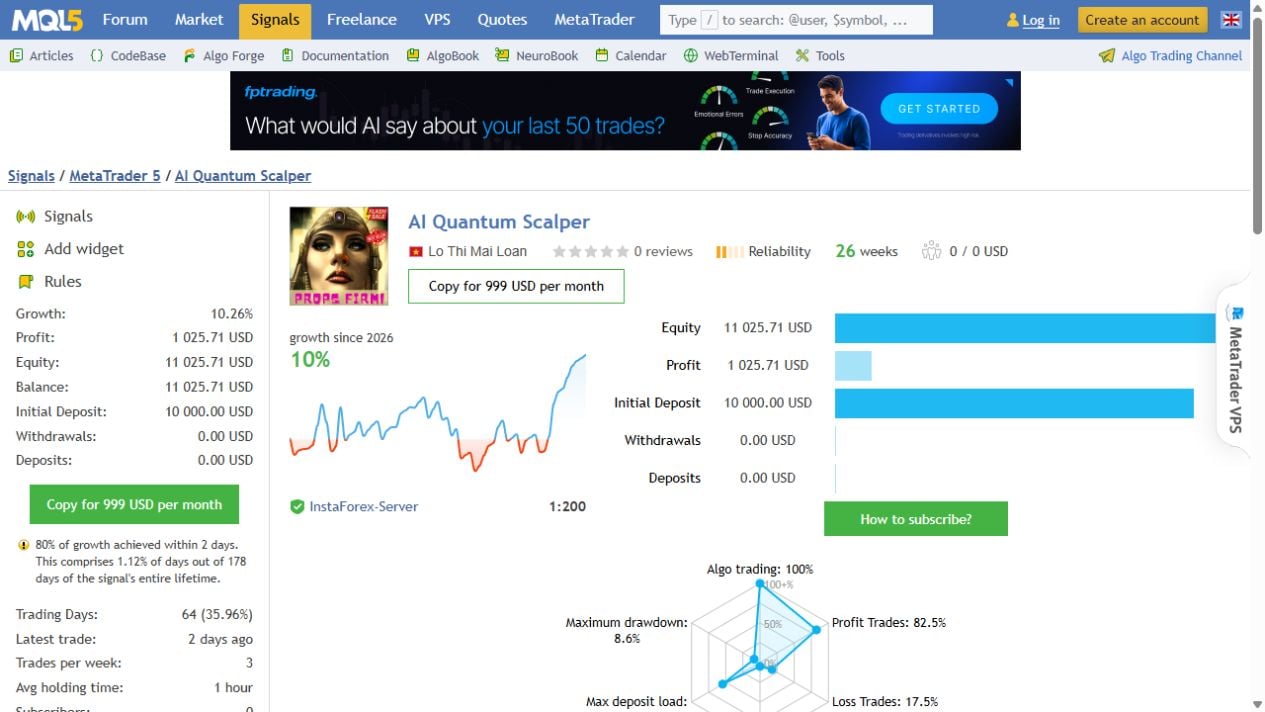
At our check, growth was 10.26%, profit was $1,025.71 and balance/equity were both $11,025.71, with no additional deposits or withdrawals shown. Of 126 trades, 104 were profitable and 22 lost money. Its profit factor was 1.22. Average profit was $54.07, compared with an average loss of $208.98: one average loss consumed roughly four average winners.
MQL5 warned that 80% of growth came in just two days. The monthly table included negative March, July and August results, followed by 11.99% in September at the check date. That is a more useful picture than describing the entire period as smooth growth. The distribution also matters: only four trades were on BTC, compared with 45 USDJPY, 43 EURUSD and 34 gold trades. This record provides very limited live evidence for the Bitcoin component.
The reported relative drawdowns were 8.56% by balance and 3.34% by equity; these are the separate fields shown by MQL5, not interchangeable measurements. Neither is a promise about future maximum loss. Maximum deposit load was 54.59%, another reason to inspect margin use as well as the headline growth percentage. A public signal also does not confirm that every buyer’s preset, broker costs and execution will match this account.
Four original backtests, four different exposures
The gallery contains a Bitcoin report and a gold report labelled as five-year tests, a USDJPY report spanning 2010–2026 and an EURUSD report spanning 2021–2026. These are developer-supplied historical tests. Their differing periods, initial balances and settings prevent a simple ranking by total profit.
- Bitcoin
- 1,623 trades; profit factor 2.35; 85.15% profitable trades; 20.29% relative equity drawdown.
- Gold
- 1,433 trades; profit factor 2.35; 85.21% profitable trades; 21.79% relative equity drawdown.
- USDJPY
- 1,352 trades; profit factor 1.48; 81.95% profitable trades; 30.76% relative equity drawdown.
- EURUSD
- 854 trades; profit factor 2.21; 83.02% profitable trades; 29.13% relative equity drawdown.
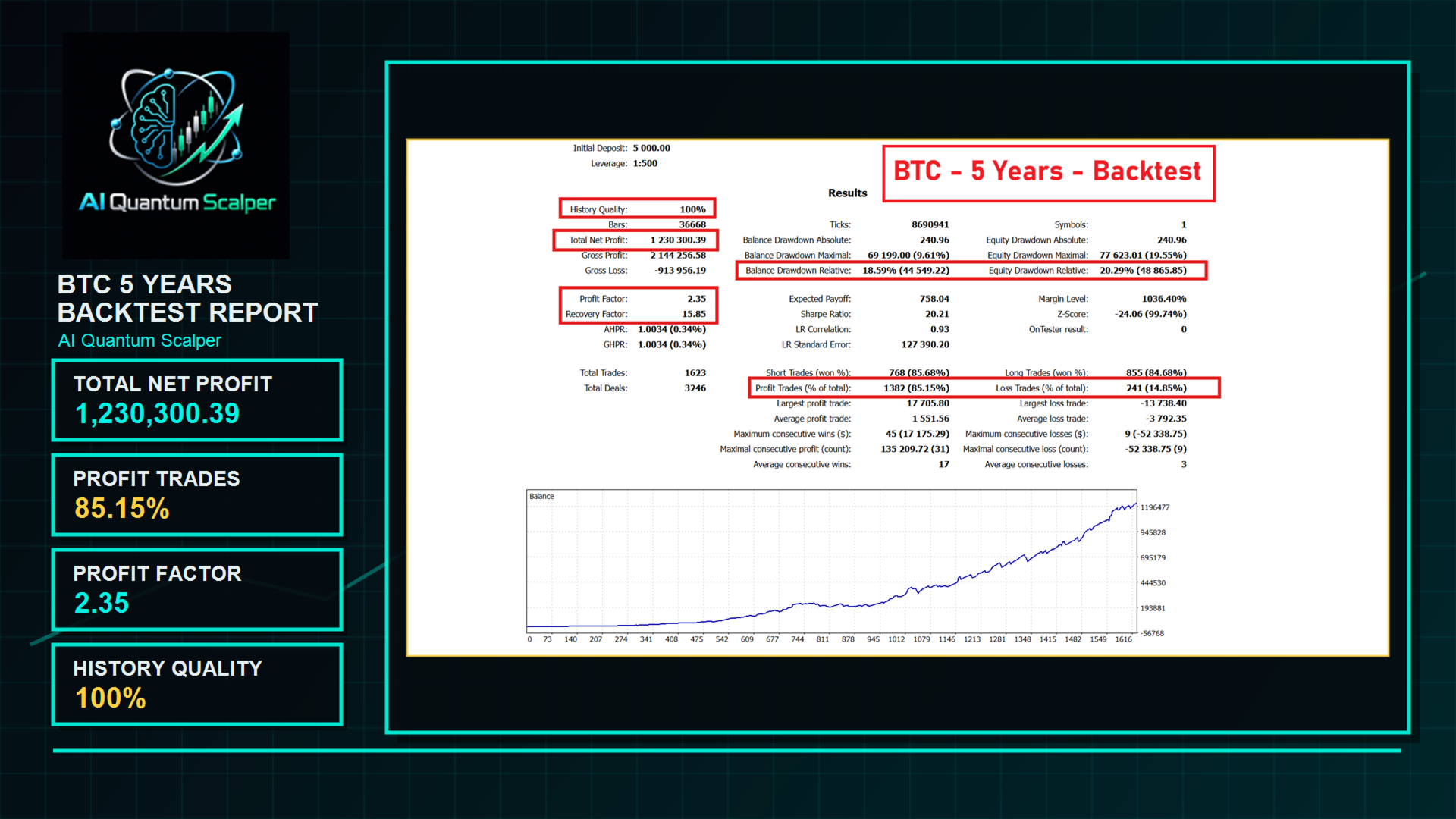
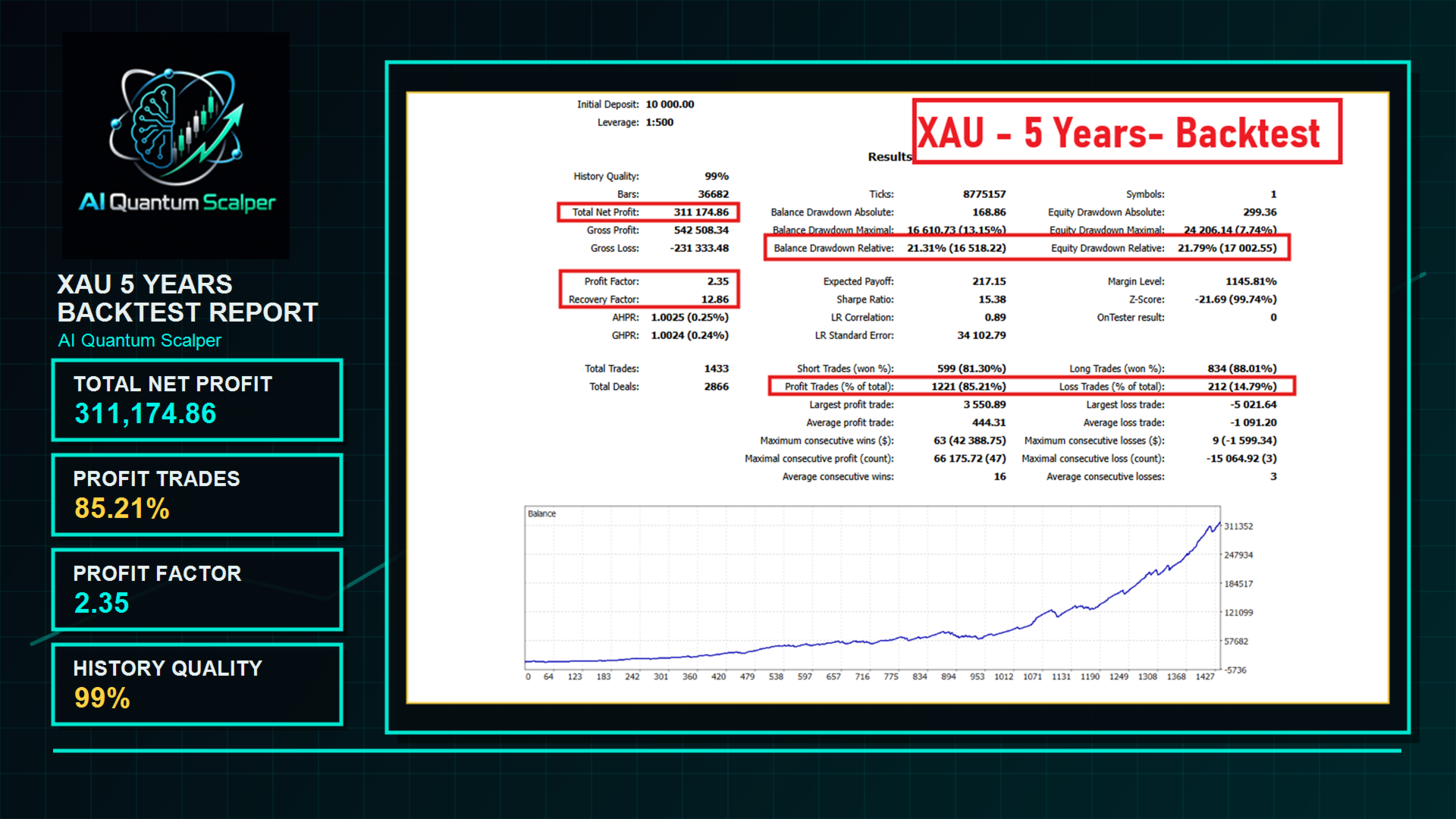
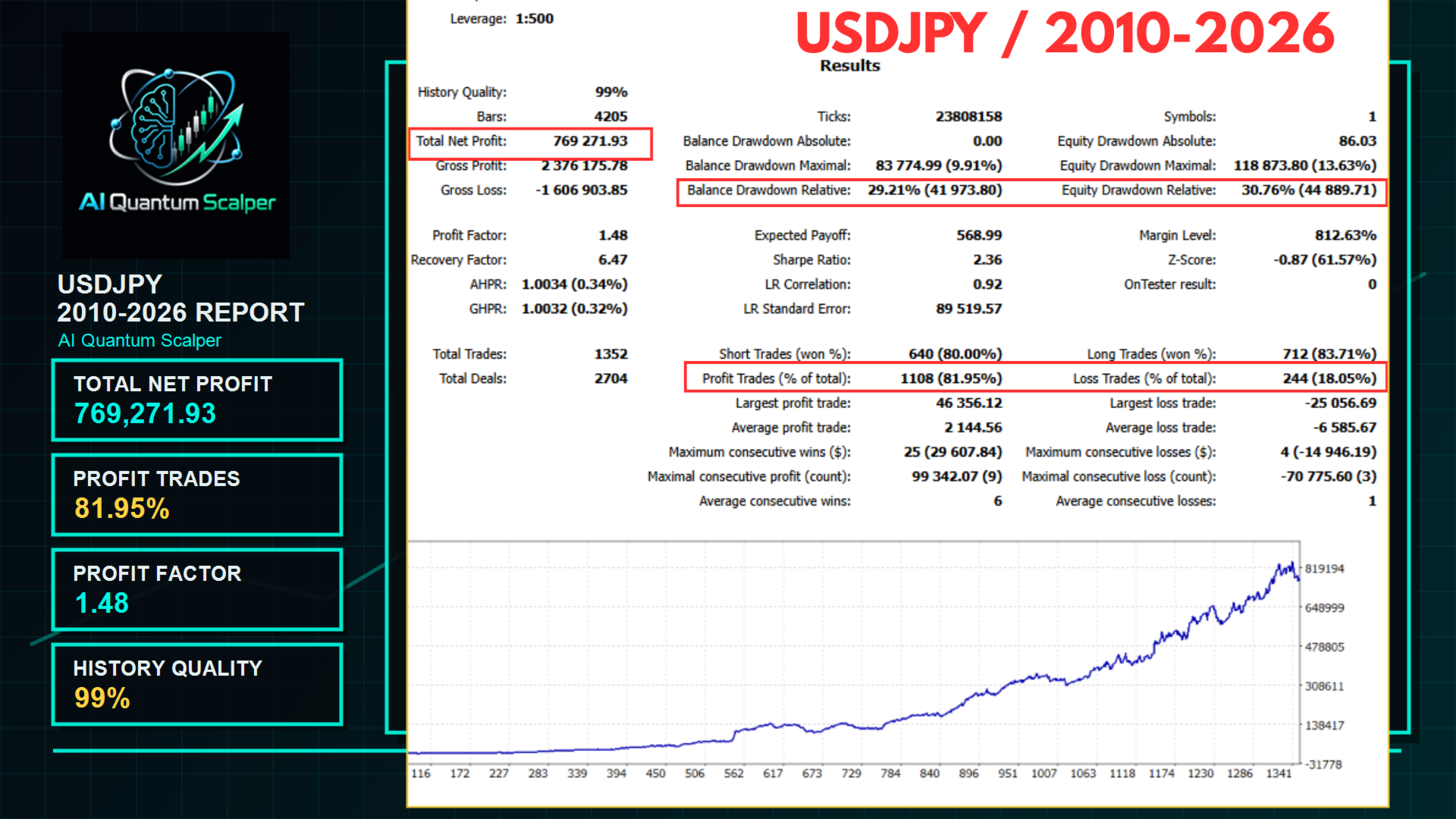
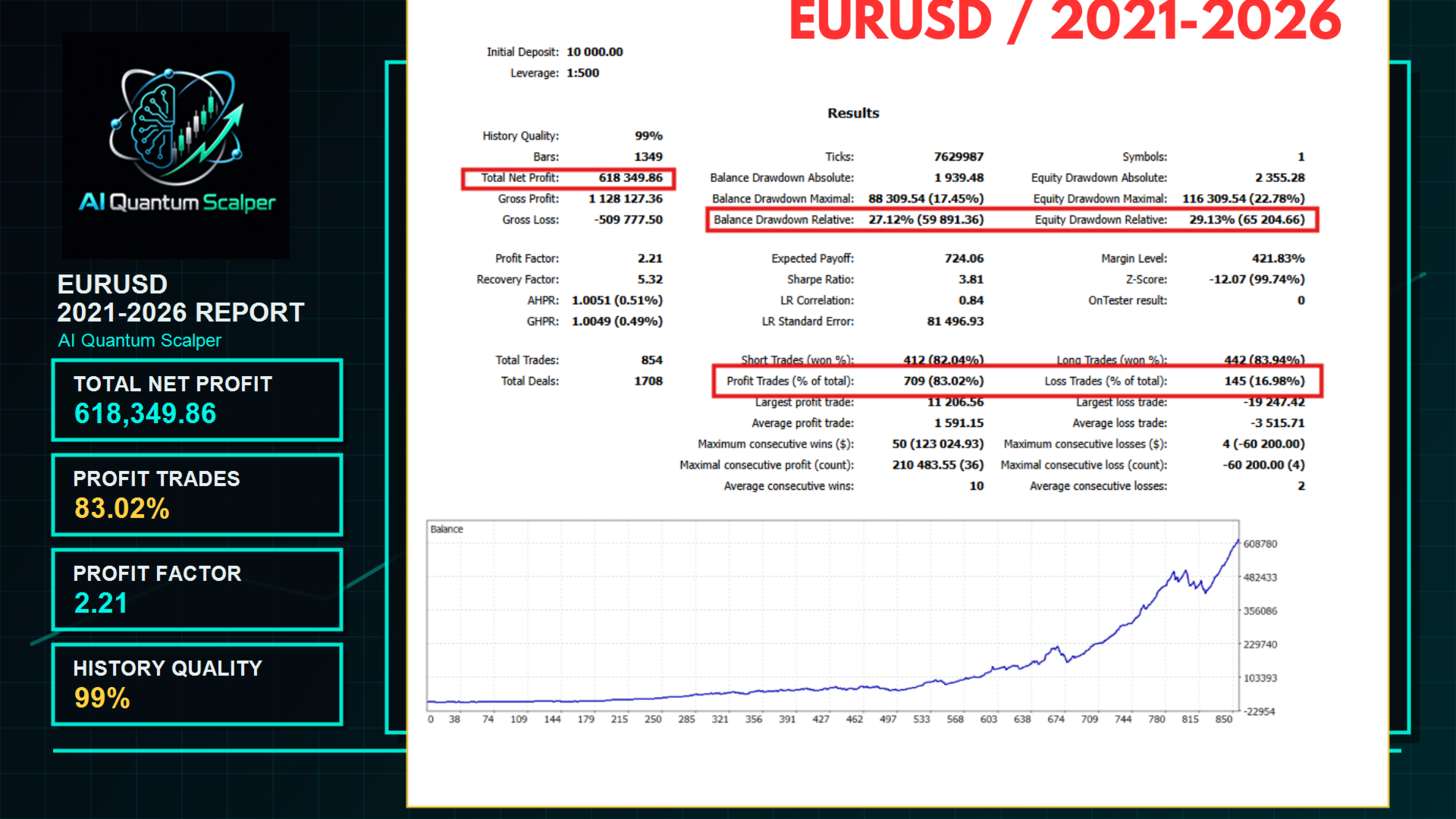
All four tests show larger average losses than average wins. For example, the gold report has an average win of $444.31 against an average loss of $1,091.20. USDJPY has the lowest displayed profit factor and the largest relative equity drawdown in this group. That points to a practical test: compare each instrument separately before enabling everything, then examine the combined exposure when several markets open positions together.
The USDJPY image also contains a presentation discrepancy: its promotional sidebar says $79,271.93 profit while the tester table shows $769,271.93. We cannot resolve that mismatch from the image alone. The original tester export, full inputs and trade list would be needed to audit it. Likewise, the four high backtest win rates do not prove the absence of overfitting or guarantee the current signal will repeat the historical curves.
Customer feedback: encouraging, but often early
The listing displayed ten five-star reviews. Philip Dierkes’s April feedback described promising backtests and responsive support while explicitly leaving forward performance for a future test. Sheikh Tanver reported six EURUSD trades after waiting four weeks, with four winners. Antoine Castagné praised setup and support but said it was too early to judge long-term results. Those details matter more than the star average on its own.

The comments section also contains a dissatisfied user’s April post and a developer reply offering to investigate privately. That exchange does not provide enough verified account settings or history to decide whether the problem was configuration, execution or the strategy itself. We include the public discussion so readers can examine both praise and problems. Customer opinions remain separate from the measured signal and from CheaperForex verified-purchase ratings.
Release history and what to check before use
The release notes visible at this check identify build 6.7, dated 21 July 2026, as adding configurable stop, target and trailing settings. March entries record initialization and pending-order deletion fixes, and exposed position/pending-order limits. These are dated development notes, not a fixed version promise for the current latest-version offer.
For an initial demo run, confirm the correct preset on each M1 chart, distinct magic numbers, risk sizing, trailing switches and drawdown-guard scope. Check how an entry is filtered and how a losing position exits. This gives you a concrete basis for assessing the software without relying on the promotional claim that protective orders make it safe.
More from Lo Thi Mai Loan
Compare the markets and evidence for each system from this developer:
- Bitcoin Scalping EA MT5 — read the review.
- Golden Blitz EA MT5 — read the review.
- Diamond Scalper EA MT5 — read the review.
- AI Scalping EA MT5 — read the review.
- AI Aurum Pivot EA MT5 — read the review.
Our assessment
AI Quantum Scalper offers useful configuration depth: four markets, five strategy switches, entry filtering and explicit loss-control inputs. It is best suited to buyers willing to work through presets and account exposure. The current public signal provides a real-account reference, but its concentrated gains, unequal win/loss sizes and small Bitcoin sample limit what can be concluded. The original reports are useful for forming tests, not a substitute for checking the settings you intend to run.
See the AI Quantum Scalper EA MT5 product page for the current standalone offer and purchase support.
Verify it yourself
- Developer source link: AI Quantum Scalper on MQL5.
- Live signal link: AI Quantum Scalper MT5 account.
- Public input guide and four-chart setup guide.
- Public instrument presets and account-size guidance.