Lycan EA MT5 trades 28 major and minor Forex pairs with an H1 strategy, individual stop-loss and take-profit levels, and developer-described automatic sizing. Rob Josephus Maria Janssen presents it as a companion to Chiroptera: the broader trading window and H1 logic replace that product’s quiet-night M5 focus.
Our assessment: Lycan may appeal to traders looking for multi-pair Forex automation beyond a night-only session. Its defined exits and default-settings approach are straightforward starting points. The main consideration is the limited product history and the lack of a public explanation of the adaptive sizing formula; test portfolio exposure as well as individual trade outcomes.
View Lycan EA MT5 features and pricing

This source-based review was prepared October 12, 2026. The current MQL5 listing displayed version 1.0 and a publication date of October 12, 2026. We have not independently traded Lycan or reproduced its performance.
H1 logic with a wider trading window
Lycan’s stated trading universe covers 28 major and minor currency pairs. The overview describes individual trades with defined stop-loss and take-profit levels, rather than explaining an entry formula or naming the indicators behind it. Its clearest distinction is time: the developer says Lycan operates at all times and uses H1 logic.
The developer considers Lycan less sensitive to spreads and broker conditions than Chiroptera. That comparative claim still needs broker-specific testing: spreads, commissions, swaps, slippage and symbol specifications affect trade costs and results.
One chart attachment, multiple currency exposures
The live-use instructions permit attachment to any chart symbol and period, with EURUSD H1 as the example. Check broker suffixes so the intended pairs can be identified. Evaluate the whole portfolio: different pairs may expose the account to the same currency, and individually stopped trades can still create concentrated combined exposure.
Stops, targets and internal sizing
Defined stops and targets make the intended exits easier to identify in a trade history. They do not establish a fixed account risk: that depends on the position size, stop distance, contract specifications and combined open trades. Gaps and slippage can also change the executed exit.
The overview says suitable lot sizes are embedded and continue to update through internal learning during live trading, without the user having to train files. It does not describe the data used, learning period, parameter bounds, restart behavior or a user-selectable risk percentage. We cannot infer a particular machine-learning model from that short statement. Watch how sizing changes over time and after terminal restarts, alongside account drawdown and exposure.
Testing the default configuration
The developer recommends defaults and says 1-minute OHLC is sufficient for backtesting. Record the build, inputs, broker and model, and compare more detailed testing where practical. A demo forward test should examine entries, exits, changing lot sizes and overlapping positions, particularly because sizing is described as adapting during live trading.
Lycan and Chiroptera compared
| Product | Stated timing and logic | What that means for comparison |
|---|---|---|
| Lycan EA MT5 | H1 strategy operating throughout the trading day across 28 major and minor pairs. | A broader trading window; examine exposure during active as well as quieter market hours. |
| Chiroptera EA MT5 | Quiet-night focus and M5 logic, according to the developer’s Lycan comparison. | A different trading window and strategy timeframe; its settings and results are not Lycan evidence. |
The shared developer and related naming do not prove identical filters, risk controls or performance. See the Chiroptera strategy and setup review for that product’s own context. We do not transfer Chiroptera’s product claims or history to this new EA.
The seller’s published signals are named Chiroptera Global Prime, Chiroptera Fusion and Chiroptera FP Trading. They are not presented as Lycan accounts and are not used here as evidence of its live performance.
Customer feedback at launch
The MQL5 listing checked October 12, 2026 showed one five-star customer review by Alexander Seidel, also dated October 12. Its entire written comment was “toll” (German for “great”). This is positive feedback, but it provides no test conditions, trading period, drawdown or account evidence. One short launch-day opinion cannot establish dependable long-term results.
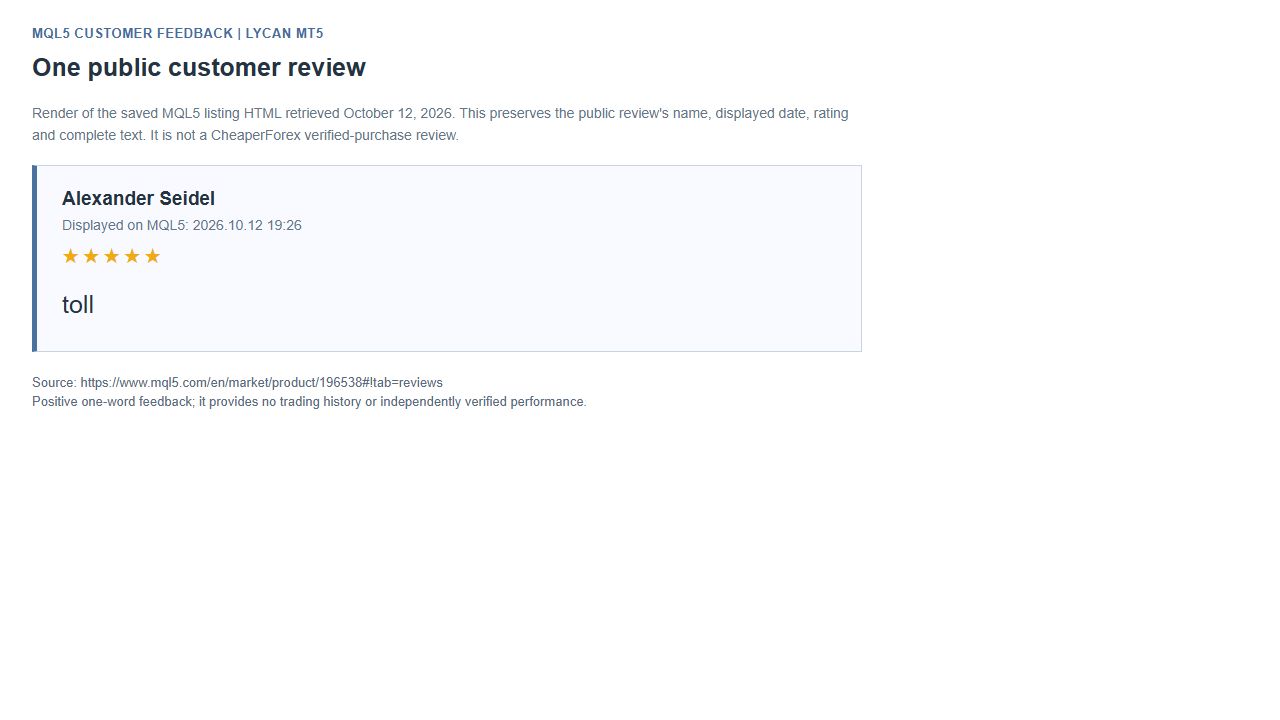
MQL5 feedback is third-party customer opinion, separate from CheaperForex verified-purchase reviews. Read the full MQL5 Reviews panel for the current discussion.
What the developer’s tester images show
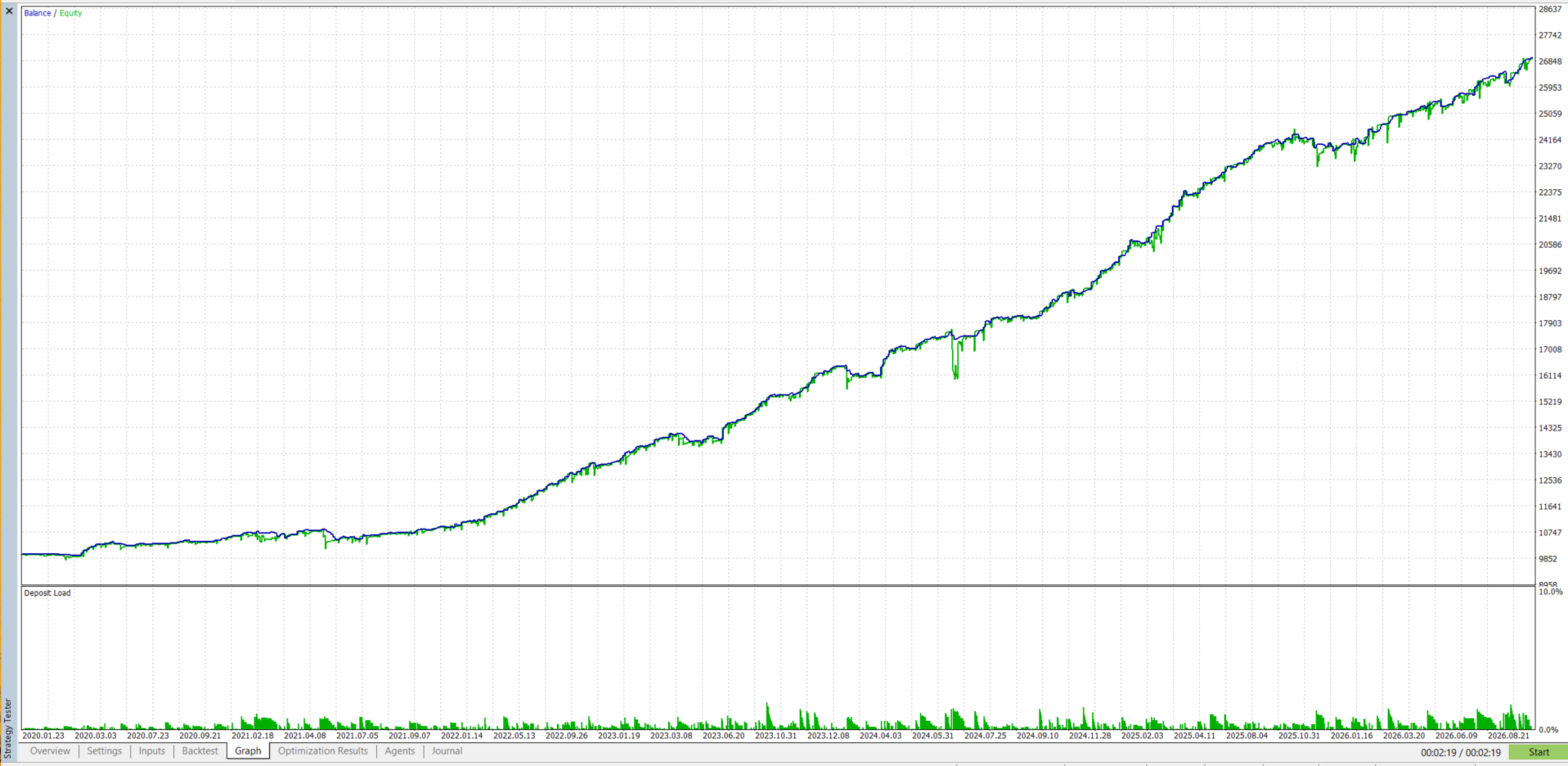
The graph rises from approximately 10,000 to 26,900, with visible floating-equity declines below the balance curve. Reading both lines matters: closed-trade balance alone can conceal losses on positions still open.
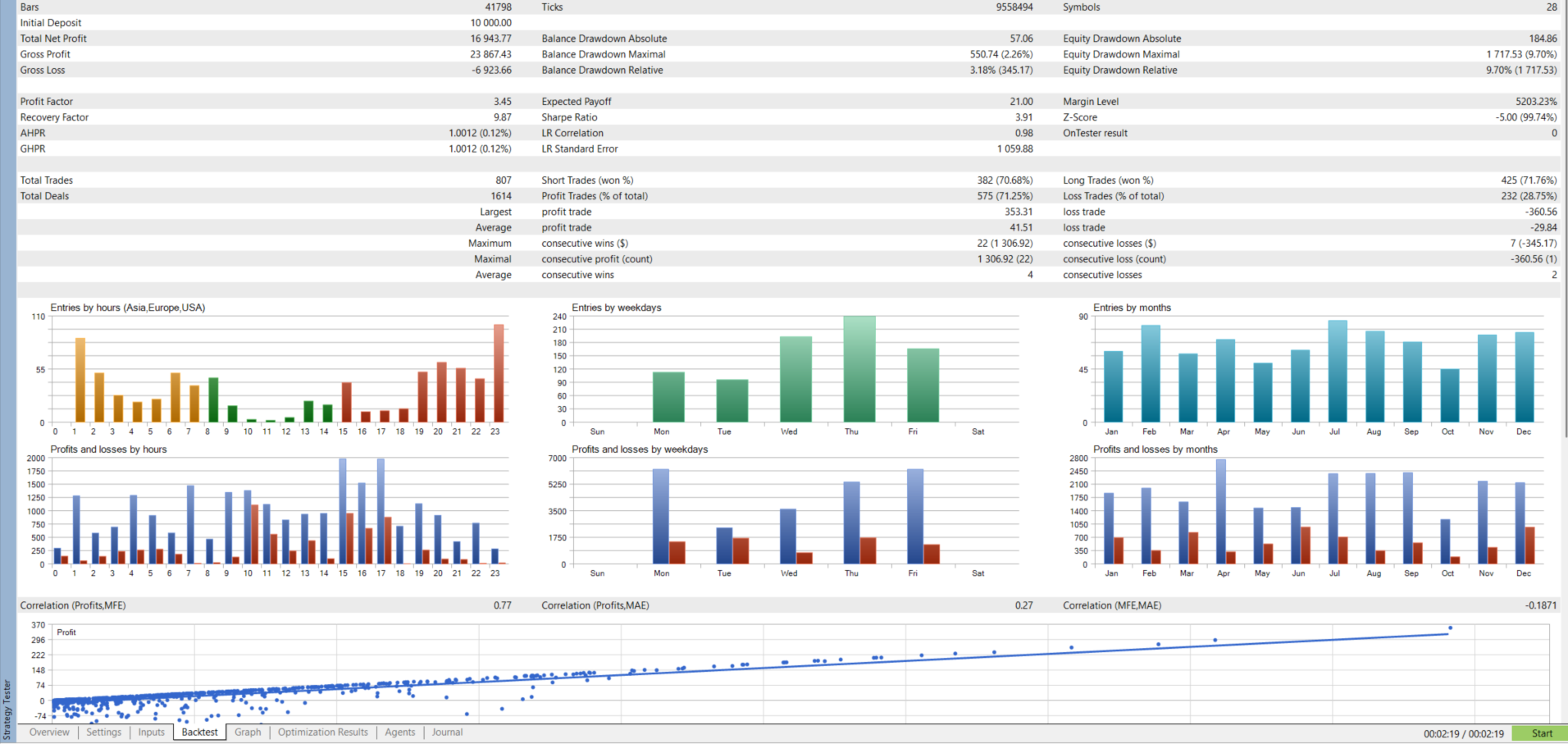
The report displays a 10,000 initial deposit, net profit of 16,943.77, profit factor 3.45 and 807 trades across 28 symbols. It records 575 profitable trades (71.25%) and maximum equity drawdown of 1,717.53 (9.70%). Relative balance drawdown is separately reported as 3.18% (345.17). Equity and balance drawdowns measure different account states; use the equity figure when considering the floating-loss picture.
The images do not establish the precise sizing configuration, test model or broker conditions, and we have not reproduced the run. Treat them as developer-supplied historical evidence to investigate, alongside demo forward testing and portfolio exposure.
The per-pair dashboard
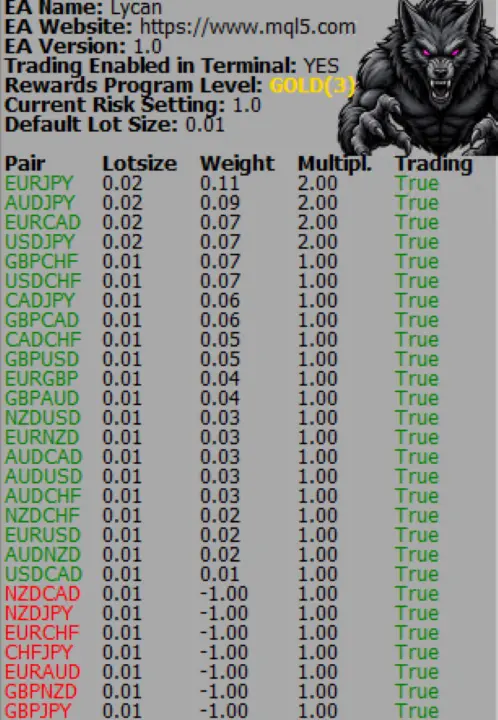
The dashboard shows per-pair lot allocation, with lot size, weight, multiplier and trading columns for 28 pairs. It also displays “Current Risk Setting 1.0” and “Default Lot Size 0.01.” The image does not explain the risk-setting units or weighting formula, so 1.0 should not be assumed to mean 1% account risk.
Verify it yourself
Read the official Lycan MT5 listing and Rob Josephus Maria Janssen’s seller profile for current product information. Use the supplied build’s actual controls and trade records to assess operation; this review is a source analysis, not an independently verified performance test.