
GBPUSD Robot Pro EA MT4
Genuine files only. No cracks, fakes or AI copies. See why
Why our prices aren’t rock-bottom
- The official file. The developer’s own, unmodified EA. Never a crack, a decompiled copy or an AI recreation.
- It trades like the original, because it is the original. AI recreations only copy how an EA looks from the outside, so they can trade very differently.
- Safe to run. Cracked files can hide malware that reaches your computer and your trading account.
- Updates and help. Free updates, a setup guide, and real people on Telegram if you get stuck.
We keep prices as low as we can. We just won’t sell fakes to be the cheapest.
GBPUSD Robot Pro EA MT4 automates GBPUSD M5 trading in MetaTrader 4 with trend, momentum and volatility checks, configurable order limits and individual trade exits. The developer describes the Pro strategy as free of grid and martingale recovery.
- GBPUSD M5 setup for an existing MetaTrader 4 account.
- Take profit, stop loss, trailing stop and break-even controls.
- MaxOrders, news protection and spread/volatility filters.
GBPUSD Robot Pro strategy and test review · View the MT5 edition
 MT4Save 17%
What you receive
- GBPUSD Robot Pro.ex4Genuine, unmodified developer file for MetaTrader 4Version 1.0
- Setup guide.pdfA general guide to installing expert advisors.Official step-by-step install guide
Delivered instantly to your account after payment
Regular priceRegular price was $599.00
$499.95 with card
Visa, Mastercard, Apple Pay and Google Pay accepted.
Card payments add bank fees, sales taxes and other charges.




 Apple Pay and Google Pay ready at checkout
- Official developer build · Version 1.0
- Instant downloadYour file is provided immediately after payment. In very rare cases we manually review an order first, then send your download straight after. If you don’t receive your file, you can request a full refund.
- Free lifetime updatesAll updates are free. They’re provided on a best-availability basis: we get new versions as fast as we can, led by customer demand, but we don’t guarantee them immediately. If you need every update the moment it’s released, our service may not be the best fit for you.
- 7-day money-backRefunds only cover an EA that fails to attach to your chart because of errors we can replicate. We don’t cover changing your mind or not liking the EA. All brokers are different, and results are never promised because markets are constantly changing.
- Unlimited activationsUse it on as many MT4 accounts and computers as you want, live or demo. There are no restrictions on how you use it.
What you receive
- GBPUSD Robot Pro.ex4Genuine, unmodified developer file for MetaTrader 4Version 1.0
- Setup guide.pdfA general guide to installing expert advisors.Official step-by-step install guide
Delivered instantly to your account after payment


28,000+ tradersServed since 2019
Don’t miss thisSee the EA we recommend
The Forex EA we trade ourselves
PrismAlgo for Forex


We have tested thousands of EAs. PrismAlgo is the one we use and recommend for Forex, and we rarely say that. We’re also an official reseller.
Real USD MyFXBook account. A live cloud, constantly evolving strategy.
See PrismAlgoOfficial versionsInstant downloadFree lifetime updatesExtra 20% off with cryptoReal people on support28,000+ tradersTrading since 2019Rated Excellent on Trustpilot
Product description
About GBPUSD Robot Pro EA MT4
- Developer source link: GBPUSD Robot Pro MT4 on MQL5
- Live signal link: no product-specific public account identified at our 17 September 2026 check. Developer website
GBPUSD Robot Pro EA MT4 automates GBPUSD M5 trading in MetaTrader 4 with trend, momentum and volatility checks, configurable order limits and individual trade exits. The developer describes the Pro strategy as free of grid and martingale recovery.
A focused GBPUSD setup for MT4
Use this edition with a MetaTrader 4 terminal and the broker’s GBPUSD five-minute chart. It evaluates market structure, support/resistance, momentum and volatility before taking entries during the trading week. Buy-only, sell-only and combined directions are configurable, alongside trading hours and lot size.
- GBPUSD M5 setup for an existing MetaTrader 4 account.
- Take profit, stop loss, trailing stop and break-even controls.
- MaxOrders, news protection and spread/volatility filters.
Watch the chart panel and control open orders
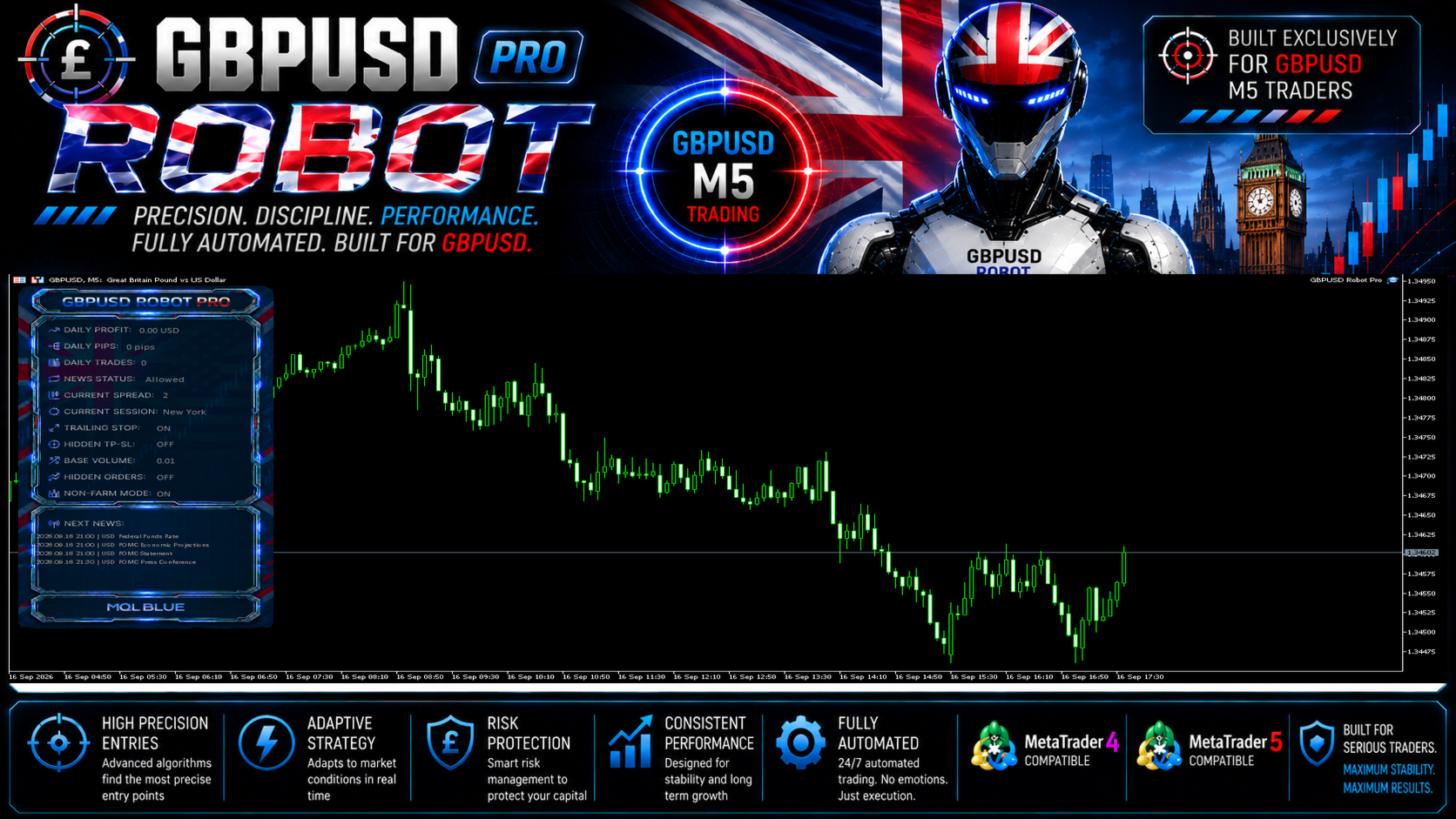
The panel puts daily pips, daily profit, spread and session information beside the chart. MaxOrders defaults to five; choose one if you want only a single open position. Several positions on the same pair can still create concentrated exposure even when the EA does not use a recovery grid.
Test the MT4 file in its own environment
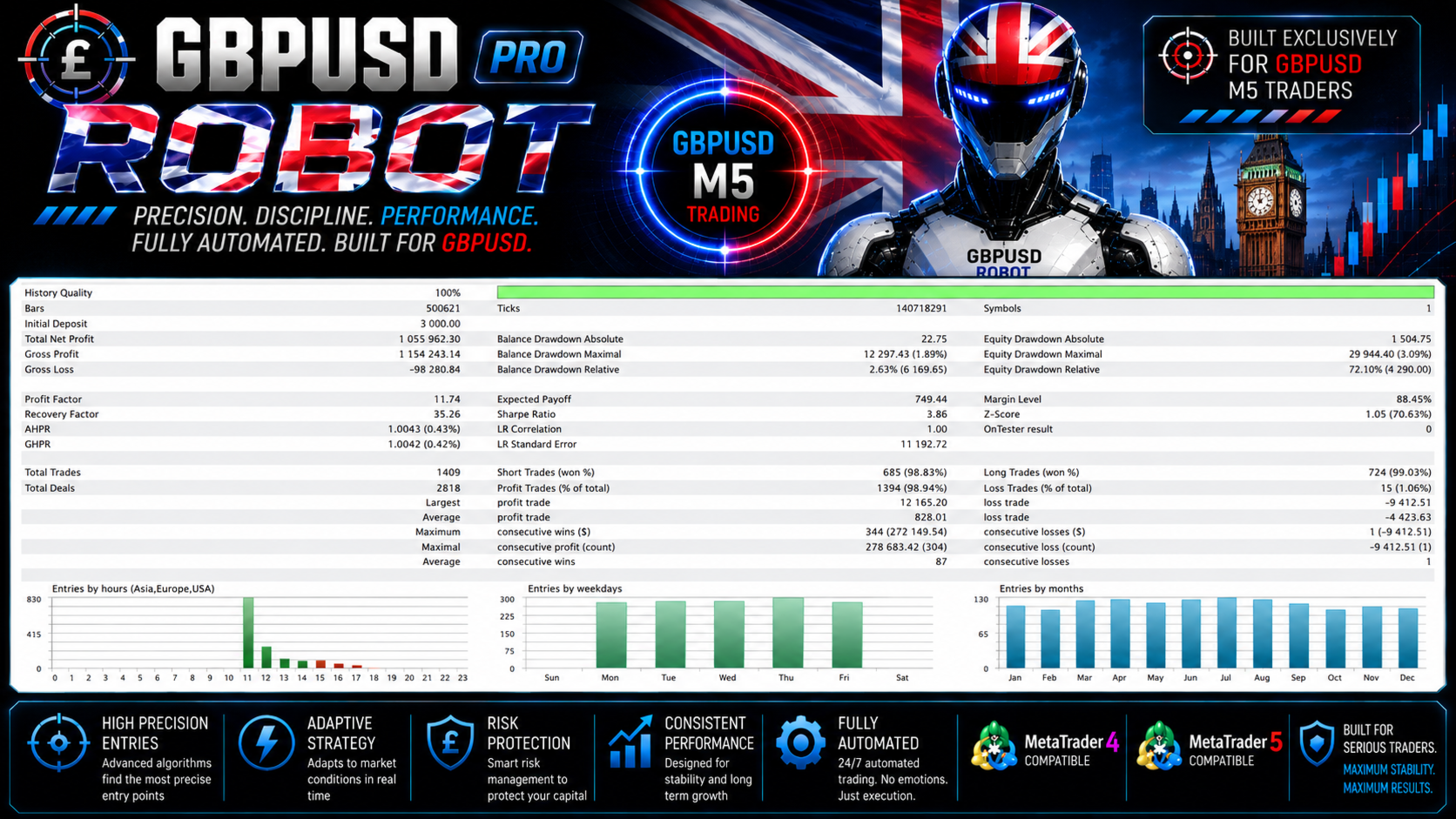
The source recommends GBPUSD M5, a 1,000 starting deposit and an Every Tick tester run with current spread. Check broker symbol naming, lot increments and realistic transaction costs before using your chosen lot size. The MT5 executable is a separate edition and cannot replace the MT4 file.
How Pro differs from the older catalogue entry
We also stock the older GBPUSD Robot EA MT4. This is a separate Pro listing with its own developer source and the controls described here. Do not assume the older product’s build, settings or results apply to Pro.
Read the original test report carefully
The developer’s shared gallery contains a Strategy Tester report with 72.10% relative equity drawdown. It also shows smaller drawdown percentages measured differently. The report is a simulation, not a verified live account; the full review explains the figures and evidence limits.
More from MQL Tools
Explore Scalping Robot Pro MT5, Aussie Loonie MT5, or XIRO Robot MT5. They are separate products from the same developer, with their own strategies and evidence.
Read the GBPUSD Robot Pro MT4/MT5 review · View the MT5 edition
Delivery: standalone file for MetaTrader 4. Your order includes the instructions for obtaining your file.
Every order
What’s included with GBPUSD Robot Pro
- Instant downloadReady after checkout and kept in your account
- Free lifetime updatesAdded as soon as we receive them, every version kept in your account
- Unlimited activationsUnlimited live and demo accounts
- Free remote installationOptional: a one-time install over AnyDesk, with settings advice and custom presets
- 7-day money-back guaranteeIf the EA fails to attach to your chart because of errors we can replicate, you get a full refund.
Product FAQs
GBPUSD Robot Pro EA MT4 FAQs
Real people on support, by Telegram or our contact form.
Which pair and timeframe does this edition use?
GBPUSD on M5 in MetaTrader 4, according to the developer.
Does it use grid or martingale?
The developer says it uses neither grid nor martingale and does not increase lots to recover earlier losses. That does not remove ordinary trading risk or the exposure from multiple open orders.
Does it open only one trade at a time?
Not by default. MaxOrders is set to five; setting it to one limits the EA to one open position.
Are the gallery results live?
The shared performance images are developer backtests. We did not identify a product-specific public live account at our 17 September 2026 review.
Is this the older GBPUSD Robot?
No. GBPUSD Robot Pro is a separate listing. The older GBPUSD Robot EA MT4 remains a distinct product.
Which file is supplied?
The standalone file for MetaTrader 4. Use the delivery instructions supplied with your order.
- Excellent on Trustpilot 4.6 out of 5 from 120 reviews (opens in a new tab)
- 28,000+ traders since 2019
- 1,570+ official EAs
- Card or crypto payments
Related EAs
Traders also explore
Premium expert advisors at vault-low prices, with your crypto price on every card.
 MT4Save 98%
 MT4
MT4 MT5Save 30%
Ready when you are
GBPUSD Robot Pro EA MT4 for $399.96 with crypto
Regular price was $599.00 · $499.95 with card · instant download · free lifetime updates

GBPUSD Robot Pro EA MT4$399.96with crypto$499.95 with card