What's included

  • Installation guideStep-by-step PDF with screenshots
  • Optimised presetsReady-to-use configuration files
  • Future updatesIncluded free when we receive them
  • Email supportHelp with setup and technical issues
7-day money-back guarantee. If the EA fails to attach to your chart because of errors we can replicate, you get a full refund. Trading results are not covered.
Trustpilot service reviews

What our customers say

Selected Trustpilot feedback about CheaperForex support, setup and service.

Since 2019 in business 28,000+ customers served

MoonDog EA MT5

MoonDog EA MT5 combines five independent gold breakout modules: Nova, Apex, Zenith, Pulse and Eclipse. Each can be switched individually, with its own trade identifier and position management.

  • XAUUSD breakout trading using buy-stop and sell-stop entries.
  • Individual stop loss and take profit for each position.
  • Fixed or balance-based sizing, with spread, margin and session controls.

Explore MoonDog’s modules and controls · Read the MoonDog review

Original price was: $299.00.Current price is: $49.95.

 
Card price. Apple Pay and Google Pay accepted.
Pay with crypto and it is  20% off at checkout
  • Instant download from your account the moment checkout completes. The files stay in your customer portal.
  • Official version, with future updates included free when we receive them. You never pay twice for the same product.
  • 7-day money-back guarantee if it fails to install or run. Setup help by email whenever you need it.
Orders over $300 include 3 months of PrismAlgo EA MT5, free Our cloud-connected EA for 28 FX pairs, Gold and Bitcoin. Added to your cart automatically. PrismAlgo.com
View listing
Need Help? Message us on Telegram, or contact us

What's included

  • Installation guideStep-by-step PDF with screenshots
  • Optimised presetsReady-to-use configuration files
  • Future updatesIncluded free when we receive them
  • Email supportHelp with setup and technical issues
7-day money-back guarantee. If the EA fails to attach to your chart because of errors we can replicate, you get a full refund. Trading results are not covered.

Quick Summary:
MoonDog EA by James Vito Armin Bianchini is a multi-strategy breakout Expert Advisor for XAUUSD (Gold) on MetaTrader 5. It runs five independent breakout modules — Moon Nova, Apex, Zenith, Pulse and Eclipse — each reading gold’s structure from a different angle, each with its own magic number, and each individually switchable. Modules scan structure, place pending stop orders in both directions, then manage the trade. Every position carries its own stop loss and take profit. No grid, no martingale, no averaging down, no floating basket.

Official MQL5 Listing:
MoonDog EA — MQL5 Marketplace

Developer’s Live Signal:
MoonDog EA — MQL5 live signal (Global Prime)

MoonDog EA MT5 overview showing five independent breakout engines named Moon Nova, Moon Apex, Moon Zenith, Moon Pulse and Moon Eclipse, a scan structure then place pending then manage the trade workflow, automatic buy stop and sell stop in both market directions, and execution guards covering spread, margin and session checks with module-specific magic numbers

Five modules and execution controls

MoonDog’s modules, sizing and execution controls

The developer’s guide runs the five modules from one chart. Loading different presets on extra charts creates additional instances, rather than adding missing modules. Read the developer’s preset guide.

Controls that change trading behaviour

These checks cover features documented by the developer for the 3.38 release. Match the wording and availability to your installed build.

Setting area What to check
Position sizing Identify fixed-lot versus percentage sizing. Review the selected volume or risk and any maximum-lot cap; changing an inactive sizing field will not change the selected mode.
Magic Number and comments Record the configured identifiers. Keep a copy with your preset so support can distinguish this setup from other EA instances.
Weekend schedule Check the Friday and Monday schedule against broker time. Record whether the automatic or custom schedule is selected.
Account protection Inspect the normal-account daily-loss and prop-firm options separately. Do not assume either is enabled just because the EA includes it.

Official version history documents these features; it does not establish the contents of an individual download.

Execution quality and trade fills

For this pending-order breakout system, compare entry and exit slippage, broker Stop Level and Freeze Level restrictions, and the exact gold contract specification. The developer’s current broker guide specifically advises against IC Markets for MoonDog; recommendations for another gold EA should not be carried across automatically. Check the current MoonDog broker guide.

If something looks wrong, send your order number, version, preset name, broker/server, exact symbol, affected trade time and relevant Experts/Journal messages. The execution panel can help diagnose fills; one losing trade does not identify the cause.

Official release notes: what changed after 3.38?

MQL5 lists 4.0, updated 6 September 2026, as checked on 8 September. Version 3.39 revised MoonLock handling; V4 added optional ONNX filtering and new dashboard controls. These are release-history notes, not a promise that V4 is included. Use documentation and presets that match your download. Compare the official releases.

Ask about my MoonDog setup · Read the full strategy and risk review

Why MoonDog EA

  • Five breakout engines, one EA — Moon Nova, Apex, Zenith, Pulse and Eclipse each read XAUUSD structure differently, so the system is not reliant on a single entry model
  • Every module independently switchable — run all five, or narrow it to the ones you want, each with its own magic number and order identity
  • Own stop loss and take profit on every trade — risk defined at entry, never adjusted afterwards to rescue a position
  • No grid, no martingale, no averaging — no lot multiplication after a loss and no floating basket left open to recover
  • Trades both directions automatically — buy stop and sell stop pending orders, with virtual pending expiration so stale setups are not left hanging
  • Execution guards — spread, margin and session checks before orders are placed
  • Broker execution grading — the panel scores fill quality and slippage trade by trade, so you can see whether your broker suits a pending-order strategy
  • Prop shield mode — an optional layer for funded-account rules
  • No hardcoded trading dates — the developer states the engine carries none

Three Risk Profiles, One Engine

MoonDog EA MT5 backtest comparison of three risk profiles on XAUUSD M15 from a 300 USD initial deposit between January 2025 and June 2026 using every tick based on real ticks at 100 percent history quality, showing fixed 0.01 lot ending at 1,791.35 USD with profit factor 2.08 and 21.13 percent equity drawdown, adaptive 1.25 percent ending at 507,446.52 USD with profit factor 3.52 and 22.31 percent drawdown, and a high risk 3 percent profile labelled research only ending at 6,985,057.74 USD with profit factor 4.45 and 58.96 percent drawdown, all across 1,866 trades at 66.18 percent winning
The same engine and the same 1,866 trades, shown at three position-sizing settings.
  • Fixed 0.01 lot: $300 to $1,791.35 — profit factor 2.08, equity drawdown 21.13%
  • Adaptive 1.25% risk: profit factor 3.52, equity drawdown 22.31%
  • High risk 3%: profit factor 4.45, equity drawdown 58.96% — labelled research only by the developer
  • Test conditions: XAUUSD M15, every tick based on real ticks, 100% history quality, January 2025 to June 2026, 1,866 trades at 66.18% winning

Worth noting what the developer chose to disclose here: the fixed-lot result is shown alongside the scaled ones rather than buried, the aggressive profile is explicitly marked research only, and the graphic states that commission was recorded as $0 and that live results vary with broker costs, spread, slippage and execution. That is a more candid presentation than this category usually offers.

Live Signal Snapshot

MoonDog EA MQL5 live signal on Global Prime at 1:500 leverage showing 348 percent growth from a 60.08 USD initial deposit with zero deposits and zero withdrawals, 70.7 percent profit trades, 29.3 percent loss trades, 20.1 percent maximum drawdown, 21.8 percent maximum deposit load and XAUUSD sell stop pending orders at 0.01 volume
The public live signal — undistorted by deposits or withdrawals, but running on a very small account.
  • Broker and leverage: Global Prime at 1:500
  • Initial deposit: $60.08, with $0 deposits and $0 withdrawals
  • Profit trades: around 70%, with a genuine 30% loss rate
  • Best trade $15.35 against a worst trade of −$6.14 — losses smaller than wins, which is what defined risk looks like
  • Max drawdown: 20.1% · Max deposit load: 21.8%
  • Instrument and timeframe: XAUUSD, M15

The growth percentage is genuine in that no capital was added or removed. It is also calculated on a $60 starting balance, so the headline figure represents a couple of hundred dollars of profit. Read it as evidence the logic works, not as a return to project onto a funded account.

The Execution Panel

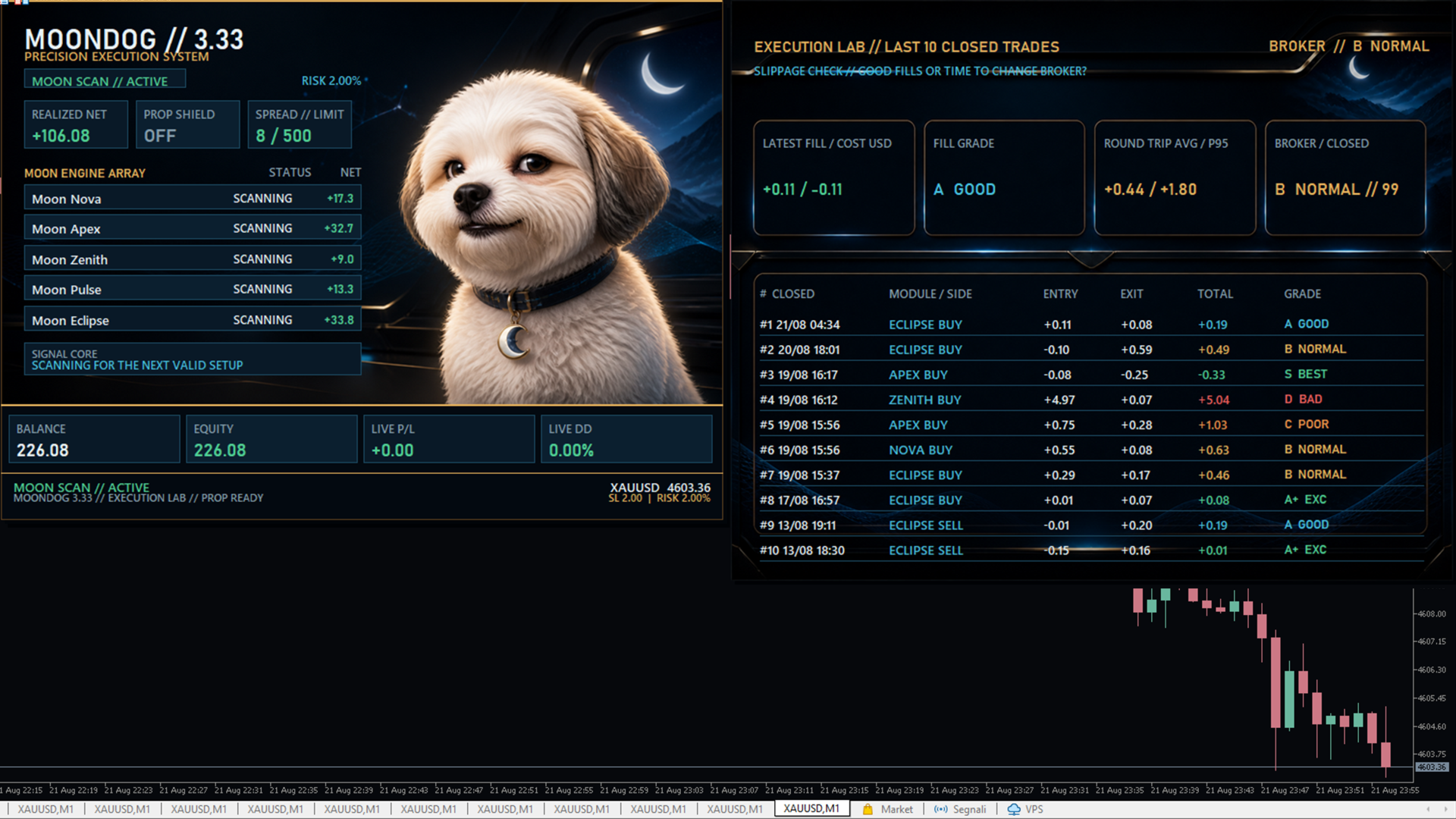
MoonDog EA on-chart panel showing the moon engine array with Moon Nova, Apex, Zenith, Pulse and Eclipse each scanning with individual net results, realized net, prop shield status, spread limit, balance, equity, live profit and loss and live drawdown, alongside an execution lab listing the last ten closed trades with entry, exit, total and a fill grade, plus latest fill cost, fill grade, round trip average and broker rating
Each module reports separately, and the execution lab grades your broker’s fills rather than the trades themselves.

Setup at a Glance

  • Platform: MetaTrader 5
  • Instrument: XAUUSD (Gold)
  • Timeframe: M15
  • Account: Raw or commission-based, with tight XAUUSD spreads and fast execution
  • Brokers noted by the developer: Global Prime (his own live account), FP Markets, Tickmill — stated with no affiliation
  • Risk management: Own SL and TP per position, selectable fixed or balance-based sizing, spread, margin and session guards, optional prop shield
  • VPS: Strongly recommended — pending-order strategies depend on prompt activation

Risk Note

The live account started at $60.08 and is about two months old, so the headline growth is roughly $200 of profit and proves nothing about execution at size. The backtest covers 18 months with commission recorded as $0. The 3% profile is marked research only for good reason: a 59% backtested drawdown. Start on fixed or adaptive. Full risk analysis in our review →

Full Editorial Review

📖 Read our complete MoonDog EA review →

A full editorial breakdown: how the five modules interact and what that means for concurrent exposure, the three risk profiles compared honestly, what a $60 live account can and cannot prove, why the execution grading matters more than it looks, and our verdict.

Delivery: MT5 download (V3.38), with instructions and recommended settings where supplied.

FAQs

What is MoonDog EA?

A multi-strategy breakout Expert Advisor for XAUUSD (Gold) on MetaTrader 5, developed by James Vito Armin Bianchini. It runs five independent breakout modules — Moon Nova, Moon Apex, Moon Zenith, Moon Pulse and Moon Eclipse — each identifying different breakout and price-expansion conditions. Each module scans structure, places pending stop orders in both directions, then manages the resulting trade with its own stop loss and take profit.

Is it a grid or martingale system?

No. Every position opens with its own stop loss and take profit and is managed independently. There is no lot multiplication after a loss, no averaging down, and no floating basket left open waiting to recover. The live account supports this: its worst losing trade is smaller than its best winning trade, which is the opposite of the pattern a recovery system produces.

What do the five modules actually do?

Each reads XAUUSD structure from a different perspective and maintains its own order identity through a module-specific magic number. You can enable or disable any of them individually, so the EA can be run as five strategies, three, or one. The practical effect is that the system is not dependent on a single entry model being right about the market.

Which risk profile should I use?

The developer publishes three, all running the identical engine over the same 1,866 trades. Fixed 0.01 lot is the conservative baseline. Adaptive at 1.25% balance-based risk is the middle option. The 3% high-risk profile is explicitly labelled research only, with a backtested equity drawdown near 59% — we would treat that label as a genuine warning rather than an invitation. Our full review breaks the three down.

Why does the panel grade my trades?

Because it is grading your broker, not the strategy. The execution panel scores fill quality and slippage on recent closed trades, so a profitable trade can be graded poorly if it filled badly, and a losing trade can grade well if it filled cleanly. For a pending-order breakout system this is genuinely useful information — it tells you whether your broker’s execution is suitable before slippage quietly erodes your results.

What broker and account do I need?

A Raw or commission-based account with tight XAUUSD spreads and fast execution. The developer’s own live account runs on Global Prime, and he has separately named FP Markets and Tickmill as Raw-account alternatives worth evaluating, stating he has no affiliation or financial arrangement with any of them. Because the strategy relies on pending-order activation, execution quality matters more here than for most systems.

Do I need a VPS?

Yes. Breakout systems depend on pending orders triggering promptly at the moment structure gives way, and a terminal that is offline or on a slow connection will miss or badly fill those entries. A low-latency VPS near your broker’s server is the sensible setup.

Why buy from CheaperForex instead of the MQL5 marketplace?

The product is identical — the same EA and the same future updates from the developer. You pay less. Since the live track record behind this system is short and on a small account, you will want to demo it and validate on your own broker before committing meaningful capital, and paying less makes that evaluation cheaper.

Pre-Purchase FAQs

Are updates always free?

Yes, all updates are completely free—you'll never pay twice.

We receive updates from developers and upload them to your account when they're available. Please be patient, as we're managing hundreds of products at discounted prices. More popular products are updated more frequently.

All versions are stored in your account for easy access.

What's your refund policy?

We offer a 7-day technical guarantee. If the EA fails to attach to your chart due to verified errors we can replicate, we'll issue a full refund.

However, we cannot refund based on trading performance or profit expectations—forex markets are unpredictable, and results vary by broker, spread, and market conditions. We provide tools, not guarantees.

I need assistance installing this?

Yes, we'd be happy to assist you!

We can advise you on the best settings for your account or create custom presets tailored to your needs. Additionally, we offer a one-time free installation service using AnyDesk for remote setup.

Please note, however, that we cannot provide advice on how to make money with any of our products.

Can I use this on multiple accounts?

Absolutely. Once you purchase, the EA is yours to use on unlimited live and demo accounts—no restrictions.

You can run it on multiple brokers, VPS servers, or trading accounts simultaneously.

There are no license limits or activation keys. Buy once, use everywhere.

How do I download after payment?

After successful payment, your product will be available for download instantly:

  • Displayed on the screen immediately after checkout
  • Emailed to the address you provided during purchase
  • Stored in your account if you created one at checkout

In rare cases (about 1% of high-value premium products), orders may be held for manual review to prevent fraud. If you don't see a download link, contact us for assistance.

Is this an original product?

Yes, absolutely.

We do not sell fake products, and our customer reviews, along with our pricing, reflect the quality and authenticity of what we offer.

Why Traders Trust Us

Excellent on Trustpilot
4.5★ from real customers
In Business Since 2019
28,000+ customers served
Instant Access
No group buys or waiting
7-Day Refund Policy
For product errors
Remote Installation
We can install for you
Flexible Payments
Cards, Apple Pay, Crypto

Reviewed by Our Trader

Picture of Peter Jones

Peter Jones

Peter Jones is a full-time trader, forex software developer, and founder of CheaperForex.com. With over 10 years of experience in algorithmic trading, he helps traders gain an edge using reliable EAs and strict risk control.
Product
— Card — Crypto