
XT Bitcoin Robot EA MT5
Genuine files only. No cracks, fakes or AI copies. See why
Why our prices aren’t rock-bottom
- The official file. The developer’s own, unmodified EA. Never a crack, a decompiled copy or an AI recreation.
- It trades like the original, because it is the original. AI recreations only copy how an EA looks from the outside, so they can trade very differently.
- Safe to run. Cracked files can hide malware that reaches your computer and your trading account.
- Updates and help. Free updates, a setup guide, and real people on Telegram if you get stuck.
We keep prices as low as we can. We just won’t sell fakes to be the cheapest.
An ADX filter governs entries, trading days and hours are fully configurable, and an on-chart panel reports live spread, session, volatility level and daily results. Setup is deliberately minimal — only three parameters normally need changing.
- ✅ Layered capital protection — take profit and stop loss on every position, plus an account-level maximum drawdown percentage cap and an optional daily profit target
- ✅ Genuine news filter — new positions are blocked for 60 minutes before and 60 minutes after high-impact releases, with upcoming events shown live on the chart panel
- ✅ From an established developer — MQL Tools has published a large catalogue over many years, including Scalping Robot Pro, AI Prop Firms and DAX Robot, all carried here
Also available for MetaTrader 4 — see XT Bitcoin Robot EA MT4. Read our editorial review covering both versions, which is candid about this being a brand-new release, before deciding.
 MT5Save 34%
What you receive
- XT Bitcoin Robot.ex5Genuine, unmodified developer file for MetaTrader 5Version 1.0
- Setup guide.pdfA general guide to installing expert advisors.Official step-by-step install guide
Delivered instantly to your account after payment
Regular priceRegular price was $799.00
$529.95 with card
Visa, Mastercard, Apple Pay and Google Pay accepted.
Card payments add bank fees, sales taxes and other charges.




 Apple Pay and Google Pay ready at checkout
- Official developer build · Version 1.0
- Instant downloadYour file is provided immediately after payment. In very rare cases we manually review an order first, then send your download straight after. If you don’t receive your file, you can request a full refund.
- Free lifetime updatesAll updates are free. They’re provided on a best-availability basis: we get new versions as fast as we can, led by customer demand, but we don’t guarantee them immediately. If you need every update the moment it’s released, our service may not be the best fit for you.
- 7-day money-backRefunds only cover an EA that fails to attach to your chart because of errors we can replicate. We don’t cover changing your mind or not liking the EA. All brokers are different, and results are never promised because markets are constantly changing.
- Unlimited activationsUse it on as many MT5 accounts and computers as you want, live or demo. There are no restrictions on how you use it.
What you receive
- XT Bitcoin Robot.ex5Genuine, unmodified developer file for MetaTrader 5Version 1.0
- Setup guide.pdfA general guide to installing expert advisors.Official step-by-step install guide
Delivered instantly to your account after payment


28,000+ tradersServed since 2019
Don’t miss thisSee the EA we recommend
The Forex EA we trade ourselves
PrismAlgo for Forex


We have tested thousands of EAs. PrismAlgo is the one we use and recommend for Forex, and we rarely say that. We’re also an official reseller.
Real USD MyFXBook account. A live cloud, constantly evolving strategy.
See PrismAlgoOfficial versionsInstant downloadFree lifetime updatesExtra 20% off with cryptoReal people on support28,000+ tradersTrading since 2019Rated Excellent on Trustpilot
Product description
About XT Bitcoin Robot EA MT5
Quick Summary:
XT Bitcoin Robot EA MT5 by MQL Tools is a fully automated BTCUSD (Bitcoin) Expert Advisor for MetaTrader 5, running on the H1 timeframe. Its design leans on protection rather than aggression: a take profit and stop loss on every position, an account-level maximum drawdown percentage cap, an optional daily profit target, and a news filter that blocks new trades for 60 minutes either side of high-impact releases. Entries are governed by an ADX filter, trading days and hours are configurable, and an on-chart panel reports live spread, session, volatility and daily results. Only three parameters normally need changing.
Official MQL5 Listing:
XT Bitcoin Robot MT5 — MQL5 Marketplace

Why XT Bitcoin Robot EA MT5
- Bitcoin specialist on H1 — built exclusively for BTCUSD rather than adapted from a forex system
- Take profit and stop loss on every position — single-trade risk is defined before entry, at developer-tested default levels
- Account-level drawdown cap — a maximum drawdown percentage setting limits total exposure, not just per-trade risk
- News filter with visible status — new trades blocked 60 minutes before and after high-impact events, with upcoming releases displayed on the chart panel
- ADX entry filter — entries require measurable directional strength rather than firing on any signal
- Optional daily profit target — stop trading automatically once a chosen daily gain is reached
- Configurable schedule — include or exclude any day of the week and set your own trading hours, or run continuously
- Three-parameter setup — tested defaults mean minimal configuration, with a manual supplied in ten languages
- Standalone MT5 file — free lifetime updates included.
- Established developer catalogue — MQL Tools also produces Scalping Robot Pro, AI Prop Firms, Big Forex Players and DAX Robot, all carried on CheaperForex
The On-Chart Panel
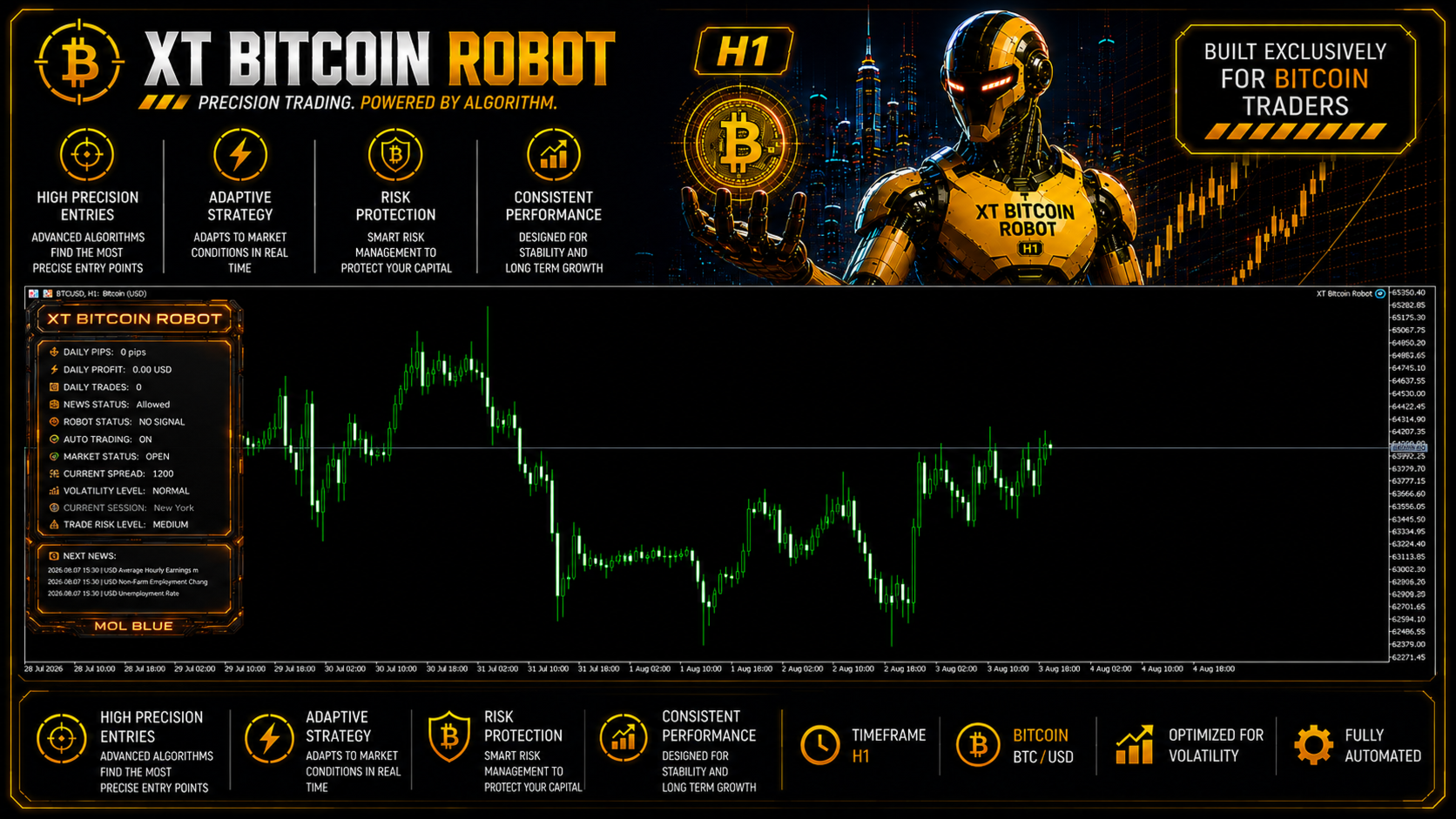
The panel is genuinely useful rather than decorative. It reports daily pips, daily profit and trade count, whether news is currently blocking entries, the live spread, the current volatility level, the active session and your selected trade risk level — plus a readout of the next scheduled news events. On an instrument as spread-sensitive as Bitcoin, having the current spread on screen next to the robot’s status is practical information. Manual position-closing buttons are included.
EA Setup at a Glance
- Platform: MetaTrader 5
- Instrument: BTCUSD (Bitcoin)
- Timeframe: H1
- Minimum deposit: $1,000
- Minimum lot: 0.01
- Leverage: 1:20 to 1:1000
- Account types: Raw, Hedging, Zero, Cent, Micro, Standard, Premium or ECN — low-spread accounts recommended
- Risk management: Take profit and stop loss on every position, maximum drawdown percentage cap, optional daily profit target, news filter
- Documentation: User manual supplied in ten languages
- VPS: Strongly recommended — Bitcoin trades around the clock and can gap hard
What You Receive
- XT Bitcoin Robot EA for MT5 — available file, supplied as a standalone MT5 file
- Free lifetime updates
- User manual in ten languages
- Developer’s recommended settings, where supplied
Risk Disclaimer
Bitcoin is among the most volatile instruments available to retail traders, with wide spreads, round-the-clock movement and a capacity to gap sharply. XT Bitcoin Robot applies a take profit and stop loss to every position and offers an account-level maximum drawdown cap, which are real protections — but they do not remove the underlying risk of the instrument. This is also a brand-new release with no established live track record and no public MQL5 live signal at the time of writing, so its real-money behaviour across varied market conditions has not yet been independently demonstrated. The developer’s published backtest shows an exceptionally high win rate and profit factor that live trading will not sustain; the same report also records a relative equity drawdown above 60% at one point during the test, which is the figure buyers should size around rather than the headline. Use a low-spread account, keep leverage and lot sizing conservative, test thoroughly on demo first, and only deploy capital you can afford to lose. Past performance does not guarantee future results.
Full Editorial Review (MT4 + MT5)
📖 Read our complete XT Bitcoin Robot EA review →
A full editorial breakdown covering both platform versions: the protective stack analysed, the backtest read honestly including the drawdown figure most buyers will miss, what the absence of a live track record means, how the two builds differ, who the product suits, and our verdict.
Standalone MT5 file. Follow the delivery instructions supplied with your order. Free lifetime updates are included, added as soon as we receive them. You never pay twice. Free remote installation is available if you need it.
Every order
What’s included with XT Bitcoin Robot
- Instant downloadReady after checkout and kept in your account
- Free lifetime updatesAdded as soon as we receive them, every version kept in your account
- Unlimited activationsUnlimited live and demo accounts
- Free remote installationOptional: a one-time install over AnyDesk, with settings advice and custom presets
- 7-day money-back guaranteeIf the EA fails to attach to your chart because of errors we can replicate, you get a full refund.
Product FAQs
XT Bitcoin Robot EA MT5 FAQs
Real people on support, by Telegram or our contact form.
What is XT Bitcoin Robot EA MT5?
A fully automated BTCUSD (Bitcoin) Expert Advisor for MetaTrader 5 by MQL Tools, running on the H1 timeframe. It trades Bitcoin’s volatility without manual monitoring, using an ADX filter for entries and a protective stack that includes a take profit and stop loss on every position, an account-level maximum drawdown cap, an optional daily profit target and a news filter that pauses new trades around high-impact releases.
How does the news filter work?
When a high-impact economic event is due, the EA stops opening new positions for 60 minutes before and 60 minutes after the release. You can choose which currency’s news feeds the filter, and the timing windows are adjustable. The on-chart panel shows the upcoming events and whether trading is currently allowed, so you can see the filter working rather than taking it on trust.
What protects my capital?
Three layers, and they are worth understanding together. Every position opens with both a take profit and a stop loss, so single-trade risk is defined. A maximum drawdown percentage setting caps exposure at account level rather than per trade. And an optional daily profit target lets you stop trading once a set gain is reached. The news filter adds a fourth layer by keeping the EA out of the market during the most unpredictable windows.
What do I need to run it?
MetaTrader 5 with BTCUSD, attached to an H1 chart. Minimum lot is 0.01 and the developer specifies a $1,000 minimum deposit, with leverage anywhere from 1:20 to 1:1000. Account types supported include Raw, Hedging, Zero, Cent, Micro, Standard, Premium and ECN, so broker compatibility is broad — but a low-spread account matters, because Bitcoin spreads are wide and eat directly into results.
Is it hard to configure?
No. The developer states that only three parameters normally need changing, with take profit and stop loss set at tested defaults that do not require adjustment. Beyond that you can optionally set the daily profit target, the maximum drawdown percentage, the news filter behaviour, the magic number and your preferred trading days and hours. A user manual is supplied in ten languages.
How do I get the MT5 version, and are updates included?
This offer supplies the standalone MT5 file. Follow the delivery instructions supplied with your order. Free lifetime updates are included, added as soon as we receive them. You never pay twice. If you prefer managed installation, request it using your order instructions. If you trade on MetaTrader 4 instead, the MT4 version is a separate build delivered as a file.
Do I need a VPS?
Yes — strongly recommended, and arguably more so for Bitcoin than for forex. Crypto moves around the clock and can gap hard, so an EA that is offline when the market runs is a real liability. A stable, low-latency VPS near your broker’s server keeps it monitoring continuously.
Why buy from CheaperForex instead of the MQL5 marketplace?
The product is identical — the EA as a standalone file, with future file updates included when we receive them. You pay significantly less. Since this is a very new release without an established track record yet, testing it on demo and validating on your own broker before scaling is essential, and paying less to run that evaluation is the practical approach. Our full review covers the strengths and the caveats openly.
- Excellent on Trustpilot 4.6 out of 5 from 120 reviews (opens in a new tab)
- 28,000+ traders since 2019
- 1,570+ official EAs
- Card or crypto payments
Related EAs
Traders also explore
Premium expert advisors at vault-low prices, with your crypto price on every card.
 MT5Save 59%
 MT5Save 30%
 MT5Save 51%
Ready when you are
XT Bitcoin Robot EA MT5 for $423.96 with crypto
Regular price was $799.00 · $529.95 with card · instant download · free lifetime updates

XT Bitcoin Robot EA MT5$423.96with crypto$529.95 with card