Project Evolution Breakout Scalper combines EURUSD and USDJPY with several hourly timeframes and a single-chart control structure. Its appeal is a contained Forex portfolio with spread-aware operation and no grid or martingale according to the developer. The central evidence limitation is that the old monitoring link is no longer available: the current decision rests on documented controls and historical developer tests, not an accessible live record.
View product details and current pricing.

Research checked: 20 September 2026. Analysis of developer documentation, original images and available public records; we have not independently run or audited the EA.
Why the single-chart design matters
Running a portfolio from one chart can simplify setup, but it also makes configuration mistakes less obvious. The enabled pair switches, symbol suffix and Magic number range determine what the instance can trade. Opening several copies without checking those settings may duplicate exposure. The documented H1, H2, H3, H4 and H6 combinations should be understood as part of the EA’s strategy design, rather than a reason to attach a new instance to every chart.
MT4 versus MT5: the practical choice
Both listings describe the same core two-pair strategy. The MT5 page explicitly requires a hedging account, so a netting-only account is not a substitute. MT5 also offers a familiar environment for testing multi-symbol strategies. The MT4 listing itself mentions Multi_Currency_BackTest; treat that as an EA-specific facility to verify in the supplied build, not a claim that the two platform testers are identical. Choose the edition that matches the broker account you will actually operate, then test it there.
The custom-symbol guide changes how the settings should be read
The linked October 2022 guide says Use_Custom_Symbol=false retains programmed symbols, timeframes and some exit settings. Enabling it exposes custom configuration. That distinction is more useful than saying the robot has unlimited adjustable settings: some controls belong to a custom setup, while the standard portfolio is preconfigured. The guide is an older developer explanation, so compare the supplied inputs with it before transferring any example values.
What the historical reports establish
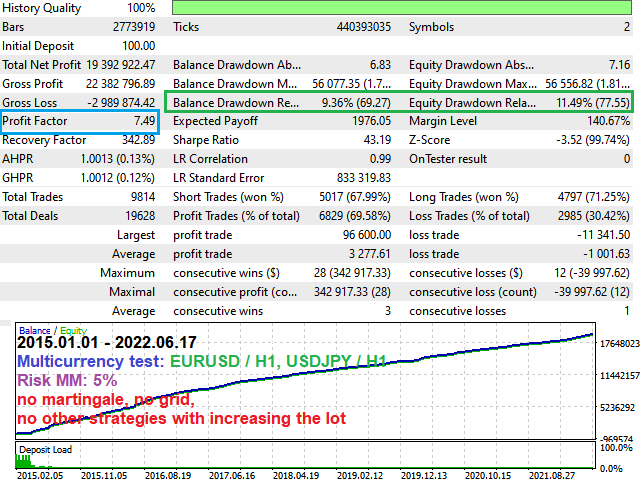
The gallery shows multiple two-symbol MT5 simulations over different periods. The longest displayed example covers January 2015 to June 2022 and uses 5% Risk MM. It reports 11.49% relative equity drawdown and an unusually large compounded ending balance. That is a property of the simulation and sizing assumptions, not a credible promise of a comparable account outcome. Smaller monetary drawdown labels and relative drawdown are different measurements; inspect the full report rather than selecting the most flattering number.
Why a high test profit is not enough
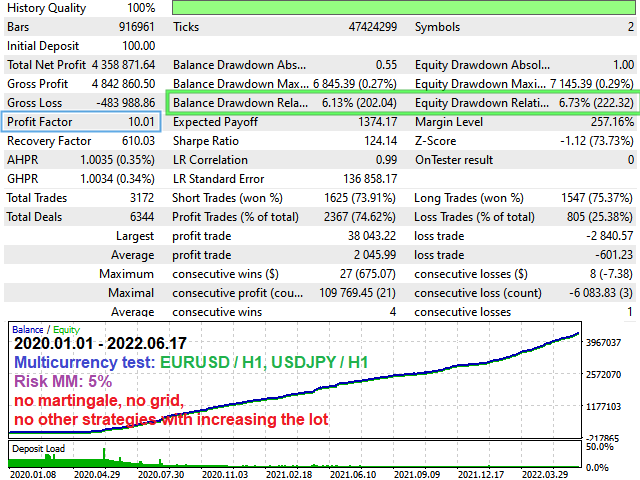
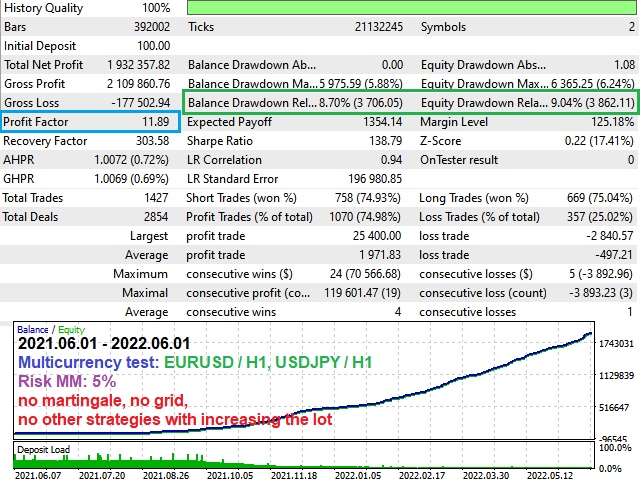
Real-tick history can improve price detail without proving live execution. Commissions, variable spread, slippage, broker stop rules and the chosen risk scaling can materially change a breakout result. The public images do not establish an independently held-out test or continuing live performance after the test period. Compare fixed-lot and balance-scaling runs, inspect losing stretches, and test each pair as well as the combined portfolio before assigning value to the large final balance.
Current signal and customer-review availability
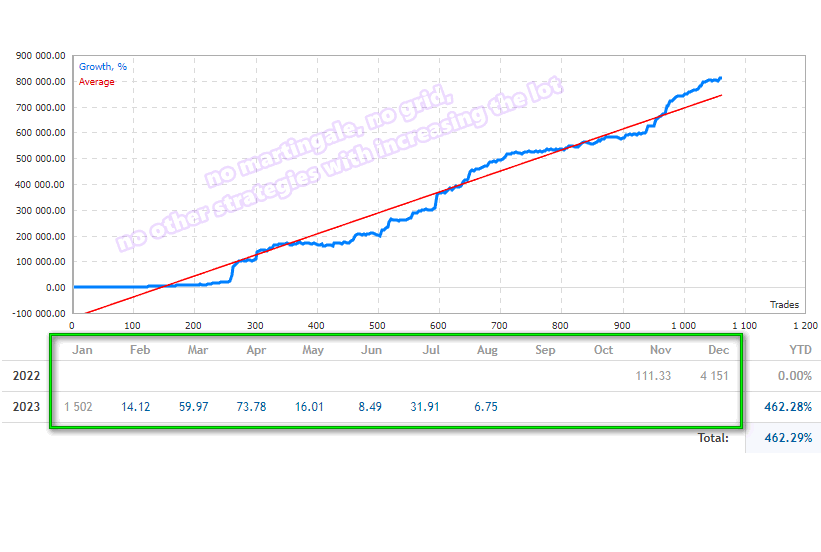
The developer-linked signal 1771745 returned “not found” on 20 September 2026. Both product editions had no posted customer reviews at the same check. The original monitoring gallery is retained only as historical context and cannot repair the missing live account. Absence of a current record does not prove failure, but it limits what can be verified before purchase.
Release history and a sensible evaluation sequence
The October 2024 update describes changes to order closing and signal search, while a December 2022 update added timeframes. That means the older gallery does not demonstrate every later revision. Begin with correct symbols and a hedging account where required, test the standard settings, check spread-related pauses and Friday cutoff, then assess custom variants separately. The product pages provide edition-specific buying and setup details; this review keeps the performance limitations visible.
More original developer test images
These are historical simulations. Open each image for its original report and period; they are not additional live accounts.
Sources and further reading
MT4 developer listing · MT5 developer listing · Release history
- Official listing: Project Evolution Breakout Scalper MT5 on MQL5
- Public account: Developer-linked monitoring page — unavailable at our 20 September 2026 check.
Compare other Ruslan Pishun systems
- EA Rx Five MT5 · EA Rx Five MT5 review
- EA Legendary Scalper MT5 · EA Legendary Scalper MT5 review
- AI Impulse Scalping Trade MT5 · AI Impulse Scalping Trade MT5 review
Each is a separate system, sold on its own, with its own strategy, settings and results. Running several together adds to your total exposure.
Compare the Project Evolution Breakout Scalper MT4 offer · Compare the MT5 offer