
DAX Robot EA Review: An Honest Look at MQL Tools’ DE40 H1 Index Trading System (MT4 & MT5)
Last updated: June 2026
DAX Robot EA is MQL Tools’ Germany 40 (DE40) index specialist Expert Advisor — a recent release in the developer’s catalogue, available in both MT4 and MT5 versions. It trades the DAX on the H1 timeframe with three configurable Trade Risk Levels (Low, Medium, High), an on-chart operational panel surfacing live market state and the current news event, and the developer’s typical operational design discipline carried across from their established forex catalogue.
This review is structurally different from our other recent product reviews because the evidence base on DAX Robot specifically is thin at the time of writing. There is no public MQL5 live signal we can analyse in the way we did for Mosquito, Spider Gold, or Sentinel MT5. There are no published backtest reports comparable to what we worked through on those products. The MQL5 review base on the listing is still very small. What’s substantial is the developer’s track record on their existing CheaperForex catalogue — Scalping Robot Pro (positive customer reviews), AI Forex Robot, Big Forex Players, and several other products with established review histories. The honest pitch on DAX Robot is developer trust based on sister-product performance, applied to a new instrument focus on a relatively new release.
We rate it 4.5 out of 5 — leaning on the developer’s catalogue performance, with the half-point reflecting the absence of DAX-Robot-specific live evidence yet. This is a fundamentally different evidence basis from the 4.5/5 we gave Mosquito EA or Sentinel MT5, both of which have direct evidence supporting the rating. Buyers should read this rating as “the developer has earned trust on other products, and this is reasonable to consider on that basis” rather than “the live signal evidence supports this rating.”
⚠️ Looking for a DAX Robot EA “free download”? Don’t.
Every legitimate marketplace EA ships with built-in DRM or licensing. There is no working cracked file in existence — so a “free” copy is always one of two things:
- malware, or
- bait for a Telegram payment scam where you pay and get nothing.
The only safe routes are the MQL5 marketplace or a reputable reseller. CheaperForex offers DAX Robot EA at a significant discount versus the marketplace price — MT4 version here and MT5 version here.
The Developer: MQL Tools’ CheaperForex Track Record
MQL Tools is the developer behind a meaningful slice of CheaperForex’s existing automated trading catalogue. The relevant products buyers can read about before evaluating DAX Robot:
- Scalping Robot Pro MT4 and MT5 — the developer’s flagship forex scalping system, with an accumulated review base of positive customer feedback on CheaperForex. The reviews speak to the developer’s operational consistency and customer support quality.
- AI Forex Robot — covered in detail in our editorial review, which works through the architecture and evidence.
- Big Forex Players — order-flow-aware forex EA with a dedicated editorial guide on our site.
- Scalping Robot EA MT4, Forex Trading Bot AI MT4, and FX EURUSD Robot MT4 — additional forex products covering different strategy approaches.
That’s a catalogue with depth. For buyers considering DAX Robot specifically, the practical question is whether MQL Tools’ demonstrated competence in forex scalping and EUR-pair systems transfers usefully to a DAX index specialist. The on-chart architecture and the configurable Trade Risk Level structure suggest the same operational design philosophy carried across — which is encouraging without being definitive evidence for the new instrument focus.
What DAX Robot Is — The Architecture
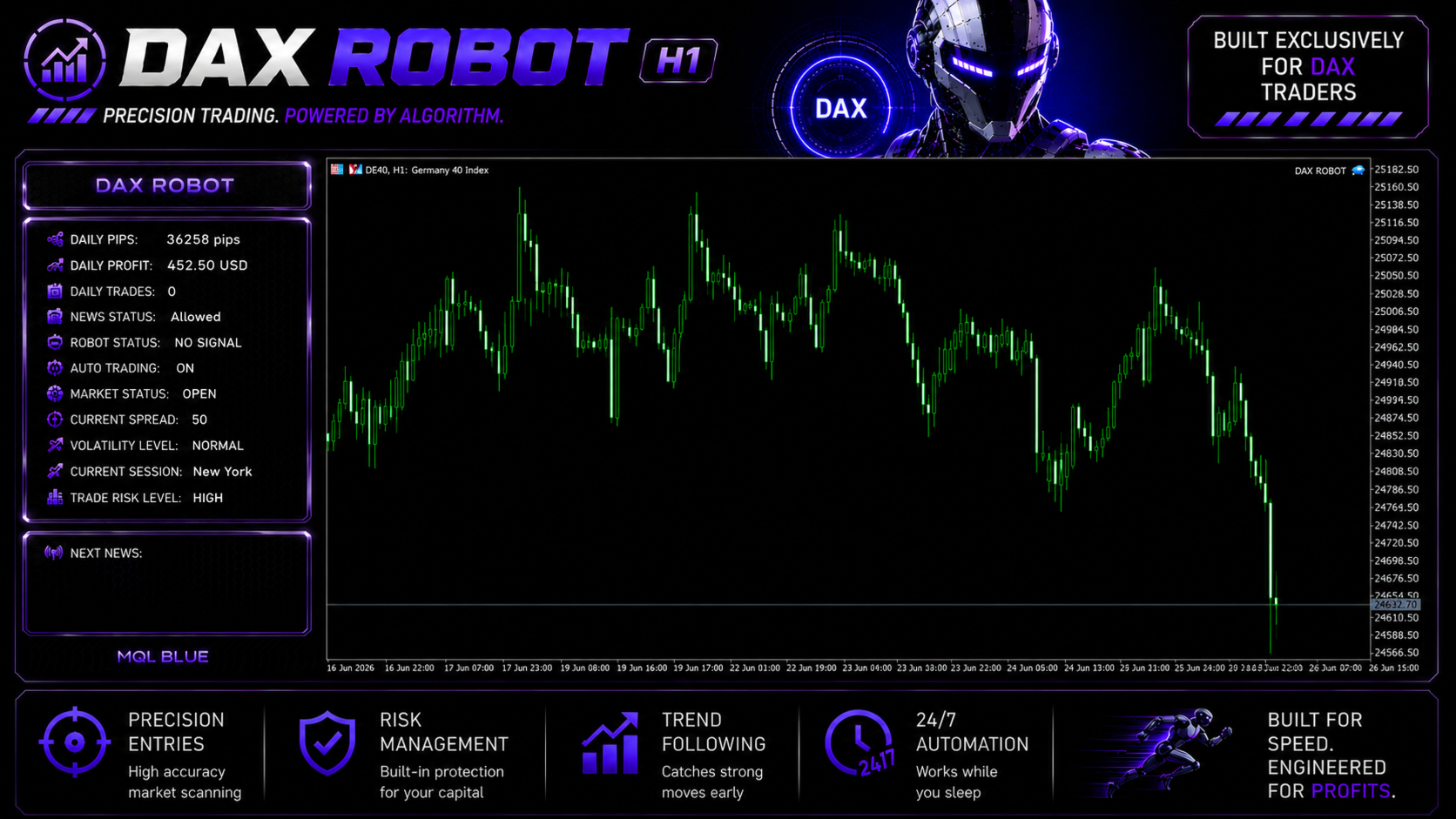
DAX Robot trades the Germany 40 (DE40) index exclusively on the H1 timeframe. The architecture visible from the on-chart panel is a configurable-risk-level system with operational state surfaced for the trader: live spread (which matters significantly for DAX where broker pricing varies materially), volatility level classification, the active trading session, the upcoming news event, and the configurable Trade Risk Level (Low / Medium / High).
What we can verify directly from the materials:
- Instrument: Single-instrument focus on the DAX (DE40 / Germany 40 / DAX40 / GER40 depending on broker symbol naming)
- Timeframe: H1 (designed for the chart timeframe rather than tick-level execution)
- Risk configuration: Three Trade Risk Levels (Low, Medium, High) adjusting position sizing
- Operational visibility: Live spread display, current session, volatility classification, market status, news event readout, daily P&L tracking
- Stated design pillars: High Precision Entries, Adaptive System, Risk Control, Consistent Results (per the developer’s marketing materials)
What we cannot verify yet because the evidence isn’t public:
- The exact entry logic and trade selection criteria
- Real-tick backtest performance on DAX historical data
- Live signal performance over a meaningful period (no public MQL5 signal at the time of writing)
- The actual differences in win rate, drawdown, and expectancy between the three Trade Risk Levels in live conditions
That gap between what’s visible and what’s verifiable is the central honest framing for this review — and it’s why the rating leans on developer trust rather than direct evidence.
DAX as an Instrument — What’s Different About It
For buyers considering an automated DAX system, there are a few instrument-specific characteristics worth understanding upfront.
European trading hours dominate. DAX’s primary liquidity window is during Frankfurt market hours (08:00 to 16:30 CET), with extended European session liquidity continuing through the US overlap. EAs trading DAX should be hosted on VPS infrastructure with reasonable latency to European broker servers, and trading-hour filters become more useful than they are on 24-hour forex pairs.
Index spreads vary materially by broker. Forex EUR/USD spreads are roughly comparable across tier-one brokers (0.1-0.5 pips typical). DAX spreads can range from 0.5 to 2+ points depending on broker, account type, and time of day. An index EA’s edge can erode quickly on a broker with poor DAX pricing, which is why the on-chart spread display matters operationally.
News and macro sensitivity is high. ECB announcements, German economic releases, FOMC events, and broader European political news can move DAX significantly in short windows. The EA’s news status readout is operationally relevant rather than decorative — buyers should understand how the system handles known news windows before deploying live.
Volatility regimes shift more abruptly than forex. DAX can transition from low-volatility consolidation to high-volatility expansion faster than most major currency pairs, particularly around macro events. The Trade Risk Level setting should be evaluated in this context — what’s appropriate during low-volatility periods may be aggressive when conditions shift.
MT4 vs MT5 — Which to Buy
The same product is available in MT4 and MT5 versions, with one specific buyer-facing difference: the MT5 release includes the developer’s official setup guide covering broker configuration and the recommended parameter ranges for each Trade Risk Level. The MT4 version is the EA itself without the bundled setup material.
Buy the MT4 version if: your broker only supports MT4, you prefer MT4 for habit and broker compatibility, or you’re already running other MT4 systems and want consistent terminal management.
Buy the MT5 version if: you’re on MT5 already, your broker supports both and you want the modern platform, or you’re new to running EAs and would benefit from the included setup guide documentation. The setup guide alone is useful reference material for first-time index-EA buyers.
For traders who run both platforms, MT5 is generally the more future-proof choice and the setup guide bundling adds practical value. For buyers strongly preferring MT4, the MT4 version is the right product without any meaningful capability loss on the EA itself.
Who DAX Robot EA Is For
It might be a fit if you:
- Want a DAX-specific automated system and trust the developer based on their existing CheaperForex catalogue (especially Scalping Robot Pro reviews)
- Are comfortable being an earlier buyer on a product where the live signal evidence base is still maturing
- Have a broker offering DAX with reasonable spreads and plan to run on a European-region VPS
- Will start at the Low Trade Risk Level and evaluate over weeks rather than days before considering stepping up
- Understand that the 4.5/5 rating here is developer-trust-weighted, not live-evidence-weighted
Look elsewhere or wait if you:
- Need substantial live signal evidence before buying — the public live track record on DAX Robot specifically isn’t there yet
- Prefer products with multi-month or multi-year backtests on real-tick data — those reports aren’t published on this product at the time of writing
- Want a developer with multi-product live signals you can independently verify — MQL Tools’ product pages focus on customer reviews rather than published signals
- Don’t have DAX index available from your broker, or your broker’s DAX spreads are wide enough to erode the strategy’s edge
- Would rather wait six months for the live signal and review base to mature before evaluating
Our Verdict
We rate DAX Robot EA 4.5 out of 5 — explicitly weighted toward the developer’s track record rather than DAX-Robot-specific live evidence.
The positive case is the developer trust signal. MQL Tools has built a recognisable catalogue on CheaperForex — Scalping Robot Pro with positive customer reviews, AI Forex Robot, Big Forex Players, and several others — and the operational design discipline visible in DAX Robot’s on-chart panel and configurable Trade Risk Level approach is consistent with how those existing products are built. A developer with a meaningful catalogue of well-reviewed products applying their approach to a new instrument focus is materially different from a brand-new developer launching their first release. The 4.5 reflects that catalogue-level trust.
The half-point we hold back is the honest absence of DAX-Robot-specific evidence. There is no published MQL5 live signal we can analyse the way we analyzed Mosquito, Spider Gold, or Sentinel MT5. There is no multi-year real-tick backtest report published at the time of writing. The MQL5 review base on the specific listing is still very small. Those gaps will fill in over the coming months as buyers run the system and post results — but they aren’t filled today, and that constrains how strongly we can recommend the product on its own evidence.
Practical recommendation: if you’re attracted to a DAX specialist EA from a developer with positive catalogue context, this is a reasonable consideration — at conservative position sizing (Low Trade Risk Level) and with the understanding that you’re an earlier buyer helping the live evidence base accumulate. Buying through CheaperForex at significant discount versus the marketplace makes the cost of being an early evaluator modest. If you’d rather wait for the live signal and review base to mature before committing, that’s a defensible position too — bookmark the listing and revisit in six months.
The MQL Tools sister products with established review histories (especially Scalping Robot Pro MT4 and the MT5 version) are the practical way to evaluate the developer before committing to the newer DAX product. Reading those reviews on our site gives you a useful read on what to expect operationally from any MQL Tools product.
How to Get DAX Robot EA Safely
Two legitimate sources, and only two.
The MQL5 marketplace — direct from MQL Tools’ developer page. Here is the official listing.
CheaperForex — the same EA at a significant discount versus the marketplace price. MT4 product page or MT5 product page depending on your platform preference.
Anywhere else offering it free or via a Telegram seller is a trap — there’s no working cracked file, only malware or pay-and-vanish scams.
Frequently Asked Questions
Is DAX Robot EA legit, or a scam?
Legitimate. A published MQL5 marketplace product from MQL Tools, a developer with an established catalogue of CheaperForex products carrying positive customer reviews on sister products like Scalping Robot Pro. The scams are the “free download” sites and Telegram sellers offering cracked copies that cannot exist. Buy from MQL5 or a reputable reseller.
How seriously should I take the 4.5/5 rating without live signal evidence?
Read it as a developer-trust-weighted rating rather than a direct-evidence-weighted one. We rated Sentinel MT5 at 4.5/5 on the strength of its 37-week clean live signal and Mosquito EA at 4.5/5 on the strength of its backtest-live behavioural alignment. DAX Robot’s 4.5 reflects MQL Tools’ catalogue performance applied to a new instrument focus — different evidence basis, same rating. Buyers should evaluate accordingly.
How should I choose between MT4 and MT5 versions?
Buy whichever matches your platform. The MT5 version includes the developer’s official setup guide as an added inclusion useful for first-time buyers; the MT4 version is the EA itself for traders on that platform. Both run the same strategy on the same DAX/H1 setup.
What if my broker calls it DE40 instead of DAX40?
Same instrument, different naming conventions. DE40, DAX40, GER40, GERMANY40 all refer to the Germany 40 index. Confirm your broker’s exact symbol and configure the EA’s Symbol input accordingly. The MT5 setup guide documents the naming across major brokers.
How does it compare to MQL Tools’ other products?
Different instrument focus. Scalping Robot Pro is forex scalping; AI Forex Robot is AI-aided forex; Big Forex Players is order-flow forex. DAX Robot is the developer’s index specialist. Architecturally they share the developer’s design discipline; instrumentally they’re different products for different buyer needs.
How should I size my account for a DAX EA?
Conservatively for evaluation. DAX point value varies by broker (and can be substantial), index leverage is lower than forex leverage (1:20 to 1:50 typical), and the live drawdown profile isn’t published yet — so absolute drawdown planning has to be inferred from the developer’s track record on sister products and adjusted for DAX’s higher per-point volatility. Start small and step up only after live behaviour on your own broker is validated.
What happens if my broker’s DAX spreads are wide?
The EA’s edge erodes proportionally. Index trading is more spread-sensitive than forex precisely because index point values are larger and spread costs scale accordingly. The on-chart spread display tells you what you’re paying live — if your broker’s DAX spreads are routinely 2+ points, look for a tighter broker before deploying live capital.
Why is it cheaper at CheaperForex?
The product is identical — same EA, same developer, same future updates. You pay significantly less. For a newer product where the live evidence base is still accumulating, paying less to test it on demo and evaluate it on your own broker is the practical approach.