Cortex Max AI MT5 trades gold through two selectable components: a local trading engine and a MiniMax API decision engine. Its most distinctive controls concern the whole trade cycle—live positions, pending orders, entry distance and expiration—alongside timeframe-specific scalp, intraday and swing modes.
Our assessment: it is a candidate for traders who want configurable gold execution and are comfortable managing an external AI service. The important qualification is that the developer excludes AI operation from normal Strategy Tester use. A local-engine backtest cannot establish how the API-enabled combination will behave. This review examines the published specification and original developer images; we have not independently traded the EA. CheaperForex sells this product.
Ready to Buy Cortex Max AI MT5?
$239.99 with crypto · $299.99 by card
Official version · Instant download · Free lifetime updates · 7-day money-back guarantee
What the two engines do
Rabi Oudani’s MQL5 specification describes the local engine through profiles named SCALPER, SWINGER, POS-RR, PROP SCALPER and CUSTOM. The source graphic calls the strategy ZigZag breakout, but the listing does not fully disclose the local entry formula, so those labels should not be mistaken for a reproducible strategy description or a guarantee of prop-firm compatibility.
The AI component sends structured market information to MiniMax through MT5 WebRequest. The listed context includes price structure, liquidity sweeps, gaps and order blocks, volatility, technical indicators, the session, spread, positions and pending orders. Analysis follows a scan cycle rather than running on every tick; AI SCAN NOW initiates an extra check.
The listing labels its model choices M2, M3 and AUTO, assigning the first to shorter modes and the second to swing analysis. These are the developer’s stated integration options, not an independent assessment of a model’s trading accuracy. Use the actual EA settings and TEST API response to confirm the selected configuration.
Timeframe and mode selection
- Scalping
- M1, M5 and M15; AUTO is described as selecting the shorter-horizon model option.
- Intraday
- M30 and H1, with a separate target and trailing profile.
- Swing
- H4, D1 and W1 appear in the AI mode table. The target-profile section separately labels its swing defaults H4–D1.
- Market
- XAUUSD is the intended instrument. The overview explicitly cautions against presenting it as an established generic multi-pair system.
The difference between the swing-mode table and target-profile heading is a detail to check in the supplied settings before using W1. Published TP, SL and trailing distances are configurable point values, not recommendations for every gold symbol or broker quote format. Confirm what those points mean on the chosen account before enabling trades.
Position limits are only part of exposure control
The AI has separate live-position and pending-order limits plus a total trade-cycle limit. The documented default is one active cycle. Pending entries can expire automatically, and their permitted distance from the current price is configurable. These controls matter because an unfilled order can become a new position after the conditions that created it have changed.
Both engines have their own magic numbers and risk settings, with an additional combined-position limit. Counting orders does not measure total monetary risk: several positions in the same gold direction can still be strongly correlated. Review lot sizing, open stop distances and pending exposure together when running the engines at the same time.
The sizing choices include fixed lots, equity-based sizing, risk-percentage sizing and a custom capital base. The description also offers AI-directed management or manual break-even and trailing settings. Structural SL/TP limits constrain those management values, but no software stop can guarantee the fill price during a gap or severe slippage.

News windows and the trading week
The integrated MT5 economic-calendar filter can pause the AI engine, the local engine or both. The described currency defaults are USD, EUR, GBP and JPY, with configurable impact levels and before/after-event windows. A pause in new entries is not the same as a guarantee that all existing exposure is closed.
Weekly controls add a Monday start delay and a Friday trading cutoff. The listing specifically mentions canceling pending orders before the Friday boundary. Check the EA’s actual clock convention, broker session hours and whether existing positions remain open; the overview does not establish a universal weekend-flat rule.
API setup and evidence limitations
Allow https://api.minimax.io in MT5’s Expert Advisors WebRequest settings, configure the required API access and use TEST API to check communication. The public listing does not confirm who supplies API access or how any usage charges are arranged; clarify these before enabling AI mode. Because the request includes market and position context, assess the external service requirement as part of the setup.
The developer says AI functions are not intended for Strategy Tester operation. That makes the distinction between local-only tests and live API behavior essential: a historical chart cannot reproduce changing remote responses simply by replaying price ticks. Forward testing should check successful responses, rejected or failed requests, entry limits, pending-order handling and engine separation.
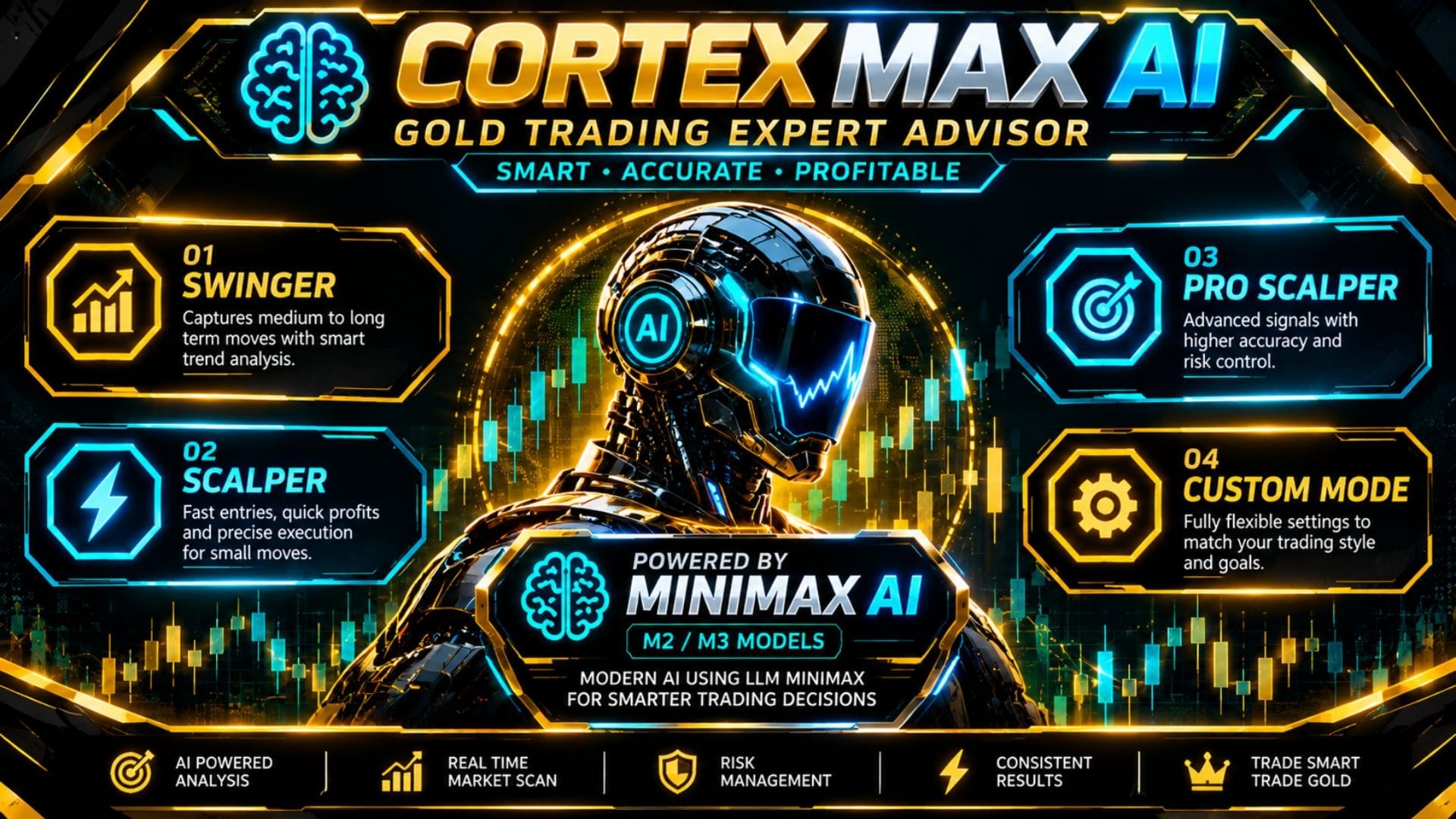
A result graphic needs clarification
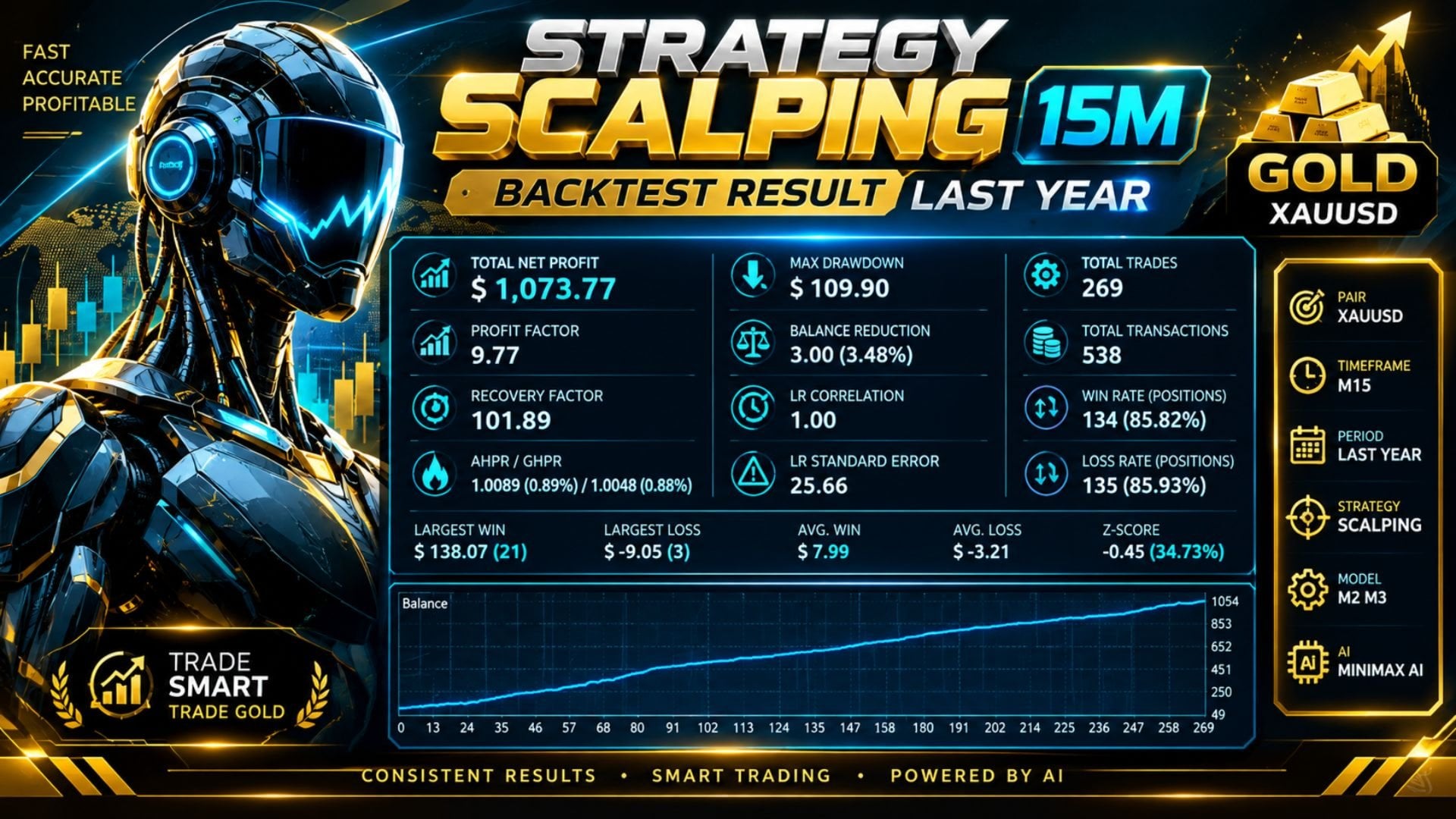
This graphic reports 269 trades, split into 134 winning and 135 losing positions, yet labels both groups above 85%. Those percentages cannot describe the stated split: the counts imply roughly half in each group. The period is only labeled “last year,” without exact dates. We therefore do not use its headline percentages, model labels or rising curve as verified evidence for either the local engine or the API-enabled system. A complete original tester report and settings would be needed to clarify the discrepancy.
The inspected listing contains no visible customer review text and links no public live signal or separate public manual. We have therefore not added third-party review stars or an invented live-performance claim. The developer images are useful for understanding the published presentation, while reproducible settings and forward execution remain separate questions.
Other gold systems from the same developer
Unlocked AI MT5 describes a DeepSeek engine alongside an H1 breakout component. Sentinel X Gold EA MT5 instead describes an optional OpenAI analysis engine and a local H1 breakout foundation. Those differences offer a useful starting point for comparison; using several gold EAs together does not automatically diversify exposure.