AI Golden Life EA is an XAUUSD H1 trading robot from MQL TOOLS SL, available separately for MT4 and MT5. It combines multiple technical confirmations, configurable exits and three entry filters: scheduled economic news, abnormal volatility and developer-hosted analysis of selected geopolitical announcements.
Our assessment: a focused hourly-gold system for traders who want more than a calendar-based news pause. Its main consideration is the evidence: the new listings offer historical tester illustrations and a feature panel, but we found no public product-specific live account or customer experience to establish sustained operation. The external geopolitical service also needs a working connection. This review analyzes the public sources checked October 13, 2026; it is not a firsthand trading test or executable audit.
View AI Golden Life MT4 pricing View AI Golden Life MT5 pricing

The strategy: hourly gold confirmation and configurable execution
The developer describes an H1 approach to gold that checks market structure, price action, momentum, volatility and multiple technical indicators before opening a position. This is broader confirmation than the fast M1 scalping focus of its separate Scalping Robot Pro. The public overview does not disclose the exact indicators, thresholds or complete entry formula, so “AI-powered” should not be read as an independently examined model specification.
Users can select buy-only, sell-only or both directions and set market sessions and separate trading hours for each weekday. Optional holiday protection helps restrict periods of reduced liquidity. Trade management includes fixed or automated Stop Loss and Take Profit settings, trailing, chosen lot size and a preferred risk profile. Optional daily-profit and maximum-drawdown inputs are described alongside spread and volatility filters.
These are configurable controls. Their presence in a feature list does not show which values are enabled in a particular preset or establish a guaranteed account-loss ceiling. The sources do not provide enough detail about averaging, order progression or simultaneous positions to certify a no-grid or no-martingale claim.
How the geopolitical service differs from scheduled news protection
The economic-news filter is described as preventing new orders for 90 minutes before and 90 minutes after high-impact scheduled events. It addresses known announcements. The geopolitical layer instead watches selected public information sources for unscheduled political statements, tariffs, sanctions, conflicts and other developments that could affect gold.
The developer’s website and October 13 announcement explain that this analysis takes place on its own server infrastructure, connected to outside information sources and AI. Initial monitoring focuses on Donald Trump and White House accounts on X and Truth Social. Detected information is classified as Low, Medium, High or Critical risk. Depending on significance, the system can pause new entries for 60 minutes, 120 minutes or the remaining trading day.
Both CheaperForex editions include access to this developer-hosted monitoring service. The developer says users do not need their own AI subscription or API keys. Follow the included official setup guide for the connection required by your edition and check the panel’s protection status. The public material does not document outage handling or a disabling input, so those behaviors should not be assumed from the marketing description.
The explanation also distinguishes protection from trade prediction. Collecting event history for potential future trading applications is part of the developer’s roadmap; it is not evidence that the current geopolitical system generates profitable entry signals. Processing latency, connectivity and event interpretation can affect when a protection pause occurs. A new-entry pause does not itself establish that open positions are closed or insulated from a price gap.
What the original terminal illustration shows
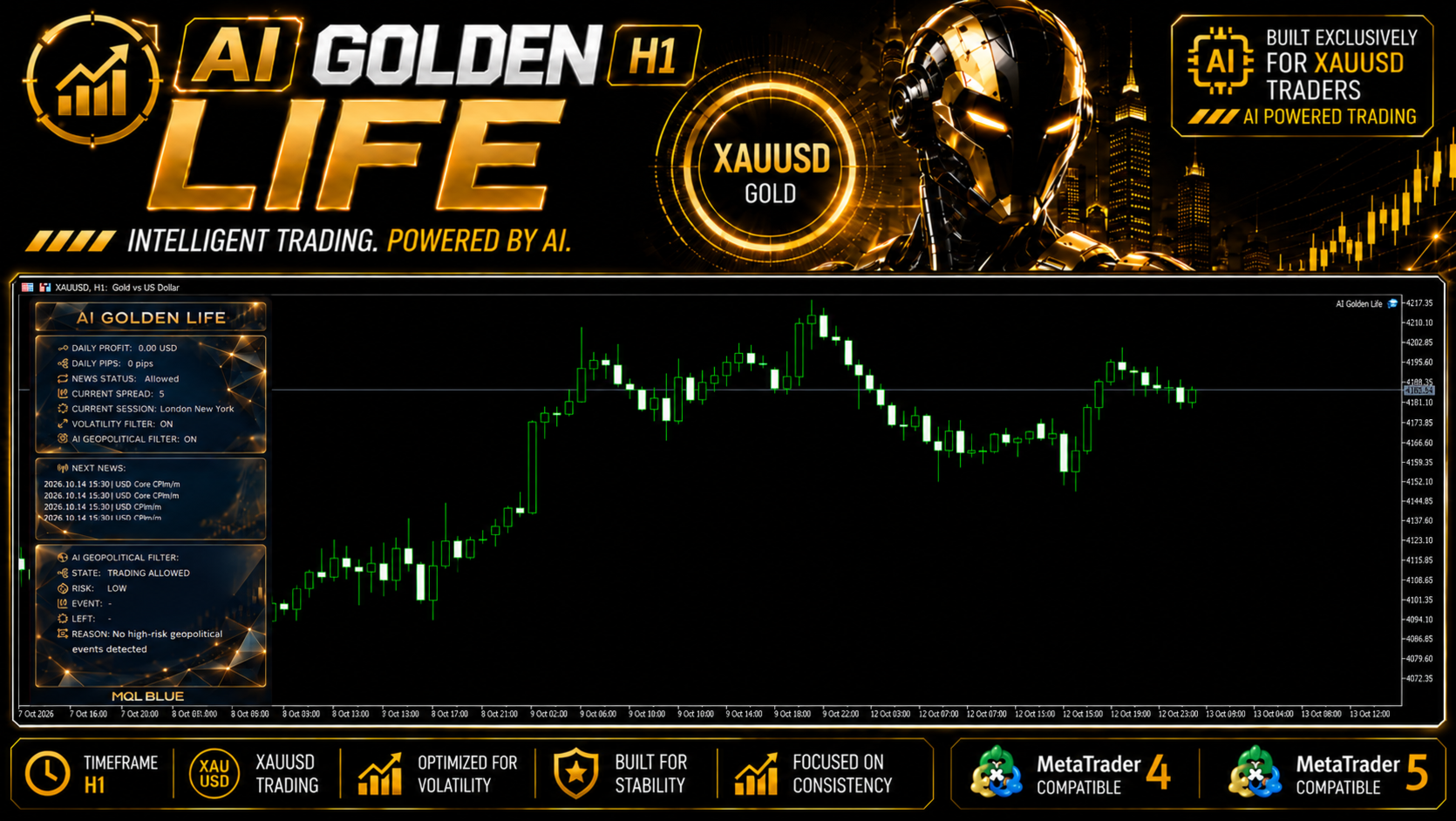
The panel reports news trading as allowed, volatility filtering ON and geopolitical filtering ON. Its geopolitical section shows trading allowed with Low risk, blank event and remaining-time fields, and an explanation that no high-risk event was detected. Daily profit is zero in this illustration. Those values show what the interface displays; they do not demonstrate a successful event-detection test, a trade history or current service uptime for every installation.
The historical tester table: interpret both drawdown measures
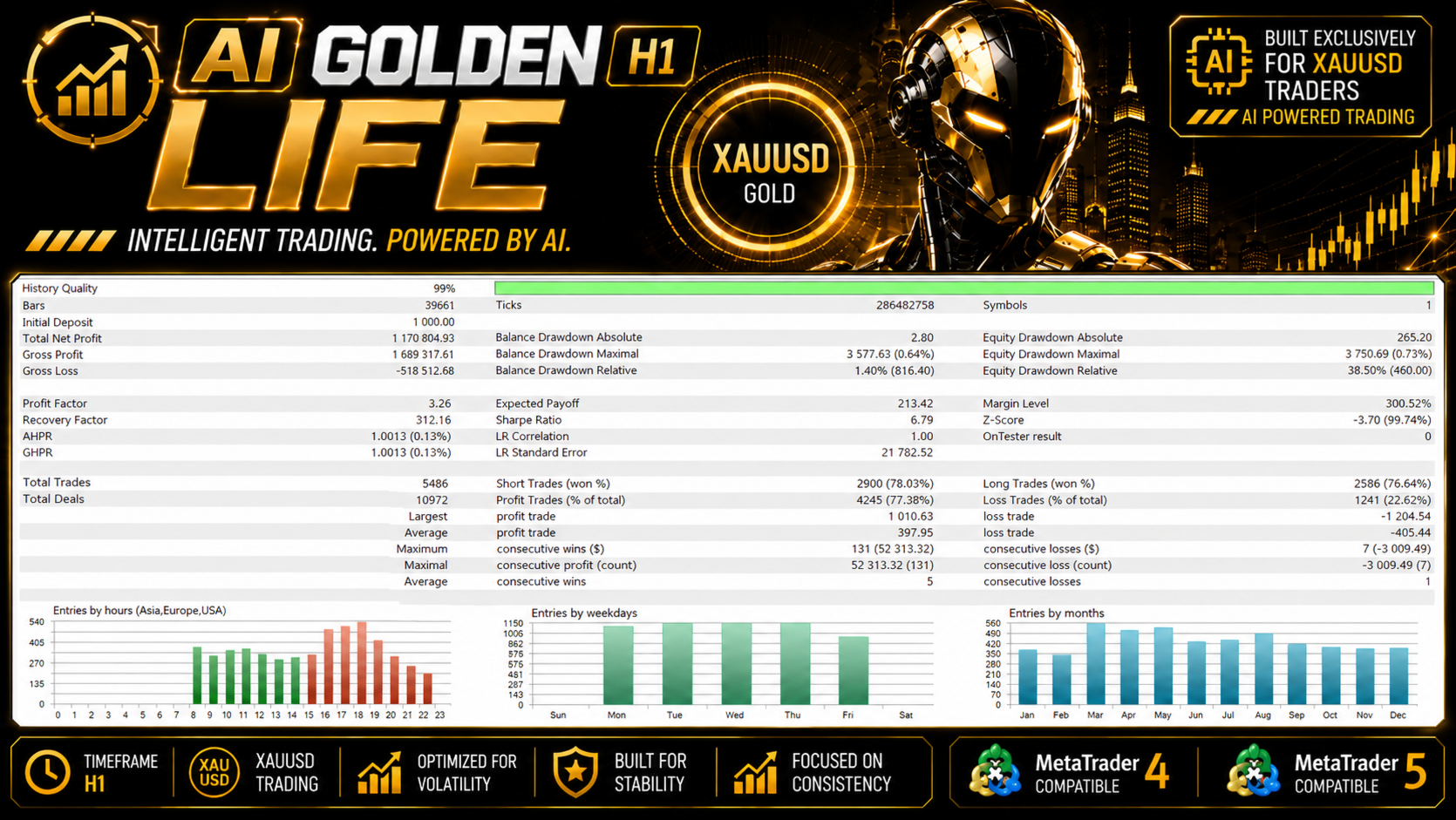
The pictured report shows 99% history quality, an initial deposit of 1,000, 5,486 trades, profit factor 3.26 and net profit of 1,170,804.93. Such a large simulated increase requires its test configuration and exposure assumptions to be examined rather than treated as an expected return.
The important distinction is the report’s two different equity-drawdown measurements. Relative equity drawdown is 38.50%, with 460.00 shown in that line. Its largest monetary equity decline is 3,750.69, displayed as 0.73%. These figures can describe different points in a growing account. The smaller percentage attached to the largest currency decline does not erase the report’s much larger worst percentage equity drawdown.
The montage does not show the full run header, exact test boundaries, risk inputs, broker execution assumptions or a reproducible preset. The overview itself acknowledges that historical testing cannot fully represent slippage, requotes, unexpected political statements or all external AI-filter conditions. History quality alone does not validate those missing assumptions or prove that the server’s geopolitical protection operated historically.
The balance and equity curve
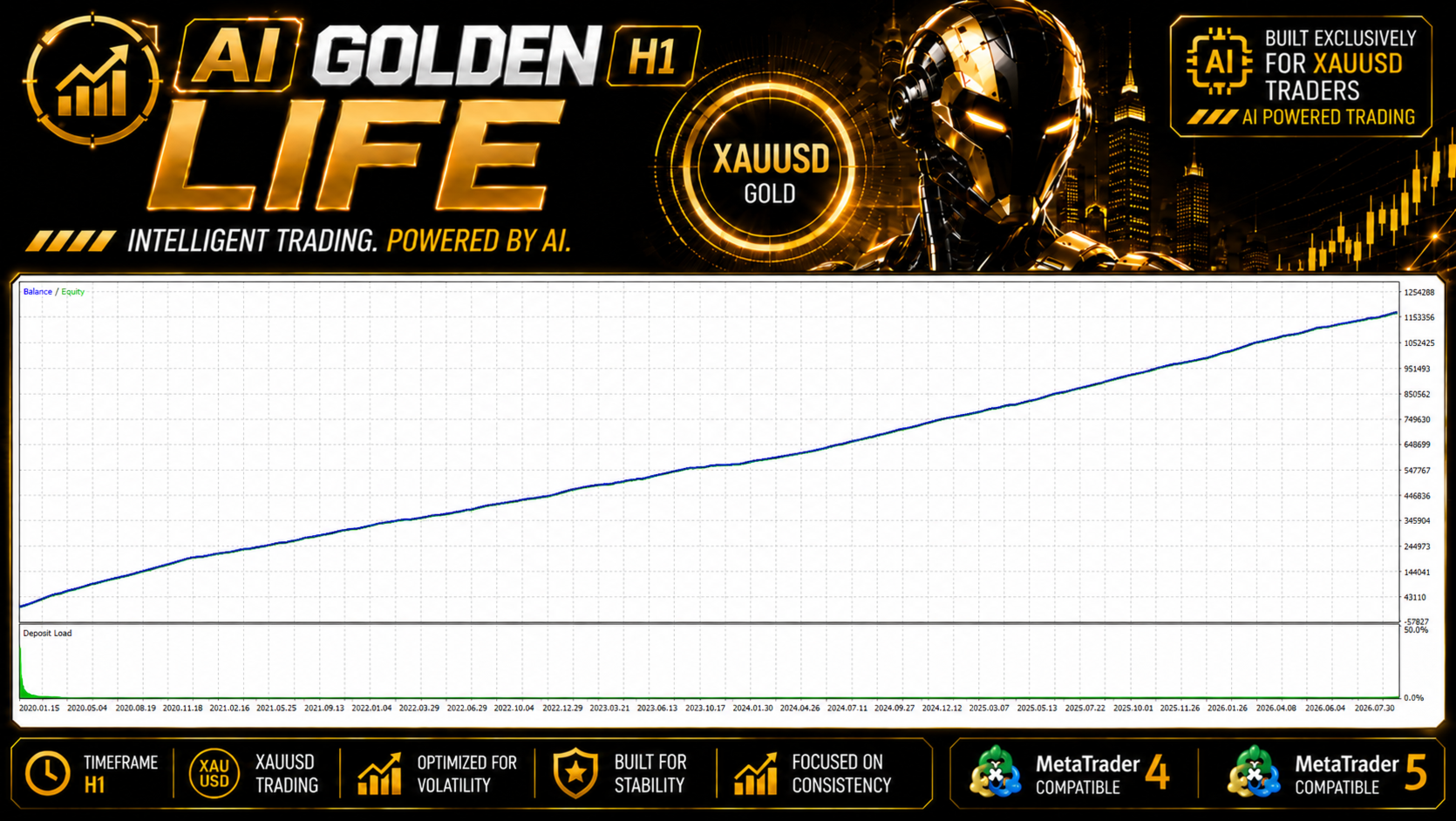
The developer’s curve rises smoothly and includes a deposit-load chart with a prominent early spike. Its appearance should be read with the tester table’s 38.50% relative equity drawdown rather than interpreted as an absence of meaningful risk. A curve image without the complete report and preset does not let a buyer reproduce the test or determine the worst combined open exposure.
All four corresponding gallery images are byte-identical between the MT4 and MT5 listings. We retain one copy of each useful original, rather than presenting duplicated artwork as independent evidence from two platform engines. The tester report and interface use MT5-style presentation; that does not establish separately reproduced MT4 performance.
MT4 and MT5 editions: common overview, separate executables
- MT4 source
- AI Golden Life MT4, MQL5 product 178063. The listing showed version 1.0, published October 13, 2026.
- MT5 source
- AI Golden Life MT5, MQL5 product 178062. The listing also showed version 1.0, published October 13, 2026.
- Shared setup
- XAUUSD on H1, configured lot size and risk profile, with technical confirmation and described event filters.
- Platform differences
- Choose the terminal edition you need. MT4 and MT5 executables are not directly interchangeable, and common marketing text does not prove identical fills or independently tested performance.
- Testing instructions
- The MT4 overview refers to Every Tick with Current spread; the MT5 overview refers to normal Every Tick. These are initial-test instructions, not a complete reconstruction of the gallery report.
The developer lists a starting deposit of 1,000 and recommends default settings with deliberate volume selection. That figure is not a universal capitalization standard: gold contract specifications, account currency, spread, commission, slippage and simultaneous positions affect the actual exposure. Broad account-type and prop-firm compatibility claims also require checking the actual terminal and provider rules; a feature label alone is not an evaluation-policy guarantee.
Live results and customer feedback available at launch
As of October 13, 2026, neither new listing showed public customer-review experience. The visible MT5 comment is a developer announcement explaining the geopolitical technology, not a purchaser testimonial. We do not transfer this developer’s reviews for Scalping Robot Pro, XG Gold or Big Forex Players to AI Golden Life, or import MQL5 stars into CheaperForex verified-purchase ratings.
The listing says live results are available on the developer’s website. The linked AI Golden Life website page, however, contains a feature explanation and launch information without a public account-result link in the checked content. Its Features, Info and Price sections repeat launch material. The public MQL5 author signal list returned no items to show. We therefore have not established a product-specific public live-money account from these sources.
That evidence limit is specific to the sources checked at launch. It is not a claim that the developer has never run a live account. A future accessible monitor would still need its platform, build, settings, history, deposits, withdrawals and floating drawdown checked separately.
Setup documentation and the standalone offer
Both CheaperForex editions include an official setup-guide PDF and working access to the developer-hosted geopolitical monitoring service. The original listing also describes a ten-language manual and private group for direct buyers; we do not transfer an unlisted private-group or bonus entitlement into this offer.
Choose the edition matching your terminal and follow its included instructions. The order’s DeliveryInformation.txt explains delivery and is not the executable. Stable internet access is needed for the monitoring service; the panel provides its current protection status. Free lifetime updates are included, with replacement standalone files supplied as they become available to CheaperForex.
Other products from MQL TOOLS SL
Scalping Robot Pro EA MT5 and its MT4 edition provide a gold M1 comparison. AI Golden Life’s H1 framing and geopolitical layer are different advertised features; the older product’s settings and record do not establish Golden Life’s outcomes.
Scalping Index Pro MT5 and its review concern US30/DE40 rather than this gold-only offer. These are separate products, not components of the Golden Life purchase.
Public sources
Official AI Golden Life MT4 listing · Official AI Golden Life MT5 listing · Developer’s launch explanation · Developer’s geopolitical-filter page · Public developer signal list
Source versions, comments and available account evidence may change after this dated review. Product pages show the current offers.
View the AI Golden Life MT4 product View the AI Golden Life MT5 product