Available from CheaperForex
SomaForex EA MT5 trades breakouts across EURUSD, GBPUSD and USDJPY through 34 strategies with different swing timeframes and breadth settings. It runs from one chart, with shared sizing, margin checks, news controls, pending-order spread limits and a detailed cost/exposure dashboard.
Our assessment: the appeal is a configurable forex portfolio rather than separate EAs and charts for each setup. It suits traders willing to assess combined exposure and understand the sizing controls. The main consideration is that strategy variety and margin protection do not create a loss ceiling, particularly when peak-capital OnlyUp sizing remains elevated during a drawdown. Sources were checked 27 October 2026; this is a source-based review, not our own terminal test or independently reproduced portfolio study.

What makes up the 34-strategy portfolio?
The developer allocates eight strategies to EURUSD, eleven to GBPUSD and fifteen to USDJPY. The timeframe mix is fourteen D1, nine H12, seven H8, two H4 and two H1 systems. Broad, medium and narrow swing variants supply different breakout frequencies. Each strategy has its own magic number, comment, exits, news distances and lot step.
The chart’s period does not select the underlying strategy timeframe: the EA reads these internally. Automatic symbol detection uses the chart’s broker prefix/suffix; custom tickers can override that mapping. A blank ticker disables that pair’s strategies. Separate identifiers help trace orders but do not establish that the strategies are statistically uncorrelated. All three pairs retain exposure to US-dollar conditions.
Read the optimization protocol as developer research
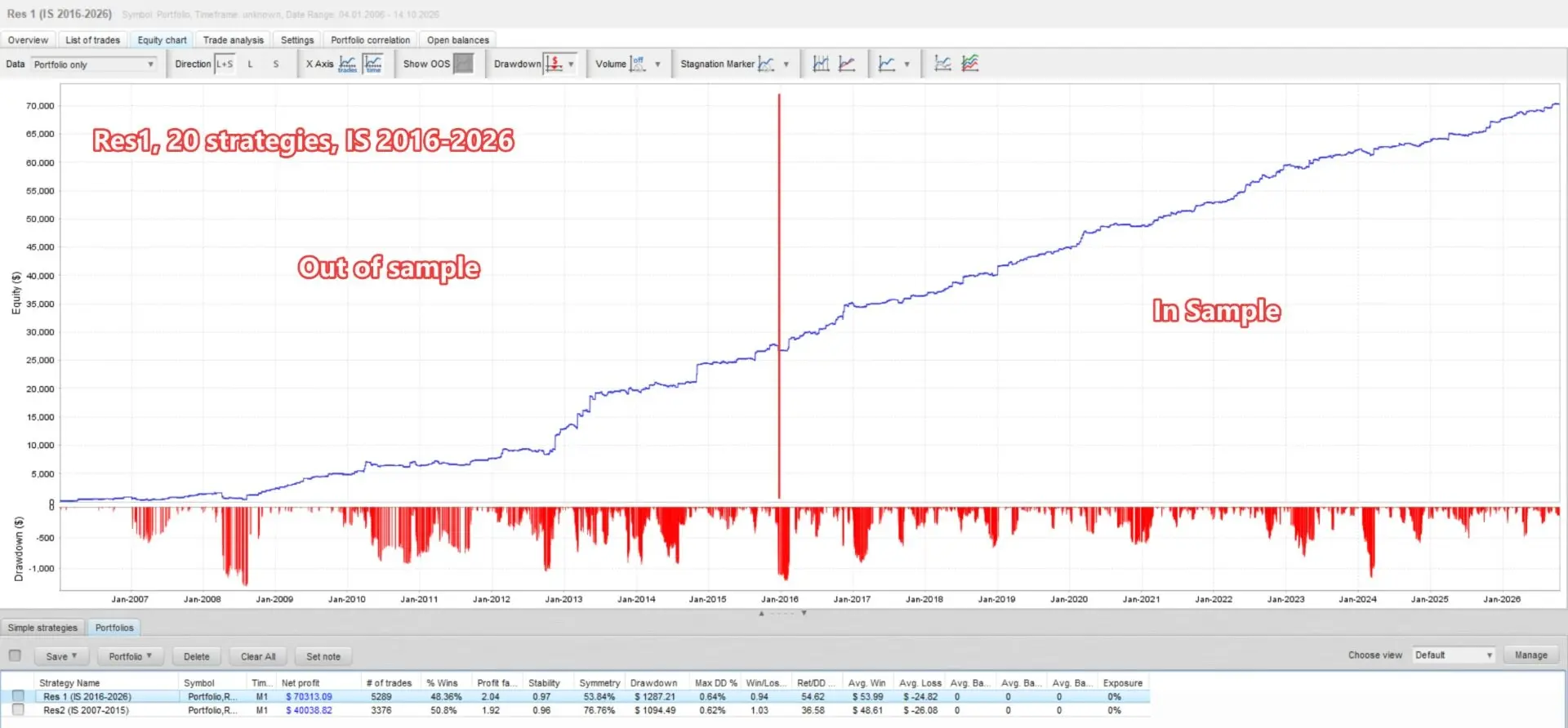
The listing describes two complementary optimization ranges: 2016–2026 with 2007–2015 out of sample, and the reverse arrangement. The same parameter grid covers pair, swing timeframe and breadth, using return/balance-drawdown and return/equity-drawdown selection. Twenty selected strategies come from the first range and fourteen from the second.
This is the developer’s historical research process. Using opposite windows supplies a cross-check, but both historical ranges contribute to portfolio selection; it is not an independently audited prospective test on untouched future data. The developer says Friday closure was enabled during optimization, matching the default trading-window policy. That does not remove all event or gap risk.
Read the two tester reports with both drawdown definitions
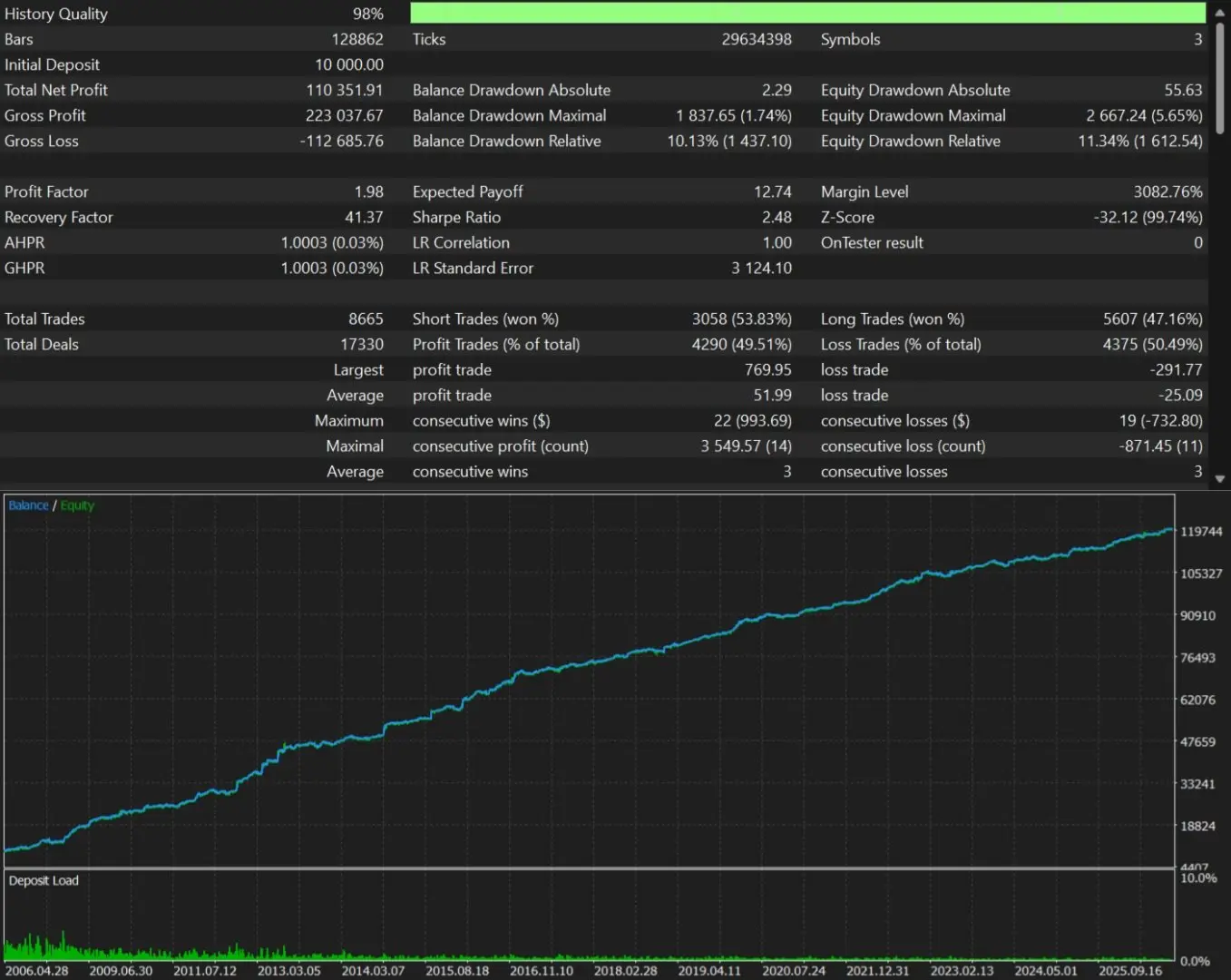
The first original report starts with $10,000 and shows $110,351.91 net profit, 8,665 trades, profit factor 1.98 and 98% displayed history quality. Preserve its separate drawdown fields:
- Relative drawdown
- Balance: 10.13% ($1,437.10). Equity: 11.34% ($1,612.54).
- Maximal drawdown
- Balance: $1,837.65 (1.74%). Equity: $2,667.24 (5.65%).
The smaller maximal percentages must not replace the relative percentages; the measures use different bases. Visible axis labels are not a complete test-period or input declaration.
The second report also starts with $10,000 and shows 8,665 trades, but its net profit is $81,009,167.29 and profit factor 1.84. Relative balance drawdown is 16.00% ($59,109.92), and relative equity drawdown is 21.44% ($78,624.23). Its separate maximal equity field shows $4,300,164.62 (7.58%). Full settings are absent, so the difference cannot be attributed to a specific sizing option from these images alone.
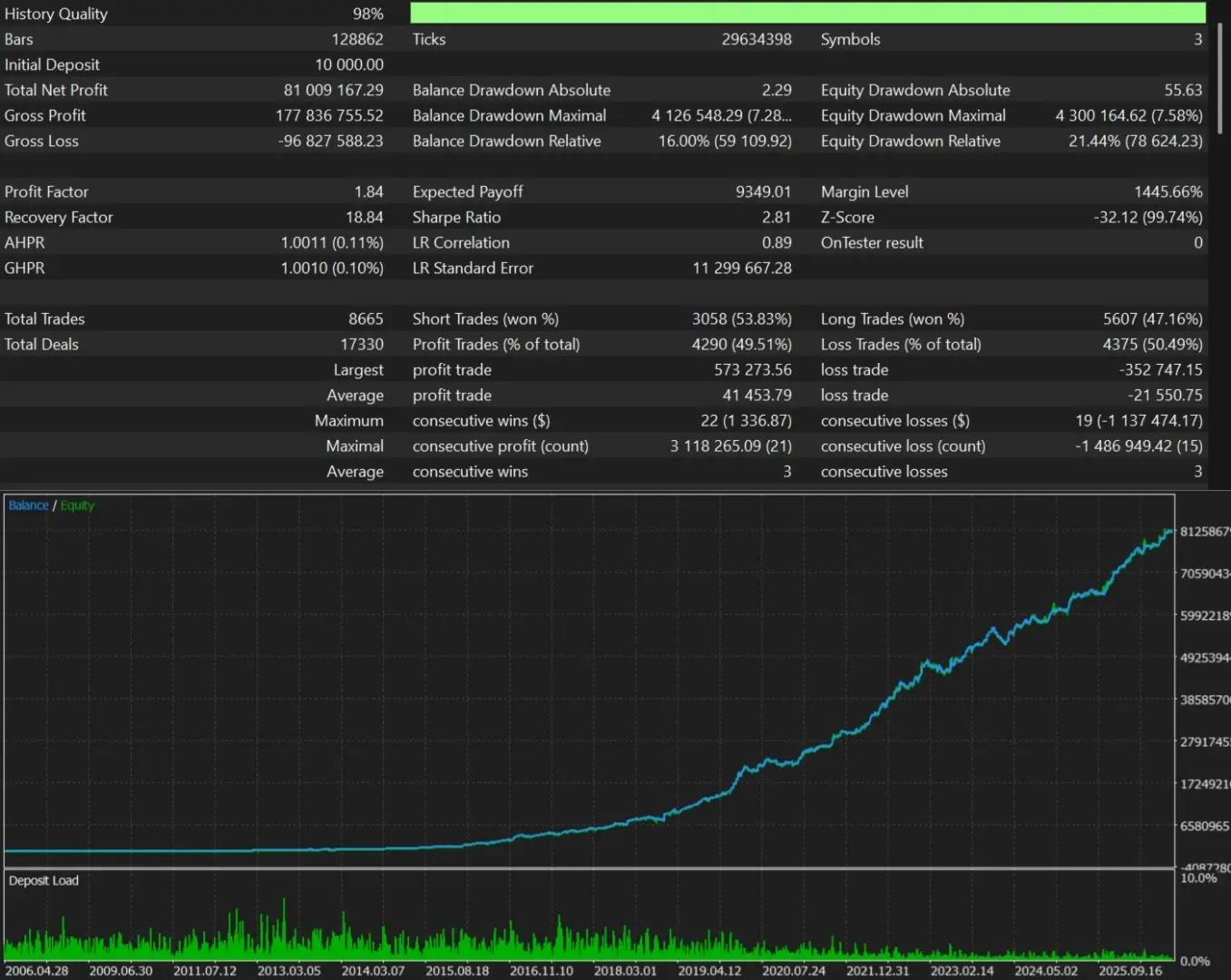
Both are developer historical simulations. Matching trade counts and long rising curves do not establish future execution, broker costs or resistance to portfolio selection bias. No result has been independently reproduced here.
The public reference is still a five-trade sample
The developer’s SomaForex MT5 signal 2395767 was checked at 19:09 UTC on 27 October 2026. The source identifies ICMarketsSC-MT5-3 at 1:500 leverage and labels it a Real Account. It shows −0.05% growth, −$2.95 closed profit and a $5,000 initial deposit without additional deposits or withdrawals.
- Trades and activity
- Five closed trades, all USDJPY; one winner and four losers; profit factor 0.87.
- Relative drawdown
- Balance: 0.45% ($22.55). Equity: 0.44% ($22.00).
- Maximal balance DD
- $22.80 (0.46%), a separate field.
- History labels
- One week displayed; actual-monitoring tooltip: 7 days 20 hours. Started: 15 October 2026 at 22:51:48.
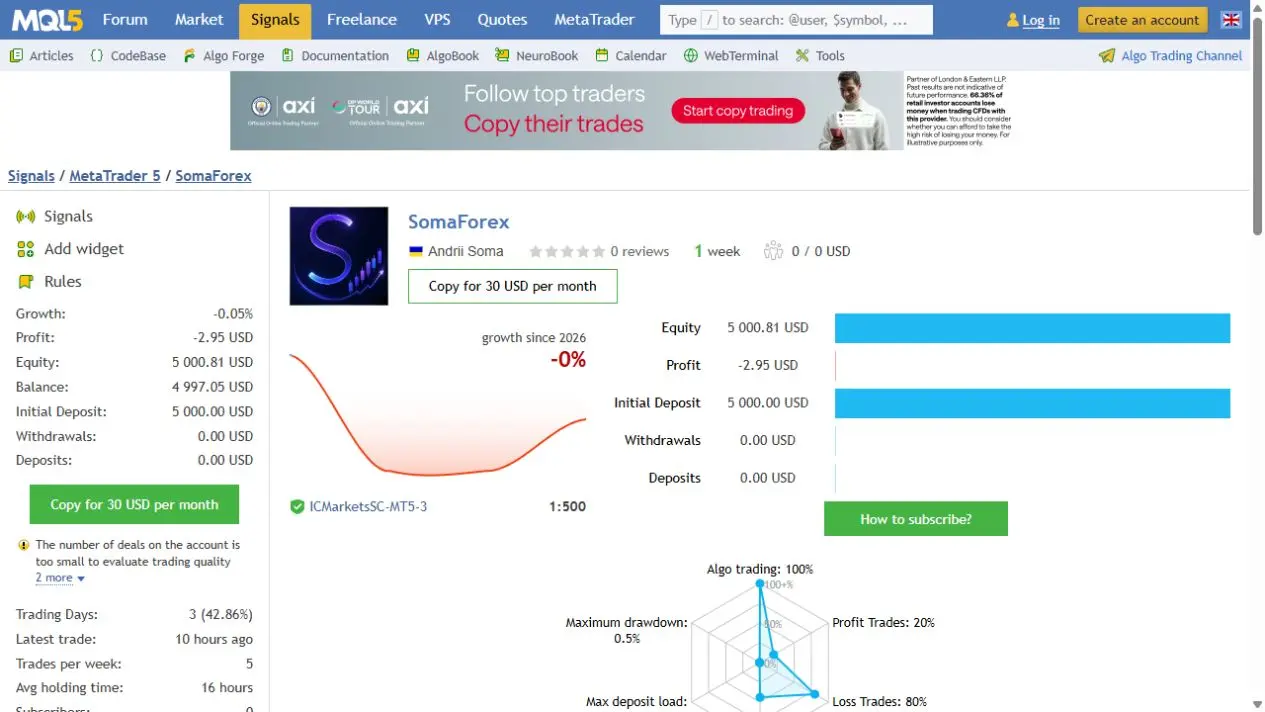
The source flags a new account, too few deals and low activity. With only USDJPY represented, this is not yet a forward test of the full three-pair mix. The account predates retail publication and the 1.1 update, so the five trades do not establish unchanged current settings. Floating equity moves between the source read and browser capture; it is not treated as a fixed performance total.
OnlyUp can preserve lot size as equity falls
Manual lots begin with separate pair values, default 0.01, then apply strategy lot steps. The default automatic mode sizes by a capital step. Additional controls select balance/equity, account-currency conversion, a global multiplier and a maximum lot cap.
With OnlyUp enabled, the sizing peak ratchets upward and is not reduced by trading drawdowns. Deposits and withdrawals synchronize that peak, and startup can seed it from recent closed-trade history. This preserves volume through ordinary losses, increasing exposure relative to remaining equity. It should not be presented as a risk-reduction mechanism.
MaxLots=0 is the default and leaves volume uncapped by the EA, subject to broker specifications. The default-on margin protection checks free margin, includes working same-side pending orders and may scale the portfolio by a common factor. Its multiplier changes that budget; it cannot create margin or cap future trading losses. Check resulting lots rather than assuming a low account balance automatically creates low risk.
News, spread and trading windows have different scopes
The built-in US calendar covers NFP, CPI and rate/FOMC events. Strategy-specific windows can independently block entries, remove pending orders and close open positions. The source describes filtering out common false positives, including ADP employment and FOMC speeches/minutes. AutoGMT synchronizes time through public WorldTimeServer WebRequest access; manual offsets remain available. Do not confuse clock synchronization with a separate AI or signal subscription.
The default broker-time window runs Monday 01:10 to Friday 22:50, with pending/open exposure removed outside the configured window. Defaults assume GMT+2 winter/GMT+3 summer; another broker clock needs correctly aligned hours/offsets.
Spread limits apply only to pending orders. Defaults are 2.0 pips EURUSD, 2.8 GBPUSD and 1.7 USDJPY, with 60 seconds of excessive spread before removal. Once a trade is open, normal exit rules continue.
Know which protections are optional
The prop-compliance master is off by default. Its daily-drawdown lockout and no-hedge rule therefore do not operate until enabled. Pending-order caps can apply independently when positive; the published defaults leave EURUSD/GBPUSD uncapped and set USDJPY to 21. Per-pair random entry/exit offsets also operate independently of that master switch. These are configuration tools, not a promise of passing a funded-account challenge.
By default, trailing/break-even exits modify broker protection. Optional internal trailing keeps those adjusted levels inside the EA and closes at market, while the original hard stop/take-profit remain at the broker. This optional mode makes running-terminal management particularly important; neither mode guarantees fills at a requested price.
Change strategy selection only after handling its trades
StrategiesToRun disables management as well as new entries. Close affected positions before removing their strategy numbers. Unique order comments and magic numbers help identify which strategy owns each position. Do not leave trades expecting a disabled component to continue managing them.
What the current update changes
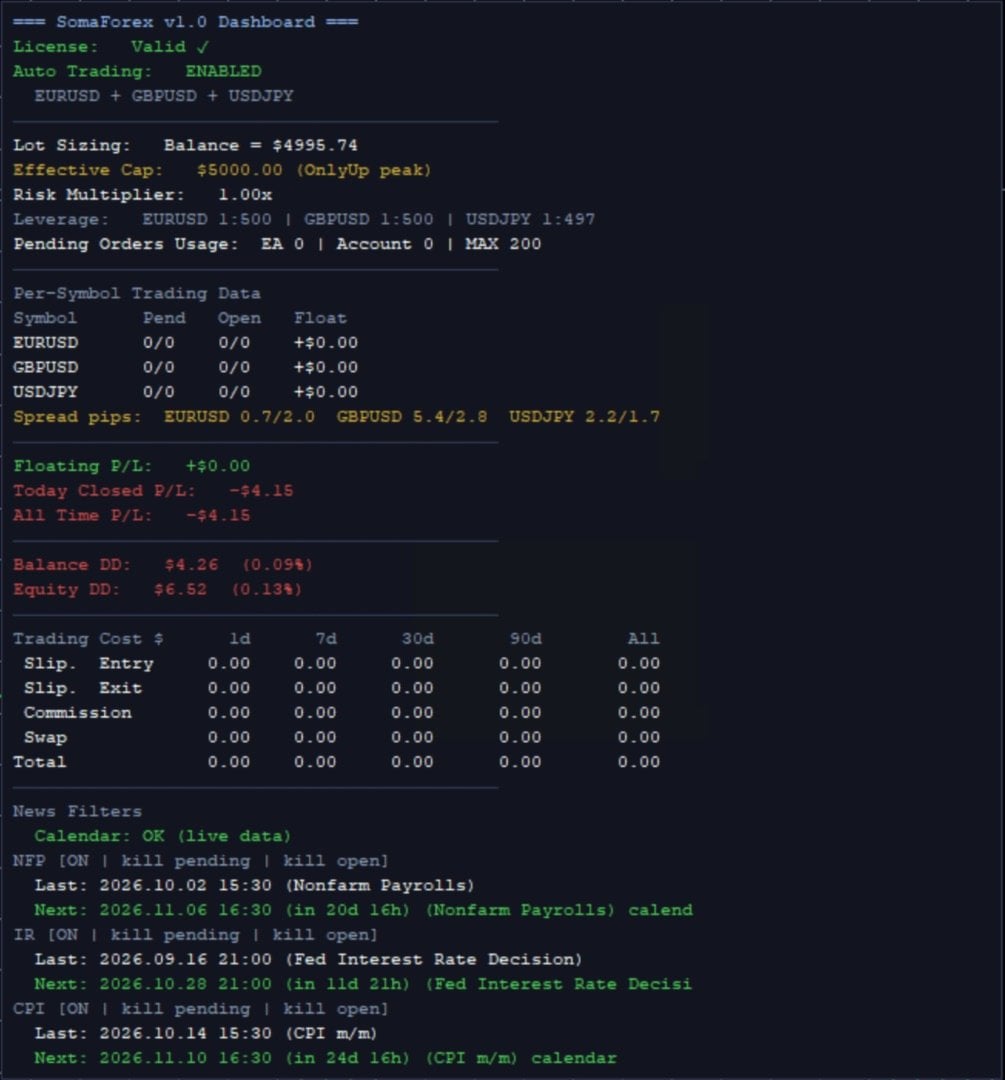
The dated listing shows version 1.1, updated 27 October 2026 after the 23 October launch. The public note adds a minimum-lot placement threshold, fixes non-USD leverage display, adds per-pair lot/pending settings, sets the USDJPY pending cap to 21 and adds automatic broker-symbol detection. Those changes explain why the earlier v1.0 dashboard should remain a dated illustration.
MinLotPlacePercent defaults to 50: calculated lots below half the broker minimum cause that pending order to be skipped. A broker minimum of 0.01 therefore gives the source’s 0.005 example. This is a sizing/placement threshold, not a guarantee that a smaller balance is adequately capitalized. No written product buyer reviews or posted comments were visible in the checked sources.
Other markets from the same developer
See our SomaGold review, SomaOil review and SomaBTC review for separate systems. Their results do not establish the performance of this forex portfolio.
Verify it yourself
Compare the SomaForex MQL5 source with the dated evidence above. The public MT5 reference account is a separate service from purchasing the EA. Check current inputs, costs and combined exposure; historical performance does not guarantee future results.
Choose SomaForex EA MT5 from CheaperForex