
Cobra EA HFT is an MT4 Forex robot built around SAR-based scalping and a separate, optional moving-average/RSI swing module. Spread checks, trailing exits and news pauses are the practical features to assess. The main caution is that its swing settings can enable martingale and remove stop losses, while its public performance evidence is currently limited to one developer-supplied image.
Our assessment: potentially interesting as a configurable short-term trading tool, but the public material does not establish a repeatable live edge. Buyers should be comfortable testing broker execution and checking the swing settings themselves. This is a source-based review, not a claim that CheaperForex has live-tested Cobra.
View product details and current pricing.

Source check: 13 September 2026. The MQL5 listing was published on 7 September 2026.
What the two trading modes do
The main engine is described as using Parabolic SAR with adjustable period, step and acceleration inputs. The optional swing mode adds fast and slow moving averages plus RSI periods and threshold levels. That gives the two modes different decision inputs, but the public description does not disclose the exact entry formula or demonstrate how the modules interact when both are active.
The developer uses AI and HFT language. No public model documentation, execution-latency study or measured order-rate data was linked. Those labels alone do not demonstrate machine learning or institutional high-frequency execution. The more useful starting point is the documented controls and the behaviour you can reproduce in your own terminal.
Spread, stop and news controls
The listed core defaults include a 25-point trailing stop, a 530 stop-loss input, a maximum spread of 20 and fixed lots of 0.05. These are source settings, not a recommended configuration for every account. Point values depend on a broker’s symbol specification; do not treat points as interchangeable with pips or carry the same values blindly from Forex into gold.
Small targets and frequent entries can be sensitive to spreads, commission, slippage and rejected or delayed orders. A backtest with ideal execution does not answer how the strategy will behave on another broker. Check actual transaction costs and how often the spread filter blocks entries.
The news filter exposes importance levels, currencies to monitor and before/after waiting times. The listing does not provide a public setup manual identifying the calendar provider or required connection details. Confirm that events load, the clock is correct and pauses work before assuming that news exposure is controlled.
The swing switches deserve particular attention
SwingUseMartingale and SwingMartingaleMultiplier allow larger exposure under the swing module. SwingDisableSL can remove its stop loss. The developer itself labels this mode high risk. These options mean a general claim that every configuration has a hard loss boundary would be misleading.
Risk percentage and maximum open trades are separate controls. Neither makes a position without a stop loss equivalent to one with a broker-side exit. Review the actual enabled state and how simultaneous trades affect margin; the public listing does not establish the default on/off state of every swing switch.
What the developer’s account image actually shows
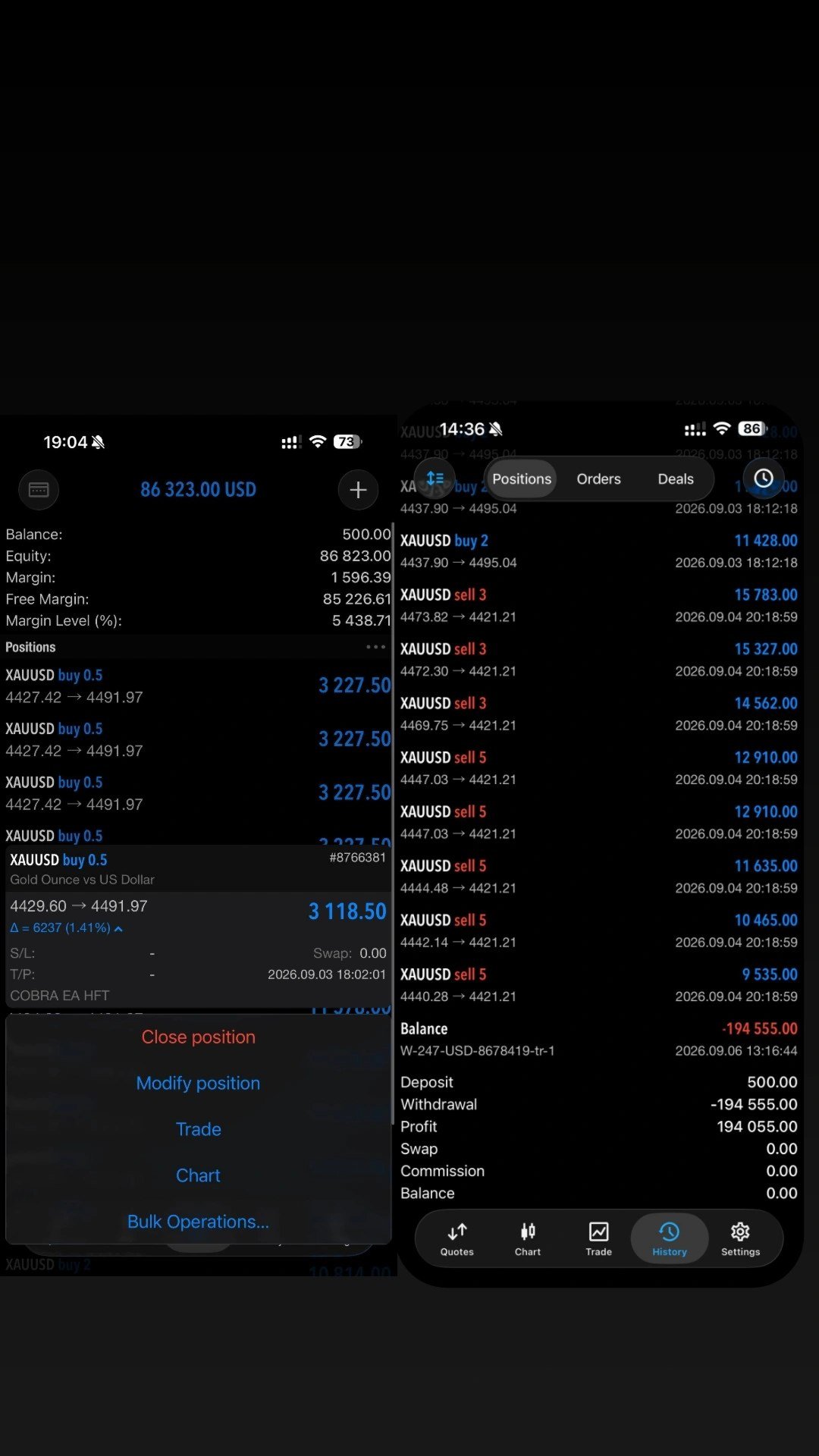
The left panel shows a $500 balance and much larger equity with multiple open XAUUSD positions. That is a balance/equity distinction: floating gains in open positions are not the same as closed realised profit. An expanded position in the image has dashes in its SL and TP fields, so the screenshot does not demonstrate that every shown trade had a visible broker-side stop.
The right panel contains a history summary showing a $500 deposit, $194,055 profit, a $194,555 withdrawal and a zero ending balance. These are the numbers displayed in the image, not figures independently verified by CheaperForex. The screenshot does not establish the account type, broker, complete losing-trade history, drawdown or proof of an external withdrawal payment. It cannot establish what another buyer should expect to earn.
There is also a market mismatch to resolve before copying settings: the written recommendation names Forex majors, while the collage shows XAUUSD. No public gold preset was linked. A gold illustration does not establish tested settings for EURUSD, GBPUSD or USDJPY, or vice versa.
Customer reviews, signal and documentation
The MQL5 Reviews tab showed no reviews at the source check, and the Comments page contained no public discussion. There are therefore no customer testimonials or third-party ratings to quote for Cobra itself. We found no linked public monitoring signal or downloadable manual in the main listing or seller page.
The seller also lists other robots, but their names, ratings and promotional claims are not evidence of this product’s results. We have not substituted another EA’s feedback for Cobra customer reviews. A longer independently accessible history, a clear broker/account identity and reproducible settings would make the performance case easier to assess.
Who this MT4 edition is for
Cobra is most relevant to an MT4 user who wants to evaluate short-term Forex entries, configurable news pauses and a separate swing approach. It is a less clear fit for someone seeking a documented long-term signal or a configuration that can be assumed to avoid martingale and unprotected positions.
The developer’s $100 minimum and $500-plus recommendation are capital references, not evidence that the stated default lot size is appropriate for those balances. Start by checking symbol specifications, margin and the enabled strategy modules. Test modes separately so that you can attribute their trade behaviour, rather than treating a large account screenshot as a settings guide.
Read the original product specification · Check current MQL5 reviews · Read current product comments