
Scalping Index Pro Review: MT4 vs MT5, Results and Setup
Scalping Index Pro raises two separate buying questions: whether its index-trading approach fits the setup you want to evaluate, and whether you prefer an MT4 file or a managed MT5 installation. This review brings the public evidence and the two CheaperForex offers together.
Our assessment: there are concrete controls to investigate, but the available records do not establish an equivalent outcome across both platforms. A useful evaluation keeps the account labels, test assumptions and actual configuration attached to every result.
Review scope: CheaperForex sells both editions. This is an analysis of public documentation and genuine captures checked on 10 September 2026; we have not run the EA or reproduced its tests. Sources: MT5 listing and MT4 listing.
View MT5 pricing & managed installation → View MT4 pricing & standalone delivery →
Jump to: MT4 vs MT5 · Controls · Account evidence · Backtest · Related products · FAQs
MT4 vs MT5: choose the platform and delivery route
| CheaperForex offer | MT4 | MT5 |
|---|---|---|
| Price | $349 | $629 |
| Delivery | Standalone trading file | Managed MQL5 installation |
| Setup route | Install in your own MT4 terminal | Follow the order README to arrange installation |
| Best starting question | Do I want to manage the file installation? | Do I want the managed setup service? |
The price difference describes the two offers; it is not evidence that one platform produces better returns. Decide where you intend to run the EA before comparing delivery. An MT4 purchase does not include MT5 setup, and the managed account is not transferred to your personal MQL5 account.
What the strategy and controls actually tell you
The developer’s product page describes US30/DE40 M1 scalping with selective grid management, plus TP, SL, trailing-stop, daily-profit and maximum-drawdown controls. Session and holiday filters determine when entries are permitted; news protection blocks new orders around high-impact events.
Entry permission and management of existing exposure are different questions. A rule that pauses new orders does not, by itself, describe what happens to positions already open. Likewise, a field named maximum drawdown does not tell you its reference value, reset time or treatment of floating losses. Establish those details in the configuration you actually evaluate.
With grid management, inspect the group of positions as well as individual trades. Count concurrent exposure, how additional entries are sized and what terminates the sequence. A small loss on one ticket does not necessarily describe the risk of the complete sequence.
Index contract specifications deserve their own check
MetaQuotes’ Market Watch documentation explains where to inspect a symbol’s contract specifications. Record its contract size, tick value, volume step, margin terms and trading sessions. Similar symbol names do not supply those details.
This gives an existing gold-EA owner a concrete starting point: compare the units before reusing a familiar lot input. Save the setup record with the observations it produced. That is more informative than changing several controls simultaneously and trying to infer which change caused a different result.
The linked account is an MT4 demo
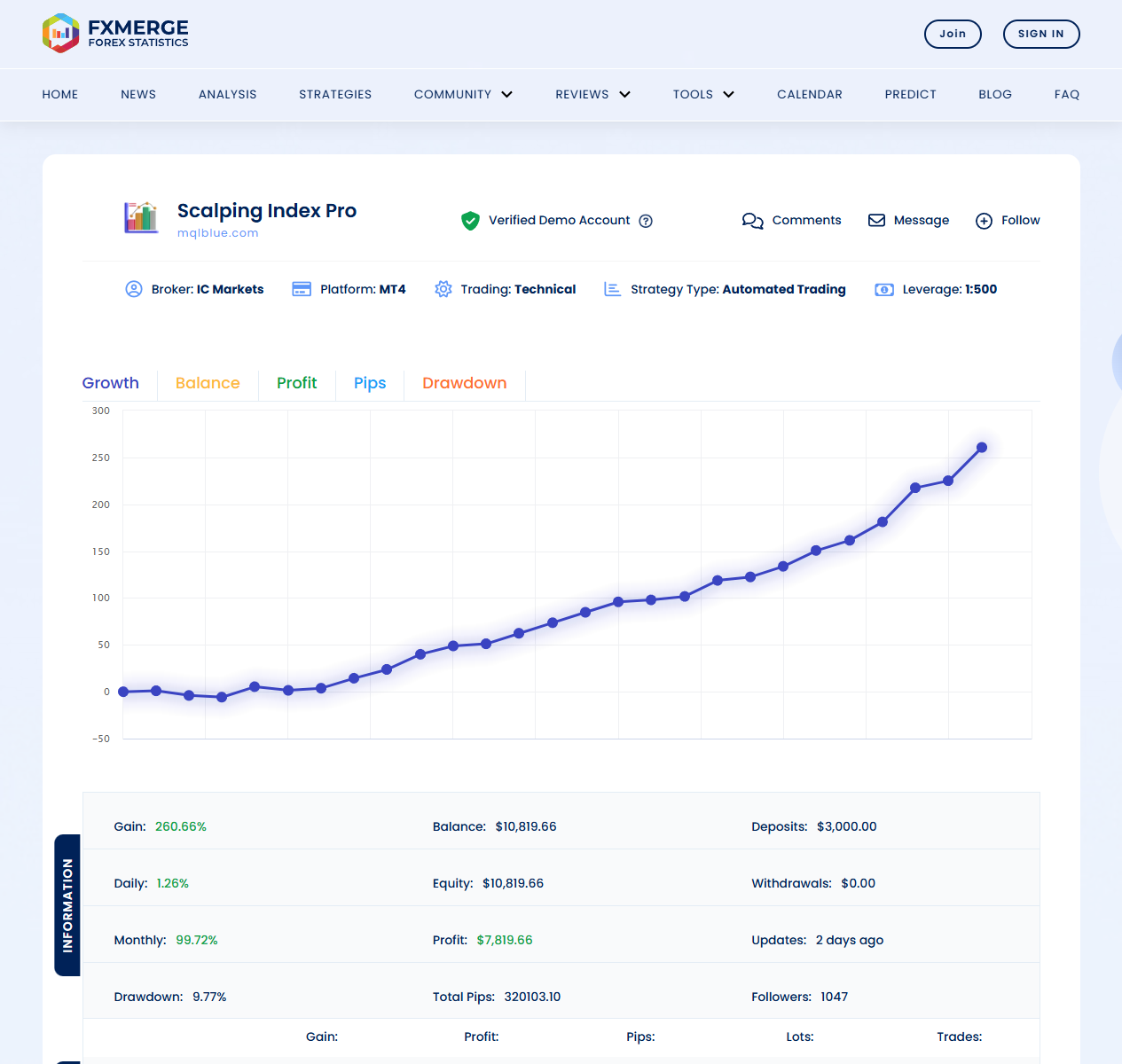
The capture identifies IC Markets, MT4, demo, 1:500. It displays 260.66% gain, 9.77% drawdown and 125 trades; its last-update label says two days ago. Those are dated observations, not an expected return.
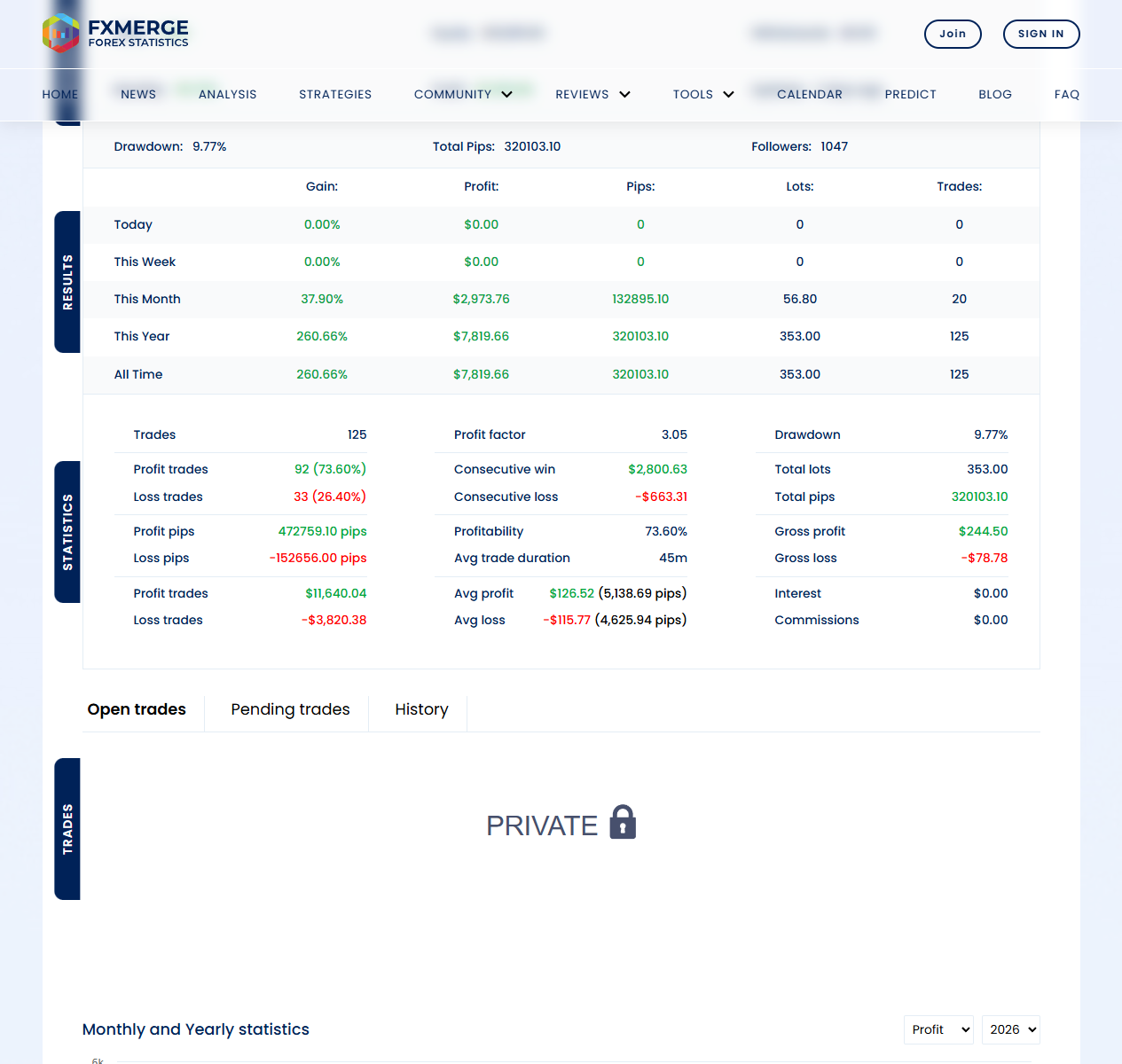
The summary shows 92 winning and 33 losing trades, a 3.05 profit factor and a 45-minute average holding time. Private history limits our ability to reconstruct entries, concurrent positions or the inputs behind the results.
“Verified” should be read with the adjacent account label. It does not turn demo capital into deposited money or establish that the MT5 edition has reproduced the same sequence. A forward account can be useful without answering either of those questions.
The public chart’s dated points span 3 August–4 September 2026. Some precede the product’s marketplace launch. These dates identify the observations shown; they do not establish when public monitoring began or which EA build produced them. Check the source for later observations when making a new comparison.
The historical illustration needs more than its headline profit
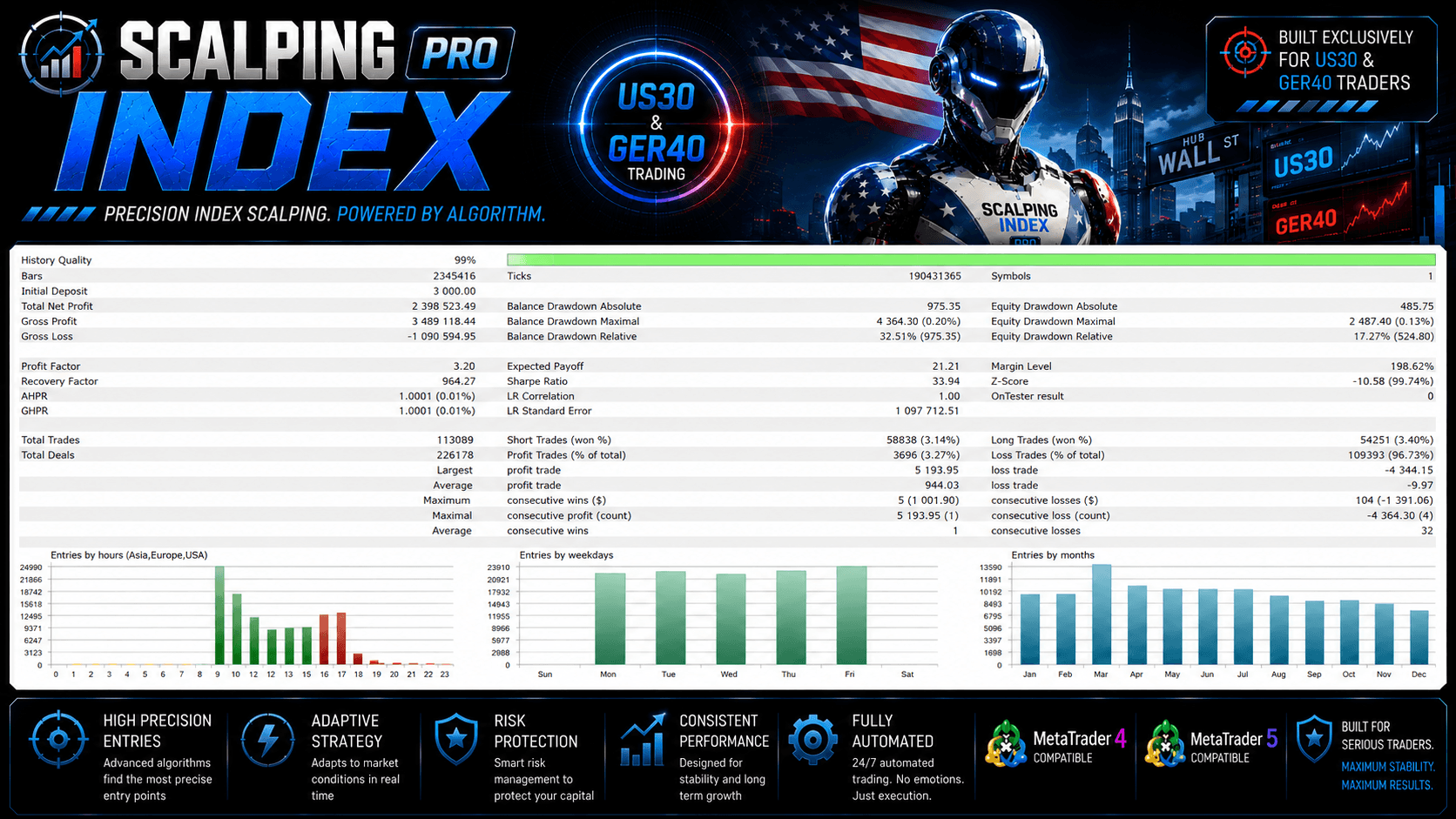
The report shows 113,089 trades, a 3.20 profit factor and 3.27% winning trades. Its relative drawdowns are 32.51% by balance and 17.27% by equity. Those fields must not be replaced with the much smaller percentages in the separate maximal-drawdown rows.
The low winning-trade percentage is a useful challenge to judging any robot by win rate alone. The image reports much larger average winners than average losers. That distribution is markedly different from the forward summary above, so the two reports should not be combined into one seamless performance story.
We cannot determine from the illustrations alone which configuration differences explain that contrast. Ask for the complete input set, test period, price data and cost assumptions if you intend to reproduce a historical claim. A curve and summary do not provide that package.
Manual availability and early user feedback
The MQL5 listing directs direct purchasers to request the complete manual and private group after purchase. We did not find a public product-specific manual in the linked material. That developer workflow is distinct from CheaperForex delivery; it is not an instruction to send us a screenshot of an MQL5 purchase.
On the MT5 listing, Lorymia2131’s 31 August feedback praises early operation and support; MehdiSoleil’s 30 August entry discusses familiarity with the developer’s other EAs. These are attributed marketplace experiences, not CheaperForex customer reviews or a substitute for a longer trading record.
How it fits alongside Scalping Robot Pro, DAX Robot and XIRO
The MQL TOOLS SL catalogue places these products in the same family. Scalping Robot Pro targets gold on M1, while DAX Robot focuses on the DAX index on H1. XIRO covers a different mix of markets. Shared authorship does not establish interchangeable settings or results.
Browse Scalping Robot Pro MT5 or Scalping Robot Pro MT4, and the separate Scalping Robot Pro review. Existing customers can also compare DAX Robot MT5 and XIRO Robot MT5 before adding another setup.
Scalping Index Pro review FAQs
Is the linked performance account an MT5 real-money account?
No. Fxmerge labels it as an MT4 demo account. Keep the platform and funding labels with the figures when comparing the two editions.
Does a high win rate prove that an EA is low risk?
No. Win frequency leaves out loss size, open exposure and the order in which outcomes occur. Assess those together rather than ranking strategies by one percentage.
Can the public record establish the exact settings used?
Not from the material inspected here. Its detailed trade-history panel is private, and the published summary is not a complete reproducible configuration record.
Is the developer’s historical report the same as a forward account?
No. A historical simulation and an account observed over time answer different questions. Keep the test assumptions, dates and build separate from the forward observations.
Which CheaperForex edition uses managed installation?
The MT5 edition costs $629 and uses managed installation. The MT4 edition costs $349 and uses a standalone file. Follow the product page matching your terminal and preferred delivery method.
Choose Scalping Index Pro MT5 managed installation → Choose Scalping Index Pro MT4 standalone delivery →